How I improved my social media profiles with an AI agent
By Agrici Daniel | September 9, 2026
A practical guide to using All-profile to audit, write, approve, and verify clearer profiles across LinkedIn, YouTube, Instagram, TikTok, and X.

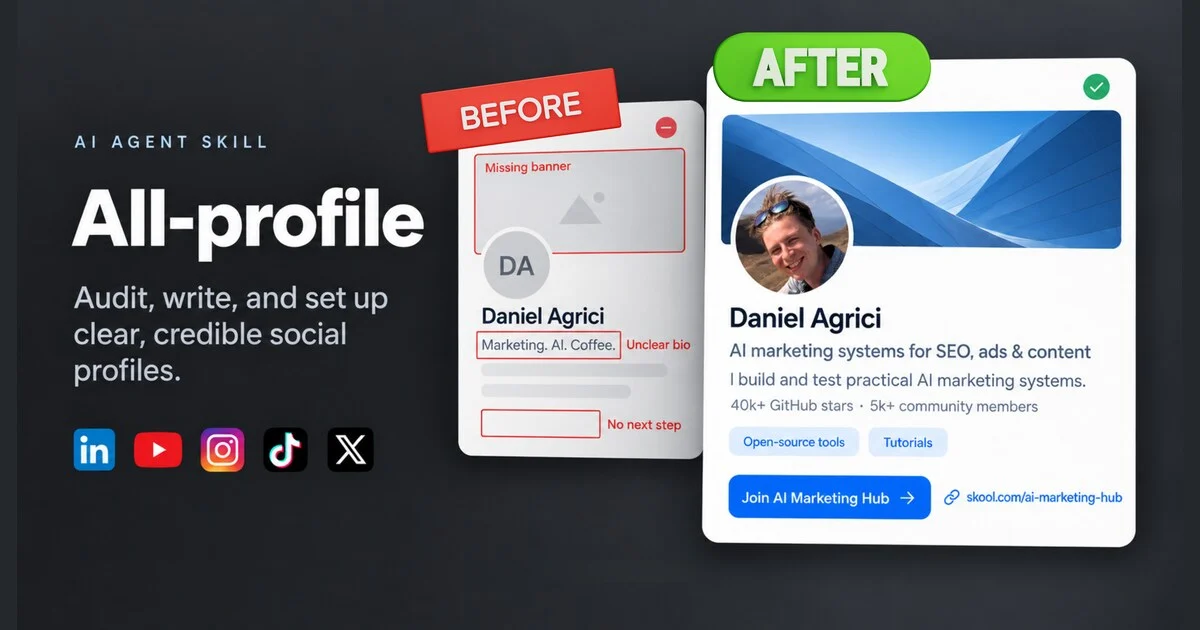
Illustrative profile comparison. The cover is not a historical account screenshot, and its counts are not adoption figures for All-profile.
Most profile problems are easy to spot and annoying to fix. LinkedIn describes one version of your work, YouTube is more current, Instagram has an old link, and X no longer matches. The harder part is deciding what all five should say.
All-profile is an open-source AI agent skill for auditing and rewriting social profiles, preparing changes for your approval, and verifying what saved. I built it to help an agent check the evidence behind your claims and adapt one recognizable message across LinkedIn, YouTube, Instagram, TikTok, and X.
Here is an illustrative example. It is not copied from a real account:
Before: AI enthusiast helping businesses grow. DM me.
After: I build accessible learning websites for small education teams. See three live demos and my project notes. Explore the portfolio below.
The second version gives a visitor three things: a clear association, relevant proof, and a useful next step. That simple structure became the foundation of All-profile.
Key takeaways
- Start with your actual work and evidence before asking an agent to write.
- Keep one recognizable identity, then adapt it to each platform and field.
- Review exact text, links, accounts, and fields before any live change.
- Treat a save response, a successful reload, and a visitor view as different checks.
- The public beta includes playbooks for LinkedIn, YouTube, Instagram, TikTok, and X.
Jump to: Evidence brief · Platform adaptation · Approval · Verification · Installation
Watch the All-profile walkthrough
The video shows why I built the skill, how the five-platform method works, and how I start an X profile audit.
Watch the 9:01 walkthrough
All-profile: audit and rewrite your social profiles
Daniel shows the profile drift that led to All-profile, explains the five-step workflow, and starts an X profile audit.
The YouTube player loads only after you activate it. Watch directly on YouTube.
Useful jumps:
- 00:00, a weak profile beside a clearer one
- 03:01, what the skill does from message to verification
- 07:35, starting the X profile audit
The video also shows Skool because it is part of my own public presence. The released skill has five built-in playbooks: LinkedIn, YouTube, Instagram, TikTok, and X. You can adapt the method to another platform, but that requires fresh research into its current fields and rules.
Start with evidence, not impressive adjectives
A tool such as Ahrefs’ bio generator is useful for drafting wording from a description and tone. For this project, I also wanted the agent to check what the profile could truthfully claim.
All-profile starts with the person or brand, audience, current profiles, desired action, and available proof. Its evidence guide explains how to scope that proof and preserve claim sources, dates, exact metrics, and limitations. Proof can include public projects, portfolio pages, work examples, accurately scoped metrics, or relevant experience. A metric needs its exact meaning and date. GitHub stars are not users. A screenshot is a dated observation, not a permanent platform fact.
This evidence-first approach also keeps the profile personal. The goal is not to fill every field with claims. It is to choose the smallest set of facts that helps the right visitor understand your work.
Use this brief before the first audit:
Use $all-profile to help me improve my social profiles.

Person or brand: [name]
What I do: [plain description of the work]
Who it helps: [specific audience]
Profiles to review: [URLs]
Main destination: [portfolio, product, community, booking page, or website]
Proof I can support: [projects, examples, experience, and carefully scoped metrics]
Voice examples: [links or pasted writing]
Tone to preserve: [direct, friendly, technical, playful, or other]
What must stay unchanged: [handles, links, images, legal wording, or other]

Do not invent achievements. Mark any claim that needs verification.
Prepare recommendations before changing an account.
If you maintain a deeper knowledge base about your work, you can provide the relevant parts. Keep passwords, session tokens, and private client material out of the brief.
Keep the identity stable and adapt the expression
Consistency does not mean pasting the same paragraph everywhere. A YouTube channel description has room to explain what viewers will learn. A short social bio needs a tighter association, one useful proof point, and a clear destination.
The five playbooks guide the agent toward the fields that matter on each surface:
| Platform | Main fields to review | What the adaptation should preserve |
|---|---|---|
| Headline, About, Featured, Experience, link and images | Professional context, inspectable work, and a relevant next step | |
| YouTube | Channel description, channel links, name and artwork | What the channel covers, why the creator is credible, and where viewers can continue |
| Name, bio, link and profile image | A compact identity, strongest proof, and one clear destination | |
| TikTok | Name, bio, link and profile image | Fast recognition in a short field, without unsupported hype |
| X | Name, bio, website, profile image, header and relevant pinned content | The same association in concise language suited to the account |
Platform fields vary by account type, region, eligibility, and current interface. All-profile treats local writing budgets as drafting aids. The live editor decides what it accepts, and the agent still needs to check the actual account.
This is the prompt I recommend for the audit itself:
Use $all-profile to audit my LinkedIn, YouTube, Instagram, TikTok, and X profiles.
Use the brief and evidence I supplied above.

First recommend one clear association, the strongest support for it, and one
natural next step. Then prepare platform-specific copy for the fields that need
work. Quote the current field before proposing a replacement. Keep effective
existing images and text when they already support the message.

Return the exact proposed text and destination for every field. Show character
counts as drafting checks, but do not treat them as verified platform limits.
Do not save anything yet.
Review the change set before the agent applies it
Account access is where useful automation can become risky. A general instruction such as “fix my profiles” leaves too much open to interpretation. Before application, I want to see the exact account, field, final text, link destination, retained elements, and any expected side effect.
This follows the same bounded approval principle I describe in my broader AI agent approval workflow. The draft is reviewable first. The account change comes only after approval.
After checking the proposed copy, use an apply prompt like this:
Use $all-profile to apply only the exact changes I approved in the proposal above.

Authorized accounts: [list the exact account URLs or handles]
Authorized fields: [list each approved field]
Approved text and links: [paste the final values or reference the approved table]
Retain unchanged: [images, handles, links, or sections that must remain]

Do not change account type, privacy, permissions, passwords, or unlisted fields.
If authentication, CAPTCHA, mobile-only controls, or a changed interface blocks
a field, stop on that field and record the manual step. After each save, reload
the account and inspect the visitor-visible result where access allows it.
The live-update guide defines the approval and access boundaries. The skill does not include a browser or manage passwords. Live changes depend on the AI host having suitable browser or connector access and on you being signed into the correct account.
Record what finished instead of saying “done”
A platform can report that it saved a change while showing an older value after reload. A field may save correctly in the editor but remain unavailable from a signed-out visitor view. Mobile-only controls can leave one task pending even when the rest of the profile is complete.
All-profile’s review and records guide defines field-level states so the handoff stays honest. Here is a small illustrative record:
| Platform and field | Intended value | Status | Evidence or next step |
|---|---|---|---|
| LinkedIn headline | Approved headline | Saved and reloaded | Same value appeared after reload |
| YouTube description | Approved description | Visitor verified | Public channel showed the intended text |
| Instagram link | Portfolio URL | Blocked | Add in the mobile app, then verify publicly |
| TikTok profile image | Existing portrait | Retained | Review found no reason to replace it |
| X bio | Approved short bio | Save reported | Reload and visitor check still required |
This distinction is one of the reasons I built a workflow instead of another copy generator. During my own profile refresh, the agent helped update the public surfaces I was working on and kept the remaining checks visible. I still reviewed the wording before application. My practical takeaway was simple: the workflow saved time because I made the core positioning decision once, then reviewed clear adaptations instead of rewriting each profile from scratch.
Install All-profile in a Codex project
All-profile uses the Agent Skills format. The public beta documents a project-local Codex installation:
- Download the GitHub repository or the standalone ZIP from the v0.1.0-beta.2 release.
- In the repository download, use
skills/all-profile. In the standalone ZIP, use its top-levelall-profilefolder. Copy that complete folder into.agents/skills/in your Codex project. - Confirm that the final path is
.agents/skills/all-profile/SKILL.mdand that itsreferencesandscriptsfolders are beside it. - Open Codex in that project, then select the skill or mention
$all-profilein your prompt. Restart Codex if it does not appear.
This path matches OpenAI's current Codex skills documentation. The beta package was discovered with the expected metadata in a fresh Codex CLI 0.153.4 process. Other agents use different locations, syntax, browser access, and account controls, so follow your host's current documentation.
The repository is free. The skill, code, and documentation are MIT licensed. The cover artwork, portrait, and third-party branding have separate terms. The skill does not require its own paid API, although your chosen AI host or browser tools may have separate costs.
What All-profile can and cannot promise
All-profile can help you replace vague wording with a clearer association, support it with evidence, adapt it to five platforms, and manage an approved change set. It can also preserve good existing work.
It cannot promise higher rankings, more reach, AI recommendations, followers, leads, or sales. Clear and consistent profiles give people better information. Business outcomes depend on the work, audience, content, distribution, and many other factors outside a bio.
The current release is a public beta. Its validation record documents six automated tests, a fresh Codex discovery check, independent review, fictional writing and reconciliation cases, and a mocked application case. It also records my confirmation of the completed real-account trial. Those checks support the package and workflow. They do not make every account interface predictable.
If you want to understand how this fits with the wider tool ecosystem, see my guide to Claude and Codex skills.
Start with one profile
You do not need to refresh every account in one session. Pick the profile people are most likely to visit, give the agent your real work and strongest proof, and ask for an audit before any change.
Get All-profile on GitHub, run the audit prompt above, and review the result as if a new visitor had only ten seconds to understand you. If the association, proof, and next step are clear, you have the core. The other profiles become adaptations of a decision you have already made.
If you want help building practical AI marketing systems beyond your profiles, you can also join the free AI Marketing Hub.