Claude Code Mods: The Complete Guide, Plus a Free Second Brain to Build Them Safely
By Agrici Daniel | October 3, 2026
Claude Code mods are JavaScript or TypeScript add-ons that run inside Claude Code. What they are, how to build one safely, and a free brain to help.

Claude Code mods are small JavaScript or TypeScript programs that run inside Claude Code. A mod can draw its own panel, put a line above your prompt, add slash commands and tools, and watch, change or block what Claude does. They are on by default since Claude Code 2.1.287, released on October 1, 2026. They are also not sandboxed: a mod runs with your permissions, so you should never install one you have not read.
I built the Claude Mods Brain, a free Obsidian second brain that teaches you (and Claude) how mods work, how to build them, and how to check someone else's mod before you install it. In the video below I use it to build a mod that lets me play Snake while Claude works. This guide is everything I learned: the mental model, the best practices, the safety audit, and the exact prompts I use. I built the brain, so this is a first-party guide, not an independent review.
- 116linked notes in the brain
- 50dated sources, docs and typings first
- 40mods graded: 5 adopt, 18 trial, 17 avoid
- 10 sa hook's own time per event, then it is skipped
- 2.1.288the Claude Code version every claim is tested on
Watch the build
The video is 9 minutes 58 seconds. It covers what is inside the brain, how to install it, the Obsidian graph, and a full mod build from one prompt, ending with a game of Snake inside Claude Code.
Chapters: 0:00 Claude Code mods are here, 0:17 what's inside the second brain, 0:42 how a mod works, 2:06 install it, 2:47 open it in Obsidian, 3:37 the Obsidian graph, 4:17 build a mod with one prompt, 8:40 done: /arcade, 8:52 playing Snake inside Claude Code, 9:49 get the brain.
Key takeaways
- A mod is a Claude Code plugin with a hooks module that exports
register(on, options). It needs Claude Code 2.1.287 or later and is on by default. - Every hook gets three moves: observe an event, rewrite it, or answer it (for example, deny a tool call). Hooks chain like middleware.
- Mods are not sandboxed. A mod can read and write your files, start programs, and make network requests with your permissions.
- A guard that times out or throws is skipped, so the command it was holding runs. Every blocking hook needs a
.catchthat denies. claude plugin validatelists what a mod hooks and calls. It is evidence, not a safety verdict.- The API is young and changes between releases. Trust the type files your own Claude Code writes over any page, this one included.
- The Claude Mods Brain gives you 116 linked notes, 50 dated sources, a graded catalog of 40 mods, a static scanner, and a drift check for every update. It is free: MIT for code, CC BY 4.0 for notes.
What is a Claude Code mod?
A Claude Code mod is a plugin that runs functions inside Claude Code's own process instead of launching a separate script per event. Anthropic's mods overview describes mods as "made of JavaScript or TypeScript event handlers". The launch post is titled Customize Claude Code with mods in TypeScript, and the 2.1.287 release is dated October 1. That release turned mods on by default. Early access ran for a few weeks before it, and on October 3 the slower stable release channel was still on 2.1.285, without mods by default.
Think of mods as browser extensions for Claude Code. A mod can:
- Draw. Open a pane beside the conversation, draw in the band above your prompt, restyle tool rows, or set a status line under the prompt with
$.ui.status. - Add. Register slash commands that run without a model turn, and tools Claude can call.
- Watch, change, or block. See every prompt and tool call, rewrite them, approve them, or refuse them. For example, hold a risky
git push --forceuntil you click Proceed.
The anatomy of a mod
A mod is an ordinary plugin with one extra file. The mods reference lists the layout:
| Path | Required | What it holds |
|---|---|---|
.claude-plugin/plugin.json |
yes | The normal plugin manifest. Mods add no required field. |
hooks/hooks.json |
yes | "modules": ["./register.ts"], one path to your hooks module |
hooks/register.ts |
yes | The entry point. An ES module that exports register. .js, .mjs, .tsx and friends also work. |
types/index.d.ts |
when you keep state | Declarations for your $.state values |
*.test.ts |
no | Tests that claude plugin test runs |
.claude-plugin/types/ |
written by Claude Code | Type definitions for your exact build. Do not commit them. |
A complete, minimal mod looks like this. It adds a /hello command and refuses one obviously destructive command:
// hooks/register.ts
import type { Register } from 'claude-code'

export const register: Register = (on, options) => {
  on('session.start', async ($, e, next) => {
    await $.command.register({ name: 'hello', description: 'Say hi' }).catch(() => undefined)
    return next(e)
  })

  on('command.run', { command: 'hello' }, async () => ({ text: 'hi' }))

  on('tool.call', { tool: 'Bash' }, async ($, e, next) =>
    /rm -rf \//.test(e.command) ? { deny: 'Refused.' } : next(e),
  ).catch(async () => ({ deny: 'Guard failed; not run.' }))
}
The module runs in a locked-down JavaScript environment: no DOM, no Node built-ins, no setTimeout, no eval. Everything that touches the outside world (files, processes, HTTP, model calls, drawing) goes through the $ object, the mods API. That single door matters for safety, as you will see below.
How a mod runs: the middleware chain
Every event in Claude Code (a prompt, a tool call, a render, a turn) passes through a chain of hooks before it reaches the core, and the result travels back out through the same chain. Each hook receives $ (the API), e (the event), and next (the rest of the chain). The events page describes the order and what each hook may return.
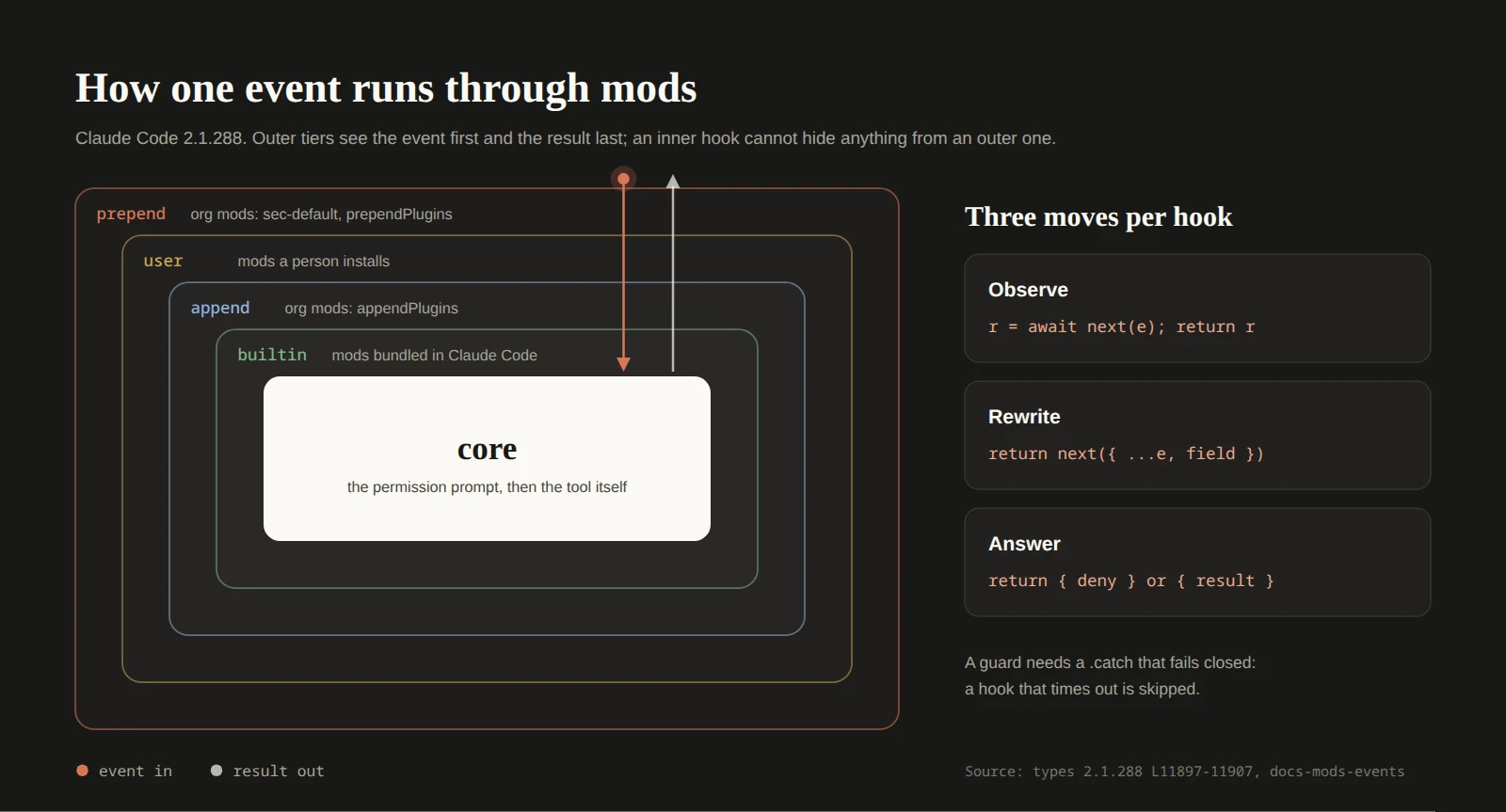
Three moves cover everything a hook can do:
| Move | Code | Example |
|---|---|---|
| Observe | const r = await next(e); return r |
Log every Bash command and its exit code |
| Rewrite | return next({ ...e, command }) |
Add --dry-run to a deploy command |
| Answer | return { deny: 'why' } or return { result } |
Refuse a force push, or return a cached result without running the tool |
Two consequences catch people out. The first is the same idea behind my AI agent approval workflow: decide before anything runs.
- Decide before you call
next. A{ deny }returned afterawait next(e)arrives after the tool already ran. - Order is authority. The outermost hook sees the event first and the final result last, so it decides whether inner hooks run at all. That is why an organization's policy mods load in the outer
prependtier.
The chain is also strictly serial. In the public design thread (issue #91870), testers on pre-release builds measured eight 300 ms function hooks at 2,427 ms against 640 ms for the same work as parallel command hooks. Treat that as a pre-release measurement. The lesson still holds: slow work in a hook adds directly to every tool call.
Mods vs settings hooks: which one to use
Classic hooks, which the docs now call settings hooks, still work alongside mods. They launch a command, an HTTP call, or a model prompt per event. Mods load once into Claude Code's process. Here is how I decide:
| You want | Use |
|---|---|
| Block a fixed command or path | A permission rule. No code at all. |
| Block or log with a script you already have | A settings hook |
| A decision based on live state (branch, a stored value) | A mod (tool.call or tool.check) |
| Anything drawn, a slash command with no model turn, a registered tool | A mod |
| Persist environment variables or replace worktree handling | A settings hook |
| Org-wide enforcement | A managed settings hook or a prependPlugins policy mod |
The biggest practical difference is the timeout. A settings command hook gets 600 seconds by default. A mod hook gets 10 seconds of its own execution time per event. Time spent waiting inside next or a $ call does not count against it, which is why long waits belong inside $ calls.
What you can build with mods
Mods draw at render sites: a Pane beside the conversation, the AbovePrompt band, message and tool rows, the Spinner, PromptHint, and more. The permission prompt is deliberately not a render site, so no mod can redraw what you are approving. Hooks run in the terminal, the JetBrains plugin and the Desktop Code tab, and drawing appears there too. In the VS Code chat panel, claude -p and the Agent SDK, hooks run but nothing is drawn (per the overview's surfaces table). The 2.1.288 type files also list vscode and mobile surfaces, so check e.surface on your build.
What people built in the first days, by type:
- Meters and dashboards: context left before compaction, plan quota, session cost, cache hit ratio.
- Guards: hold risky Bash, require a code before a deploy, refuse merges until CI passes.
- Panes: a
/diffview of uncommitted changes (built into Claude Code), PR trackers, agent maps. - Toys: Snake, pixel pets, a boss fight fed by failing tests. Harmless, and a good way to learn the API.
A community scanner by karanb192 found 359 mods in 373 repositories on October 2. By its static grading, 79 of them reach the network and 111 see every prompt you type. That is the case for reading before installing.
Meet the Claude Mods Brain
The Claude Mods Brain is an Obsidian vault, built on the same pattern as my Claude Obsidian second brain. It is plain Markdown notes, plus a few small Python tools. You can read it like a book, and Claude can read it before it writes a line of mod code. Every claim names its source, the date it was read, and the Claude Code version it holds for (2.1.288 at launch).
| Layer | What you get |
|---|---|
| Plain explanations | How a mod is put together, how hooks chain, every event family, the $ API, render sites, limits |
| Step-by-step recipes | Build a status band, a pane, a slash command, or a tool-call guard. Migrate a settings hook. Test and publish. |
| Safety checklist | What a mod can reach, what it costs in usage, how prompt injection gets in, and an ordered audit |
| Graded catalog | 40 built-in, official and community mods pinned to a commit: 5 adopt, 18 trial, 17 avoid, each with a reason |
| Patterns and pitfalls | What works and what breaks, gathered from the docs and the 235-comment design thread |
| Small tools | audit-mod, a scanner that reads a mod without running it, and drift, which lists the notes to re-check after an update |
| An agent | mods-secretary, a Claude Code agent that answers from the notes with citations and never installs anything |
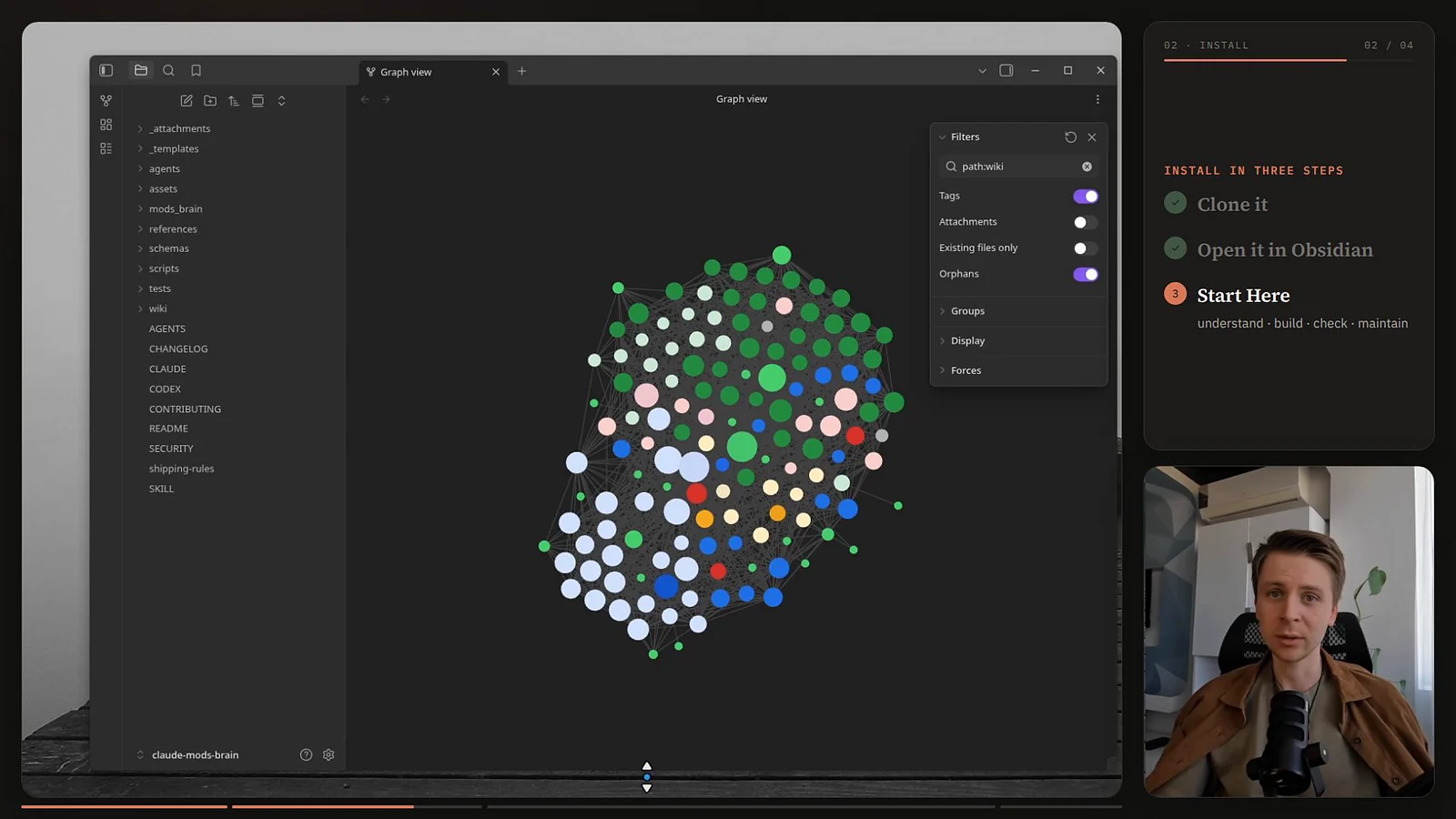
Install it in three steps
- Clone it:
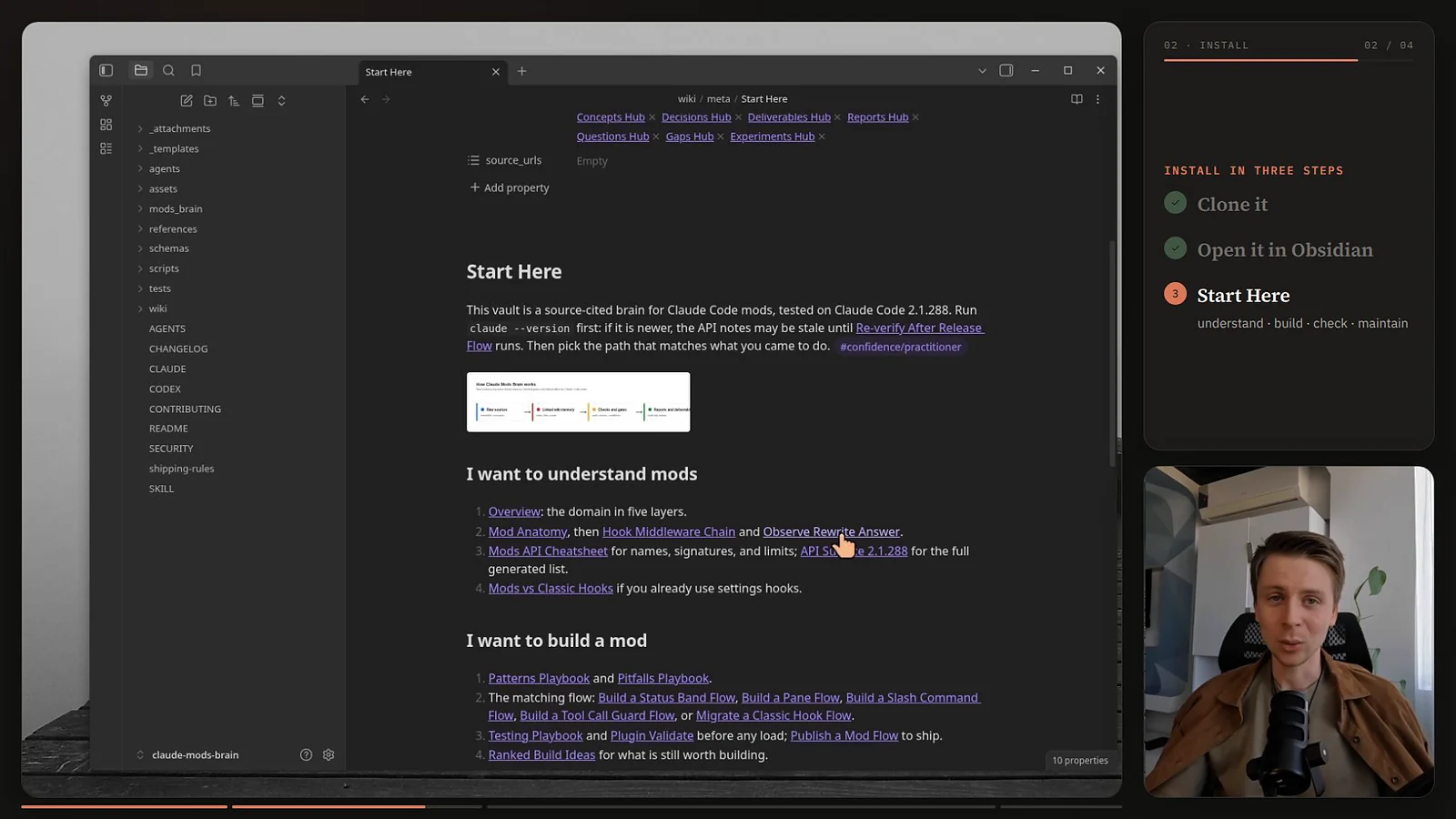
gh repo clone AgriciDaniel/claude-mods-brain(orgit clone https://github.com/AgriciDaniel/claude-mods-brain.git). You can also paste the repo link into Claude Code and ask it to clone it. - Optional: open the folder as a vault in Obsidian and start at
wiki/meta/Start Here.md. You do not need Obsidian for Claude to use the brain; it is for you, and the graph is a good map. - Open Claude Code inside that folder. The repo's
CLAUDE.mdandSKILL.mdtell Claude to read the notes first. To ask questions from any project, copyagents/mods-secretary.mdinto that project's.claude/agents/folder.
Start Here splits into four paths: understand mods, build a mod, check someone else's mod, and keep the brain current.
How to build a Claude Code mod with the brain
In the video I opened Claude Code inside the brain's folder and typed, roughly:
Hey Claude, we're going to create a new mod. When we're doing any sort of work,
I want to be able to play a game, Tetris or Snake.
Claude read the mods API notes, picked the right building blocks (a pane, a small game loop with its own keys and frame clock, state kept in $.state so it survives redraws), asked whether to enable the mod for this session only, then wrote it. It ran claude plugin validate, a type check, and tests through the engine test kit before handing it over. On camera the build took a few minutes, and I talked through most of it.
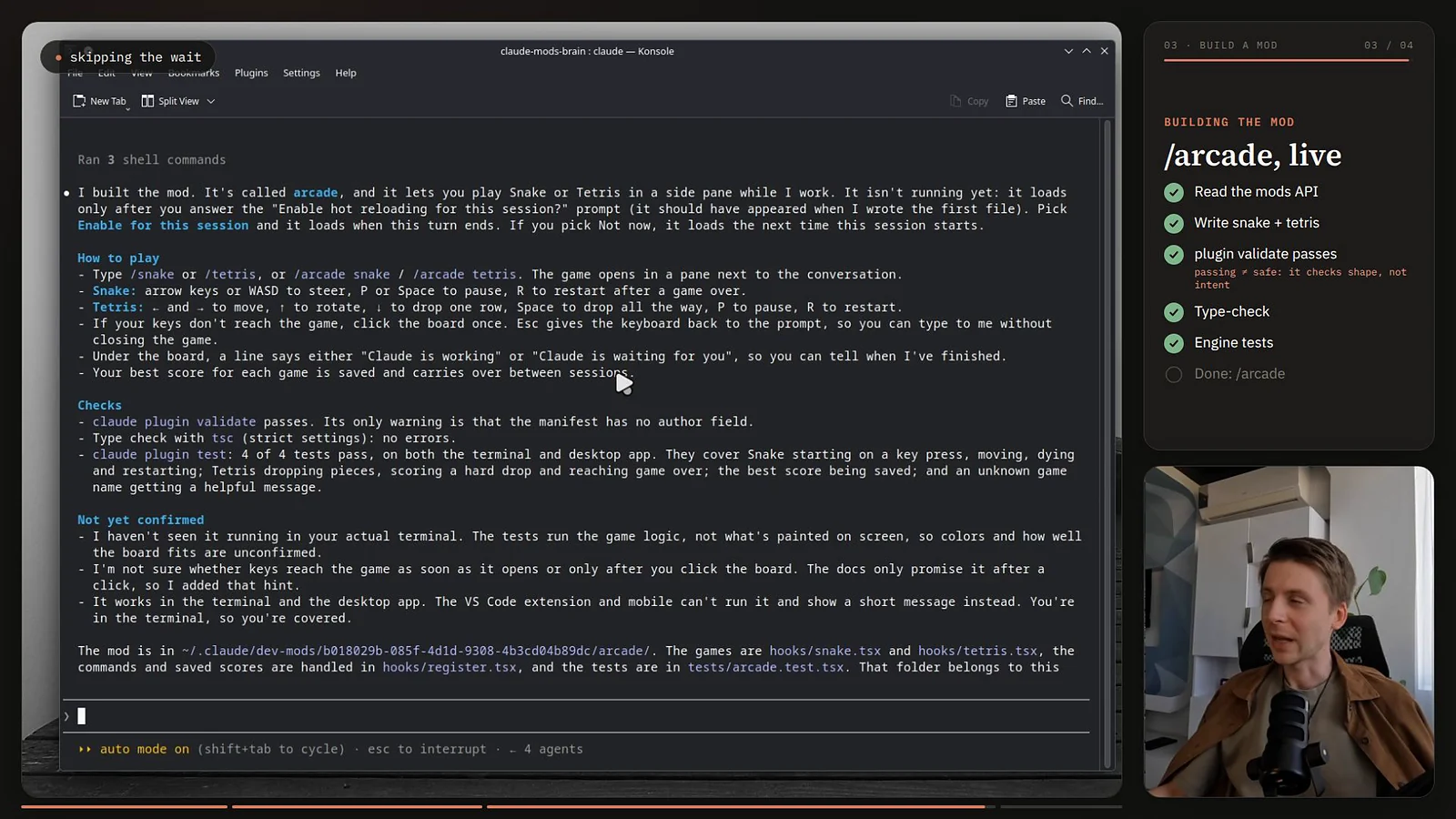
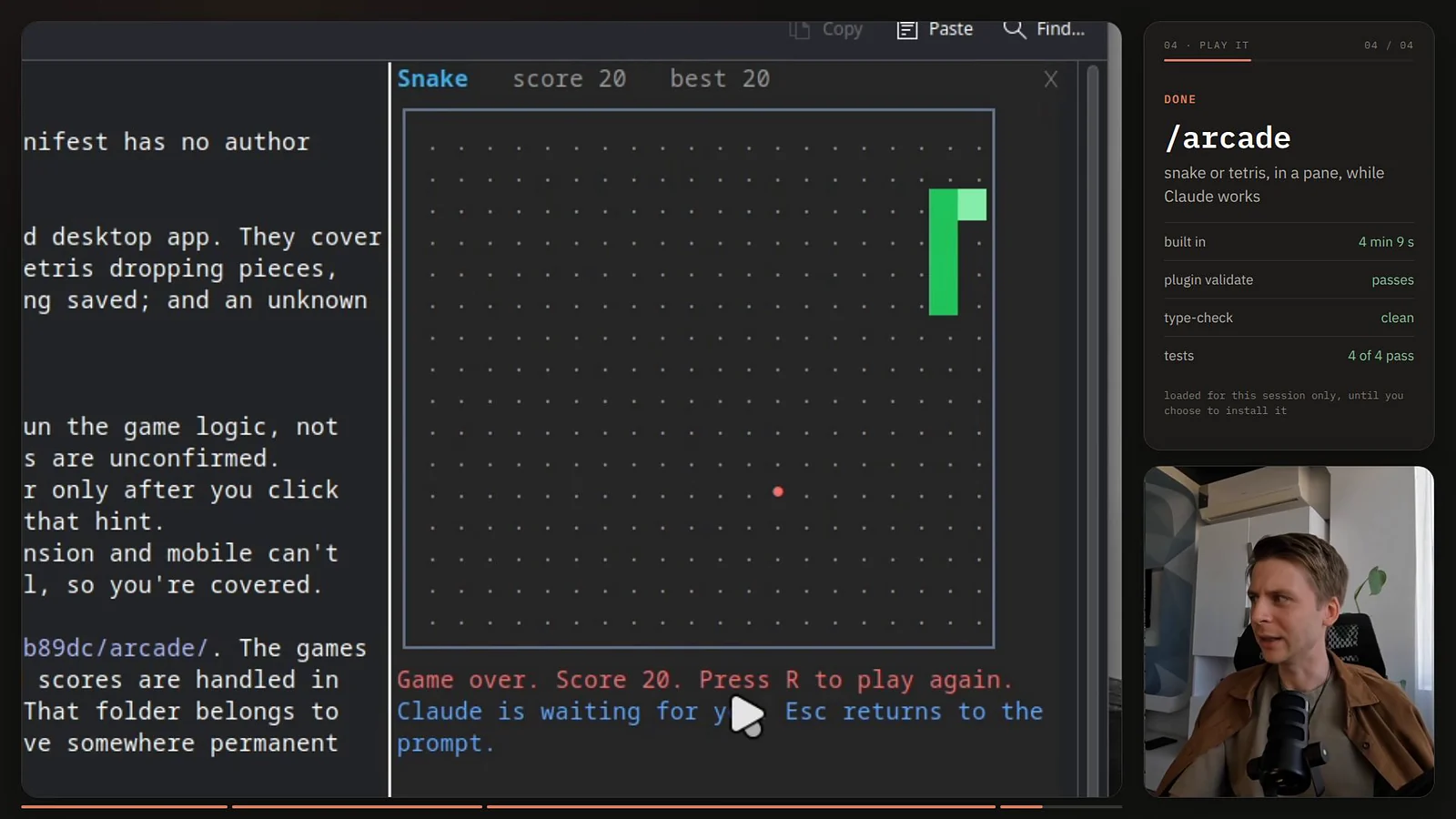
The result is a mod called arcade: /arcade snake, /arcade tetris, or plain /snake and /tetris open a side pane, and Esc hands the keys back to the prompt. It is three source files (register.tsx, snake.tsx, tetris.tsx), about 515 lines, plus a test file.
Can you build this without the brain? Yes. Claude Code even ships a built-in plugin-authoring helper, and skills like the ones in my Skill Forge guide can teach a model a procedure. What the brain adds is the stuff a model gets wrong on a three-day-old API: which events exist on your build, which limits apply, why a guard fails open, and which community patterns already broke. What you feed the AI is what you get back.
What does the brain's own scanner say about the finished mod? The scanner reads the files and the validate output, and never runs the mod:
$ claude plugin validate arcadehooks: session.start, command.run, turn.start, turn.complete, ui.message, ui.render{component=Pane, requestId=arcade}calls: $.command.register, $.state.get, $.state.set, $.store.get, $.store.set, $.ui.open, $.ui.resolvesurface modules: hooks/snake.tsx, hooks/tetris.tsx$ python3 -m mods_brain.cli audit-mod arcade ...{"plugin": "arcade", "reach": "L0", "events": 6, "red_flags": []}cost surface: none (no model calls, started turns or tools)
Reach L0 means the mod only draws and remembers: no files, no processes, no network, no model calls. It also hooks no event that can block or rewrite anything: the audit lists no control events. That is exactly the footprint a game should have. If a "Snake" mod showed $.http.fetch or $.process.run, you would want to know why.
10 copy-paste prompts for building and checking mods
Open Claude Code inside the brain's folder (or with the mods-secretary agent installed), then paste. Replace the bracketed parts. Each prompt tells Claude what to read, what not to do, and what evidence to show you, which is most of what makes a prompt reliable.
1. Get oriented on your version
Run claude --version and compare it with tested_on in wiki/hot.md. If my
version is newer, tell me first. Then explain, in plain words, how one Bash
tool call travels through mods on my version: the tiers, what a hook can do
with it, and where the permission check happens. Cite the notes you used.
2. Build a status band
Using this brain, build a mod that shows [what I want, e.g. the current git
branch and context left] in the band above my prompt. Follow the Build a
Status Band Flow and the Best Practices Kernel. Keep it at reach L0: no
$.http, no $.process, no model calls. Then run tsc, claude plugin validate
--strict and claude plugin test, and show me the hooks: and calls: lines
before I load anything.
3. Build a guard that holds risky commands
Build a guard mod that holds Bash commands matching [git push --force,
rm -rf, terraform apply] until I click Proceed. Follow the Build a Tool
Call Guard Flow. Decide before calling next, wait inside $.ui.ask, and chain
a .catch that returns { deny } so a timeout or error fails closed. Also tell
me which permission rule I should add, since a text match is a reminder,
not a wall.
4. Build a pane
Build a mod with a /[name] command that opens a pane showing [what]. Follow
the Build a Pane Flow. Keep drawn values in $.state and anything that must
survive a restart in $.store. Check isPlaced and tell me what happens on a
narrow terminal. Register the command last in session.start, inside
try/catch.
5. Build a slash command with no model turn
Build a mod that adds /[name], which [does what] and prints the result
without starting a model turn. Follow the Build a Slash Command Flow. Show
me the command.run hook and explain why it costs no usage.
6. Decide: settings hook or mod?
Here is a settings hook from my settings.json: [paste]. Using Mods vs
Classic Hooks, tell me whether it should stay a settings hook or become a
mod, and why. If it should move, follow the Migrate a Classic Hook Flow and
list every behavior that changes, especially timeouts and ordering.
7. Audit a mod before installing it
Audit the mod at [path or repo URL] without installing, enabling, loading or
running it. Clone it into a scratch folder and pin the commit. Follow the Mod
Security Audit Checklist and run python3 -m mods_brain.cli audit-mod on it with --origin
owner/repo@sha --tested-on <my version> --date <today>.
Report: every event it hooks, every $ call, its reach level, whether it can
rewrite or approve anything, whether it can spend my usage, every URL it
contacts, and any red flags with file:line. End with adopt, trial or avoid
and the reason.
8. Check what a mod costs
Before I install [mod], list every way it can spend my usage: $.model calls,
started turns, spawned agents, timers. For each one, say how often it fires
and what triggers it. Use the Usage Cost Surface note.
9. Claude Code updated: what broke?
Claude Code just updated. Follow the Re-verify After Release Flow: capture
the new type definitions, run the drift check against the 2.1.288 surface,
and list every note and every mod of mine that the changes touch. Do not
edit anything yet; show me the list first.
10. Draft a team policy
Draft managed settings for a team that should run only mods we approve.
Use Org Mod Controls and the Org Mod Policy Guide. Explain each key you set,
what it does not cover, and cite the admin docs page. Do not apply anything.
One more habit worth stealing: end every build prompt with "show me the hooks: and calls: lines before I load it". It turns a vibe into a reviewable footprint.
12 best practices for Claude Code mods
These come from the brain's Best Practices Kernel, distilled from the docs, the type definitions, and the pitfalls other builders hit. Most mod failures are silent: a hook that throws, overruns or returns the wrong shape is skipped and the session carries on. So most rules are about failing safely.
- Read the types your build wrote. Claude Code writes
.claude-plugin/types/beside every mod it loads from your own folder. The create page says it plainly: "The events and methods can change between releases, so trust these files over any page, this one included." - Decide before
next. A deny afterawait next(e)is too late; the tool already ran. - Fail closed. Chain
.catch(() => ({ deny }))on every hook that can deny. An uncaught throw or a timeout skips the hook, and the call goes through. - Return documented shapes only.
next(e),{ deny },{ result }. Returningundefinedcounts as a failure. - Never hold the worker. Wait inside
$calls, run heavy work through$.process.runwith atimeoutMs, and keep your own code far under 10 seconds. - Put state where it survives. Module variables reset on every hot reload. Use
$.statefor what you draw and$.storefor what must persist. - Re-seed after
/clear.session.startdoes not fire after/clear,/resumeor/branch; listen toclassic.SessionStarttoo. - Keep prompt text byte-stable. Text that changes between requests in
prompt.sectionortool.describeinvalidates the prompt cache. Put volatile facts inprompt.submitcontext. - Use permission rules for hard blocks. A mod that matches command text is a reminder;
$(...), aliases and scripts can walk past it. - Say what your mod costs. Every
$.modelcall and started turn is a recurring line on the user's plan or API bill. Put it in the README. - Prove it in this order:
tsc -p .,claude plugin validate --strict,claude plugin test, then one load withclaude --plugin-dir. Validate alone does not catch a call to a$method that does not exist. - Pin the version. Write the Claude Code version you tested on beside every mod and every verdict. Next month it will matter.
The safe build loop
Six steps from prompt to a mod you trust
- Ask with the brain open
Run Claude Code inside the brain's folder and say which flow to follow and which reach level to stay under.
- Type check
tsc -p .against the types your own build wrote in.claude-plugin/types/. - Validate and read the footprint
claude plugin validate --strict, then read thehooks:andcalls:lines yourself. - Test
claude plugin testdrives your hooks through the engine test kit. Each test gets 5 seconds by default. - Load once, watch it
claude --plugin-dir ./my-modhot-reloads on save. Use--debug-fileto see skipped hooks. - Pin the version
Write the Claude Code version you tested on in the README, and re-run steps 2 to 4 after every update.
$ method that does not exist, which is why the type check comes first.Are Claude Code mods safe?
Mods are as safe as the code you install, and no safer. Anthropic is direct about it. The overview says "A mod is code that runs with your permissions. It can read and write your files, start processes, and make network requests", and "Mods aren't sandboxed." The launch post adds: "you should only install mods from sources you trust."
Four things surprise people. If you want the wider security picture for AI tooling, my Claude cybersecurity audit guide covers it.
- The Bash sandbox does not cover mods. It isolates Claude's Bash commands. A process a mod starts runs outside it.
- Deny rules do not cover a mod's own calls. The admin page gives the example: with
Read(.env)denied, a mod can still read that file with$.fs.read. - A project folder is not isolation.
$.fstakes absolute paths, so a "disposable project with no secrets" still exposes your home directory. - Validate does not judge. The brain tested a probe module on 2.1.288 that read a file and an API key, posted both out, and ran the response in a shell.
claude plugin validatepassed it with no warning beyond a missingauthorfield.
Independent researchers saw the same shape. Pluto Security tested a pre-release build (2.1.274) and showed a mod reading credentials and prompt history, and drawing a fake credential request "inside the real client". Some details in that report predate the current release, so the brain re-checks each finding against 2.1.288 in its Mods Trust Model note.
What does hold: the permission prompt cannot be redrawn, every effect goes through $ where a scan can list it, identities and tiers are assigned by Claude Code, and Claude Code refuses to load a mod that uses $ in a way the scan cannot read.
Check a mod before you install it
The short version of the brain's audit has six steps. None of it loads or runs the mod.
- Pin it. Clone into a scratch folder, record the commit, and do not install from a moving branch.
- Inventory everything. Read
plugin.json, both halves ofhooks/hooks.json(settings hooks and the module),bin/,.mcp.json, and every imported file. Validate reports only the hooks module. - Read the footprint. Run
claude plugin validate --strict --jsonand copy thehooks:andcalls:lines. - Grade the reach. L0 draws and remembers, L1 reads, L2 writes files, runs programs or drives Claude, L3 reaches the network. Then add two flags the levels miss: can it rewrite or approve anything, and does it cost usage?
- Sweep for red flags. Fetch-then-run, reads of credential files, unconditional approvals, a reworded question dialog, an input box asking for a key, obfuscation.
- Decide. Adopt, trial in an isolated account, or avoid. Write down the version you checked on.
Or let the scanner do the mechanical part:
git clone https://github.com/AgriciDaniel/claude-mods-brain.git && cd claude-mods-brain
python3 -m mods_brain.cli audit-mod path/to/some-mod \
  --origin owner/repo@abc1234 --tested-on 2.1.288 --date 2026-10-03
The report lists the events, the calls, the reach, the cost surface and red flags such as "downloads code and then runs it". A clean report is a starting point, not a verdict; the checklist covers what a scan cannot see, like what a drawn panel says.
Mods for teams: the controls that matter
If you run Claude Code for a team, the admin page is required reading. The short version:
| Control | What it does | Watch out |
|---|---|---|
sec-default (built in) |
Loads ahead of every user mod on machines with managed settings or Team and Enterprise sign-in. Protects managed hooks, the system prompt and managed instructions, and stops a user mod from lifting a deny rule. | It does not limit a mod's own file, process or network calls. |
allowManagedModsOnly |
Only org mods and built-ins load. Set under the cc-plugin-sec-default@builtin options in managed settings. |
The targeted "no user mods" switch. |
disableSideloadFlags |
Rejects --plugin-dir, --plugin-url and session-written mods |
Pair it with a marketplace allowlist, which alone leaves --plugin-dir open. |
disableAllHooks |
Turns off every mod and hook from installed plugins, the org's included | Too wide for most teams; built-in mods keep running. |
A prependPlugins policy mod |
Sees every event first; can refuse other mods at load by what they call | List sec-default@builtin in prependPlugins too, or the guard does not load. |
Two more facts worth knowing: the hooks worker crashing three times unloads every non-built-in mod, org mods included, and --safe-mode runs without installed mods. So keep managed PreToolUse hooks and deny rules for anything that must always hold.
Limits you will hit
From the reference and the 2.1.288 type definitions. These are constants and can move between releases.
| Thing | Limit |
|---|---|
| A hook's own time per event | 10 s (waits inside next and $ calls do not count) |
A .catch handler |
1 s |
All session.end hooks together |
1.5 s wall clock |
$.process.run |
30 s default, 10 min max, 4 MiB per stream |
$.fs read or write |
4 MiB per file |
$.store |
4 MiB of JSON in total |
$.model.complete |
1,024 tokens by default |
| Redraws | 10 a second; 30 in the terminal for the visible pane, expanded band and prompt hint |
One claude plugin test test |
5 s unless you set timeoutMs |
| Command, tool and pane names | letters, digits, _ and -, up to 64 characters |
Keep up with Claude Code releases
Mods are days old, and the API is moving: 2.1.288 already added $.ui.selection() according to the changelog. Many early guides still tell you to set CLAUDE_CODE_ENABLE_FUNCTION_HOOKS=1. That variable is ignored since 2.1.287, and setting it to 0 does not turn mods off.
Two more things to know:
- Anthropic can switch mods off per account. The troubleshoot page says so. If
claude plugin testreports that hooks modules are turned off, check your account before you debug your code. - The brain has a drift check. After an update, capture the new type definitions and compare surfaces:
python3 -m mods_brain.cli surface --capture .raw/captures/types-<new> \
  --out references/data/api-surface-<new>.json
python3 -m mods_brain.cli drift --old references/data/api-surface-2.1.288.json \
  --new references/data/api-surface-<new>.json --out references/data/api-drift-<new>.json
The drift report names the notes to re-read. Prompt 9 above does the same through Claude.
What this guide does not claim
- The brain's notes come from Anthropic's docs, the type definitions Claude Code 2.1.288 writes, and public sources. The brain itself never loads or runs a mod, and its code samples were type-checked, not executed.
- The arcade mod was built and played in the video on my machine. That shows one build working, not that every prompt produces a working mod.
- Community counts (359 mods, the reach levels) come from karanb192's scanner, not from Anthropic.
- Everything here is tested on Claude Code 2.1.288. Check your version before trusting a limit or a method name.
Frequently asked questions
What are Claude Code mods?
Claude Code mods are plugins made of JavaScript or TypeScript event handlers that run inside Claude Code. They can draw panes and status bands, add slash commands and tools, and observe, rewrite or block prompts and tool calls. They need Claude Code 2.1.287 or later and are on by default.
Are Claude Code mods safe?
A mod is not sandboxed and runs with your permissions, so it can read and write files, start programs, and make network requests. Only install mods you have read or that come from a source you trust. Run claude plugin validate and a source review first, and treat a clean scan as evidence, not a verdict.
What is the difference between mods and hooks in Claude Code?
Settings hooks launch a command, HTTP call or model prompt for each event, and command hooks get 600 seconds by default. Mods load once into Claude Code's process, chain like middleware, get 10 seconds of their own execution time per event, and can draw interface elements and register commands and tools. Both work side by side.
How do I turn Claude Code mods off?
For one session, start Claude Code with --safe-mode. To stop installed mods and hooks, set disableAllHooks. For a team, set allowManagedModsOnly on the built-in sec-default guard in managed settings so only your organization's mods load. The old CLAUDE_CODE_ENABLE_FUNCTION_HOOKS variable no longer does anything.
Do I need Obsidian to use the Claude Mods Brain?
No. The brain is a folder of Markdown notes, so Claude Code can read it directly when you open Claude Code inside the folder. Obsidian is optional and gives you the graph view and easy browsing.
Is the Claude Mods Brain free?
Yes. The code is MIT licensed and the notes are CC BY 4.0, so you can reuse them with credit. It is an independent project, not affiliated with or endorsed by Anthropic.
Related reading
- Claude Obsidian: turn Obsidian into a self-organizing AI second brain
- The best Claude Code skills in 2026
- AI agent approval workflow: a practical review matrix
- Gatekeeper: Jev picks the right AI agent
Build one small mod this week
Mods are the biggest change to how far you can bend Claude Code, and the easiest way to hurt yourself with it. Start small: a band that shows something you check ten times a day, at reach L0, with the checks in the order above. Clone the brain, open Claude Code inside it, and paste prompt 2. Then tell me in the comments on the video what you built.
Claude and Claude Code are trademarks of Anthropic. The Claude Mods Brain is an independent open-source project, not affiliated with or endorsed by Anthropic.