I Turned Obsidian Into a Self-Organizing AI Second Brain - Here's the Free Plugin
By Agrici Daniel | April 10, 2026
I built a free Claude Code plugin that turns Obsidian into a self-organizing AI second brain. 15 skills, plain Markdown you own, zero manual filing.

Why Most Second Brains Quietly Die
The personal knowledge base AI market hit $1.65 billion in 2025 and is growing at 30.3% CAGR toward $6.15 billion by 2030 (Research and Markets, 2026). Yet most people's note vaults are graveyards. Notes go in, links never get made, and six months later you can't find anything.
I've been there. Hundreds of notes, almost zero connections, and the low-grade guilt of knowing the system only pays off if I maintain it. The usual advice is "just build a Zettelkasten" or "use bidirectional links." That's the productivity equivalent of telling someone to floss more. Technically correct, practically useless, because the bottleneck was never the method. It's the maintenance.
So I built claude-obsidian, a free Claude Code plugin that does the organizing for you. You drop in sources. It reads them, writes linked notes, flags contradictions, and keeps a living index. Your second brain finally maintains itself.
Key Takeaways
- claude-obsidian is a free, MIT-licensed Claude Code plugin built on Andrej Karpathy's LLM Wiki pattern. It reads your sources and writes the linked notes for you.
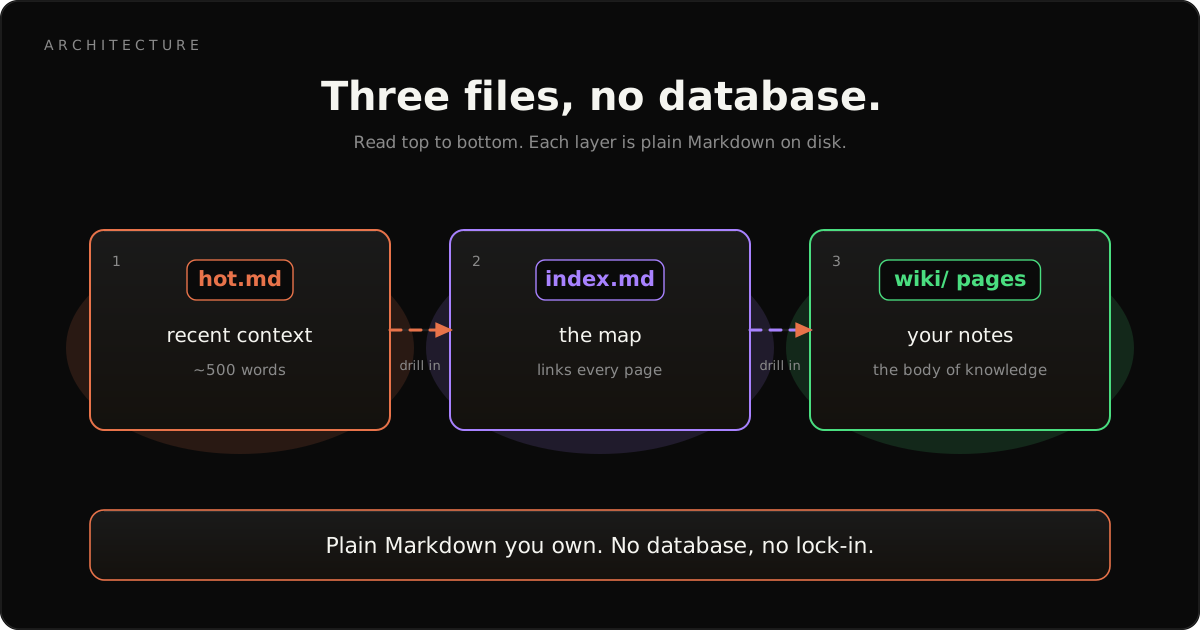
- The core is three plain files: a hot cache, an index, and your wiki pages. No database, no embeddings server, plain Markdown you own forever.
- AI knowledge management saves knowledge workers 30-45% of time on information retrieval (McKinsey, 2025).
- v1.9 "Compound Vault" adds hybrid retrieval, methodology modes, multi-writer safety, and a thinking framework across 15 skills.
What Is an AI Second Brain?
An AI second brain is a personal knowledge base where the AI does the filing. You add raw material; the AI reads it, writes summaries, builds links, and keeps the index current.
The old "second brain" idea, popular in PKM and Notion circles, still asks you to do the labor. You tag, you link, you maintain. An AI second brain flips that. The model reads the source, extracts the people and concepts, writes the pages, and connects them to everything you already have. Your job shrinks to two steps: feed it good sources and ask good questions.
Here's the part people miss. The value of a knowledge base is proportional to its link density, not its note count. A vault with 100 notes and 500 cross-references beats one with 1,000 notes and 50 links. An AI second brain is worth building precisely because the machine is patient enough to make every link, every time.
What Is Karpathy's LLM Wiki Pattern?
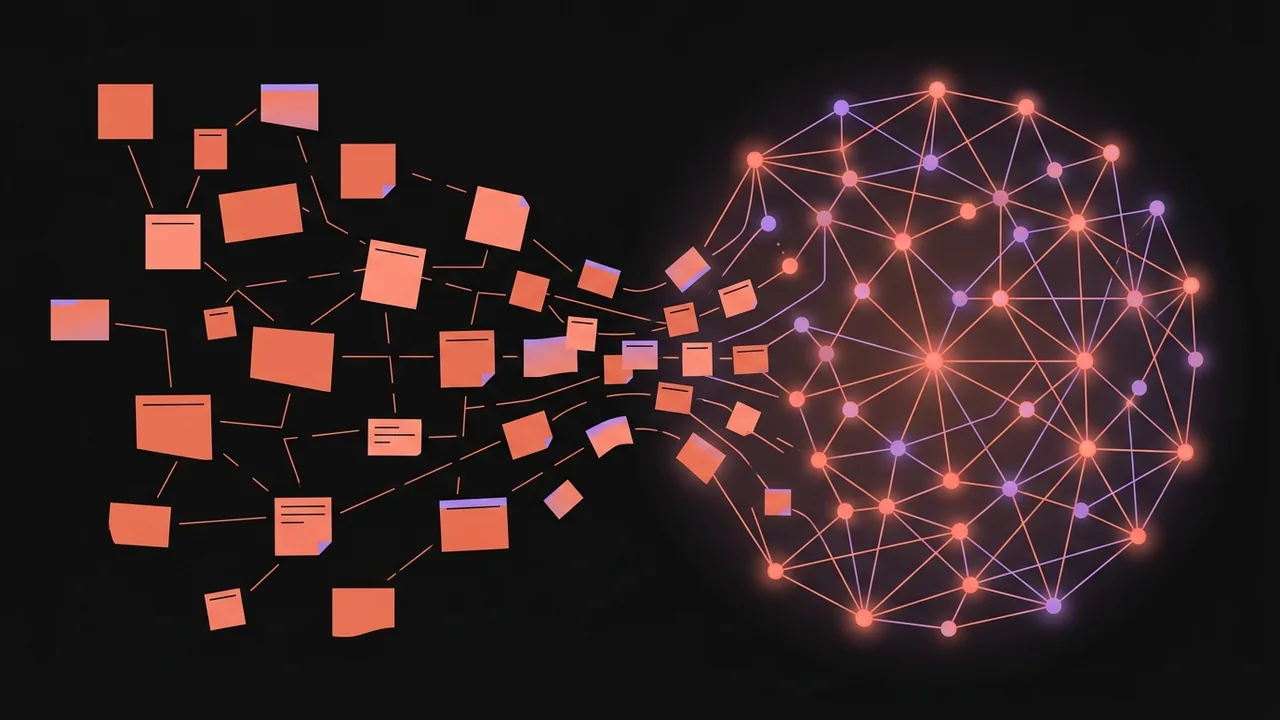
Andrej Karpathy, co-founder of OpenAI and former Tesla AI director, shared an approach to personal knowledge management that skips traditional vector search entirely (Karpathy's gist, 2025). Instead of embedding notes into vectors, you keep them as plain Markdown an LLM can read directly. The LLM doesn't just search your notes. It writes and maintains them.
The shape is simple. You index source documents into a raw directory. Then you use an LLM to "compile" a wiki: a set of Markdown files with summaries, backlinks, and concept pages that tie everything together. Obsidian is the front end where you browse the raw data, the compiled wiki, and the graph. The LLM owns the busywork.
Why does this beat a vector database for personal knowledge? Three reasons, in plain terms:
- No vector database. No embeddings server to host, no Pinecone bill, no background worker eating RAM. Just Markdown files on your disk.
- Human-readable output. The wiki is browsable in Obsidian with graph view, links, and full-text search, even with no AI running at all.
- Compounding intelligence. Each new source gets cross-referenced against everything already there. The 50th source is far more useful than the first.
claude-obsidian is my implementation of this pattern. It is not the only one on GitHub, but it is the most complete, with 15 skills, autonomous research, and a hot cache the others don't have.
How Do You Build a Second Brain With AI?
Building an AI second brain with claude-obsidian is genuinely a three-step loop, and the third step is "do nothing." Once it is set up, you stop filing and hunting for notes entirely.
The workflow looks like this:
Step 1: Drop a source in
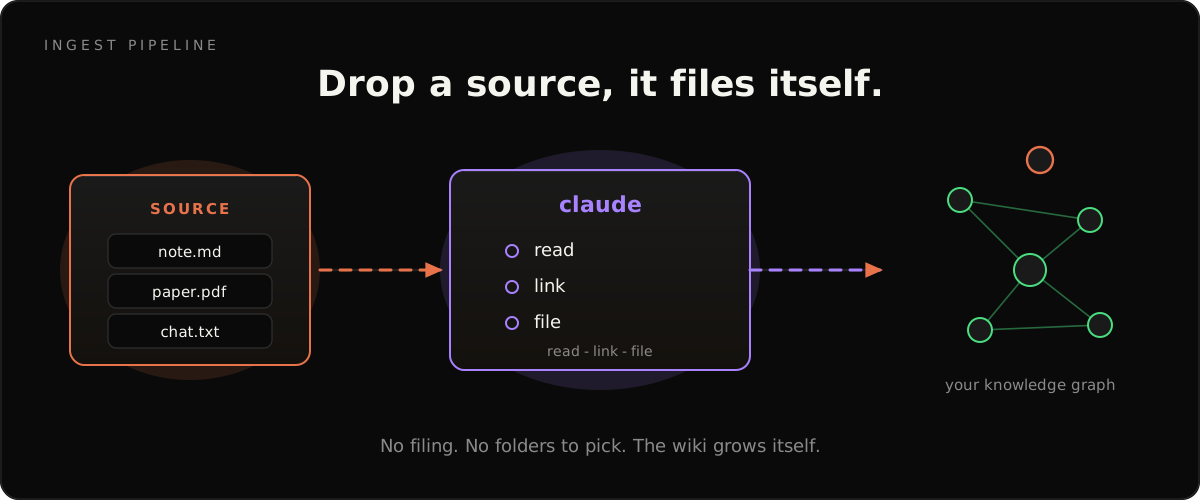
Drag a PDF, paste a URL, or dump a meeting transcript into the raw folder. Originals are never modified. They sit there as your immutable record of truth.
Step 2: Run "ingest this"
The ingest skill reads the source and does the work you'd normally dread. It pulls out named entities like people, tools, and companies. It identifies concepts and frameworks. It creates or updates wiki pages, adds links between related pages, and flags anything that contradicts what you already had.
Step 3: There is no step 3
That's it. One command, and a 20-page PDF becomes 8-15 connected wiki pages with proper structure, cross-references, and source tracking. You didn't create a single folder, tag, or link by hand. In my own use, a vault built from a few dozen mixed sources ends up with the large majority of pages linked to at least two others, with zero manual linking on my part.
What Can claude-obsidian Actually Do?
claude-obsidian ships 15 skills as of v1.9, which makes it less of a chat plugin and more of a knowledge operating system. Most tools in that space do one thing. This one covers the full lifecycle.
The headline commands, in plain English:
- /wiki scaffolds the whole vault from a short description.
- /save files an entire conversation as one clean, linked note. No copy-paste cleanup.
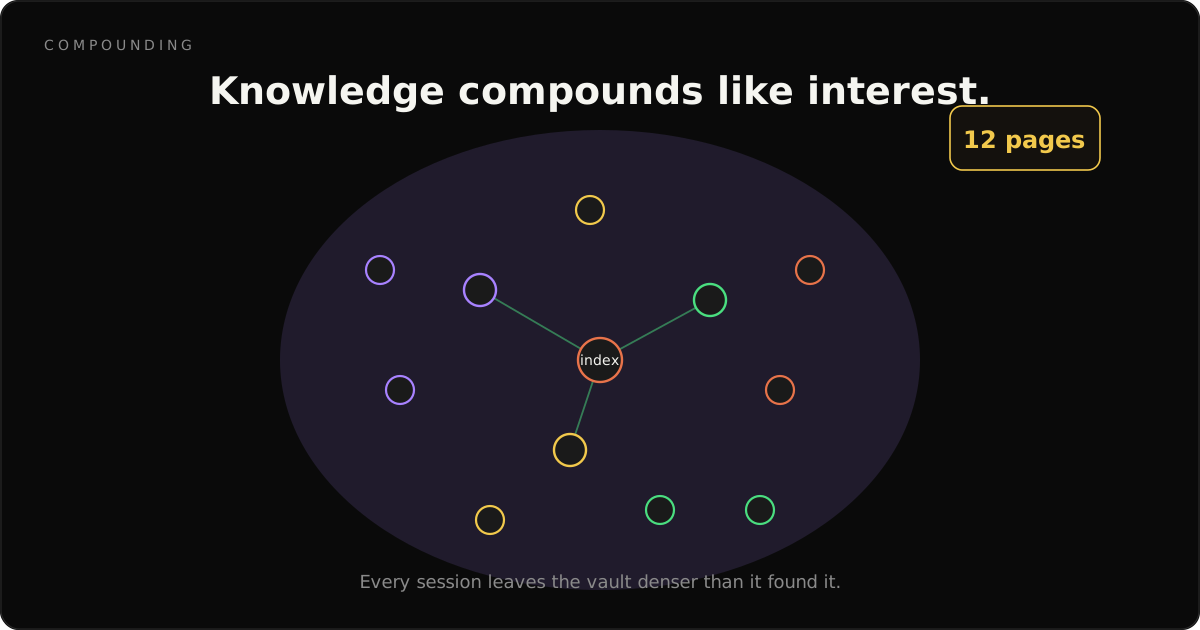
- /autoresearch takes a topic, reads sources, writes pages, and grows the graph. Up to 12 pages hands-free in a single run.
- /canvas builds visual reference boards with images and PDFs.
- /think runs a 10-principle thinking loop for harder decisions, new in v1.9.
Under those sit the workhorses: wiki-ingest, wiki-query, wiki-lint, wiki-retrieve, wiki-mode, wiki-cli, and wiki-fold. The point isn't the count. It's that the skills compound. When you ingest a source, the agent doesn't just summarize. It creates entity pages, concept pages, cross-references them against every existing page, and flags conflicts. The 50th source you add weaves 10 new notes into a mesh of 500.
Is claude-obsidian a Good Notion Alternative?
Yes, if owning your data matters to you. A lot of knowledge-app spend is locked inside proprietary clouds. claude-obsidian goes the other way. Your notes are plain Markdown on your disk.
Here's the honest comparison. Notion-style apps are excellent for collaboration and structured databases, but your data lives in their format, on their servers, under their export rules. If they raise prices or shut a feature, your knowledge is hostage. Most AI-memory setups make this worse, not better: they bolt a vector database and a background worker onto your notes, which quietly burns tokens and RAM and adds a second thing that can break.
claude-obsidian has neither. The core is three plain files: a hot cache of recent context, an index, and your wiki pages. You can open them in Obsidian, in a text editor, or in Notepad ten years from now. The AI is a tool that reads and writes those files, not a landlord that holds them. That's the whole pitch for the PKM and second-brain crowd: own the data, rent only the intelligence.
How Does the Hot Cache Fix Session Amnesia?
Every fresh AI conversation starts with total amnesia, and that tax is real. And a chunk of every session gets clawed back re-explaining context to a model that forgot where you left off.
claude-obsidian fixes this with a hot cache: a single file holding roughly 500 words of your most recent context. When you start a new conversation, the plugin reads it first and restores the AI's working memory. No recap. No "where were we?" Typically it holds what you were working on, the key decisions and why, which pages changed, and your open next steps.
The math is friendly. That's about 500 tokens to read, a rounding error against Claude's context window, and it saves the 2,000 to 3,000 tokens you'd otherwise burn re-establishing context. In my own daily use that's roughly a 4x to 6x return on a tiny token investment, every single session.
What Is New in claude-obsidian v1.9 (Compound Vault)?
The public release jumped from v1.6 to v1.9.2, and the "Compound Vault" arc is the biggest change since launch. It rests on Anthropic's contextual retrieval research, which cut retrieval failures by up to 49% and up to 67% with reranking (Anthropic, 2024). The short version: your second brain now remembers better and works safely with multiple writers.
Four things landed across the arc:
- Hybrid retrieval. A contextual prefix, BM25 keyword search, and a cosine rerank work together so the wiki pulls the right pages, not just the similar-sounding ones.
- Methodology modes. Pick how the vault organizes itself: LYT, PARA, Zettelkasten, or Generic. Ingestion and saving route new pages accordingly.
- Multi-writer safety. Per-file advisory locking means several agents can ingest at once without corrupting your vault.
- A thinking framework. The new /think skill brings a 10-principle reasoning loop for audits, architecture calls, and ambiguous requests. That's the jump from 14 to 15 skills.
I wrote a full walkthrough of the update for anyone who wants the deep dive. Read it here: Claude Obsidian v1.9: the Compound Vault release.
How Do You Connect Claude to Obsidian?
Connecting Claude to Obsidian with this plugin takes about two minutes. Obsidian's local-file model is exactly why this works: your vault is just a folder of Markdown, so the plugin reads and writes it directly. The retrieval layer behind it leans on research that reduced failures by up to 49% (Anthropic, 2024).
The fastest path is two lines:
git clone https://github.com/AgriciDaniel/claude-obsidian.git my-wiki
bash my-wiki/bin/setup-vault.sh
Then open the my-wiki folder in Obsidian and you're done. Prefer the marketplace? Run claude plugin marketplace add AgriciDaniel/claude-obsidian instead. On desktop the plugin uses the Obsidian CLI as its default transport, and it always keeps plain filesystem access as a fallback, so a missing dependency never blocks you.
This is the local-first promise in practice. If Claude's API goes down, your wiki still opens and searches in Obsidian. If you switch AI tools next year, your knowledge comes with you because it was never trapped anywhere. For a visual companion to your notes, pair it with claude-canvas to build image and PDF reference boards.
Frequently Asked Questions
What is an AI second brain?
An AI second brain is a personal knowledge base where an AI reads your sources, writes the notes, links them, and keeps everything organized. You add raw material; the AI builds the structure. McKinsey reports knowledge workers save 30-45% of retrieval time with AI knowledge management (McKinsey, 2025).
How do you build a second brain with AI?
Drop sources into one folder, then let the AI extract entities, write linked pages, and maintain an index. With claude-obsidian you run one command and a 20-page PDF becomes 8-15 connected notes. No manual folders, tags, or links. The graph compounds with every source you add over time.
Is claude-obsidian a good Notion alternative?
Yes, if you want to own your data. Notion stores notes in a cloud-proprietary format you cannot easily move out. claude-obsidian writes plain Markdown that lives on your disk and opens in Obsidian forever. There's no vendor lock-in and no subscription for the plugin, which is MIT licensed and free.
How do you connect Claude to Obsidian?
Install claude-obsidian as a Claude Code plugin, then point it at an Obsidian vault folder. The plugin reads and writes the Markdown directly. On desktop it uses the Obsidian CLI by default, with filesystem access as an always-available fallback. Setup takes about two minutes with a two-line clone command.
Is it free?
Yes. claude-obsidian is MIT licensed and fully open source on GitHub. You pay only for your AI model usage, such as Claude API tokens, and Obsidian itself is free for personal use. There's no subscription, no vector database to host, and no background worker quietly burning your RAM.
The Wiki That Builds Itself
The personal knowledge base AI market is climbing from $1.65 billion in 2025 toward $6.15 billion by 2030 (Research and Markets, 2026), and most of that growth will come from tools that do the work humans hate. claude-obsidian is my bet on what that looks like.
It's Karpathy's pattern, productized. Fifteen skills covering the full lifecycle from source to maintenance. A hot cache that remembers your context. A Compound Vault that retrieves better and survives multiple writers. And it's free and open source, because knowledge tools should be owned, not rented.
- Star the repo on GitHub.
- Read the deep dive: Claude Obsidian v1.9 Compound Vault.
- Add a visual layer with claude-canvas.
- See the same vault pattern applied to one topic: the Claude Mods Brain and the complete guide to Claude Code mods.