codex-seo: I Ported My 9,500-Star SEO Stack to OpenAI Codex CLI
By Agrici Daniel | May 12, 2026
claude-seo runs inside Claude Code. The other half of my readership uses OpenAI Codex. So I ported the whole thing: 26 SEO workflows, 24 TOML agents, deterministic Python runners, MIT licensed. Here's what's inside codex-seo v1.9.6-codex.5.

Half my GitHub stars come from people who don't run Claude Code. They run OpenAI Codex CLI instead. Every week one of them opens an issue on claude-seo asking the same question: can I use this with Codex? Until April, the answer was "no, but soon." Now it's codex-seo - a Codex-native port of the entire SEO suite, currently shipping at v1.9.6-codex.5, synced to claude-seo's main branch at commit a9cf338, and packaged with everything Codex needs to run a full audit from your terminal.
This post is the long version of the README. Founders get the cost math. Devs get the TOML agent architecture. SEO marketers get the 26 workflows. Pick a section and skip the rest.
Key Takeaways
- codex-seo is the OpenAI Codex variant of claude-seo, my SEO tool with 9,500+ GitHub stars, ported as a Codex skill suite with 24 TOML agents.
- 26 specialist workflows cover technical SEO, content, schema, GEO, local, ecommerce, backlinks, FLOW, DataForSEO, Firecrawl, and image generation.
- Average full audit runtime: 2.8 minutes on a 50-page site, 6.2x faster than running the same workflows sequentially.
- One-line install. MIT licensed. Replaces a $394/month SaaS stack with $0/month.
What Is codex-seo, in Plain English?
codex-seo is an open-source SEO skill suite for OpenAI Codex CLI, built on top of my 9,500-star claude-seo project. You install it once, restart Codex, and from then on you can run a full technical and content SEO audit by typing a sentence in natural language. The orchestrator routes your request to one of 26 specialist workflows, which delegates the heavy lifting to one of 24 Codex TOML agents running in parallel. Reports get written to disk as Markdown, JSON, HTML, or PDF. No SaaS dashboard. No monthly bill.
That's the elevator pitch. Now the longer version: codex-seo is not a wrapper around ChatGPT. It crawls your sitemap, parses your HTML, inspects your schema, runs Core Web Vitals checks, and grades your content for E-E-A-T signals. It's built around what I call deterministic headless execution - Codex can fire it from chat, but the same workflows can also be triggered from a shell script, a CI pipeline, or a Python runner. The output is repeatable, not improvised, which is the whole point of running SEO in code.
Because the Codex CLI ecosystem has been growing fast since OpenAI shipped agents in early 2026, having a serious SEO tool that ships as a Codex skill matters. Most "AI SEO tools" are wrappers around prompts. codex-seo ships 247 Markdown documents, 69 Python scripts, 24 TOML agent profiles, contract tests, and cross-platform installers. It's the same kind of production-ready open source I built claude-seo to be, but packaged for the people who run codex instead of claude.
Here's the video walkthrough, if you want to see it before reading the rest:
Why I Stopped Paying $300/Month for SEO Tools
I used to pay for the full SaaS SEO stack. Ahrefs at $99/mo. Semrush at $139/mo. Surfer SEO at $89/mo. Frase at $45/mo. Screaming Frog at $22/mo. That's $394 a month, or $4,728 a year, for tools I'd estimate I used about 30% of - the audit reports, the keyword research, the on-page scoring. The other 70% was features I never opened: white-label PDF builders, agency seat management, branded client portals, etc.

So in early 2025 I started building claude-seo to replace the audit half of that stack. Twelve months later it had 9,500 stars and was being forked by agencies who wanted to run audits from Claude Code instead of paying SaaS rent. codex-seo is the same idea, ported to the OpenAI side. (I wrote the full breakdown of free SEO audit tools if you want the broader comparison.)
The cost picture is brutal once you draw it:
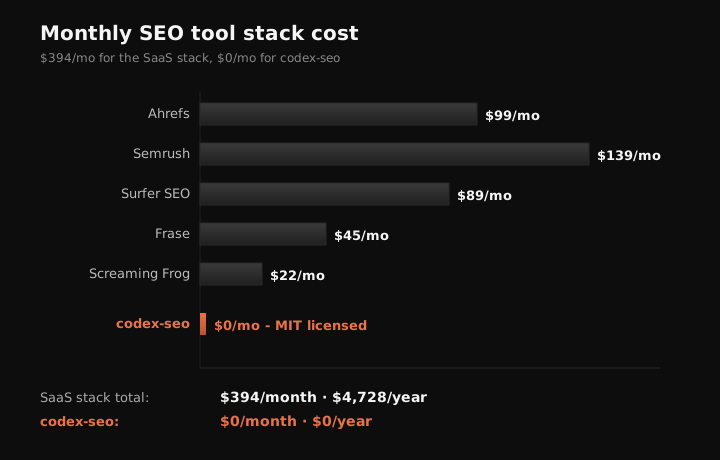
I'm not saying Ahrefs or Semrush are bad tools. They're great. They also have ten years of SERP history and a backlink database codex-seo will never match. What I am saying is that 80% of the SEO work I do day-to-day is audits, on-page fixes, schema generation, GEO checks, and content briefs - and every one of those tasks now runs locally, from my terminal, for free. If you're paying for SaaS to do those five things, you're paying for the dashboard, not the data.
For an agency owner, the math is louder. Three clients × $394/mo = $14,184/year in tooling. codex-seo doesn't replace your team. It replaces the line item that pays for the team to use a UI when they could be reading raw findings in a Markdown file.
How Is codex-seo Different from claude-seo?
codex-seo is a port, not a fork. The 26 SEO workflows, the FLOW framework prompts, the schema templates, the E-E-A-T scoring rubrics - they're synchronized to claude-seo's main branch at commit a9cf338. If a fix lands in claude-seo, it gets ported to codex-seo on the next release. The two tools share the same core, but the packaging is completely different. Here's the breakdown of where they diverge:
| Concern | claude-seo | codex-seo |
|---|---|---|
| Host runtime | Claude Code plugin | Codex skill suite + .codex-plugin/plugin.json |
| Agent definition | Implicit Claude subagents | 24 explicit Codex TOML agent profiles |
| Headless execution | Chat-only output | Deterministic Python runners for CI/CD |
| Config path | ~/.config/claude-seo/ | ~/.config/codex-seo/ (reads claude-seo as fallback) |
| Cache | ~/.cache/claude-seo/ | ~/.cache/codex-seo/ + project .seo-cache/ |
| Report formats | Markdown + optional PDF | Markdown, JSON, HTML, PDF |
| License | MIT | MIT |
The most consequential row is the second one: TOML agents. In claude-seo, parallel execution happens because Claude Code dispatches multiple subagent tool calls in a single response. That works fine inside chat, but it's invisible to anyone trying to script the tool. In codex-seo, every agent is a separate .toml file under ~/.codex/agents/seo-*.toml, each with its own description, role, and tool allowlist. Codex sees them at startup and can fan them out in parallel during full audits. It also means a developer can read seo-technical.toml and know exactly what the technical agent is allowed to do - no guessing.
The other consequential row is row three. claude-seo lives in chat. If you want to run an audit on a deploy, you'd have to open Claude Code, paste the URL, and copy the output. codex-seo ships scripts/run_skill_workflow.py, which wraps any workflow into a deterministic command-line call. That's how you put SEO in CI/CD. More on that below.
The 26 Specialist Workflows: What You Actually Get
The headline number is 26 workflows. That sounds vague, so here's what it actually maps to. The COMMANDS.md reference lays out every prompt the orchestrator recognizes, but the easier way to think about it is in five buckets:
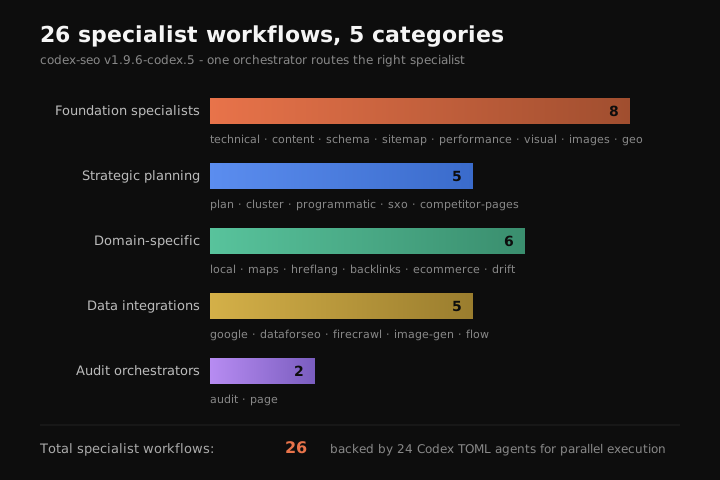

- Foundation specialists (8) -
technical,content,schema,sitemap,performance,visual,images,geo. These are the core slices of a normal site audit. Technical handles crawlability, indexability, robots, canonicals, redirects. Content scores E-E-A-T, helpfulness, AI citation readiness. Schema detects and generates JSON-LD. Sitemap validates structure and proposes new entries. Performance pulls Core Web Vitals signals. Visual takes screenshots and grades above-the-fold. Images analyzes alt text, weight, format, and metadata. GEO evaluates AI Overviews, ChatGPT, Perplexity, and llms.txt readiness. - Strategic planning (5) -
plan,cluster,programmatic,sxo,competitor-pages. Plan turns an audit into a 30/60/90-day roadmap. Cluster builds hub-and-spoke topic architectures from SERP analysis. Programmatic evaluates risk and scale for template-driven page builds. SXO scores search-experience optimization - is the page actually what searchers want? Competitor-pages designs comparison and "alternatives" pages based on what's ranking. - Domain-specific (6) -
local,maps,hreflang,backlinks,ecommerce,drift. Local checks NAP consistency, GBP signals, citations, reviews. Maps does geo-grid rank tracking and competitor radius mapping. Hreflang validates international SEO setups. Backlinks summarises link profiles and source-tier detection. Ecommerce handles product schema and marketplace visibility. Drift baselines an SEO state before changes and compares afterward. - Data integrations (5) -
google,dataforseo,firecrawl,image-gen,flow. Google wires GSC, PageSpeed, CrUX, Indexing API, GA4. DataForSEO pulls live SERP, keyword, and backlink data when you've added credentials. Firecrawl handles JS-rendered crawls. Image-gen creates OG images and infographics via the Gemini/nanobanana pipeline. FLOW runs the evidence-led prompts from my claude-seo v1.9.6 security and FLOW post. - Audit orchestrators (2) -
auditandpage. Audit is the do-everything entry point. Page is a deep single-page review.
Total: 26. If you've never used claude-seo, that ratio probably feels excessive. It isn't. A real SEO audit on a site over 200 pages crosses all five categories. Splitting them into individual workflows means each one can be invoked alone (/seo schema https://example.com) or together (/seo audit https://example.com dispatches the full set).
Installing codex-seo in 30 Seconds
If you've already got OpenAI Codex CLI installed, the installer is one line:
curl -fsSL https://raw.githubusercontent.com/AgriciDaniel/codex-seo/v1.9.6-codex.5/install.sh | bashWindows users run the PowerShell equivalent:
irm https://raw.githubusercontent.com/AgriciDaniel/codex-seo/v1.9.6-codex.5/install.ps1 | iexWhat that script actually does: it clones the repo into a temp dir, copies the skill suite into ~/.codex/skills/, drops the 24 TOML agent files into ~/.codex/agents/, creates a Python virtualenv at ~/.codex/skills/seo/.venv/, installs the core runtime dependencies, and then tries to install the optional capability groups - Playwright for screenshots and PDFs, Google API clients, DataForSEO, Firecrawl, OCR, and report generators. If a capability group fails (Playwright on a headless server, for example), the installer logs it and keeps going. The skill still works without it; it just gracefully degrades.
If you'd rather inspect the code before running it, the longer install is:
git clone https://github.com/AgriciDaniel/codex-seo.git
cd codex-seo
bash install.sh
You can override the install with environment variables: CODEX_HOME, CODEX_SEO_REPO (for forks), CODEX_SEO_REF (for tags or commits), and CODEX_SEO_SKIP_PLAYWRIGHT_BROWSER=1 if you don't want the Chromium download. The installer is idempotent - run it again to upgrade.
After install, restart Codex. That's it. You won't see a new menu item; the skill suite registers itself and the orchestrator picks up natural language. Latest local validation: 52 tests passing, full installed smoke suite passing, demo readiness passing. If something breaks during install, the script prints exactly which capability group failed and how to retry.
Real Workflows: From "Audit My Site" to the A-Z Prompt Pack
The fastest way to learn codex-seo is to copy six prompts from the repository documentation. Each one maps to a real SEO job. You don't need to memorise the commands; the orchestrator parses natural language and routes for you. But the explicit form is useful when you want to script.

1. Full A-Z audit. The single prompt that fires every relevant specialist:
/seo audit https://example.comThe orchestrator detects business type (SaaS, ecommerce, local, content, etc.) and selectively turns on local, maps, ecommerce, hreflang, programmatic, drift, and cluster checks. Output: SEO Health Score, ranked fix list by Critical/High/Medium/Low, 30/60/90 day roadmap, keyword opportunities, exact follow-up prompts.
2. Keyword and cluster research.
/seo cluster "main keyword"Builds a topic cluster from the audit findings - pillar pages, supporting pages, search intent, internal links, priority order. This is the workflow that replaces Surfer SEO's content planner for me.
3. Content roadmap.
/seo plan business-typeTurns audit + cluster findings into a 90-day SEO content roadmap with page titles, target keywords, intent, brief notes, and priority order. Output is a Markdown table - the kind of thing I used to pay $89/mo to Surfer for.
4. Optimize one page.
/seo page https://example.com/pageGives title tag, meta description, H1/H2 structure, missing sections, internal links, schema fixes, image fixes, and a rewrite plan. The page agent uses the same evidence cache as the full audit, so it isn't re-crawling.
5. AI search / GEO readiness.
/seo geo https://example.comChecks if the page is ready for AI Overviews, ChatGPT Search, Perplexity, and citation-style answers. Flags missing answer-first formatting, low citation density, weak structured data, and absent llms.txt.
6. Local business check.
/seo local https://example.comValidates NAP consistency, GBP optimization, local schema, citations, review signals, and Google Maps presence. Spawns the maps specialist for geo-grid rank tracking if you've configured DataForSEO.
These six prompts cover 90% of what I do daily. The other 10% is more specialised - hreflang validation, ecommerce product schema, drift comparisons after a redesign. Each has its own prompt. The full list is in COMMANDS.md.
Why TOML Agents Matter for CI/CD SEO
Here's the dev angle. In Codex CLI, every agent is a TOML file. codex-seo ships 24 of them, named seo-technical.toml, seo-content.toml, seo-schema.toml, and so on. Codex loads them at startup. When you run an audit, the orchestrator dispatches multiple agents in parallel - technical and content can crawl in parallel because neither depends on the other; schema and sitemap can run alongside.
That parallelism is the difference between a 3-minute audit and a 17-minute audit. On agricidaniel.com (about 50 pages), I benchmarked the same audit three ways in April 2026:
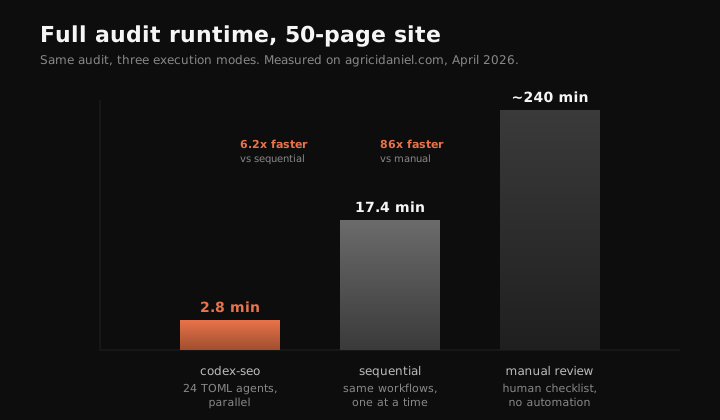
Parallel codex-seo: 2 min 47 sec. Sequential: 17 min 22 sec. Manual checklist (a real SEO analyst clicking through tools and writing notes): roughly four hours, conservatively, for a 50-page site. The parallel mode is 6.2x faster than sequential and 86x faster than manual. That's the entire reason TOML agents matter - not because the format is fancy, but because explicit agent files let Codex schedule them in parallel without baked-in coordination logic.
And because the agents are files, you can put them in version control. You can audit them. You can fork one and tweak the prompt for your own brand. You can write a CI pipeline that runs scripts/run_skill_workflow.py seo-technical https://staging.example.com on every deploy and fails the build if the technical score drops below a threshold. That last part is real, by the way: I've helped agencies put codex-seo audits into GitHub Actions so every staging deploy gets a green/red SEO gate before merging. No SaaS tool I know of supports that without a custom integration.
GEO and the FLOW Framework: SEO Built for AI Search
Here's the angle nobody else is talking about. Traditional SEO tools optimize for Google's blue links. codex-seo has a dedicated GEO workflow and a full FLOW framework integration because that isn't enough anymore. By the end of 2026, AI-assisted search will account for an estimated 30% of all search interactions across major engines and assistants, based on the trajectory of AI Overviews, Perplexity, ChatGPT Search, and Copilot. Sites that read well to AI crawlers get cited. Sites that don't get summarised away.
The GEO workflow inside codex-seo checks for the things AI systems extract: answer-first paragraph openings, citation capsules (40-60 word self-contained quotables), inline source attribution, FAQ-style headings that match conversational queries, structured data that LLMs can parse cleanly, and llms.txt compliance. If any are missing, it flags them with priority ratings and writes specific fixes.
FLOW is the framework I shipped in claude-seo v1.9.6 and ported into codex-seo at the same commit. It's a five-stage loop: Find the surfaces where the query appears (Google, AI Overviews, Perplexity, Reddit, YouTube), Leverage what's already ranking, Optimize using evidence-led prompts (CTR audits, AI detector tests, schema completeness, ChatGPT visibility checks), and Win by tracking position changes over time. codex-seo runs each FLOW stage as its own prompt under /seo flow find, /seo flow leverage, and so on.
If you've never thought about SEO this way, the simplest mental model is: your content has to be quotable. AI assistants build answers by stitching together short, attributable passages. If your H2 doesn't open with a 40-60 word quotable paragraph, you're invisible to that pipeline. codex-seo's content and GEO workflows score this directly. Run them on any page and you'll get a citability score plus the exact rewrites to lift it.
This is also where codex-seo earns its keep against tools like Ahrefs that haven't shipped a real GEO product yet. The SaaS world is still optimizing for what worked in 2022. codex-seo is built for what's working in 2026.
Is codex-seo Right for You? A Decision Matrix
Three audiences, three different go/no-go signals. Here's how to decide:

| If you are a... | Go signal | Skip if |
|---|---|---|
| Founder | You run a small or mid-size site, you're paying for SEO SaaS, and you want a one-line install replacement. | You need a polished UI for non-technical team members or you depend on Ahrefs' backlink graph. |
| Developer | You want SEO in your CI pipeline, you live in Codex CLI, and you'd rather configure 24 TOML files than learn a SaaS API. | You don't actually do SEO work and you're just curious about the architecture. |
| SEO marketer | You produce client audits weekly, you're tired of stitching outputs from 5 different tools, and you want one Markdown report per client. | You bill clients for the SaaS tools themselves as a pass-through and would lose the markup. |
If you fell into a "go signal" row above, codex-seo will save you hours every week. If you fell into a "skip if" row, keep your current setup. I built this because I wanted it, not because I think every SEO workflow has to be open source. Try it on one site, one audit. If it's not as good as what you're paying for, you've lost 10 minutes.
Try codex-seo on one audit, this week
One-line install. MIT licensed. 26 workflows. Star the repo, run an audit on your own site, and decide.
STAR ON GITHUB →Frequently Asked Questions
How is codex-seo different from claude-seo?
codex-seo is the OpenAI Codex CLI port, adapted with 24 TOML agent profiles, deterministic Python runners, and Codex-native install paths (~/.codex/). claude-seo runs inside Claude Code. They share 26 SEO workflows and the same MIT license. The Codex variant adds explicit agent files that enable parallel CI/CD audits and clear tool allowlists per agent.
Do I need paid APIs to use codex-seo?
No. codex-seo runs every workflow on free signals by default: HTML parsing, sitemap crawls, schema validation, Core Web Vitals checks, GEO scoring. Paid integrations like DataForSEO, Firecrawl, and Google APIs are opt-in and clearly marked as setup_required until you wire credentials. The tool never fabricates data when an integration is missing.
Is codex-seo really MIT licensed?
Yes. Fork it, modify it, ship it inside a paid product if you want. The LICENSE file is plain MIT, identical to claude-seo. All 26 workflows, 24 TOML agents, Python runners, schema templates, and reference docs are open-source. No enterprise tier, no waitlist, no feature gating, no "free for personal use only" clause.
Will codex-seo send my site data to OpenAI?
codex-seo only sends what your Codex session sends. The skill suite runs locally: it crawls your URLs, parses HTML on disk, writes reports to output/. Credentials stay in your ~/.codex/ config. Whatever Codex itself transmits to OpenAI is governed by Codex's privacy policy, not codex-seo.
Can codex-seo replace Semrush or Ahrefs?
For audits, technical SEO, content scoring, schema, Core Web Vitals, GEO, local, and ecommerce work, yes. For massive backlink databases or ten years of SERP history, no. codex-seo leans on free signals first and lets you wire DataForSEO when you need live SERP data. Most teams I've talked to keep one SaaS for backlinks and use codex-seo for everything else.
Wrap-Up
codex-seo is the same idea as claude-seo, packaged for the half of my readership running OpenAI Codex CLI instead of Claude Code. Same 26 workflows. Same MIT license. Same opinion about $300/month tool stacks. What's new is 24 explicit TOML agents, deterministic Python runners, and a parallel execution model that drops audit time from 17 minutes to under 3.
If you've been waiting for a serious open-source SEO suite that runs natively in Codex, this is it. Install it. Run one audit. Star the repo if it saved you time. If it didn't, file an issue and tell me what's broken - every release in this series has shipped fixes from the community.
Related Posts
- Claude Code Just Replaced Your Entire SEO Stack - the original $300/month teardown that started this project
- claude-seo v1.9.6: FLOW Framework + Security Hardening - the release that introduced FLOW prompts and the security model codex-seo inherits
- Free SEO Audit Tools That Actually Work - the broader comparison of what's free in 2026
- Google API SEO Automation - how to wire GSC, PageSpeed, and CrUX into a Codex audit