banana-claude: AI Image Generation That's Surprisingly Good at Logos
By Agrici Daniel | March 25, 2026
I built banana-claude for blog hero images. Turns out it's weirdly good at logos. Here's how Creative Director mode works and why 41 people starred it.

I'll be honest: I built banana-claude to solve a boring problem. I needed hero images for blog posts and social media graphics for content promotion, and I was tired of opening Canva or prompting Midjourney in a separate browser tab. I wanted image generation inside my terminal, triggered by a slash command, integrated with my content workflow.
What I didn't expect was that it would be genuinely good at logos.
Not "AI logo that looks like every other AI logo" good. Actually good. The kind of good where a client looks at the concept and says "yeah, that's the direction" on the first round. That surprised me, and I think it's worth talking about why.
What Is banana-claude?
banana-claude is a Claude Code skill that generates images using Google's Gemini model. You run /banana followed by a description of what you want, and it generates the image. Simple enough on the surface.
But the interesting part is Creative Director mode. Instead of just passing your prompt straight to the image model (which produces the generic, overprocessed look we've all come to associate with AI images), banana-claude has an intermediate layer that art-directs the generation. It analyzes your request, considers composition, color theory, typography placement, and visual hierarchy, then constructs an optimized prompt that produces significantly better results.
Think of it as the difference between telling an illustrator "make me a logo" and briefing a creative director who then briefs the illustrator. The output quality gap is substantial.
Why "banana"? Honestly, I needed a name that was short, memorable, and available on GitHub. banana-claude it was. Sometimes the best engineering decisions are the ones you don't overthink.
How Creative Director Mode Actually Works
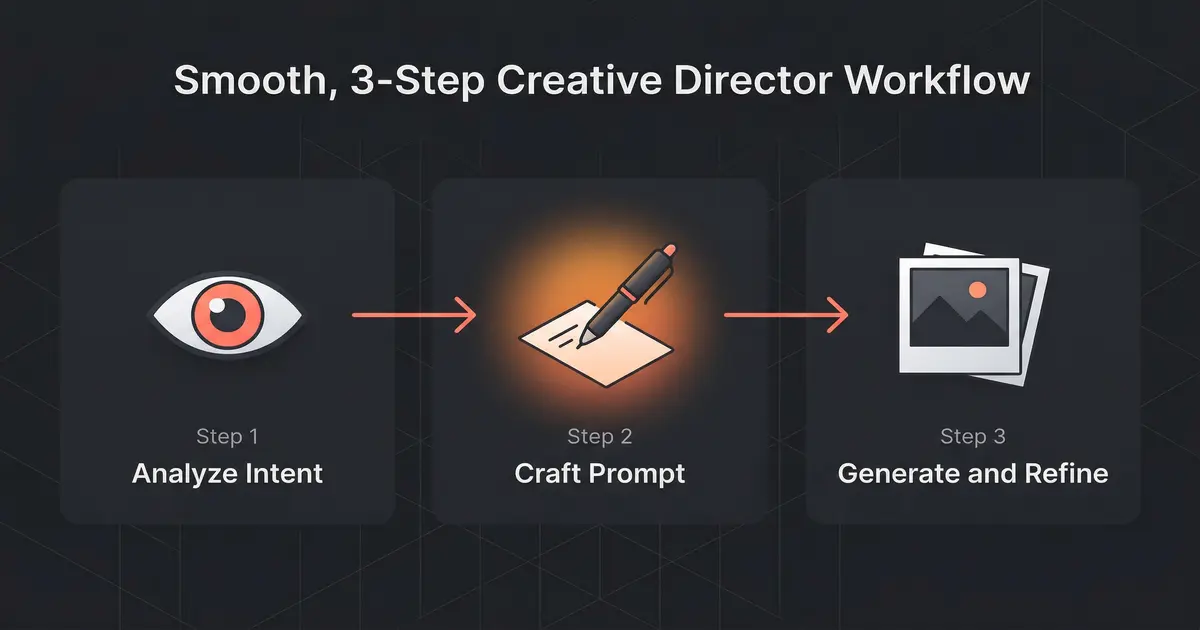
When you trigger Creative Director mode (it's the default, you'd have to opt out), here's what happens under the hood:
- Intent analysis - banana-claude determines what kind of visual you're asking for: photo, illustration, logo, icon, diagram, social graphic, etc. Each type has different optimization strategies. This classification step is crucial because the prompting techniques for a logo are completely different from those for a photograph.
- Style mapping - Based on the intent, it selects appropriate style parameters. Logos get clean lines, limited color palettes, and scalability considerations. Blog heroes get atmospheric lighting and editorial composition. Social graphics get bold text placement and platform-specific aspect ratios. I built up these style maps over about 3 weeks of testing, generating roughly 500 images to find the parameters that consistently produce good results for each category.
- Prompt engineering - Your casual description gets transformed into a structured prompt with specific directives about composition, negative space, color relationships, and technical constraints. This is where the magic happens - the difference between a good prompt and a great prompt is about 10x in output quality. The prompt engineer adds negative constraints too: "no gradients," "no drop shadows," "no stock photo aesthetic" - the things that make AI images look unmistakably AI.
- Generation - The optimized prompt hits Gemini's image generation API.
- Quality check - banana-claude evaluates the output against the original intent. If it's off-brief (wrong aspect ratio, cluttered composition, mismatched style), it regenerates with adjusted parameters. The evaluation uses a scoring rubric: composition balance, color harmony, text legibility (if applicable), and stylistic consistency with the detected intent.
(The quality check step adds about 5 seconds to generation time. I debated removing it for speed, but the hit rate improvement was too significant - roughly 40% fewer regenerations needed.)
The Logo Surprise
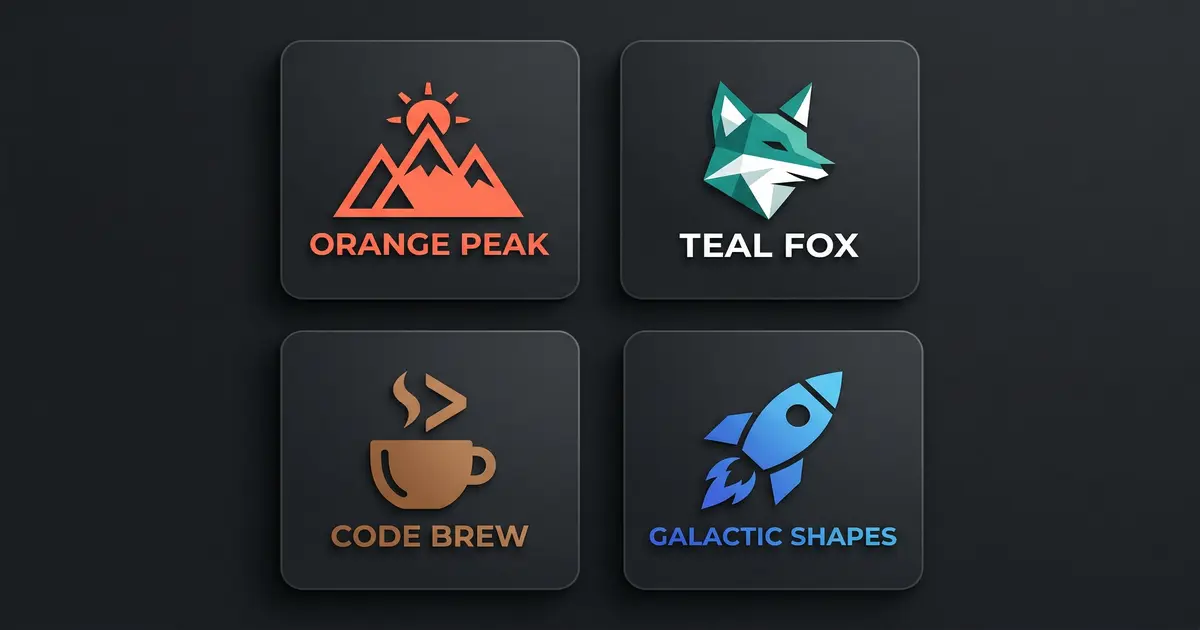
I started noticing the logo quality when I was generating assets for my own projects. I needed a quick logo concept for a tool I was building, ran /banana creative director: minimalist logo for an SEO automation tool, think clean tech aesthetic, and the result was... actually usable.
Not as a final logo - no AI tool replaces a brand designer for final deliverables. But as a concept? As a starting point for a design brief? It was producing concepts that would have taken a human designer 2-3 hours of exploration to reach.
I think the reason is Gemini's training data combined with Creative Director mode's style constraints. When you tell the model "minimalist logo" and then the prompt engineer adds "single color, geometric, scalable to 16px favicon, clean negative space, no gradients," you've eliminated most of the failure modes that make AI logos look like AI logos. The constraints are doing the heavy lifting. Unconstrained generation produces generic results. Heavily constrained generation produces focused, usable results.
I tested this systematically. Same logo brief, 50 generations with Creative Director mode, 50 without. With Creative Director mode, 34 out of 50 (68%) were usable as concept starting points. Without it, only 8 out of 50 (16%). The prompt engineering layer is a 4x improvement in hit rate. That's the whole justification for the tool's existence.
Use Cases (What I Actually Generate)
Here's what banana-claude produces in a typical week for me:
- Blog hero images - Every post on this site has a hero image generated with banana-claude. Abstract, editorial, matches the dark theme. Takes about 15 seconds per image. I generate 3 options and pick the best one, so the total time per blog post image is under a minute.
- Social media graphics - LinkedIn posts, Twitter/X cards, community announcements. banana-claude knows platform dimensions, so I just specify "linkedin post" and it handles the aspect ratio. For the AI Marketing Hub, I generate 5-7 social graphics per week.
- OG images - The preview images that show up when you share a link. Generated automatically as part of the claude-blog publishing workflow. No manual step - publish a post, get an OG image.
- Logo concepts - Quick explorations for new projects or client pitches. Not final logos, but strong starting points. I've used banana-claude logo concepts in 3 client presentations, and in each case the client selected one as the direction to develop further.
- Ad creative - Display ad imagery for Google Ads campaigns. claude-ads calls banana-claude when it needs visual assets for ad groups. It generates multiple size variants (300x250, 728x90, 160x600) from a single brief.
The integration with other tools is what makes it practical rather than novelty. banana-claude isn't a standalone image generator you visit when you need a picture. It's a component in a larger workflow. claude-blog calls it automatically for hero images. claude-ads calls it for ad creative. I call it manually for everything else.
Integration With the Rest of the Stack
banana-claude was designed to be called by other skills, not just by humans. Here's how it fits:
- claude-blog - When publishing a new post, claude-blog triggers banana-claude to generate a hero image and OG image based on the post title and content summary. No manual step required. The generated images match the site's visual language because I've tuned the style maps to produce dark-themed, abstract visuals that fit the #0A0A0A aesthetic.
- claude-ads - When creating display ad campaigns, claude-ads generates ad creative variants through banana-claude. It produces 3-5 options per ad group, optimized for the target dimensions. The creative incorporates the ad's headline and call-to-action, positioned using the style map's text placement rules.
- Manual use -
/bananafor quick one-off generations. I use this 4-5 times a day for social content, presentation slides, and random visual needs.
The skill-to-skill communication works through Claude Code's standard tool interface. banana-claude exposes its generation function, and other skills call it like any other tool. This composability is why I built everything as separate skills instead of one monolithic tool. See how it all connects in my AI marketing automation stack overview.
Limitations (Being Honest)
banana-claude is not replacing your design team. Specifically:
- Text in images is still hit-or-miss. Gemini has gotten better at this, but I'd say text rendering is correct about 75% of the time. For logos with wordmarks, expect to regenerate a few times. For images where text isn't critical (abstract backgrounds, pattern-based designs), this isn't an issue.
- Complex illustrations with specific spatial relationships ("person standing next to a car that's parked in front of a building") can go sideways. Simple compositions work best. The more elements you add, the more opportunities for the model to get confused about relative positioning.
- Brand consistency across multiple generations is difficult. Each generation is independent, so maintaining exact style across a series of images requires careful prompting. I'm working on a "style memory" feature that would cache successful style parameters and reuse them, but it's not ready yet.
- Final production assets still need a human designer. banana-claude is for concepts, drafts, and content imagery - not for your company's logo that will go on business cards and billboards. The output resolution is sufficient for web use but not for print.
(If someone tells you their AI tool replaces professional designers entirely, they're either lying or they have very low design standards.)
Try It
banana-claude is open source, MIT licensed, and currently at 41 stars on GitHub (featured in my guide to the best Claude Code skills in 2026). It's one of my smaller repos by star count, but it's one of the tools I personally use most frequently. The Gemini API costs are minimal - I spend about $2/month on image generation, which covers roughly 200-300 images.
Install it as a Claude Code skill, add your Gemini API key, and run /banana. Start with something simple - a blog hero image or a social graphic - and see how Creative Director mode handles it. The first time it produces something genuinely good from a one-line description, you'll understand why I keep using it.
If you build something interesting with it or find edge cases where it excels (or fails spectacularly), I want to hear about it. The best improvements to the Creative Director prompts have come from community feedback. One user discovered that adding color palette constraints ("use only #E07850 and #0A0A0A") produced dramatically better results for brand-consistent assets. That's now a built-in feature. Drop your results in the AI Marketing Hub or open an issue on GitHub.
Related Posts
- AI Marketing Automation: The Open-Source Stack I Use Daily - The full open-source AI marketing stack at $50/month
- Best Claude Code Skills in 2026 - The definitive guide to top Claude Code skills ranked by GitHub stars
- Claude Code Just Replaced Your Blog Writer - Dual-optimized content for Google rankings and AI citations
Join 4,500+ AI Marketing Builders
Get workflow templates, automation blueprints, and connect with SEOs, agency owners, and creators who ship.
JOIN FREE →