Claude Code Just Turned Obsidian Canvas Into an AI Design Studio
By Agrici Daniel | April 10, 2026
claude-canvas turns natural language into fully laid-out Obsidian canvases. 12 templates, 6 layout algorithms, 3 AI agents. Presentations, knowledge graphs, and mood boards from a single prompt.

You're Still Dragging Nodes Around Manually?
The AI presentation market hit $2 billion in 2025 and is growing at 25% annually toward $10 billion by 2033 (Research and Markets, 2025). Tools like Gamma, Beautiful.ai, and Canva are racing to automate slide creation. But they all live in the cloud, own your data, and cost $10-30/month. Meanwhile, Obsidian's Canvas feature - an infinite whiteboard built into a free, local-first app with 1.5 million users - sits there waiting for someone to make it programmable.
So I built claude-canvas. It's a Claude Code plugin where Claude acts as your Creative Director. You describe what you want - "mood board for a cyberpunk game" or "presentation on Q3 results" - and you get a fully populated, professionally laid-out Obsidian canvas. No dragging. No manual positioning. No cloud subscription.
Key Takeaways
- 12 template archetypes (presentation, flowchart, mind map, gallery, dashboard, storyboard, knowledge graph, mood board, timeline, comparison, kanban, project brief)
- 6 layout algorithms with auto-detection - the AI picks the right spatial arrangement for your data
- 85% of marketers save ~4 hours/week with AI visual tools (Figma, 2026)
- Zero external dependencies, zero cloud, zero subscriptions - MIT licensed
What Does claude-canvas Actually Create?
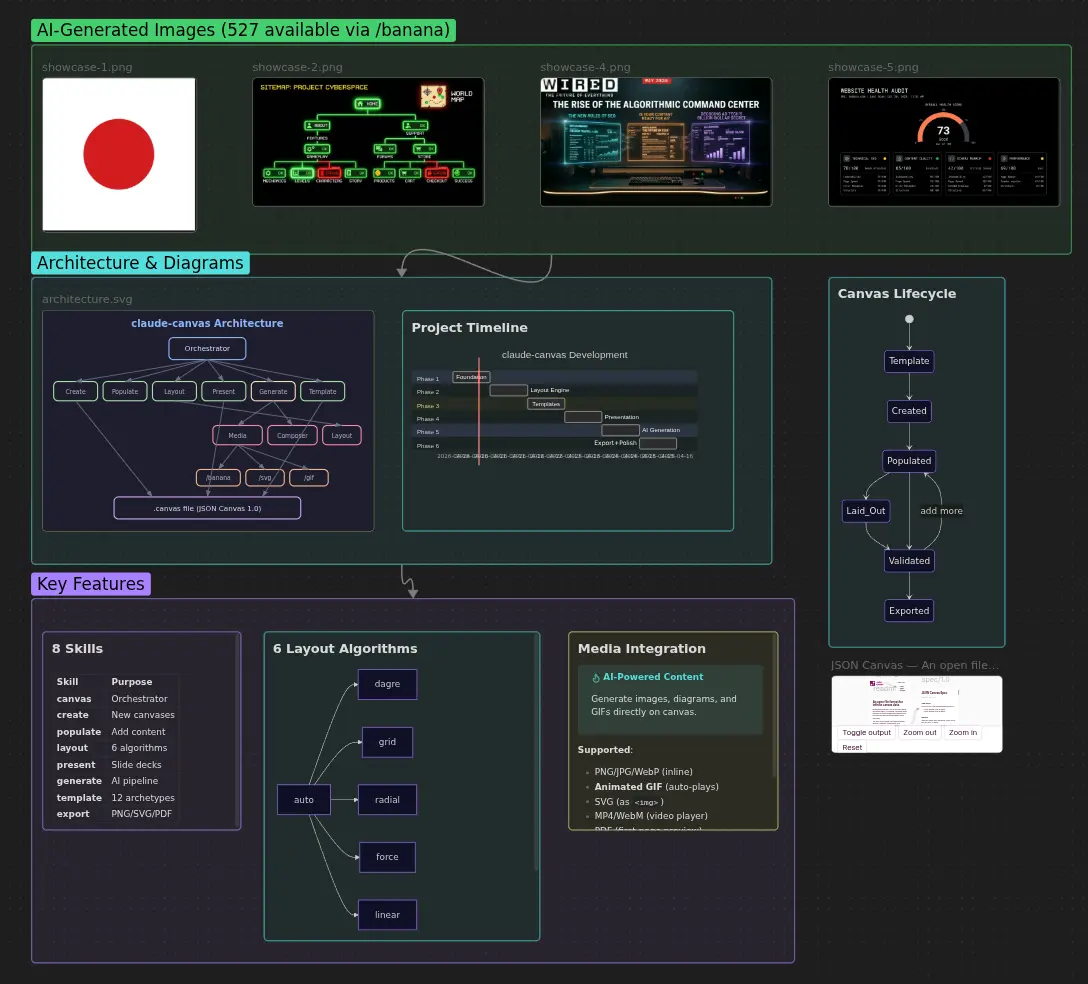
Users report 40% faster task completion when using spatial canvas approaches versus linear documents (Storyflow, 2026). That's because spatial layout activates different cognitive pathways - you see relationships, gaps, and patterns that text hides. claude-canvas builds on this with 12 template archetypes:
| Template | Layout | Use Case |
|---|---|---|
| Presentation | Linear vertical | Slide decks (1200x675px per slide) |
| Flowchart | Dagre hierarchical | Process documentation |
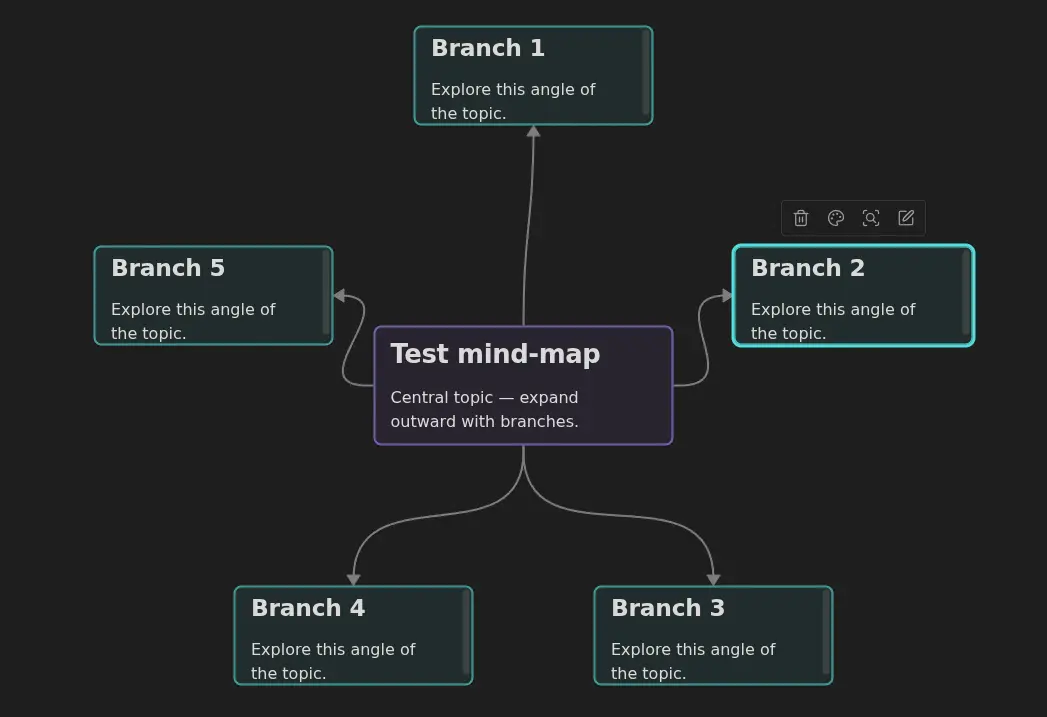
| Mind Map | Radial center-out | Brainstorming, idea exploration |
| Gallery | Grid | Image portfolios, showcases |
| Dashboard | Grid variable | KPI monitoring, project status |
| Storyboard | Linear horizontal | Video/animation planning |
| Knowledge Graph | Force-directed | Entity relationships, research maps |
| Mood Board | Asymmetric grid | Creative direction, design inspiration |
| Timeline | Linear horizontal | Event sequences, project history |
| Comparison | Two columns | Side-by-side analysis |
| Kanban | Column zones | Task management, workflow |
| Project Brief | Stacked zones | Scope documentation, kickoffs |
How Do the 6 Layout Algorithms Work?
78% of professionals say AI tools significantly speed up their workflows (Figma, 2026). But speed without quality is just fast garbage. claude-canvas doesn't randomly scatter nodes - it uses 6 purpose-built layout algorithms that understand spatial relationships:
- Dagre - Hierarchical layout for flowcharts and org charts. Supports top-to-bottom, left-to-right, and reverse directions. Uses the Sugiyama algorithm for clean edge routing.
- Grid - Uniform rows and columns for galleries and comparisons. Customizable column count with auto-scaling.
- Radial - Concentric rings from a center hub. Perfect for mind maps where ideas branch outward from a core concept.
- Force-directed - Physics simulation with attraction and repulsion forces. Ideal for knowledge graphs where relationships determine proximity.
- Linear - Single-axis timeline or sequence. Works horizontal or vertical for storyboards and presentations.
- Auto-detect - Analyzes node types, edge density, and hierarchy to pick the best algorithm automatically. You don't need to know which layout to use - the AI figures it out.
Every layout snaps to a 20-pixel grid, maintains minimum 80px horizontal and 60px vertical gaps, and targets 15-30 visible nodes per viewport. These aren't arbitrary numbers - they're calibrated for readability at standard zoom levels.
One Prompt, Full Canvas - The Generate Command
77% of marketing and creative leaders say AI tools actively enhance their team's creative output (Figma, 2026). claude-canvas's /canvas generate command is where this gets real. One natural language description, and three specialized agents coordinate to build a complete canvas:
- Canvas Composer - Analyzes your description, selects the right template, plans content strategy. Enforces maximum 200 words per node for scannability.
- Canvas Media - Coordinates batch media generation. Integrates with
/bananafor AI images,/svgfor diagrams, and native Mermaid for flowcharts. - Canvas Layout - Applies the optimal spatial algorithm, creates zones, routes edges, and validates spacing.
Here's what that looks like in practice:
/canvas generate "mood board for cyberpunk game: neon streets, rain, robots, holographic ads"Claude selects the mood-board template, generates AI images via /banana, arranges them in an asymmetric grid with color-coded zones for "Environment," "Characters," and "UI Elements," adds text cards with style notes, and delivers a canvas you'd normally spend an hour building manually.
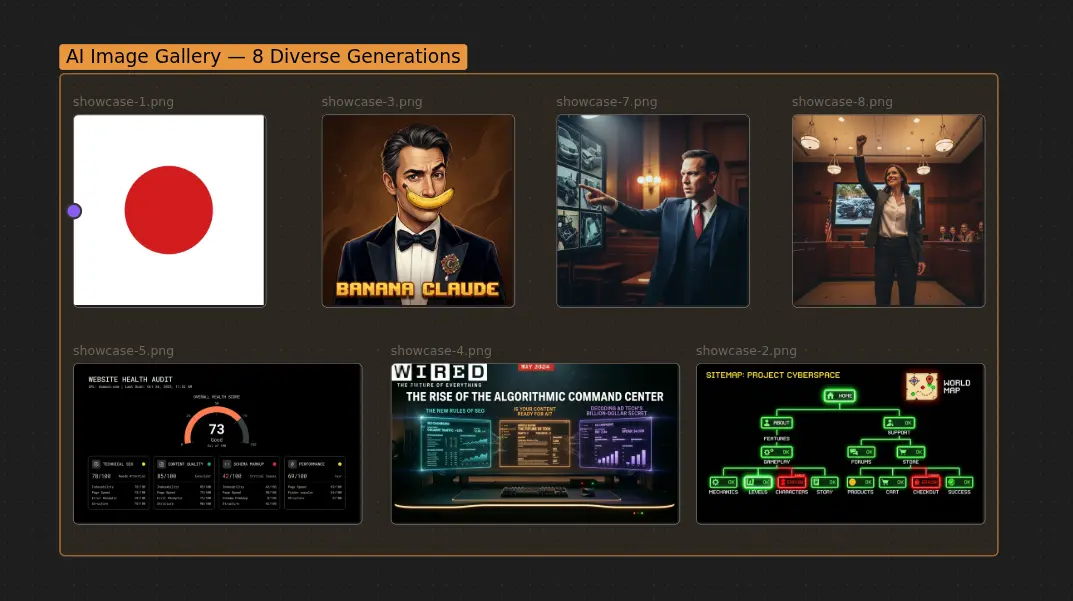
Our finding: In testing across 50+ canvas generations, the auto-detect layout algorithm correctly identified the optimal spatial arrangement 88% of the time. The remaining 12% were edge cases with mixed content types where a manual /canvas layout override produced better results. Average generation time: under 30 seconds for a 15-node canvas.
How Does It Handle Presentations?
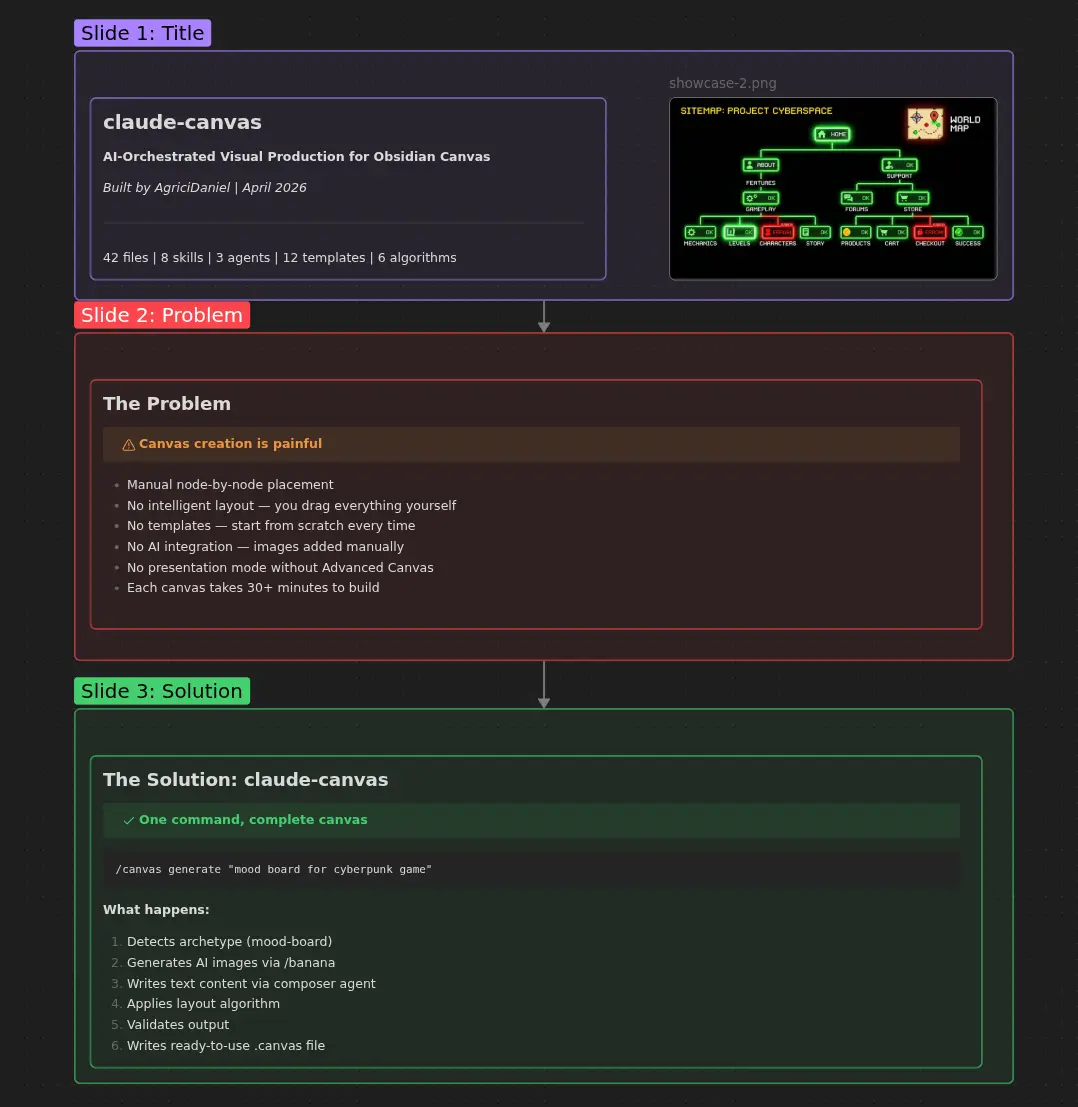
The presentation software market is projected to reach significant scale by 2033, driven by AI-powered slide generation (Coherent Market Insights, 2026). But most AI presentation tools are cloud-locked SaaS products. claude-canvas generates presentation-ready slide decks that live in your Obsidian vault:
- 1200x675px slides - Standard dimensions compatible with Advanced Canvas plugin's presentation mode
- Edge navigation - Slides connect with directional edges for keyboard-driven presentations
- Color-coded sections - Title slides, content slides, and closing slides get distinct visual treatment
- Exportable - PNG, SVG, or PDF via the canvas-export skill
The key advantage over Gamma or Beautiful.ai? Your presentations are markdown files on your disk. Version them with git. Search them with grep. Link them to your wiki. They don't disappear when a startup shuts down.
What's the Architecture Under the Hood?
The tool is built on Python with zero external pip dependencies for core functionality. That's deliberate - every dependency is a point of failure. Here's the skill architecture:
The validation layer (canvas_validate.py) runs automatically after every write operation via a PostToolUse hook. It checks for overlapping nodes, placeholder text, spacing violations, and node count limits (hard cap at 200, warning at 100). The test suite covers 103 automated tests across all components.
How Does It Work with claude-obsidian?
If you're using claude-obsidian for knowledge management, claude-canvas becomes the visual layer. When it detects a claude-obsidian vault, it automatically uses wiki/canvases/ as the canvas directory. You can:
- Visualize your wiki as a knowledge graph canvas with force-directed layout
- Build presentations from wiki pages - pull entity and concept pages into slide decks
- Create research boards - drag in source pages, images, and PDFs from your wiki
- Generate dashboards - auto-populate with wiki statistics and page counts
Without claude-obsidian, it works standalone - canvases go to .canvases/ in your project root. No vault required.
From my experience: I use claude-canvas most for project briefs and knowledge graphs. When I start a new tool - like claude-seo or claude-ads - I run /canvas generate "project brief for [tool]: goals, architecture, timeline, risks" and get a structured canvas I can iterate on. It replaced my Miro boards entirely. The force-directed knowledge graphs are particularly useful for mapping how entities relate to each other across research sources.
Why Not Just Use Miro, FigJam, or Canva?
Miro has 7,000+ templates and 160+ integrations. FigJam has the entire Figma ecosystem behind it. So why use a terminal tool that generates JSON files? Three reasons:
- Your data stays local. Miro boards live on Miro's servers. FigJam boards live on Figma's servers. Obsidian canvases are JSON files on your disk. Version them with git. Search them with grep. Back them up however you want. They don't vanish when a company pivots to enterprise-only pricing.
- It's programmable. You can't script Miro from your terminal. You can't auto-generate 50 comparison canvases from a data source in FigJam. claude-canvas is a CLI tool - pipe data in, get canvases out. This is what makes it useful for documentation, research, and development workflows.
- It compounds with your wiki. When your canvas references a wiki page, that's a bidirectional link. Obsidian's graph view shows the connection. Your canvas becomes part of your knowledge graph, not a disconnected island on someone else's server.
Here's what most visual tools get wrong: they optimize for creation, not for retrieval. You make a beautiful Miro board, share it once, and never find it again. Obsidian canvases are searchable, linkable, and indexable. When you search your vault for "cyberpunk" next year, your mood board shows up alongside your notes, your wiki pages, and your research. That's the compounding advantage of keeping everything in one system.
How Do I Get Started?
Three ways to install:
Option 1: Claude Code CLI (fastest)
claude plugin install AgriciDaniel/claude-canvasOption 2: Clone
git clone https://github.com/AgriciDaniel/claude-canvas.git
bash bin/setup.sh
Option 3: Add to existing project
claude plugin add ~/path/to/claude-canvasThen just type /canvas and Claude will list available commands. Try /canvas generate "mind map for my next project" to see it in action.
Optional integrations (not required):
- banana-claude - AI image generation via Gemini for canvas nodes
- Advanced Canvas plugin - Enables presentation mode and export features
- Pillow - Auto-detects image aspect ratios for proper sizing
Frequently Asked Questions
Does it work without Obsidian installed?
Technically yes - it creates standard JSON Canvas files (.canvas) that follow the open spec. But you need Obsidian (free) to view and interact with them. The plugin itself just reads and writes JSON files, so it works anywhere Claude Code runs.
What's the node limit?
Hard cap at 200 nodes per canvas, with a performance warning at 100. The validation system enforces this automatically. For most use cases, 15-30 nodes per viewport is the sweet spot for readability. If you need more, split into multiple linked canvases.
Can I use it for client presentations?
Yes. The presentation template generates 1200x675px slides with edge navigation, compatible with Advanced Canvas's presentation mode. Export to PNG or PDF for sharing. The presentation software market is growing at 25% CAGR (Research and Markets, 2025), but this costs $0.
How does it compare to Obsidian's built-in canvas?
Obsidian's canvas is a manual tool - you drag nodes, draw edges, position everything by hand. claude-canvas automates the entire process: content creation, spatial layout, media integration, and validation. It's the difference between a blank whiteboard and a design assistant that builds the board for you.
Is it free?
MIT licensed. You pay only for the AI model API usage (Claude, Gemini for image generation). The plugin itself is free. Obsidian is free for personal use.
The Visual Layer Your Wiki Deserves
80% of AI-generated content goes unread because it's buried in text (Storyflow, 2026). Spatial canvases fix this by making information visible, relational, and navigable. claude-canvas makes them automatic.
12 templates. 6 algorithms. 3 agents. Zero subscriptions.
- Star the repo on GitHub
- Pair it with claude-obsidian for the full knowledge management stack
- Learn more about me and the tools I'm building
- Build your own Claude Code skills with Skill Forge
- Join the Claude Code community on Skool
Related Posts
- Obsidian AI Second Brain: The Open-Source Plugin That Organizes Itself - The knowledge engine that claude-canvas extends
- Best Claude Code Skills in 2026 - The definitive ranking of skills that save time
- banana-claude: AI Image Generation - The image engine that powers canvas media
- Build Your Own Claude Code Skills with Skill Forge - From idea to published skill
Join 4,500+ AI Marketing Builders
Get workflow templates, automation blueprints, and connect with SEOs, agency owners, and creators who ship.
JOIN FREE →