Claude Obsidian v3: Give Claude Code a Memory You Own
By Agrici Daniel | October 22, 2026
Claude Obsidian v3 is out: the free AI second brain for Obsidian, built for Claude Code. What changed, how to update, and three real vaults built on it.

Claude Obsidian v3 is a free, open-source plugin that turns Claude Code into the writer and librarian of an Obsidian vault you own. You drop in sources, Claude reads them and files them as linked notes that point back to where each claim came from, and every answer you choose to keep becomes a note you can open a year from now. The latest release is v3.0.1, out since 2026-10-21. It keeps the plugin name claude-obsidian, ships 15 skills and 3 read-only agents, and makes every change to your vault a careful save that stops on conflicts and rolls back if it is interrupted.
This is the written companion to my v3 video. It covers what Claude Obsidian is, what changed in v3, the two commands to install or update it, and three real vaults I run on it: a public Local SEO Brain, a video hub with an AI team, and AI Marketing Hub Home.
Key takeaways
- Your vault is a folder of plain Markdown files on your computer. Obsidian is how you see it as a linked graph instead of raw text.
- v3.0.0 was a hardening release: recoverable transactions, lint that matches Obsidian, Unicode file name fixes, an optional local Ollama tier and offline evaluation. v3.0.1 restored the original plugin name.
- Install with two commands from the project's own Claude Code plugin marketplace on GitHub. Updating from 2.x is an ordinary update; only people who installed 3.0.0 need one extra install command.
- The point of the vault: research your agent does for you stops disappearing into chat history and temp files. It stays as sourced notes you can query, check and build on.
/savekeeps an answer only when you ask, and/autoresearchgoes to the web only with your consent.- The same pattern scales from a public research vault to a full team workspace. In AI Marketing Hub Home, the agents are written roles your assistant follows, not processes running in the background.
Watch the v3 video
Nine and a half minutes, all on screen: the new README, the Local SEO Brain, the 15 skills, the Obsidian community plugins, my personal vault, a video hub and AI Marketing Hub Home.
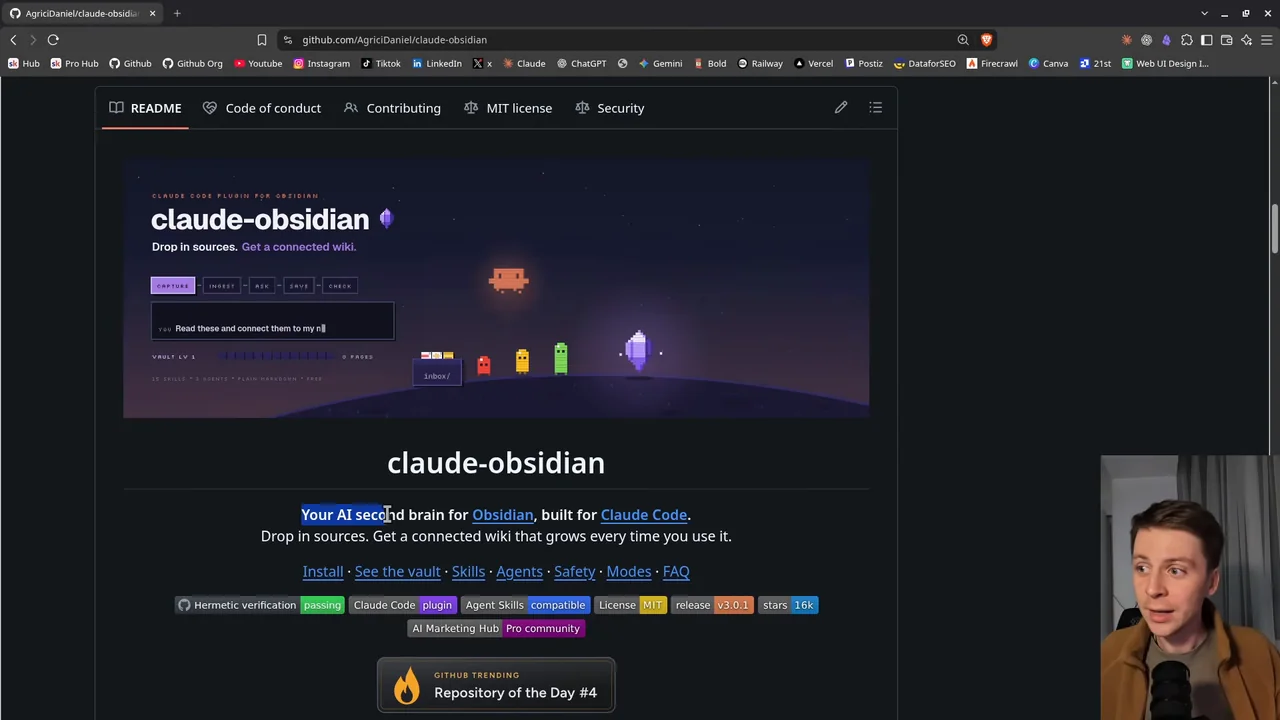
Video: “My 15.7k-star Obsidian second brain just got v3 (/save wizard)” by Agrici Daniel, published 2026-10-22. The privacy-enhanced player loads only after you activate it. Watch directly on YouTube.
Jump to a chapter:
- 0:00 What Claude Obsidian is
- 0:46 Sources in, connected wiki out
- 1:07 Example: the Local SEO Brain
- 1:50 The v3 update and the new README
- 2:25 My personal second brain and /save
- 3:03 Obsidian community plugins
- 4:05 The 15 skills
- 4:44 Why your agent's research belongs in a vault
- 5:22 /autoresearch, canvas, defuddle and more
- 6:19 Example: my video hub with an AI team
- 7:17 Example: AI Marketing Hub Home and its agents
- 8:11 Local first, and sharing a vault
- 9:01 Update to v3.0.1
What is Claude Obsidian?
Claude Obsidian is an AI second brain for Obsidian, built for Claude Code. It turns the things you read into a knowledge base that gets more useful every time you use it. Drop in a paper, an article, a transcript or your own notes. Claude reads it, writes linked notes with their sources, and files everything into one knowledge graph.
Obsidian itself is just a viewer for a folder. Your vault is plain Markdown files, so any tool can read them, and nothing is locked into an app. What Obsidian adds is the view: links, backlinks, Graph view, Canvas, and a community that has published 9,314 plugins (Obsidian's community plugin list, counted on 2026-10-22). Open a Markdown folder in a plain editor and you see hashes and asterisks. Open it in Obsidian and you see a connected wiki.
The structure follows Andrej Karpathy's LLM Wiki pattern: the AI maintains a wiki you can read, with an index on top, instead of a black box you cannot inspect. Claude Obsidian adds a short hot cache of recent context that its skills read first. The project is MIT licensed and sits at 15,723 GitHub stars as of 2026-10-22. Thank you to everyone who starred it, opened a pull request or reported an issue.
New to the idea of an AI second brain? The full Claude Obsidian guide covers the concept from the start. This article is about v3 and how I use it today.
What changed in Claude Obsidian v3
v3 came out as two releases on the same day. v3.0.0 did the real work. v3.0.1 undid its only breaking change: a new plugin name.
| Area | What v3 changed |
|---|---|
| Safe writes | Recoverable transactions. If a note is deleted or edited outside the transaction, the change rolls back with the conflict instead of leaving a journal that blocks later work. |
| Lint | Lint now matches how Obsidian reads links: a stray backtick no longer hides later links, encoded paths resolve, and flat vaults that were never scanned are reported instead of passing clean. |
| File names | Notes with decomposed Unicode names, common on macOS or vaults synced from it, are linted, chunked and indexed. Before, one such note stopped chunking for the whole vault. |
| Retrieval | An optional local Ollama tier for context prefixes, Haiku 5.5 support, bounded requests and stricter reply parsing. Corrupt index records are skipped without losing healthy results. |
| Evaluation | Offline evaluation for retrieval and for the Query and Save prompts, on fixed test sets, with no provider calls. |
| Plugin name | 3.0.0 renamed the plugin to agricidaniel-obsidian. 3.0.1 restored claude-obsidian, so commands are /claude-obsidian:<skill> again. |
The release notes also report what was tested: all GitHub checks green across Ubuntu and macOS on Python 3.11 to 3.14, a Windows surface, a reproducible release archive, and a hermetic suite of 448 unit test cases for 3.0.0. In a live session all 15 skills and 3 agents load under claude-obsidian:. Several of the fixes started as community pull requests and issue reports, and the release notes credit each person by name.
The README got a rebuild too. It now opens with small animated pixel scenes, drawn as code, that walk through installing, the skills, the agents, the safety model and the filing modes, with a credits roll for every contributor at the end.
Install or update to v3.0.1
You need Claude Code, Python 3.11 or newer and, for the visual side, Obsidian. A fresh install is two commands:
claude plugin marketplace add AgriciDaniel/claude-obsidian
claude plugin install claude-obsidian@agricidaniel-claude-obsidian
Then open the folder you want as your vault, start Claude Code there and set it up:
claude                        # start Claude Code in your vault folder
/claude-obsidian:wiki         # set up the vault (shows a preview first)
/claude-obsidian:wiki-ingest  # turn what is in inbox/ into linked notes
/claude-obsidian:wiki-query   # ask a question, answered from your notes
Open the same folder in Obsidian with Open folder as vault to watch it grow. Already have a vault? /claude-obsidian:wiki can adopt it without moving your notes. On Windows, use WSL for anything that writes to the vault.
Updating from 2.x is an ordinary update, and your commands never change:
claude plugin marketplace update agricidaniel-claude-obsidian
claude plugin update claude-obsidian@agricidaniel-claude-obsidian
One thing to know when you come from 2.x: contextual prefixes no longer fall back to claude -p (without a configured API or local Ollama provider they stay synthetic), and the first retrieval run after updating rebuilds the cached prefixes. If you use --allow-egress, that sends every page to your configured API again.
If you installed 3.0.0 (the agricidaniel-obsidian name), run the marketplace update, then install once with claude plugin install claude-obsidian@agricidaniel-claude-obsidian. Restart Claude Code after either path. Your vault needs no migration. The v3.0.1 release notes have the details, including managed settings.
How sources become a connected wiki
The whole loop is five steps, and you can drive every one of them in plain words instead of slash commands:
The Claude Obsidian loop
- Capture
Put sources in
inbox/. The originals are kept untouched, so every summary can point back to where it came from. - Ingest
Say "ingest this folder". Claude writes linked pages, indexes and maps of content, with each source recorded.
- Query
Ask a question and get an answer from what is already in your vault. Querying is read-only.
- Save
Keep a good answer, decision or session summary as a note, only when you ask.
- Check
Lint finds dead links, orphan pages, missing metadata and empty sections before they pile up.
Markdown sources work best. PDFs are kept with their metadata, but reading their text depends on your host, such as Claude Code, being able to open them. Web pages can be captured too, as a separate step that asks first.
Why your agent's research belongs in a vault
Think about the last real research job you gave an agent. It read sources, compared them and gave you a good answer. Where is all that text now? In a chat you will never scroll back to, or in temporary files that get cleaned up without you ever knowing what was in them.
A vault fixes that. When the work lands as linked notes with sources, it stays on your computer, and one, two or three years from now you can still see what the agent found, from which source, and build on it instead of starting over. You don't need to pay for a separate hosted memory service for this; the vault does that job. Your agent can also work without the skills, just reading and writing the folder, but the skills give it the same structure every time.
/save is one of the commands I use most. My personal second brain is a Claude Obsidian vault with notes about me, my socials, my YouTube, my GitHub and my community, all linked together. I review things with my agent there, and anytime I run /save, the answer is saved to my vault, so I can come back to it a year or two from now.
The 15 skills
Call any skill by name with /claude-obsidian:<skill>, or just say what you want. Here is the full set, in the README's three groups:
| Skill | What it does |
|---|---|
| Build and use the wiki | |
wiki | Sets up a new vault or adopts yours, checks it is ready and routes your request |
wiki-ingest | Turns captured sources into linked pages with their sources recorded |
wiki-query | Answers from what is already in the vault, read-only |
save | Keeps one answer or insight as a note, only when you ask |
wiki-lint | Finds dead links, orphan pages, missing metadata and empty sections |
| Extend the workflow | |
autoresearch | Bounded web research, only with your consent, merged after review |
canvas | Creates and updates Obsidian Canvas boards |
defuddle | Plans a clean Markdown capture of a web page; the cleaner itself is an optional external tool |
wiki-fold | Rolls up the operation log into short, traceable summaries |
wiki-mode | Sets how new notes are filed: Generic, LYT, PARA or Zettelkasten |
wiki-retrieve | Local BM25 search with optional reranking |
wiki-cli | Reads and searches through the official Obsidian command line |
| Reference | |
obsidian-markdown | Correct Obsidian Markdown: links, embeds, callouts and properties |
obsidian-bases | Native .base tables, cards, filters and formulas |
think | A structured review loop for hard decisions |
Behind the skills sit three read-only agents: wiki-ingest drafts pages from one source, wiki-lint double-checks the health report, and verifier tests a proposed change. They hand back drafts and reports, and only the transaction core ever writes to your vault.
Three vaults I run on it
A public Local SEO Brain
For the Local SEO Brain I dropped in research papers, real research data and Google's own guidance with links, and Claude built a second brain of local SEO best practices from them. It looks like a lot, but it is only files and folders of Markdown, set up so an agent can work from them. I made it public so local businesses can use the same practices: the Local SEO Brain repository is free on GitHub.
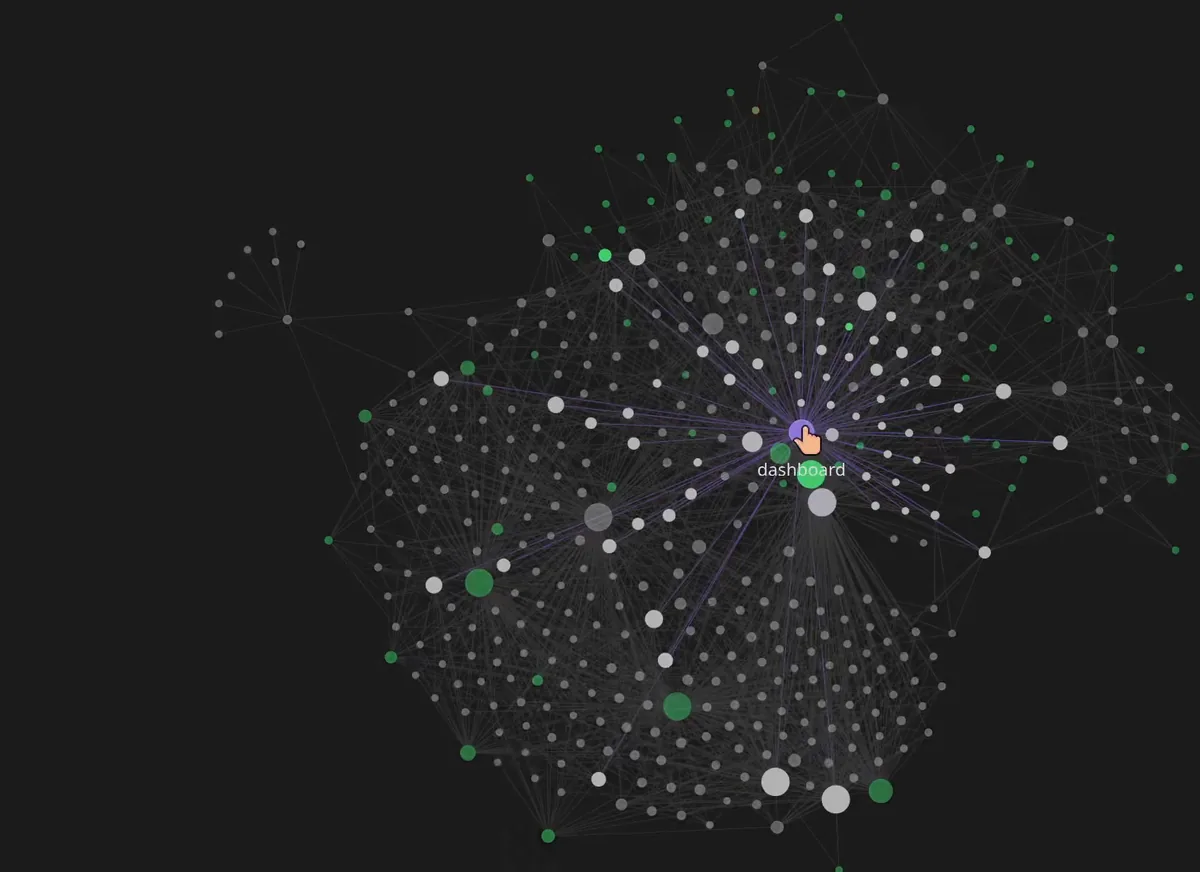
That is also the sharing story. A vault stays on your computer until you decide otherwise. When it is useful to other people, you can publish it as a repository, like I did here.
A video hub with an AI team
The same plugin, used differently. My video hub vault holds an AI team for video editing: a secretary, an orchestrator, a producer, a story editor, an illustrator and more, each with the skills it should pull in. Next to them are the brains, workflows, templates, checklists and the apps and plugins the work needs, all interlinked in one vault.
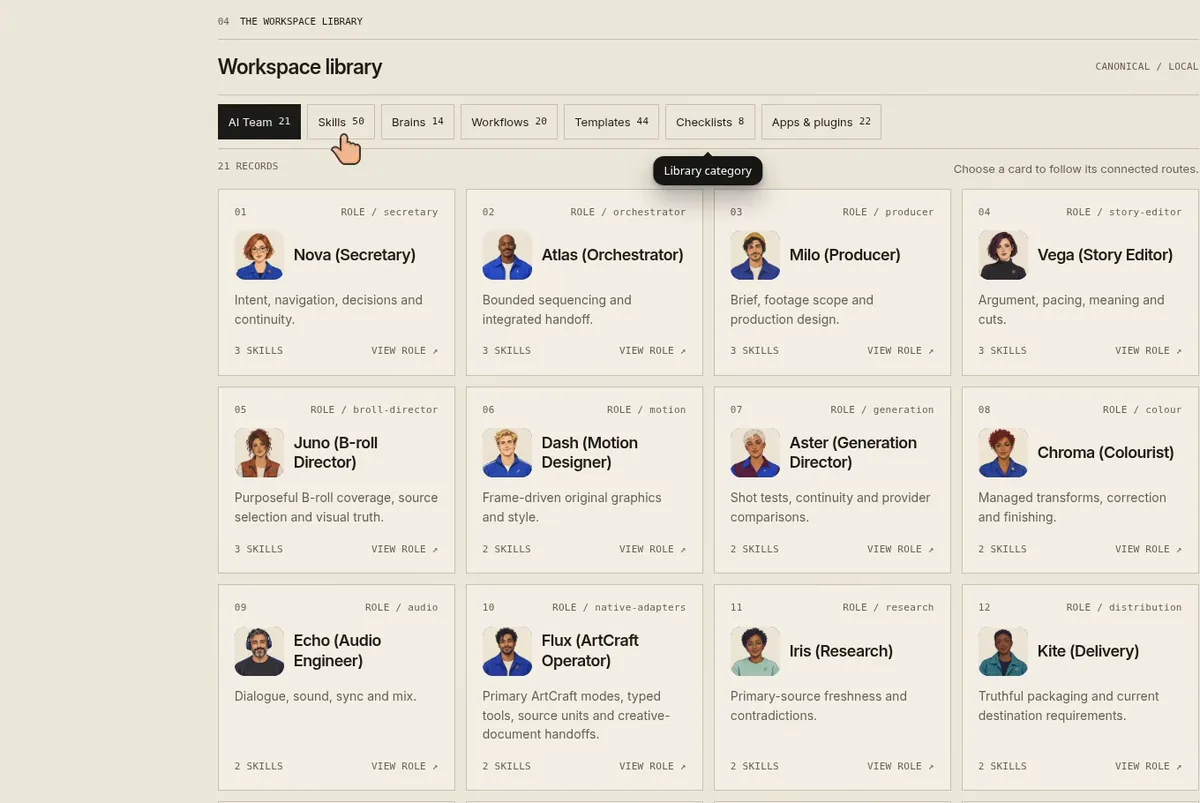
The video hub is private for now and lives inside my AI Marketing Hub Pro community.
AI Marketing Hub Home
The biggest one is AI Marketing Hub Home, the vault behind my Pro community: brains, checklists, skills, templates and workflows for SEO, blogs and ads, with agents that link to the exact skills, brains and workflows they use and to the teammates they work with. Arjun, the SEO role, is a good example.
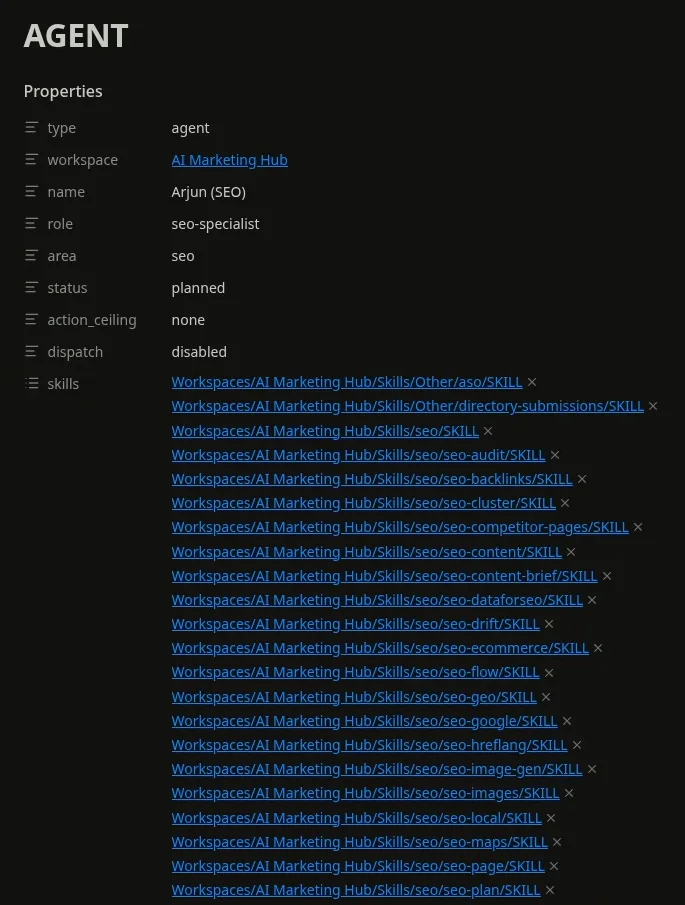
Those properties matter. These agents are written roles your assistant reads and follows. They do not run on their own in the background. I walked through the whole vault in Claude Code for marketing: the full system I built.
Limits worth knowing
- Claude Code is not free. The plugin and Obsidian cost nothing, but Claude Code needs your own Claude plan or API billing.
- Local, with one honest exception. Your notes are plain files on your computer, with no cloud database and no telemetry. When you work in Claude Code, the notes Claude reads are sent to Anthropic's model, like anything else you open in Claude Code. Web research and remote models stay off until you allow them.
- Windows writes need WSL. Native Windows can inspect and preview, and stops with a clear error instead of writing.
- One known link gap. A wikilink typed in composed Unicode to a file whose name is decomposed is still reported as dead. It is listed in the release notes and was the same in 2.2.0.
- Protection is for cooperating writers. The write lock covers tools that use it. Other devices and sync tools do not share it, so keep backups, especially when you sync Canvas or Base files.
Frequently asked questions
What is Claude Obsidian?
Claude Obsidian is a free, open-source AI second brain for Obsidian, built for Claude Code. You drop in sources, Claude reads them and writes linked notes with their sources, and everything is filed into one knowledge graph in a folder of Markdown files you own.
What is new in Claude Obsidian v3?
v3.0.0 is a hardening release: recoverable transactions, lint that matches how Obsidian reads links, fixes for decomposed Unicode file names, an optional local Ollama tier and offline evaluation. v3.0.1, the latest release, restored the plugin name claude-obsidian after 3.0.0 had renamed it.
How do I update to Claude Obsidian v3.0.1?
From 2.x, run claude plugin marketplace update agricidaniel-claude-obsidian, then claude plugin update claude-obsidian@agricidaniel-claude-obsidian, and restart Claude Code. If you installed 3.0.0, run the marketplace update and then claude plugin install claude-obsidian@agricidaniel-claude-obsidian once. Vaults need no migration.
Do I need Obsidian to use it?
Not strictly. Your vault is plain Markdown files in a folder, and Claude Code reads and writes them directly. Obsidian is how you see them in full, with links, Graph view and Canvas instead of raw text, and it adds a large library of community plugins.
Is Claude Obsidian free?
Yes. The plugin is free and open source under the MIT license, and Obsidian is free to use. You do need your own Claude plan or API billing to run Claude Code.
Where do my notes live?
In a folder on your own computer, as plain Markdown, with no cloud database and no telemetry. When you work in Claude Code, the notes Claude reads are sent to Anthropic's model, like anything else you open there. Web research and remote models stay off until you allow them, and your notes stay until you delete them.
Does it search the web on its own?
No. /autoresearch runs bounded web research only with your consent, and the results are merged into the vault after review.
Can I share a vault with other people?
Yes. A vault is a folder, so you can publish it as a repository when it is useful to others. The Local SEO Brain is a public example on GitHub.
Methodology and disclosure
I build Claude Obsidian and sell access to the private vaults shown here through AI Marketing Hub Pro, so read this as a first-party article. Release facts come from the v3.0.0 and v3.0.1 release notes and the repository at its current main. The star count comes from the GitHub API and the plugin count from Obsidian's community plugin list, both checked on 2026-10-22. The vault screenshots are frames from my v3 video. This article was drafted with Claude Code from my video transcript, the release notes and those sources, then checked against a source ledger and reviewed before publishing. Independent project, not affiliated with Anthropic or Obsidian. Written by Agrici Daniel. To report an error, contact me in the AI Marketing Hub community and I will correct it.