Claude Code for Marketing: The Full System I Built (17 Roles, 139 Skills)
By Agrici Daniel | October 9, 2026
Claude Code for marketing, the way I run it: 139 skills, 12 brains, 17 roles, approval gates and records in one Obsidian vault. Tour, results, limits.

Claude Code for marketing works when the agent has a written system to work from, not a blank chat. Give it step-by-step procedures, sourced knowledge, checklists tied to official sources, clear roles, a gate before anything costs money, and a record of the work. Then a capable assistant, Claude Code or Codex, works from the same playbook every time, so runs are meant to follow the same steps and rules, and the records it writes help you spot where one drifted.
That is the system I built over about 1,200 hours and $21,455 of Claude Code and Codex usage (my own tally). It is called AI Marketing Hub Home: one Obsidian vault with 139 marketing skills, 12 brains, 7 business checklists and 17 roles, covering SEO, blogs, ads, email, social and sales. This article is the written companion to the full video tour. It shows what is inside, how one task moves through it, how to build a smaller version yourself, and the limits I would want to know before buying anything like it.
- 139step-by-step marketing skills
- 12brains: sourced knowledge packs
- 17roles, from Orchestrator to Verifier
- 2,092checklist items across 7 business models
- 54.5Korganic clicks on claude-seo.md, built on the open-source base
Key takeaways
- A blank chat starts from nothing each time. A vault of written procedures, sourced knowledge and checklists gives the agent the same playbook every time.
- AI Marketing Hub Home holds 139 skills (34 Ads, 32 Blog, 25 SEO, 48 Other), 12 brains, 9 workflows, 27 templates and 7 Business Master Checklists with 2,092 items.
- Nothing for you to install: the skills are notes in the vault, so your assistant reads only the one it needs. Start with
/home(an entry procedure your agent reads, not a registered command), or ask your agent to read the Home note. - You stay in control: finished work waits on an activity board for Accept, Ask or Deny, and the house rules send paid API calls to an approval gate with their cost first.
- The records your assistant writes are kept, so a year from now you can read what an agent did, on which brief, and who reviewed it.
- The 17 roles are written contracts your assistant follows. They do not run on their own in the background, and the rules are instructions, not hard locks.
- You can build a small version yourself with five files. The vault is that idea, built out and sourced.
Watch the full tour
The video is 27 minutes of the real vault on my screen: the activity board, my Search Console, the checklists, the skills, the brains, the AI team, the approval gate and the Obsidian views.
Video: “I Spent $21,455 & 1,200 Hours On Claude Code & Codex For This” by Agrici Daniel, published 2026-10-09. The privacy-enhanced player loads only after you activate it. Watch directly on YouTube.
Jump to a chapter:
- 0:56 Activity board: approve or deny agent work
- 1:53 My sites and real Search Console results
- 4:57 Checklists and their sources
- 10:04 139 skills for ads, blog, SEO and more
- 14:49 Projects: the records agents write
- 17:01 The AI team: 17 agents and the orchestrator
- 18:48 Approval gate for paid API calls
- 21:33 No skills to install: the /home entry note
Why a blank Claude Code chat is not a marketing system
Ask Claude Code for an SEO audit on Monday and again on Friday and you get two different audits. Neither is wrong, exactly. The problem is that nothing told the agent what a good audit contains for this business, which sources count, what it must not invent, and when to stop and ask you. Marketing is full of those rules, and a chat window forgets all of them. That holds for Claude for marketing in any form, Claude Code, Cowork or the Claude app: the model is capable; what it usually lacks is the written context.
Both major coding agents already read written instructions from your folder. Anthropic's docs say Claude Code reads CLAUDE.md files and that “Claude reads them at the start of every session” (Claude Code memory docs). OpenAI says “Codex reads AGENTS.md files before doing any work” (OpenAI AGENTS.md guide). I compared the two ecosystems in Claude and Codex skills. So the leverage is not a better prompt. It is a better folder: one that holds the procedures, the knowledge and the rules, written down once and reused on every job.
That is my view after building one, not a measured experiment. The rest of this article shows the folder I built, so you can judge it yourself.
What is AI Marketing Hub Home? A marketing workspace in one Obsidian vault
AI Marketing Hub Home is a complete marketing workspace in one Obsidian vault. Obsidian stores notes “as Markdown-formatted plain text files in a vault,” and a vault “is a folder on your local file system” (Obsidian Help). That matters: the same folder is a dashboard for you and a readable instruction set for your agent. For the general pattern of using Obsidian with Claude Code, see Claude Obsidian as an AI second brain. Obsidian itself is free, including for work use (Obsidian pricing).
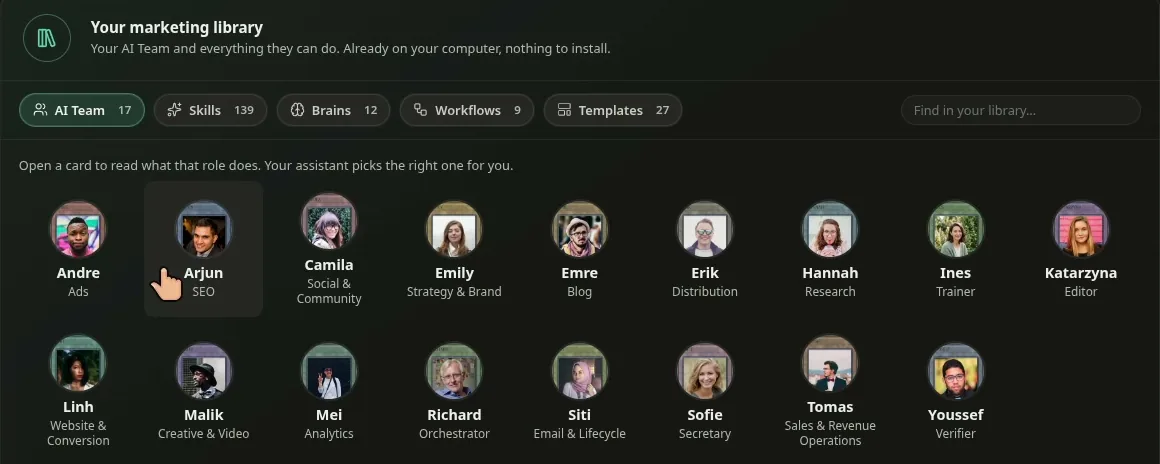
Here is what each room holds:
| Room | What it holds | Count |
|---|---|---|
| Skills | Step-by-step procedures: what the skill needs from you, the steps, what it produces, and its limits | 139 |
| Brains | Sourced knowledge packs your assistant reads before it works, from ads and local SEO to sales and YouTube | 12 |
| Checklists | Business Master Checklists for local services, ecommerce, SaaS, B2B lead gen, affiliate, publisher and agency | 7 (2,092 items) |
| Workflows | Multi-stage routes such as Pro Blog, marketing plan, content pipeline, council review and funnel build | 9 |
| Templates | Deliverable shapes: pro blog package, landing page brief, case study, how-to guide, FAQ, proposal and more | 27 |
| AI Team | Role contracts with their own rules and voice, plus guidelines, SOPs, evaluation cases, session records and learnings | 17 roles |
| Brands, clients, people | Your own records: sites, logos, audience, offers, claims you can prove. One vault can hold many clients | yours |
| Projects | Tasks, checklist runs, deliverables and the sources behind them, per client | yours |
The rooms for your business data ship empty. The vault also includes one fictional worked example, so you can see a client, a project, an assignment, a review and a result from start to finish before you add your own.
How one marketing task moves through the system
Say you ask for a blog post on your site. In a blank chat, that is one prompt and one answer. Here, it is a short chain with a record at each link.
One request, start to finish
From a note to accepted work, with you at the two decisions that matter
- Request
Type it to your assistant, or write it in a note and start an agent from that note inside Obsidian.
- Route
The Secretary handles simple questions; the Orchestrator picks the specialist roles and the review the work needs.
- Work from the playbook
The specialist follows the matching skill, reads the right brain, and works through the checklist for this client.
- Approval gate
Anything that costs money, like a DataForSEO call, is set to stop and show the exact action and its worst-case cost.
- Separate review
A reviewer role, such as the Verifier or the Editor, checks the result against its brief and sources. It is the same assistant under a reviewer's instructions unless you run the review in a fresh session or with another model.
- Your answer
The work lands on the activity board: Accept, Ask, or Deny. Work counts as checked only after a reviewer passes it.
- Record and learn
The assignment, result, review and your decision are saved as linked records. Lessons you approve are read on the next job.
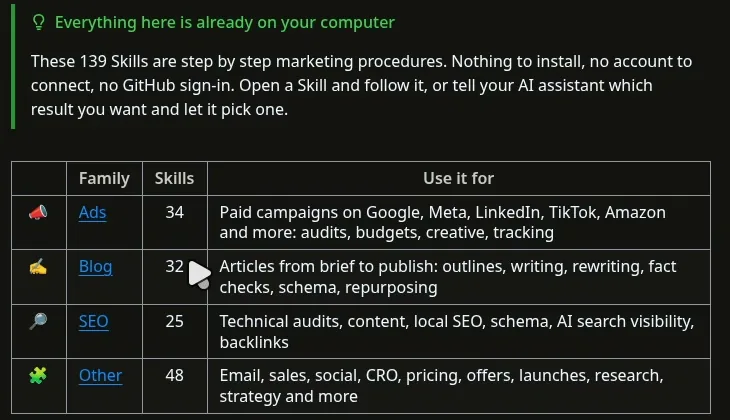
139 Claude marketing skills, and why there is nothing to install
These are Claude marketing skills in the plain sense: written procedures for one job each. A skill says what it needs from you, the steps, what it produces, and its limits. Each one is written to say no data or ask you when a fact is missing, instead of inventing prices, results, reviews or audiences.
The Skills Catalog
139 marketing skills in four families
The Ads, Blog and SEO families grew out of my open-source Claude Ads, Claude Blog and Claude SEO, rebuilt for the vault. The stories behind them are in Claude Code as an ad agency and the Claude Code blog writer. Many of the Other skills are adapted, with attribution, from open-source work, mainly Corey Haines' marketingskills (MIT); each adapted skill keeps its source attribution, and the vault's third-party notices carry the licenses. Almost every skill carries its own reference notes and evaluation cases (test prompts, not passed evaluations). The catalog marks every skill active, and formal evaluation is optional, so treat each output as a draft you review.
Why nothing to install. Installed skills are light by design. Anthropic's Agent Skills docs explain that “until a Skill is triggered, only its name and description occupy context” (Agent Skills overview), at about 100 tokens per skill. That is small for ten skills and roughly 14,000 tokens for 139, in every session. In the vault, the skills are ordinary notes. The vault carries one small project router skill; your assistant reads the catalog only when a job needs it, picks the narrowest skill for the result you asked for, and reads only that one. The entry point is /home, or ask your agent to read the Home note.
Brains and checklists: knowledge with a source
A skill says how to do the work. A brain says what is true and why: concepts, trade-offs, evidence and limitations, with source records you can trace (a few statements are marked unverified). There are 12: ads, local SEO, email marketing, sales, social strategy, YouTube strategy, product pages, website, DataForSEO, WebMCP, agent readiness and marketing strategy. I have written before about building a local SEO brain for Claude Code; the vault packs twelve of them behind one catalog.
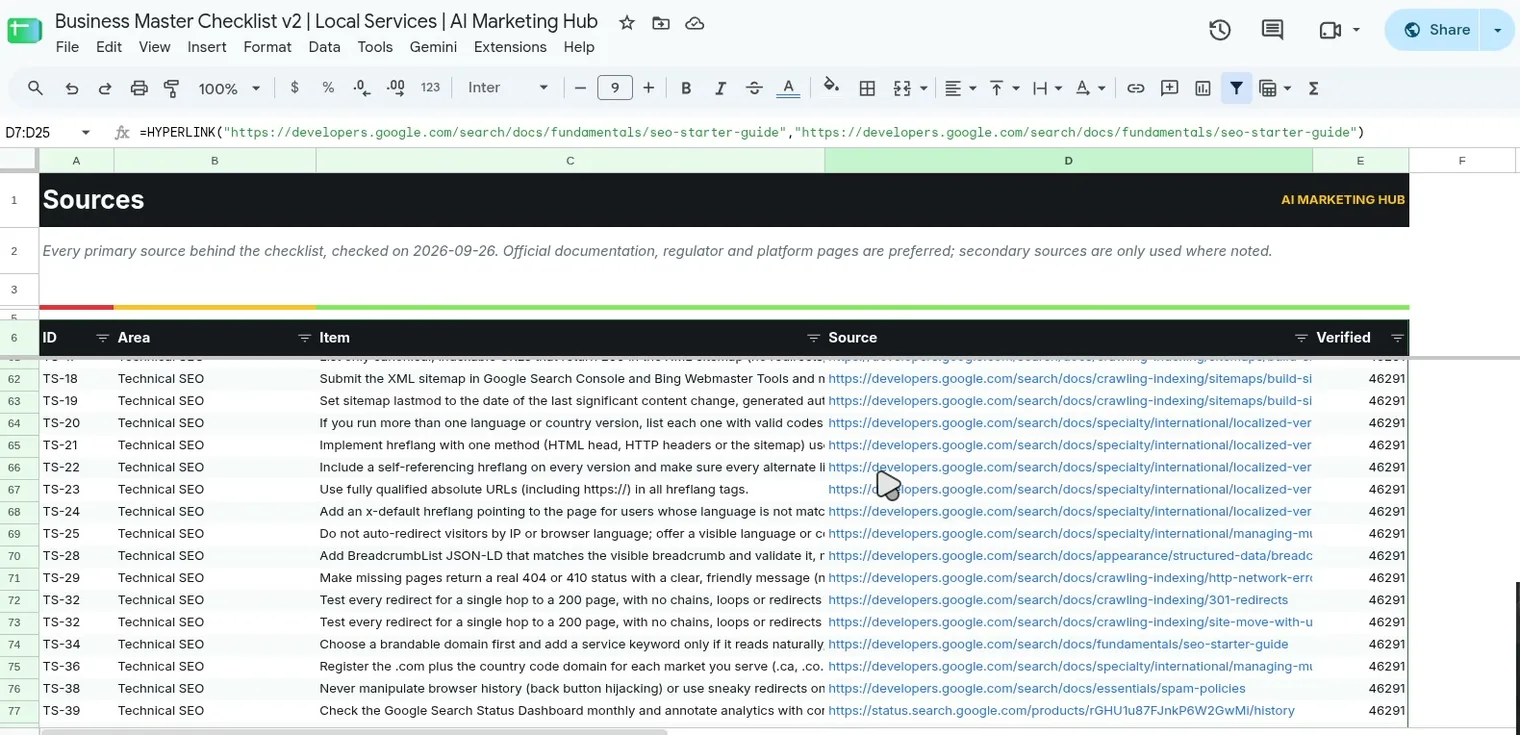
The checklists are where the work gets concrete. Each Business Master Checklist covers one business model. The Local Services one, for example, walks through essentials, business profile, on-page and technical SEO, performance, AI search and agents, Google Business Profile, citations, reviews, authority, tracking, ads, automation and sales. About 7 in 10 of the 2,092 items link to a source, most often Google's own documentation (Search Central, help pages and web.dev), plus regulators such as the FTC. The other 609 have no source link and are labelled “Rule of thumb”, and the Sources sheet records when each source was checked.
Why bother with sources? Because the cheap version of AI marketing gets sites in trouble. Google defines scaled content abuse as “many pages are generated for the primary purpose of manipulating search rankings and not helping users” (Google spam policies). Google said in 2023, “Appropriate use of AI or automation is not against our guidelines” (Google Search Central Blog), and its current guidance warns that generating many pages without adding value “may violate Google's spam policy on scaled content abuse” (Google's generative AI content guidance). The line is usefulness, and a checklist that points to the rule it came from helps keep the agent on the right side of it.
The 17 roles: what AI marketing agents really are here
When I hear “AI marketing agents”, I picture a dashboard of bots. My AI agents for marketing are 17 written roles, each with its own instructions and voice, and most with their own skills, brains, workflows and templates:
| Group | Roles |
|---|---|
| Lead | Orchestrator (Richard), Secretary (Sofie), Verifier (Youssef), Trainer (Ines) |
| Search and content | SEO (Arjun), Blog (Emre), Editor (Katarzyna), Research (Hannah), Distribution (Erik) |
| Paid and growth | Ads (Andre), Website and Conversion (Linh), Analytics (Mei), Strategy and Brand (Emily) |
| Channels and revenue | Email and Lifecycle (Siti), Social and Community (Camila), Creative and Video (Malik), Sales and Revenue Operations (Tomas) |
The Orchestrator has no skills of its own; its job is picking the right specialists and the review the work needs. The Verifier and the Editor exist so that the role that did the work is not the role that signs it off.
These roles are contracts, not separate running programs. Your one assistant takes on a role when the instructions say so, does that role's work, records it, and hands off. Nothing is spawned in the background, and nothing runs unless you or your assistant starts it. The records say which role did what; the assistant writes them, so they are only as good as its discipline. The upside: fewer moving parts, and each handoff has a written place to go.
You approve the work and the spend
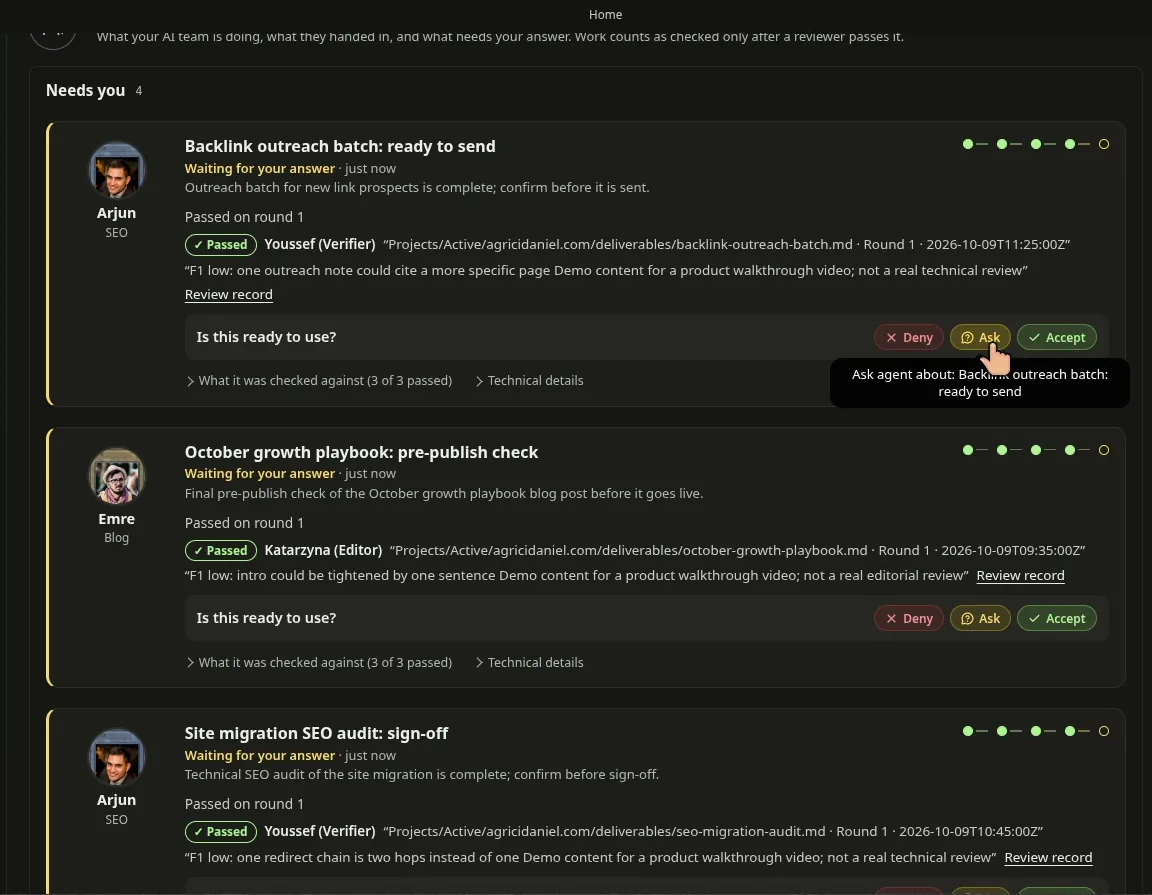
Two controls keep you in charge. The first is the activity board on the Home dashboard. Each finished piece of work shows who did it, who reviewed it, what it was checked against, and one question: is this ready to use? You answer Accept, Ask, or Deny. In the tour, Ask opens a chat with the agent about that item (the in-Obsidian agent panel needs setting up first). The house rules reserve that answer for you; an agent's statement does not count as acceptance.
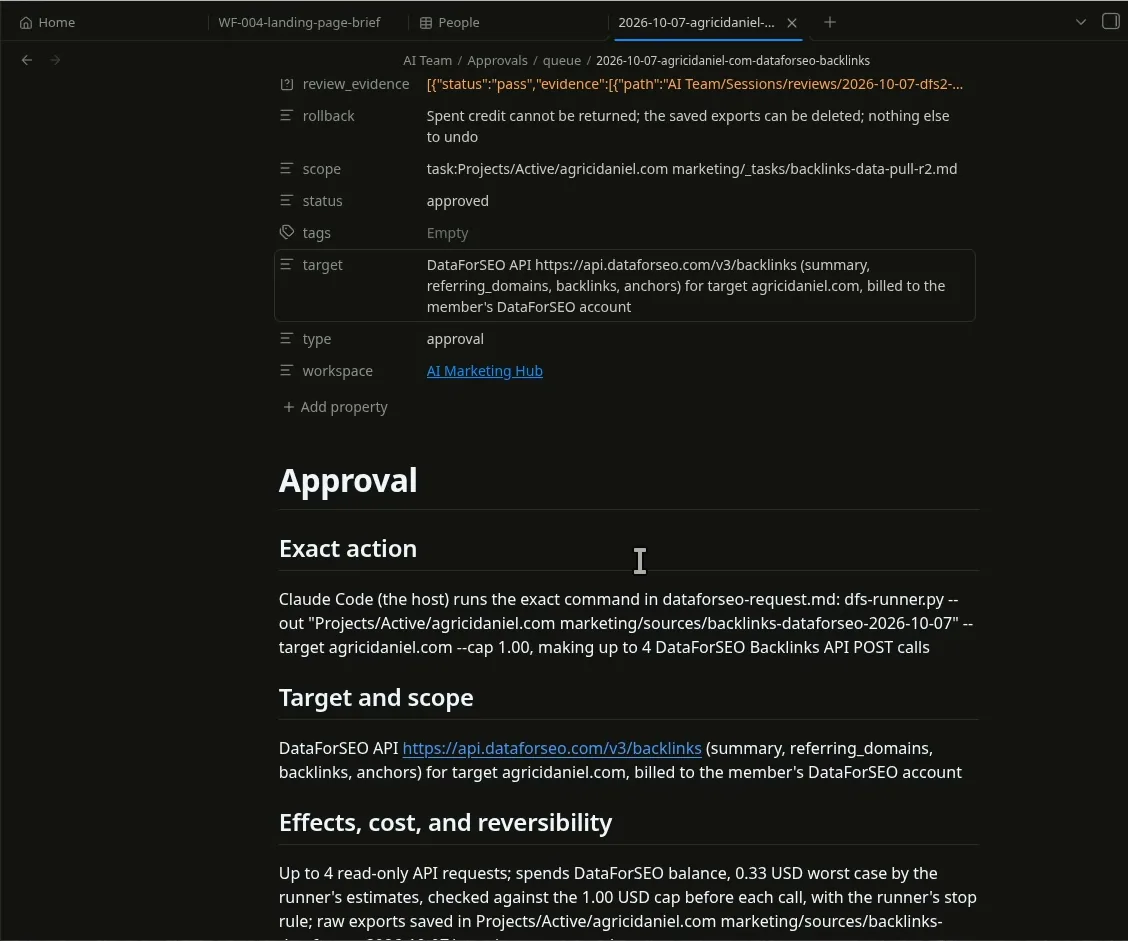
The second control is the approval gate. Before any paid call, the house rules tell the agent to write an approval note with the exact command, the target, the worst-case cost and what cannot be undone, and then wait. In the tour, the gate was a real one from 2026-10-07: a DataForSEO backlink pull for my own site, up to 4 read-only API requests, 0.33 USD worst case, checked against a 1.00 USD cap before each call. DataForSEO is pay as you go (DataForSEO pricing), so a cap per job keeps a 33-cent check from turning into a surprise. Both controls are house rules your assistant follows, not locks, so keep spending limits on your provider accounts too.
One real approval
A backlink check, priced before it ran
Records and learnings
A blank chat keeps nothing you can audit. A week later nobody can say which brief produced which page, or whether anyone checked it. In the vault, each assignment, result, review, handoff and decision is a note in the AI Team's session records, linked to its project. The project tracks the checklist progress for each client and keeps the deliverables (in the tour: a backlink report, the DataForSEO request, a pro blog package, an SEO audit and its action plan) next to the sources they came from. There is no background recorder: the assistant writes these records as it works, and nothing flags a session that skips them, so check that the records exist for any work you rely on.
The AI Team room adds the operating layer: guidelines, SOPs for starting and closing a session or handling an approval, evaluation cases, and learnings. When work is accepted or denied, the Trainer role can turn the reason into a proposed lesson scoped to a role and an area. A second role reviews it, and only lessons you accept are read on the next job. You can also teach it directly: tell it what you want done differently, and the same review and your decision apply. It is a written feedback loop, not model retraining, so you can read every lesson and replace or reject any of them.
Results on my own sites
My sites run on the open-source tools these skills grew from: claude-seo.md, the Claude Ads and Claude Blog sites, and this one. The vault itself is newer (its first commits are from September 2026), so read the numbers below as results of the open-source base, not of the vault. I show claude-seo.md because it has the longest history; the other sites appear in the video from 2:15.
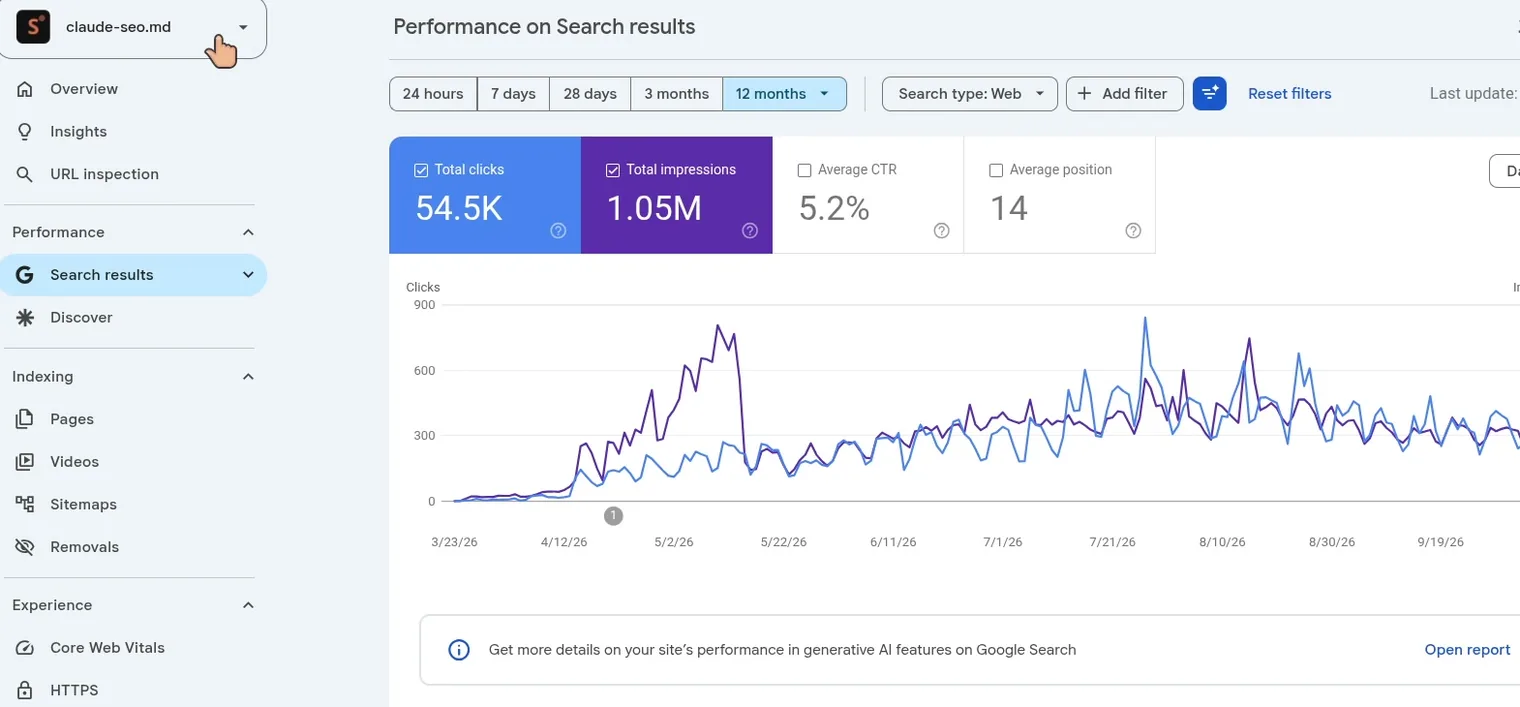
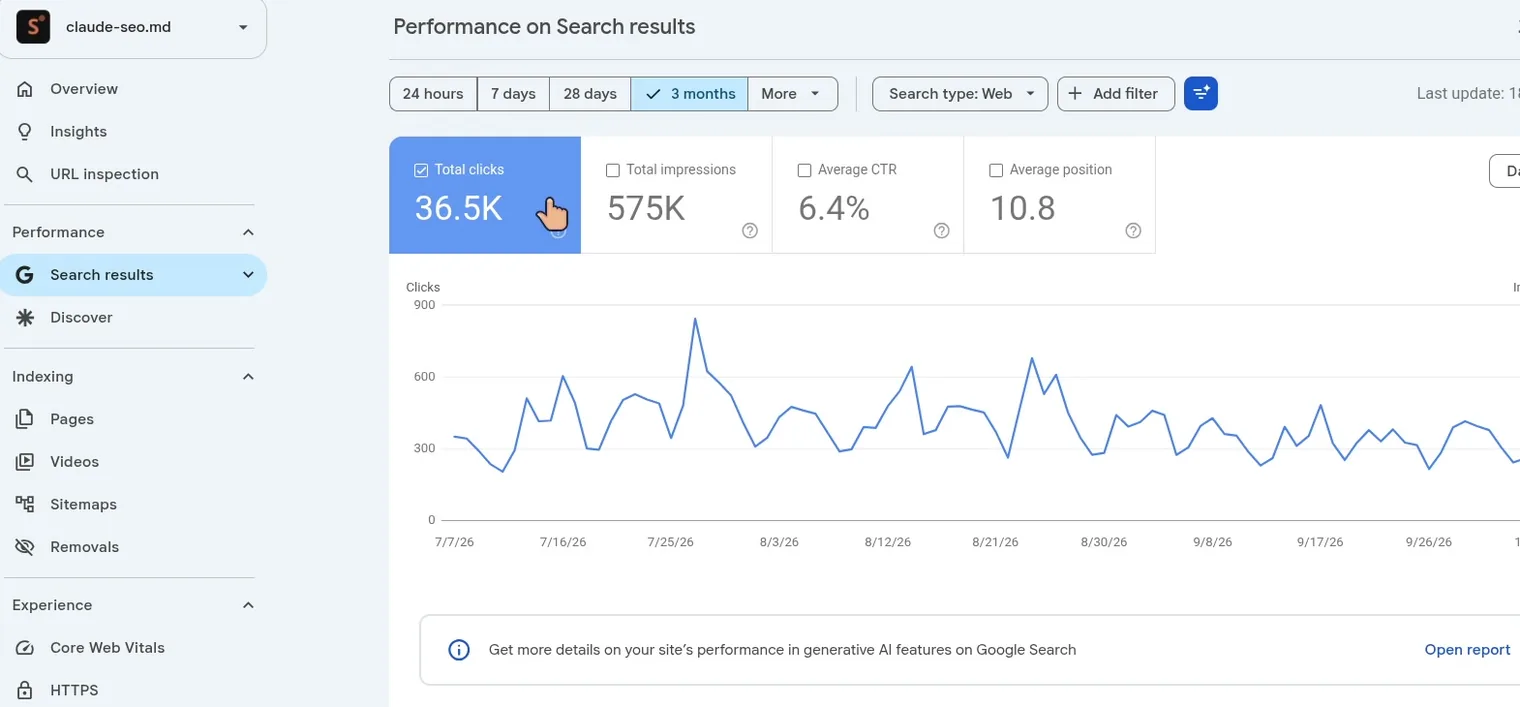
Three things to keep in mind. First, claude-seo.md is the home of a popular open-source tool, so it has demand most new sites do not. Second, daily clicks have held roughly level since July, a little softer in September, rather than kept climbing. Third, a site's results have many causes; these screenshots show what my site did, not what the vault will do for yours. The open-source tools are public: as of 2026-10-09, Claude SEO, Claude Obsidian, Claude Ads and Claude Blog have about 46,000 GitHub stars between them, and all four are free. Start with my Claude Code SEO stack or Claude Obsidian as an AI second brain if you want to try the base first.
Build a small version yourself
You do not need my vault to get much of the benefit. Five files in one folder turn Claude Code or Codex from a chat into a small marketing system:
- House rules. One
CLAUDE.mdorAGENTS.md: use only facts from this folder, never invent results, say what you could not verify, ask before spending or publishing. - One skill note for your most repeated job: inputs, steps, output, limits. Write it once and point the agent at it every time.
- One sourced checklist for your business type, each item with the official page it came from and the date you checked it.
- An approval note template with the exact action, worst-case cost, a hard cap and what cannot be undone. The agent fills it in and waits.
- A results folder where every job leaves its brief, output, sources and your decision.
Run your next job through those five files and compare it with your last blank-chat result. If it helps, grow it one skill and one checklist at a time, starting with the best Claude Code skills I know of. AI Marketing Hub Home is the same idea, filled in over about 1,200 hours.
Limits to know before you rely on it
The vault is an early member release that is still being improved, and it ships with its own Known Limitations page. These are the ones I would want to know first:
- Rules are instructions, not locks. Routing, the house rules and workflow stages guide the assistant; apart from some record checks, nothing in the vault forces them. Assistants follow them to different degrees, so the vault includes a seven-check test to run on yours before client work.
- Check that each stage really ran. In one test on 2026-09-21, an agent following the Pro Blog workflow skipped the SEO and editorial reviews. The article passed repeated accuracy reviews, then failed its first SEO and editorial reviews, and the destination site's own validator rejected the payload with 35 errors. The fix: run the destination's checks before you publish. That is why this article went through separate SEO, editorial and fact-check reviews and my site's validator.
- No skill claims a passed evaluation. The evaluation cases are there to run. One rerun of the Local SEO brain with its skills met every assertion in 16 of 33 cases, so review outputs before you use them.
- Look through client folders before you import them. The importer's secret scan is partial and it copies binary files unscanned.
- Tested platforms. I opened and accepted an early version (0.2.0) in Obsidian on Linux desktop; newer views added since then still await my acceptance in Obsidian. Members run it on Windows, but the maintainers have not tested Windows, macOS or mobile, and calendar sync is not included.
- Outside accounts stay off until you connect them. The vault cannot see your YouTube channel or ad accounts, so when you record that you made an outside change, it checks that your records are consistent, not that the change happened.
Who it is for, what it costs, and how to get it
It is for marketers, freelancers, agencies and founders who already use Claude Code, Codex, Claude Cowork or another agent that can read a folder (it was tested with Claude Code and Codex), and who want repeatable work instead of clever one-off chats. The checklists cover local services, ecommerce, SaaS, B2B lead gen, affiliate, publishers and agencies, and one vault can hold many clients and companies. If you have old work, point the agents at a client folder or brand files and they can import it into your records (look through the folder first; see Limits).
What it costs to run: AI Marketing Hub Pro is $144 a month on Skool (as of 2026-10-09), and AI Marketing Hub Home comes with it. You also need your own Claude or ChatGPT plan (or API billing) for Claude Code or Codex. Obsidian is free. Paid data is optional and yours: DataForSEO, for example, is pay as you go with a $50 minimum top-up.
The vault lives in a private GitHub repository (named AIMH Pro Home there), and you get the invite after you join and accept the member license. Use of the vault's own material is licensed while your Pro membership is active; third-party parts keep their own licenses. If you cancel, you stop using and delete the vault's own material; your data, records and client outputs stay yours. If you are not ready for that, the free AI Marketing Hub, the four open-source tools and the five-file version above are a real starting point.
Frequently asked questions
Can you use Claude Code for marketing?
Yes, and the same goes for Claude for marketing in general. Claude Code reads and writes files, runs scripts and follows written instructions, so it can research, draft, audit and report. It works best from a written system: house rules in CLAUDE.md, one procedure per job, sourced checklists, an approval step before paid calls, and a folder where every job leaves its brief, output and sources.
What are Claude marketing skills?
Claude marketing skills are written procedures an AI assistant follows for one marketing job, such as an SEO audit, a blog brief or an ad account review. Each one states its inputs, steps, output and limits. They can be installed as Agent Skills or, as in AI Marketing Hub Home, kept as notes the assistant reads when needed.
What is AI Marketing Hub Home?
AI Marketing Hub Home is a complete marketing workspace in one Obsidian vault: 139 step-by-step skills, 12 brains, 7 business checklists with 2,092 items, 9 workflows, 27 templates and 17 roles. Your AI assistant works from it instead of a blank chat. It is included with AI Marketing Hub Pro.
Which AI assistants work with AI Marketing Hub Home?
It was tested with Claude Code and Codex. Other agents that can read a folder, such as Claude Cowork, should be able to use it, but they were not tested. Type /home, or ask your agent to read the Home note. Assistants follow the written rules to different degrees, so run the included seven-check assistant test first.
Do I need to install 139 skills?
No. The skills, brains and workflows live inside the vault as notes, with one small project router skill. Your assistant opens the catalog and reads only the skill it needs, so there is nothing for you to install.
Do I need Obsidian for AI Marketing Hub Home?
Obsidian is free and gives you the dashboard, activity board, Kanban, task views and canvas. Your agent can also work from the folder without it, because the vault is plain Markdown files. Calendar sync is not included.
Will AI Marketing Hub Home publish or spend money without me?
Its house rules say no. Finished work waits on the activity board for you to accept or deny, and paid API calls, like DataForSEO, go to an approval gate with their exact action and worst-case cost first. These are written rules your assistant follows, not hard locks, so keep your own account limits too.
Are the 17 AI marketing agents running on their own?
No. The 17 roles are written contracts with their own rules and voice. Your assistant takes on a role when the instructions say so, records the work and hands off. Nothing is spawned or run in the background.
What does it cost to run AI Marketing Hub Home?
AI Marketing Hub Pro is $144 a month as of 2026-10-09, and the vault comes with it. You also need your own Claude or ChatGPT plan (or API billing) for Claude Code or Codex. Obsidian is free. Paid data such as DataForSEO is optional and billed to you.
How do I get AI Marketing Hub Home?
Join AI Marketing Hub Pro at skool.com/ai-marketing-hub-pro and you get an invite to the private GitHub repository. Use of the vault's own material is licensed while your Pro membership is active; third-party parts keep their own licenses. If you cancel, you delete the vault's own material and keep your data and client outputs.
Methodology, disclosure, and limitations
I built AI Marketing Hub Home and sell access to it through AI Marketing Hub Pro, so read this as a first-party product article. The counts come from the vault as recorded in the video on 2026-10-09 (library panel and Skills Catalog) and from the member release; the Search Console and approval figures come from frames of the same recording. The hours and the $21,455 are my own tally of Claude Code and Codex usage. The limitations come from the vault's Known Limitations page. External claims were checked against the linked official pages on 2026-10-09, and GitHub stars and the Pro price are a snapshot from that day. This article was drafted with Claude Code from my video transcript, the product files and those sources, following the Pro Blog workflow: a source ledger, separate SEO, editorial and fact-check reviews, and my site's own validator, then my review. Independent project, not affiliated with Anthropic, OpenAI or Obsidian. Written by Agrici Daniel. To report an error, contact me in the AI Marketing Hub community and I will correct the article.