Herdr for Obsidian: Run Claude Code, Codex and 20 More AI Agents in Your Vault
Herdr for Obsidian is a free plugin that runs Claude Code, Codex, Gemini, Hermes and 18 more agents inside your vault, with one click undo for bridge edits.


Herdr for Obsidian is a free, open-source plugin that runs Claude Code, Codex, Gemini, Hermes and 18 more coding agents inside your Obsidian vault. The agents work in real terminals next to your notes, keep running when you close a tab or restart Obsidian, and can read and edit notes through Obsidian itself. Since release 0.2.0 they can also see and use the Obsidian window, if you allow it. Every edit an agent makes through the Vault Bridge is logged, and you can undo it with one click. The latest release, 0.2.1 from 2026-11-09, lists the plugin in Obsidian as Herdr Mission Control.
This is the written companion to my video. It covers why I built it, the four parts of the plugin, what the agents did in the live demo, how to install it, and what is still untested.
Key takeaways
- Your notes and your agents finally sit in one window. No more copying the same context from Obsidian into a terminal and back.
- The plugin is built on Herdr, the open-source runtime that keeps agent sessions alive. Herdr holds the session, not the Obsidian window, so a reload does not stop your agents.
- Mission Control shows which agent is working, blocked or done. You can allow, deny or prompt any of them from the sidebar.
- Agents edit notes through the Vault Bridge, at the access level you choose, and the bridge never touches the settings folder,
.gitor.envfiles. Agents still run in a normal terminal, so their own permission settings matter too. - New in 0.2.0: agents can take screenshots of Obsidian, click, type and press shortcuts. It is off by default, and clicking and typing need the Full level.
- Tested on Linux with four agents at once. macOS and Windows are not tested yet.
Watch the video
Twenty minutes, all on screen: a short presentation of the four parts, then a live demo where Claude spawns five more agents and they build a product launch inside my vault with little input from me.

Video: “Claude Code, Codex, Gemini, Hermes and more inside Obsidian (free plugin)” by Agrici Daniel, published 2026-11-09. The privacy-enhanced player loads only after you activate it. Watch directly on YouTube.
Jump to a chapter:
- 0:00 Herdr inside Obsidian
- 1:25 The problem: notes here, agents there
- 1:55 The four parts
- 2:57 Agents keep running after a reload
- 3:05 Mission Control: allow, deny, prompt
- 3:30 Agents use Obsidian like you do
- 3:50 Audit log and one click undo
- 4:04 Install in three steps
- 4:56 Live demo: Claude spawns five agents
- 7:17 The launch plan appears
- 12:05 Images, tabs and splits
- 16:05 The finished launch vault
Why I built it
My notes live in Obsidian. My coding agents lived in a terminal somewhere else. So every time I wanted an agent to work on my notes, I copied the context over, explained it again, and pasted the result back. Every single time.
I already use several harnesses: Claude Code, Codex, Antigravity, and a few local models for private work. My vaults are where the work actually lives, from my Claude Obsidian second brain to AI Marketing Hub Home, the workspace I run my marketing from. I wanted all of those agents inside the vault, working on the same notes, with me able to see and stop any of them.
What is Herdr for Obsidian?
Herdr is an open-source runtime for coding agents, made by the herdrdev team under the Apache 2.0 license. It keeps your terminals running in a background server when you close the client, lets you split panes, and marks every pane as working, blocked or idle. It is a great piece of software on its own.
Herdr for Obsidian is my plugin that brings Herdr into Obsidian. It is a third-party Obsidian plugin, not an official Herdr or Obsidian project, and it is free and open source: MIT, with the UI control module under Apache 2.0. You install Herdr once, drop the plugin into your vault, and your agents get a home next to your notes. Inside Obsidian it shows up as Herdr Mission Control.
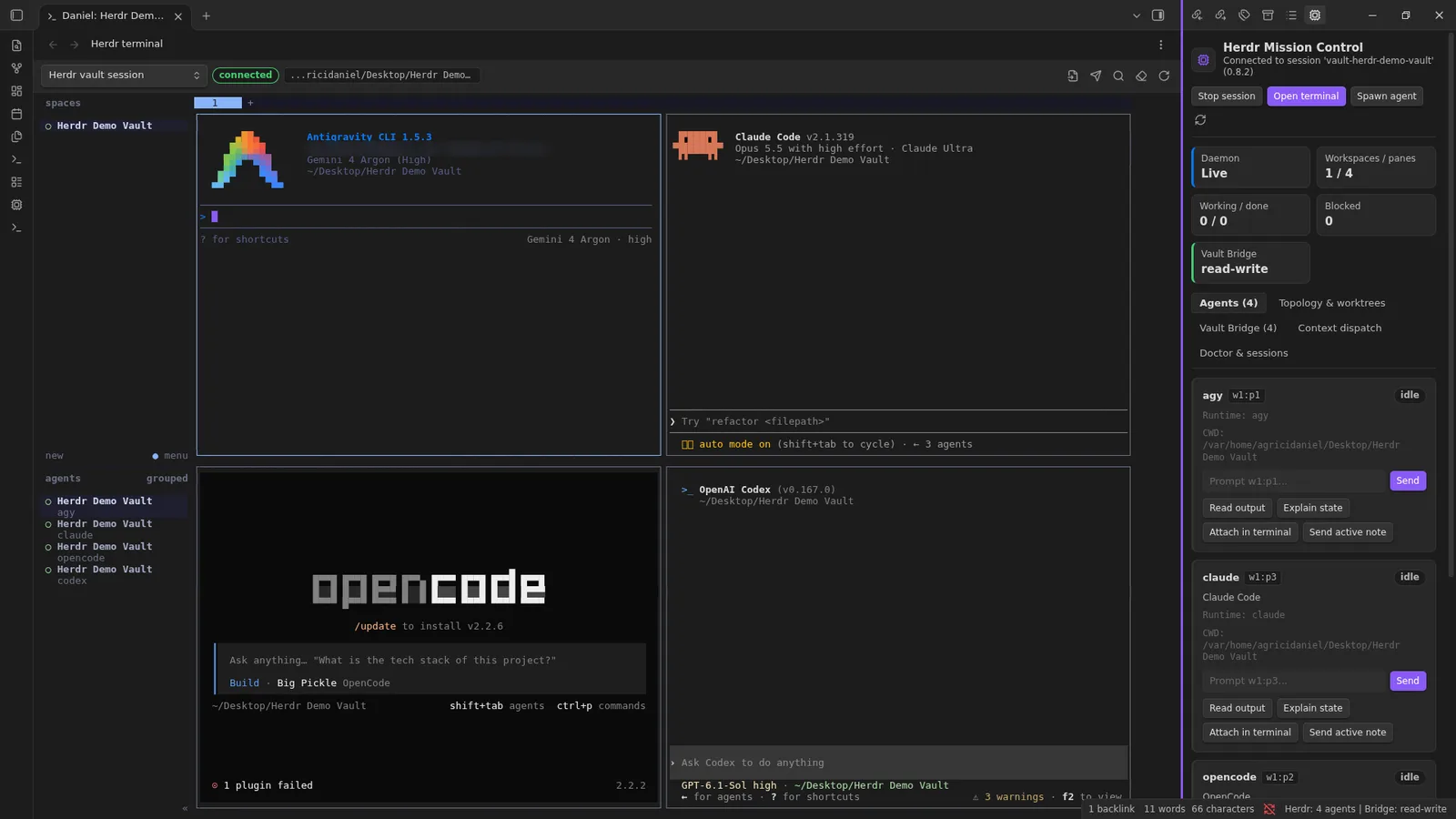
The four parts
Herdr for Obsidian, left to right
- Terminals
Real terminals inside Obsidian, with split panes and tabs. Start
claude,codex,agy,opencodeor any other command line tool. - Mission Control
A sidebar that shows every agent as idle, working, blocked or done. Unblock one with a click, or send it a prompt from its card.
- Vault Bridge
Agents search, read, create and edit notes through Obsidian itself, so links update when a note is renamed. Only at the access level you choose.
- Obsidian control
If you turn it on, agents can see the Obsidian window and use it: open panes, click, type and press shortcuts.
Terminals that keep running
Open the Herdr terminal from the status bar, start a session, and launch your agents. Close the tab, restart Obsidian, come back: the agents are still there, because Herdr holds the session, not the window.
Mission Control
Blocked is the state that matters. When an agent asks for permission, Mission Control shows it, and you answer from the sidebar instead of hunting for the right pane. You can also prompt any agent from its card. Run herdr integration install <agent> once per agent so Mission Control can tell when it is working, blocked or done. If you want to go deeper on approvals, I wrote about how I decide what an agent may do without asking.
The Vault Bridge
Every terminal pane gets a small tool called obs-herdr. Agents use it to search, read, create, update, rename and open notes, and to change frontmatter. The writes go through Obsidian's own file APIs, so links update the way Obsidian normally handles a rename. There is also an MCP server with 24 tools for agents that prefer MCP.
obs-herdr note search "roadmap"
obs-herdr note read "Roadmap.md"
obs-herdr note update "Daily/2026-11-09.md" --mode append --content "- shipped"
obs-herdr note rename "Specs/Plan.md" "Specs/Approved Plan.md"
obs-herdr mcp   # stdio MCP server, 24 tools
You pick what agents may do through the bridge: Read-only, Read-write or Full. You can turn the bridge off at any time. The settings folder, .git and .env files are always off limits to the bridge, whatever level you choose.
One thing to be clear about: the agents also run in a normal terminal with your vault as their working folder. Claude Code, Codex and the others can still change files with their own tools, and those changes skip the bridge, its access levels and its audit log. So keep each agent's own permission settings on, or give it a copy of the vault when you test something risky.
New in 0.2.0: agents can use Obsidian
Some things only the app can show: a view, a plugin panel, a layout. So in 0.2.0, agents can use the Obsidian window itself. Turn on Let agents see and operate Obsidian in Herdr settings and an agent can:
- See. Take a screenshot of the window and list its buttons and fields.
- Act. Click, type, press shortcuts like
Ctrl+P, scroll and drag. This also needs the Full access level. - Check. Wait until some text appears, so it knows the action worked.
It is off by default. It runs inside the plugin through Obsidian's own window APIs, so there is no debugging port and nothing extra to install. Typing that changes the open note is logged and can be undone like any other edit. One honest caution from the README: anything an agent sees is sent to that agent's provider, just like note text, so leave UI control off for windows you would not share.
The UI control comes from Obsidian Control Center, another plugin of mine. The module keeps its own Apache 2.0 license.
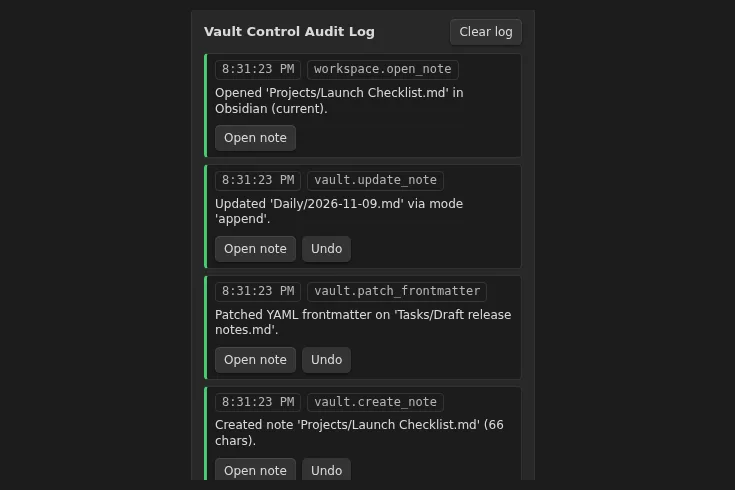
Every bridge edit can be undone
Agents make mistakes. Every edit an agent makes through the bridge lands in an audit log with a snapshot of the note before the change. One click on Undo puts the note back. The undo history lives in memory: it keeps the last 200 bridge edits and clears when Obsidian reloads.
The demo: six agents plan a product launch
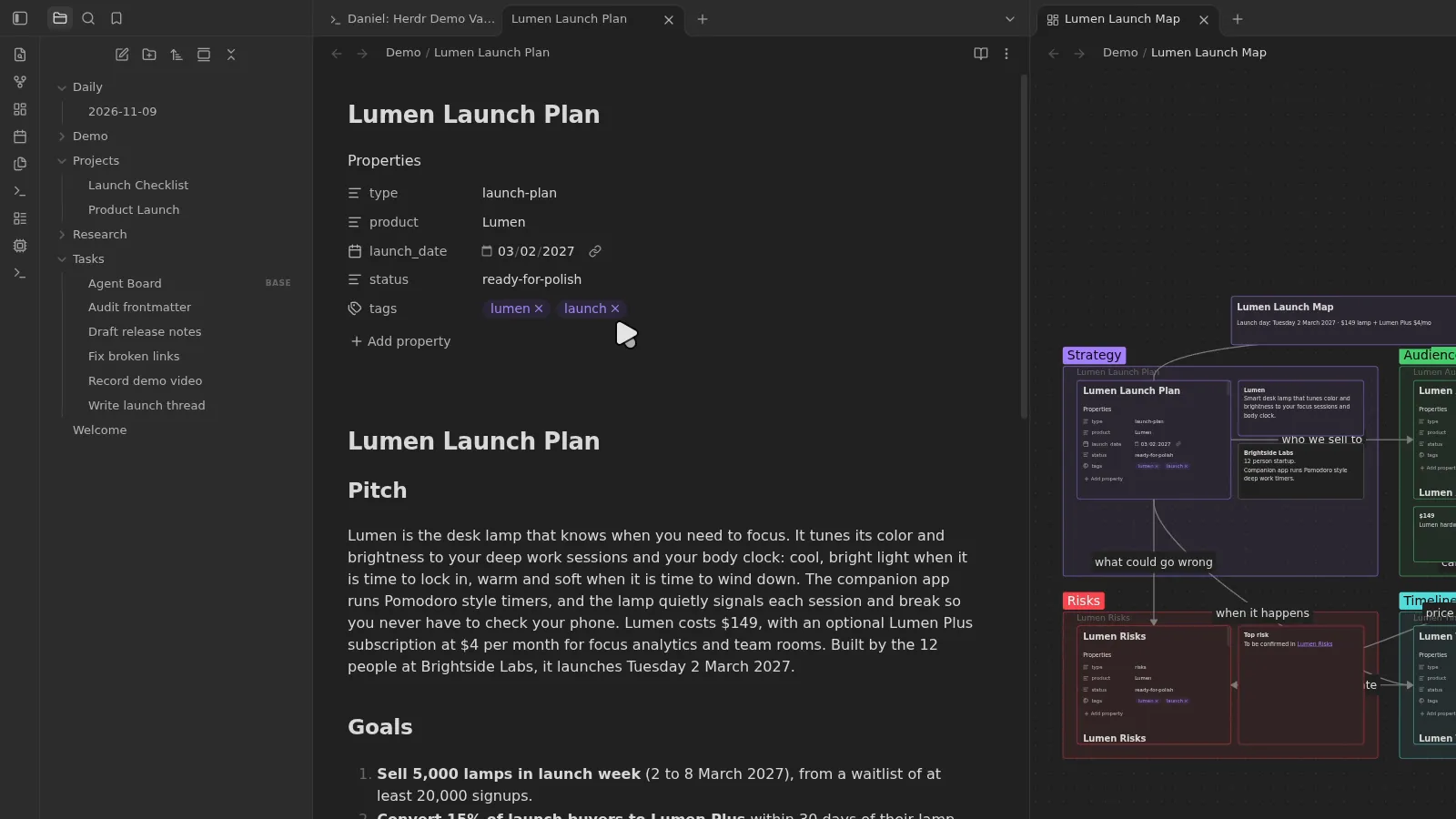
For the live demo I gave Claude one prompt: spawn five more agents next to you in Herdr, and give them a fun project. Plan a launch for a made-up product called Lumen. One agent writes the launch plan, one creates linked notes for audience, pricing, risks and timeline, one builds a canvas map, and Codex polishes.
Claude spawned the agents straight away. They pitched Lumen as a desk lamp that knows when you need to focus. Within a couple of minutes the launch plan was on screen. Apart from giving Codex full access, I did not touch anything. The agents opened notes, split panes and arranged the view themselves.
Then I asked for more: images for the product, a nicer canvas, a few graphs. Codex generated product and persona images and the agents placed them into a gallery on the canvas, with every note cross-linked. By the end the vault held a project hub, the plan, audience and personas, pricing, budget, risks, team, timeline, a press kit and the canvas map.
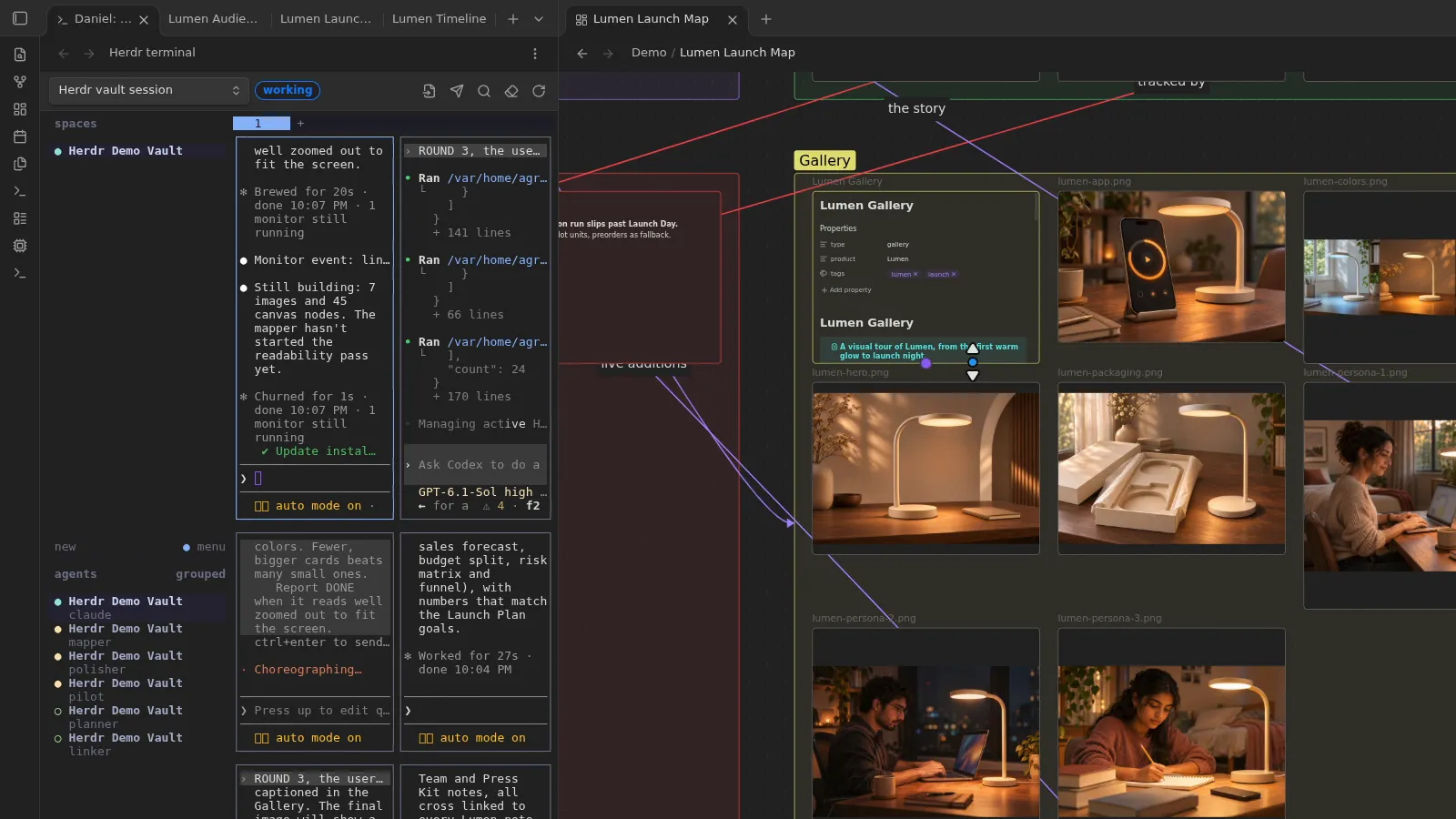
Two notes on what this shows. First, I used no special skills here, only the agents as they come, this plugin, and Obsidian Control Center, my plugin whose UI control is now built into 0.2.0. Second, the output is a first draft. Before anything like this goes public, I still apply my own review and my writing rules.
Which agents it works with
Herdr knows 22 coding agents, and in 0.2.0 you can spawn any of them from Mission Control:
Claude Code, Codex, Hermes Agent, Antigravity, Gemini, OpenCode, Cursor CLI, GitHub Copilot CLI, Amp, Factory Droid, Grok, Kimi CLI, Kiro CLI, Qwen Code, Devin, Cline, Kilo Code, Mastra Code, Qoder CLI, Pi, Oh My Pi and Maki.
Any other command line tool runs in the terminal too. That includes local models: you can keep a cloud model as your main agent and send private work to a local one, in the same vault.
Install Herdr for Obsidian
- Install Herdr, version 0.8 or newer.
- Download
main.js,manifest.jsonandstyles.cssfrom the latest release into<your vault>/.obsidian/plugins/herdr-obs/. Or addAgriciDaniel/obsidian-herdrin BRAT. - Turn on Herdr Mission Control in Settings, Community plugins. You need Obsidian desktop 1.14.4 or newer.
Then click Herdr in the status bar to open Mission Control, click Start session and Open terminal, and start an agent. Ask it to work on a note. Every pane already has obs-herdr, and obs-herdr --skill tells the agent how to use it. Want to look around first? The repository has a demo vault: open it as a vault and copy the three plugin files into its .obsidian/plugins/herdr-obs/.
Installed 0.1.0 or 0.2.0 by hand? Since 0.2.1 the plugin folder is herdr-obs. Move .obsidian/plugins/herdr/ to .obsidian/plugins/herdr-obs/; your settings move with it.
Limits worth knowing
- Tested on Linux only, for now. I tested it on Linux with Herdr 0.8.2 and four agents at once, and UI control live in Obsidian 1.15.0. macOS and Windows are not tested yet. If you run it there, please open an issue.
- Not in the community directory yet. Release 0.2.1 renamed the plugin so it can be listed there. Until it is, you install it from the release or with BRAT. A different plugin that also uses Herdr, Gjetr, is already in the directory; it is not this one.
- Your agents still cost what they cost. The plugin and Herdr are free, but Claude Code, Codex and the others need their own plans or API billing.
- Local, with one honest exception. The plugin makes no network calls, has no telemetry and needs no account or API key. But any note or screenshot an agent reads goes to that agent's provider, like anything else you open in it.
- Desktop only, plus one folder outside the vault. The plugin starts Herdr and your shell as local processes, so it needs Obsidian desktop. It keeps a small runtime folder at
~/.cache/obs-herdr/for the bridge socket and UI screenshots (the temp folder on Windows), which you can delete at any time.
Frequently asked questions
What is Herdr for Obsidian?
Herdr for Obsidian is a free, open-source Obsidian plugin that runs coding agents like Claude Code, Codex, Gemini and Hermes in terminals inside your vault. Agents keep running when you close a tab, can edit your notes through the Vault Bridge at the access level you choose, and every bridge edit can be undone until Obsidian reloads.
Is Herdr for Obsidian free?
Yes. The plugin is free and open source under the MIT license, with the UI control module under Apache 2.0. Herdr is free and open source too. Your agents still need their own plans or API billing.
Which AI agents does it work with?
It lists 22 coding agents, including Claude Code, Codex, Hermes Agent, Antigravity, Gemini, OpenCode, Cursor CLI, GitHub Copilot CLI, Amp, Grok and Kiro CLI. Any other command line tool runs in the terminal too.
Do I need to install Herdr separately?
Yes. Install Herdr 0.8 or newer first, then add the plugin to your vault. Herdr keeps the agent sessions alive; the plugin brings them into Obsidian.
Can agents change my notes without asking?
Through the Vault Bridge, only at the access level you choose: Read-only, Read-write or Full. Those edits are logged and can be undone until Obsidian reloads, and the bridge never touches the settings folder, .git or .env files. Agents also run in a normal terminal, so their own file tools can still change files directly unless you limit them in the agent's own permission settings.
Can agents control the Obsidian app?
Yes, if you turn it on. Since 0.2.0, agents can take screenshots, list buttons, click, type, press shortcuts, scroll and drag. It is off by default, and clicking and typing also need the Full access level.
Does it work on Mac and Windows?
It is tested on Linux only so far. macOS and Windows are not tested yet, so reports in the GitHub issues are welcome.
Does it send my notes anywhere?
The plugin itself makes no network calls and has no telemetry. Anything an agent reads, including screenshots, goes to that agent's provider, like anything else you open in that agent.
Methodology and disclosure
I built Herdr for Obsidian, so read this as a first-party article. Product facts come from the plugin's README and the 0.2.0 and 0.2.1 release notes, checked on 2026-11-09. Herdr's license, home page and session behavior come from its GitHub repository and README on the same day. The screenshots are from my own Linux test and frames from my video, recorded on 2026-11-09; the demo product Lumen is made up. This article was drafted with Claude Code from my video transcript and those sources, then checked against a source ledger and reviewed before publishing. Herdr for Obsidian is an independent project, not affiliated with Herdr, Obsidian, Anthropic or OpenAI. Written by Agrici Daniel. To report an error, contact me in the AI Marketing Hub community and I will correct it.
Share this article
Keep reading.
All 45 posts
Claude Obsidian v3: Give Claude Code a Memory You Own
Claude Obsidian v3 is out: the free AI second brain for Obsidian, built for Claude Code. What changed, how to update, and three real vaults built on it.
16 min read
Claude Code Mods: The Complete Guide, Plus a Free Second Brain to Build Them Safely
Claude Code mods are JavaScript or TypeScript add-ons that run inside Claude Code. What they are, how to build one safely, and a free brain to help.
28 min read

Claude Ads v2.0.1: The Paid-Ads Operating System for Claude
Claude Ads v2 is a full architecture rebuild for source-grounded paid-media operations across 12 platforms. v2.0.1 brings that release to the public repository with 506 passing tests and a green repository audit.
6 min read