DataForSEO Agent: A Free Terminal SEO Agent That Shows the Price First
DataForSEO Agent is a free, open-source terminal app that turns plain SEO questions into priced DataForSEO API calls and charts. What it costs, with the sums shown.


DataForSEO Agent is a free, open-source terminal app that turns a plain SEO question into the right DataForSEO API call, shows you the price, and waits for your yes. The answer comes back as a chart, a table or a map in your terminal. The app is MIT licensed. The data is not free: DataForSEO bills each call, usually a fraction of a cent to a few cents. The repository is github.com/AgriciDaniel/dataforseo-agent.
I built it, so this is a first-party guide and not an independent review. DataForSEO did not pay for it or review it. Below: what the agent does, what a question costs with the arithmetic shown, how the spending guard works and where it stops, how to install it, and what a real AI Overview check returned. Every price is either on DataForSEO's public rate card or printed on my screen in the demo.
- 576DataForSEO v3 endpoints in the catalog
- 12APIs, one specialist agent each
- 33workflow skills in the Brain
- 16chart types drawn in the terminal
- $1default hard budget per session
Watch the demo
In the video I run keyword research on potatoes, pull Google Maps results with a geogrid for New York, check AI Overviews for a real service business, and export a competitor's keywords to CSV. Each paid run shows its plan and cost on screen.

One note on the video: I switched on "auto allow" for paid calls to keep the recording moving. That is my choice in a demo. The default is that every paid call waits for you.
Key takeaways
- The app is free. The data is pay as you go. DataForSEO bills each API call, with no subscription.
- There is a floor. New accounts get $1 of trial credit. After that, DataForSEO's minimum top-up is $50. The balance does not expire, but "4 cents" is the price of a query, not the price of an account.
- You see the price before every paid call. The agent estimates it, then the app asks again with the list price and the exact endpoint.
- A hard session budget stops overspending. $1 by default, enforced by the app, not by the model's good intentions.
- Answers are charts, not JSON. 16 chart types, CSV export, an HTML report, and PDF reports when your machine has the Python libraries for them.
- It works with the model you already pay for. Claude, ChatGPT, Gemini, OpenRouter and 75+ other providers.
What is DataForSEO Agent?
DataForSEO sells SEO data through an API: Google results, keyword volumes, backlinks, site crawls, business listings, AI visibility and more. The pricing is per call. The catch is the API itself. There are hundreds of endpoints, each with its own parameters, modes and prices, and the reply is JSON.
DataForSEO Agent sits between you and that API. You type a question such as "Who ranks for best crm in the US?". The agent works out which endpoint fits, picks the cheapest correct mode, tells you what it will cost, and runs it once you approve. Then it draws the result.
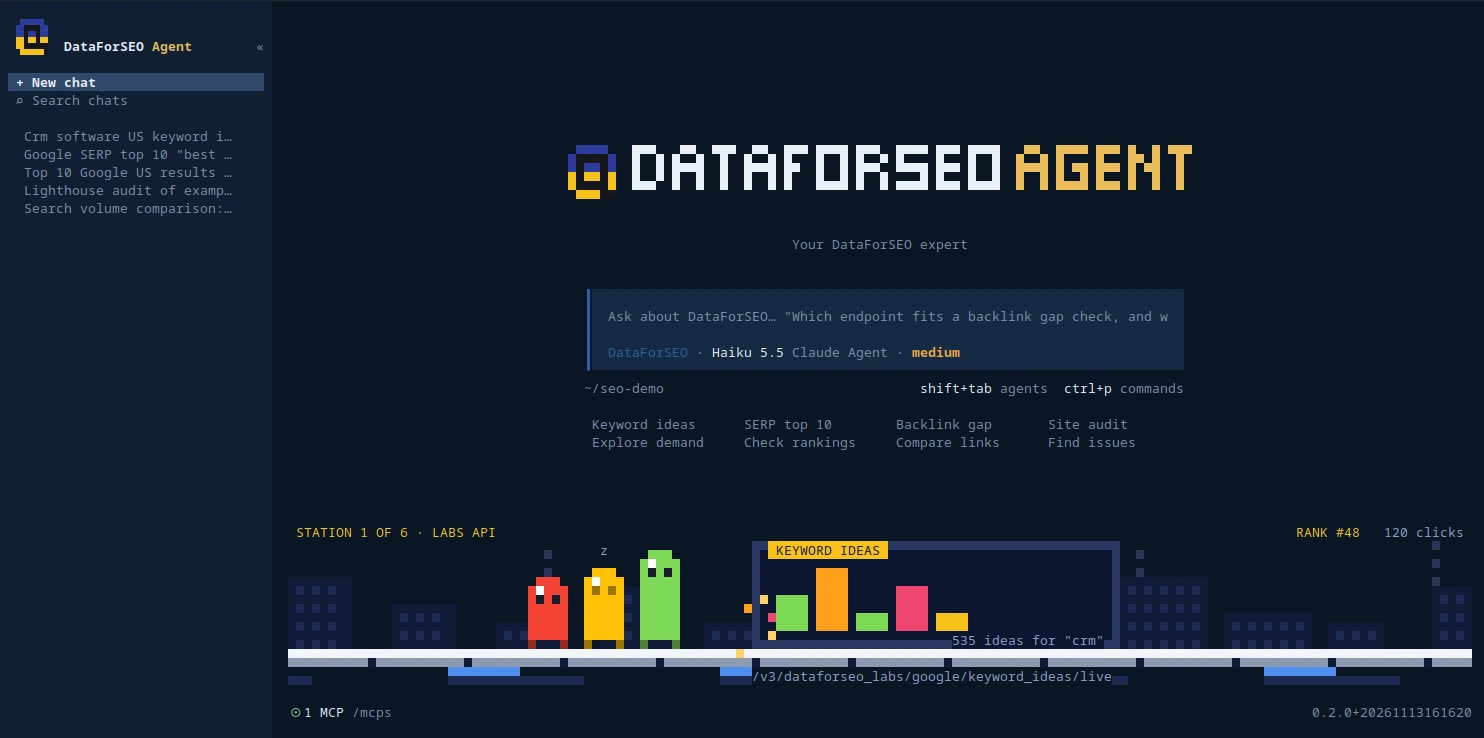
Under the hood it is a fork of opencode, an open-source terminal agent, with a DataForSEO knowledge base, a cost guard and a chart renderer added. If you have used Claude Code or Codex in a terminal, the feel is the same. The difference is that this one knows the DataForSEO catalog and treats your balance as something to protect.
What it costs
Three separate costs, and only one of them is zero.
The app: free
MIT licensed. Clone it, change it, ship your own version.
The data: pay as you go
DataForSEO's pricing page states the model plainly: no subscriptions, a $50 minimum top-up, and a balance that never expires. New accounts get $1 of trial credit, which DataForSEO says can be used in the dashboard Playground, through MCP in an AI tool, or through its integrations. There is also a free Sandbox that returns sample responses. I checked these on November 17, 2026.
So the full version of "SEO research for cents" is this: each question costs cents, the first dollar is on DataForSEO, and after that you load at least $50 at a time. I have not tested the agent on trial credit alone. For scale, $50 would cover the keyword research run from my demo more than 1,000 times.
Two rates explain most of what you will pay:
| What you ask for | List price | How it is billed |
|---|---|---|
| One Google results page (up to 10 organic results), Standard queue | $0.0006 | Per SERP |
| The same page, Priority queue | $0.0012 | Per SERP |
| The same page, Live mode | $0.002 | Per SERP |
| DataForSEO Labs Google endpoints, such as keyword ideas (Live only) | $0.012 + $0.00012 per item | Per task plus per returned item |
Sources: DataForSEO's Google Organic SERP API pricing and Labs Google API pricing, read on November 17, 2026. Some Labs endpoints are listed as exceptions and cost more, and extra parameters can raise a price.
The sums on my screen match the rate card:
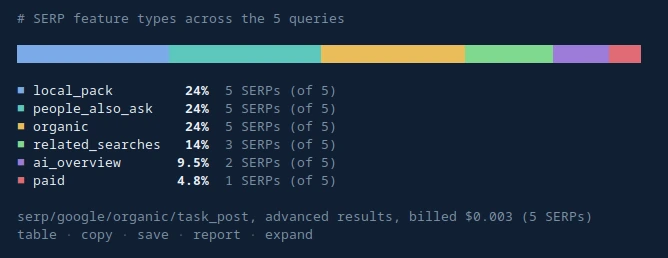
- Five Google results pages in the Standard queue: 5 x $0.0006 = $0.003. That is the amount billed under the chart in Figure 5.
- Keyword ideas: the table in Figure 3 was billed $0.036. At $0.012 per task plus $0.00012 per item, that works out to 200 returned rows: $0.012 + 200 x $0.00012 = $0.036.
The Standard queue is the cheap one because it is not instant. DataForSEO lists about five minutes on average for it, against a few seconds for Live. The agent defaults to the cheapest mode that fits the job and says which one it picked.
The model: your own account
The agent thinks with an AI model, and that runs on your account: your Claude or ChatGPT login, or an API key for Gemini, OpenRouter and the rest. I used Claude Haiku in the demo because it is fast and the work is structured enough that a small model handles it. Your model cost depends on your plan and is separate from the DataForSEO bill.
What I spent in the demo
These are the amounts shown on my screen during the recording on November 16, 2026. One account, one sitting, four separate chats, my queries. Yours will differ.
Receipts
What each run cost in the demo, in US cents
The most expensive chat in 28 minutes was 27 cents ($0.2685 on screen), and that included Google Maps results, a geogrid and a PDF report about potato restaurants in New York. I regret nothing. At the end of the recording, my account's "spent today" counter read $0.631 for the whole day.
How it keeps your money safe
An agent with an API key and a balance is the kind of thing that should make you nervous. Here is what stands between a chatty model and your money.
The cost guard
Six steps between your question and your balance
- You ask
A plain question. No endpoint names needed.
- The agent plans
It picks the endpoint and the cheapest mode that fits, estimates the cost from the catalog and ends with "Run it for $X?".
- The app asks again
A prompt shows the method, path, body, number of tasks and the catalog list price. Nothing is sent until you accept.
- The call reserves its cost
Each paid call reserves its estimate against the session budget before it is sent, so chats running at the same time cannot overshoot together.
- The budget is a hard stop
$1 per session by default. Once a session has spent it, the app sends no more DataForSEO requests.
- You see what was billed
Each chart names the endpoint and the billed cost under it.
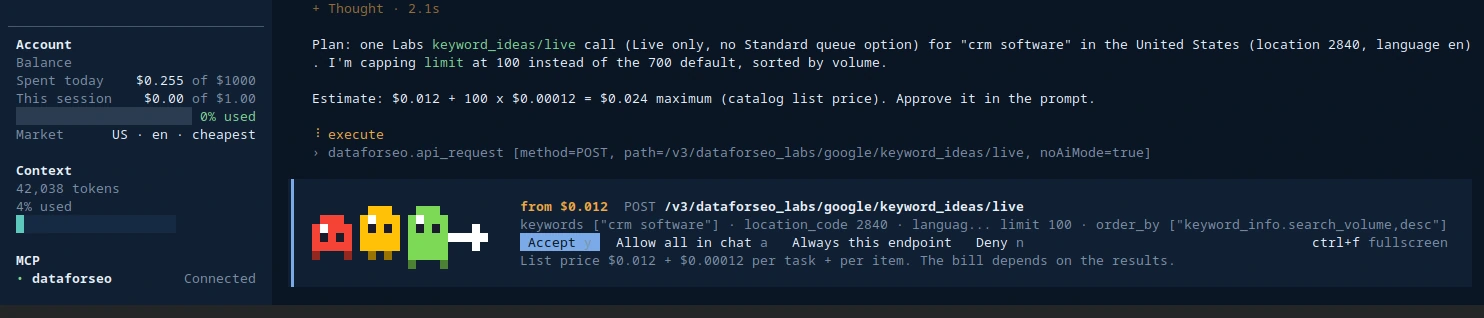
A few details that matter in practice:
- "Always allow" covers one endpoint only. Approving keyword ideas does not approve a site crawl.
- Free calls do not ask. Your balance, the Sandbox, results you already paid for, and location lists run without a prompt.
- The budget survives a restart. Session spend is written to disk, so closing and reopening the app does not refill it.
- A lost result is not retried on its own. If a call was sent and the app crashed before the reply, the agent is told it may already have been billed.
The stated limit. The agent also has a shell tool. It refuses any command that names api.dataforseo.com, so a paid call cannot skip the prompt that way. That check reads the command text, so a script that builds the address in pieces would get past it. The balance backstop still counts that spend against the session budget. I put this in the README because a guard you cannot describe the edges of is not much of a guard.
DataForSEO adds its own layer on top: the account dashboard lets you set daily spending limits for the whole account or for single APIs.
How to install DataForSEO Agent
You need Bun, Python 3, Node 22 or newer, and a DataForSEO account. It runs on Linux and macOS. Windows is untested.
git clone https://github.com/AgriciDaniel/dataforseo-agent.git
cd dataforseo-agent
tools/install.sh          # builds the app, installs it to ~/.local/bin
dataforseo-agent-setup    # account, budget and market, AI model
dataforseo                # start
Setup asks three things:
- Account. Your DataForSEO API login and password, or the path to an env file you already keep. The password is stored in a file only you can read and never goes through a model.
- Budget and market. The session budget, plus your default location, language and mode.
- Model. Sign in to Claude or ChatGPT, or add an API key later with
/connect.
Then run one free call and one cheap paid call, in that order:
> What's my DataForSEO balance?                 (free, no prompt)
> Top 10 Google results for "best crm" in the US
  ...route, plan and cost...
  Run it for $0.002?                            (say yes, then approve)
If the balance call works, your login is right. If the second one shows a price and waits, the guard is working. Now you can ask real questions. That $0.002 is the Live price, so the answer is back in seconds. The same page in the Standard queue is $0.0006.
Five questions to start with
Each of these maps to a different part of the API. Swap in your own keyword, site or city.
Find keyword ideas for crm software in the United States with
search volume and difficulty.
Top 10 Google results for "emergency plumber nyc". Show the SERP
features too.
Who shows up on Google Maps for coffee shop in Austin, Texas?
Give me the geogrid as well.
Check AI Overviews for [your site]. Which of my keywords show an
AI summary, and does it cite me?
List the top 3 competitors of [your site], then the keywords they
rank for. Save it as a CSV.
If you are not sure what something will cost, ask before you run it. /dfs-route names the endpoint that fits a job and its price, and /dfs-cost estimates a whole plan.
What the answers look like
Numbers come back as one of 16 chart types, including a local rank geogrid drawn on map tiles and a US state map. Each chart names the endpoint and the billed cost under it. You can sort a column, switch between chart and table, copy or save the data as CSV, and write one HTML report with every chart from the session.
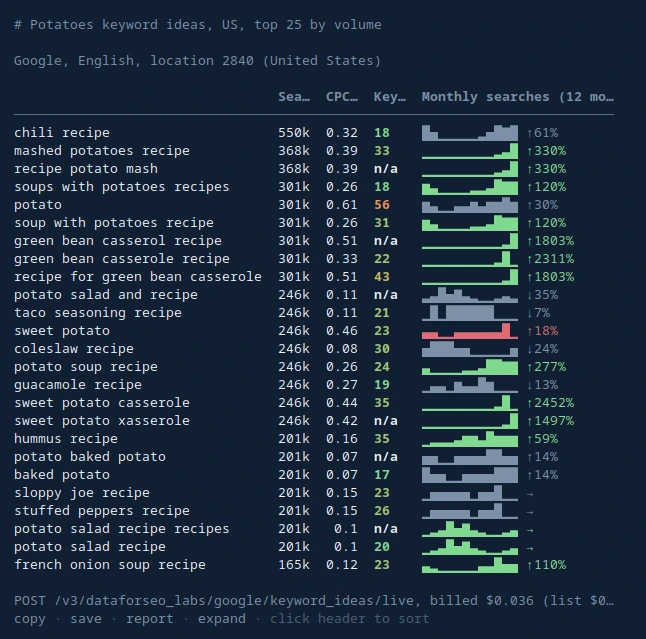
Yes, the top row is "chili recipe". Keyword ideas returns what people search around a topic, not only phrases containing the word. That is the point of asking for ideas.
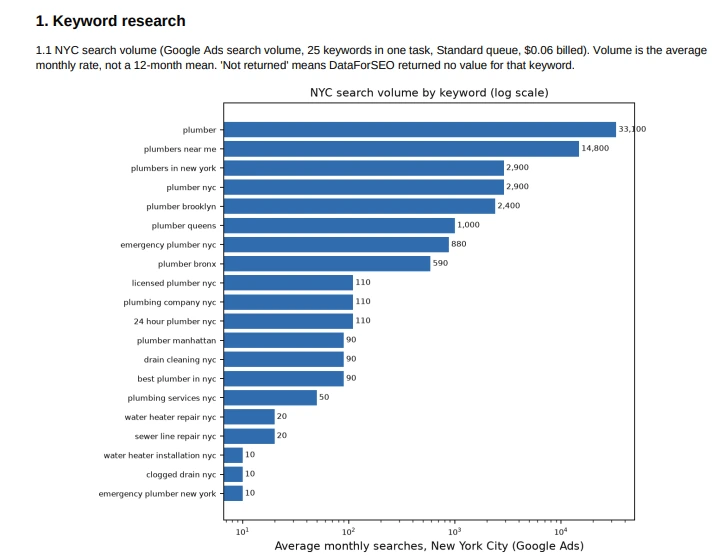
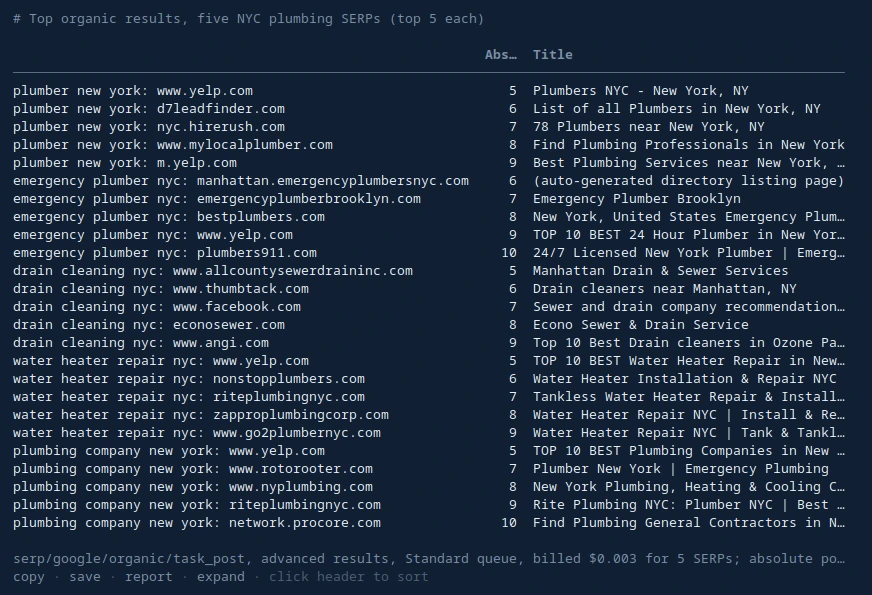
When you want something to hand to a client, ask for it: "create a PDF report" or "save it as a CSV" both worked in the demo. The agent writes the file and can open the folder for you. It built the PDF with Python libraries already on my machine (reportlab and matplotlib), so a PDF depends on those being installed.
A real check: AI Overviews for a service business
The most useful run in the video was not about potatoes. I asked the agent to check AI Overviews for a member of my community, an HVAC contractor. The site appears in the video. I am leaving its name out of the text.
What happened, in order:
- Stored data first, $0.0144. The agent pulled the keywords the site already ranks for and reported how many showed an AI Overview in DataForSEO's stored Google snapshot.
- It flagged its own data. The snapshot was a few months old, so the agent said so and posted fresh results pages to check the current state. That step was billed $0.024, so the whole check cost $0.0384.
- The result. On November 16, 2026, 19 of 20 service keywords showed an AI summary. None of those summaries cited the site.
- Where the answers came from. Mostly YouTube, Reddit and the sites of equipment brands.
The PDF report ended with next steps in plain language: put a direct two or three sentence answer at the top of each key page, add a short FAQ to each service page, make a video for the top questions, and repeat the check every month.
Two cautions. This is one site on one day, so it shows what the tool reports, not a rule about AI Overviews. And a report like this tells you where you stand. It does not move a ranking. The work after it does.
How it works inside
The main agent, dataforseo, routes every job. @cost-guard estimates cost, checks your balance and budget, and blocks unapproved spend. Twelve specialists, one per API, know their endpoints, parameters, limits and prices: @serp, @keywords-data, @labs, @backlinks, @onpage, @domain-analytics, @content-analysis, @business-data, @merchant, @app-data, @ai-optimization and @databases.
Behind them sits the DataForSEO Brain: source-cited notes and 33 workflow skills, from a backlink gap check to a local rank geogrid. The endpoint catalog is built from DataForSEO's official OpenAPI spec and pricing pages. The README states that each of the 576 active endpoints was called live to confirm it works. That is my own test, not an outside audit. When a Brain note and the catalog disagree, the catalog wins.
This structure is why a small, fast model is enough. The model does not need to remember the API. It needs to read the right note and follow it.
Limits and your data
- Where your data goes. DataForSEO gets the calls you approve, with your API login. Your AI model provider gets your chat, as with any AI tool. The app also contacts models.dev for the public model list, the npm registry for the official DataForSEO MCP server, and GitHub for syntax highlighting files.
- No telemetry. The app sends no usage data and does not update itself. Reports and session logs stay on your machine.
- The data is DataForSEO's. Volumes, difficulty scores and stored snapshots come from their databases. Treat them like any third-party SEO data: good for direction, worth checking against Search Console for your own site.
- Prices change. The catalog carries list prices, and
/dfs-newsshows recent DataForSEO changes. The prompt shows the catalog price before you approve, and the chart shows what was billed after. - Platforms. Linux and macOS. Windows is untested.
- The model makes mistakes. In the demo it misread one response, so $0.027 of business profile lookups came back unused, and one call failed on a bad field (that one cost $0). The budget caps the damage. It does not prevent it.
- It is young. Version 0.2.1, first released in November 2026. Expect rough edges and report them in the repository's issues.
Who it is for
- SEO consultants who want answers from live data without writing API code.
- Agencies that want to see API spend per session before it happens, not on the invoice.
- Developers learning which DataForSEO endpoint fits a job.
/dfs-endpointexplains one endpoint with parameters, modes, limits, price and an example request.
It is not for you if you want a hosted dashboard with saved projects and rank tracking history. This is a terminal tool that answers the question in front of it.
Frequently asked questions
Is DataForSEO Agent free?
The app is free and open source under the MIT license. The data is not free: DataForSEO bills each API call you approve, and the app shows the price before you approve it. Your AI model runs on your own Claude or ChatGPT login, or your own API key.
How much does DataForSEO cost per query?
Most single lookups cost a fraction of a cent to a few cents. On DataForSEO's public rate card, one Google results page costs $0.0006 in the Standard queue and $0.002 in Live mode, and a Labs keyword ideas call costs $0.012 plus $0.00012 per returned item. Bigger jobs such as a site crawl or a city-wide geogrid cost more.
Is there a minimum payment for DataForSEO?
Yes. DataForSEO's pricing page lists a $50 minimum top-up. It is a balance, not a subscription, and DataForSEO says the balance never expires. New accounts also get $1 of trial credit, which DataForSEO says can be used through MCP in an AI tool. I have not tested the agent on trial credit alone.
Can the agent spend money without asking me?
No, not by default. Every paid request stops at a prompt with its price and waits for your yes, and a hard session budget, $1 by default, is enforced by the app itself. You can choose to allow all paid calls in a chat, as I did in the video, and the budget still applies.
Which AI models work with DataForSEO Agent?
Claude through your Claude Code login, ChatGPT through your ChatGPT account, and Gemini, OpenRouter and 75+ other providers with an API key. Your DataForSEO password never goes through the model.
Does DataForSEO Agent work on Windows?
It runs on Linux and macOS. Windows is untested.
Can it check AI Overviews and local rankings?
Yes. It can report which of your keywords show an AI Overview and whether the summary cites your site, and it can draw a local rank geogrid on map tiles with your business pinned. The geogrid uses DataForSEO's SERP and Business Data APIs.
Is this an official DataForSEO product?
No. DataForSEO Agent is an independent open-source project that uses the public DataForSEO API. DataForSEO did not build, pay for or review it.
Related reading
- Keyword research and website SEO: the workflow behind the data
- Geogrids for local SEO
- The Claude Code SEO stack
- ChatGPT SEO: a free SEO plugin that runs inside ChatGPT
Ask your first question
Install it, check your balance, then spend $0.002 on a top 10 check for a keyword you care about. If the answer is useful, you know what the next hundred cost. The repository is at github.com/AgriciDaniel/dataforseo-agent. Bug reports and pull requests are welcome there.
Want more workflows like this one? Join the free AI Marketing Hub, or AI Marketing Hub Pro.
DataForSEO is a trademark of its owner. DataForSEO Agent is an independent open-source project that uses the public DataForSEO API. It is not made or endorsed by DataForSEO.
Share this article
Keep reading.
All 48 posts
ChatGPT SEO: A Free Open-Source SEO Plugin That Runs Inside ChatGPT
ChatGPT SEO is a free, open-source plugin with 27 SEO skills. Install it, run your first audit, and see what it found on a real site.
15 min read
Keyword Research and Website SEO: From Demand to Audit
Learn one practical SEO workflow that connects keyword evidence, search intent, page mapping, technical audits, prioritization, and measurement.
21 min read
Legends GeoGrid: Local SEO You Can See on a Map
An open-source Google Maps rank checker with updated interface screenshots, local leaders, business-name reviews, and six historical maps.
13 min read