Keyword Research and Website SEO: From Demand to Audit
By Agrici Daniel | August 31, 2026
Learn one practical SEO workflow that connects keyword evidence, search intent, page mapping, technical audits, prioritization, and measurement.

Keyword research and website SEO are one workflow, not two separate jobs. Research identifies a search job worth serving. Page mapping gives that job a clear destination. A website audit checks whether search engines can discover, render, index, and understand the destination. Measurement tells you whether the decision helped.
That is the complete loop. A 5,000-row keyword export without page decisions is inventory. A perfect audit score without useful demand is maintenance. You need both, joined by judgment.
This guide shows the process I use, then grounds it in a recorded Research Pro run. The product demonstration is first-party evidence from my own tool. Public SEO claims come from Google and provider documentation, not from the product dashboard.
Watch the keyword research and website audit walkthrough
The 8 minute 31 second video shows one keyword run for ai marketing, one audit of claude-ads.md, the available exports, the provider connections, and the difference between Classic and Raw modes.
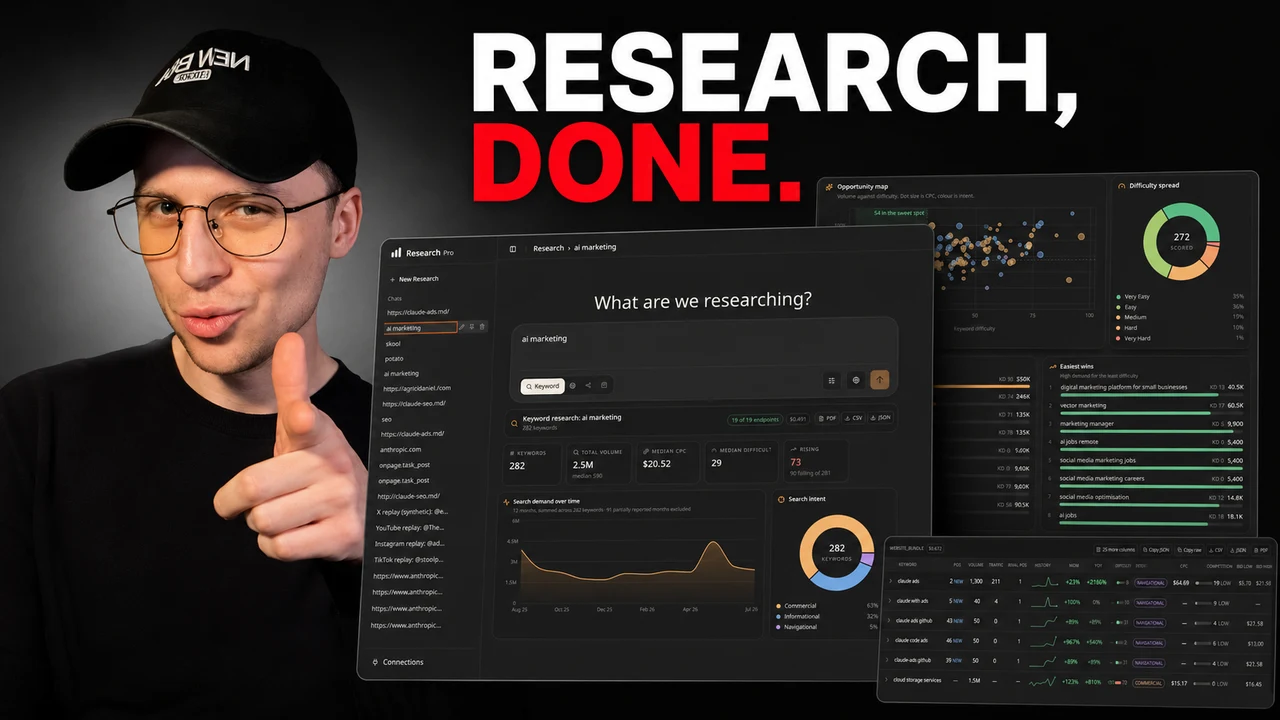
Video: “i built my own ahrefs and it costs 50 cents a run” by Agrici Daniel. The privacy-enhanced player loads only after you activate it. Watch directly on YouTube.
The title makes a sharp comparison, so the boundary matters. Research Pro does not rank a page, host a team workspace, schedule rank tracking, bundle provider data, write an article, or publish changes. It runs locally and uses your DataForSEO credentials for Keyword and Website research. In the 2026-08-31 source snapshot, the Settings screen can save a Gemini model and key, but those research workflows do not call Gemini. The product produces research and audit outputs for you to judge.
Listen instead
Keyword research and website SEO in one loop
AI-generated audio using Daniel's authorized local 02-warm voice at 1.05 times speech speed. The original sample-free music bed is sidechain-ducked beneath the narration. Duration: 2:34.
Download MP3Download English captionsJump to transcript
Read the synchronized transcript
Why keyword research and website SEO belong in one loop
Google describes SEO as work that helps search engines understand your content and helps people decide whether to visit. That definition already connects demand, content, and site quality.
The practical workflow has six decisions:
- Define the business goal and audience.
- Gather keyword evidence.
- Group compatible search intent.
- Map each cluster to one clear page purpose.
- Audit whether the site can support that page.
- Measure the outcome and revise the next decision.
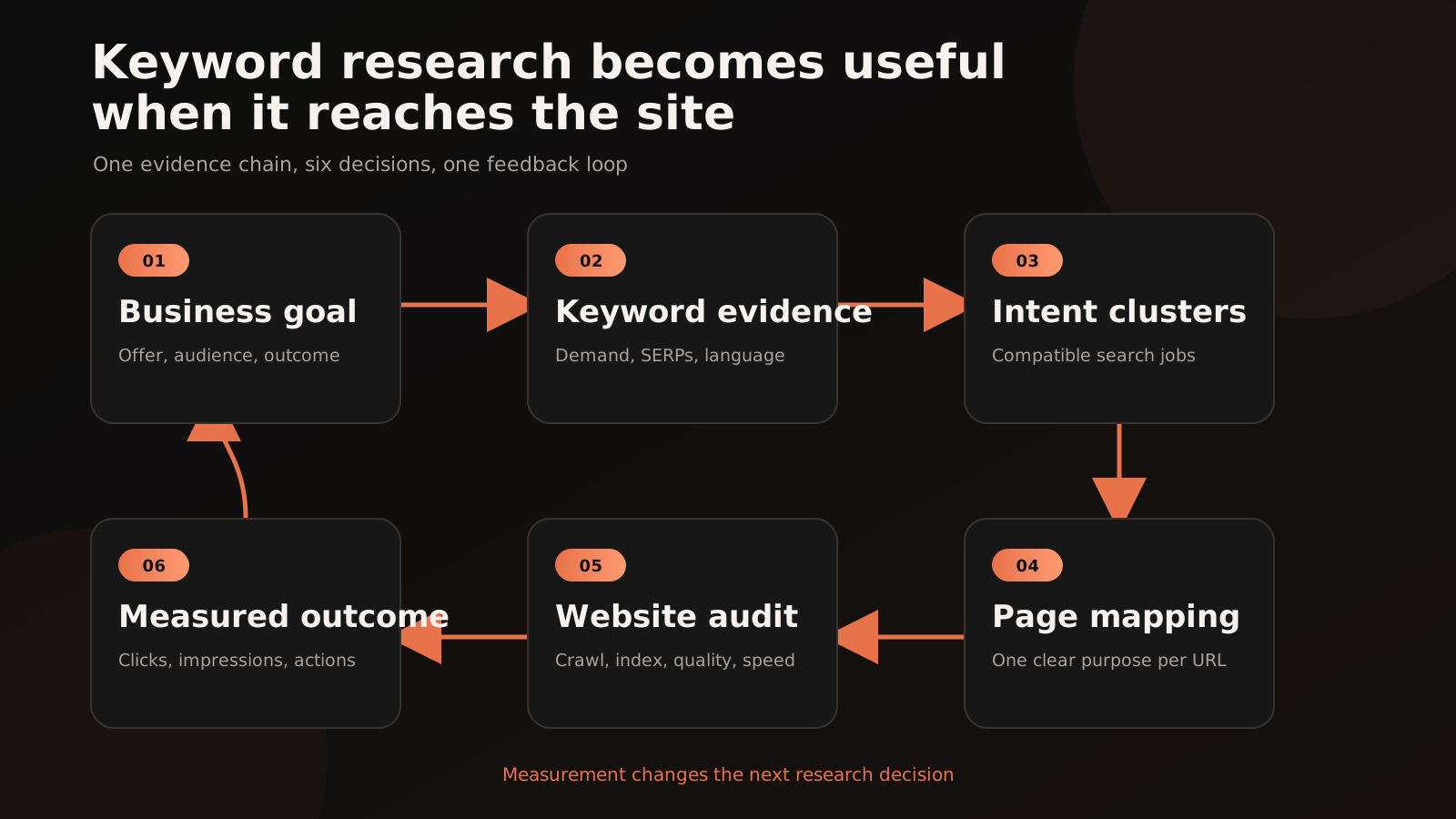
The loop prevents two common failures.
The first is research without a destination. You collect volume, cost per click, difficulty, trends, and related queries, but no one decides whether the result needs a guide, product page, comparison, template, or support page.
The second is optimization without a reason. You improve titles, speed, schema, and internal links on pages that do not match a useful search job or business outcome.
Neither failure is fixed by collecting more columns.
Keep four evidence layers separate
SEO dashboards make different types of evidence look equally certain. They are not.
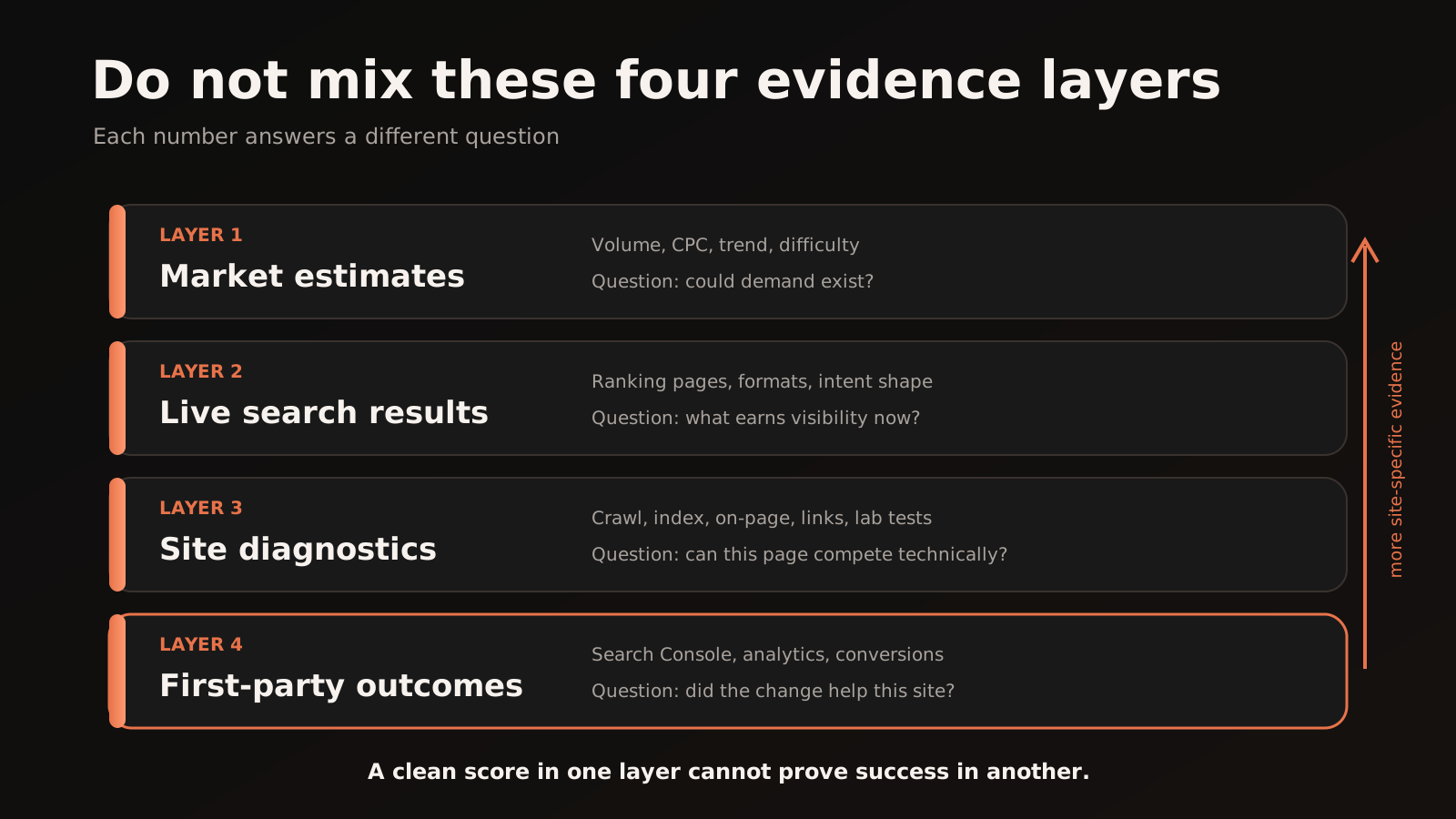
1. Market estimates
Search volume, cost per click, trend, and difficulty help you form a demand hypothesis. They do not tell you exactly how many organic visits your page will receive.
Google's Keyword Planning documentation covers keyword ideas, historical metrics, and campaign forecasts. Historical search volume and CPC can help reduce a large list, while forecasts model campaign configurations. It is useful evidence, but it was built for advertising planning.
Google Trends answers a different question. Results on the Trends website are scaled from 0 to 100 for each request and represent search interest, not absolute search counts. A Trends score is not monthly search volume.
Provider difficulty scores are also provider metrics. Google does not publish a universal keyword difficulty number.
2. Live search results
The current results page shows what Google is willing to serve now. Inspect the leading pages, their format, the apparent search job, freshness, specificity, and the degree to which one page satisfies several related terms.
This is not a license to copy the top result. It is a reality check. If every leading result is a calculator, a generic article may be the wrong format. If the results split between beginner guides and product pages, the query may contain mixed intent and need a narrower target.
3. Site diagnostics
Crawl status, canonical signals, renderability, internal links, on-page content, accessibility, and performance tell you whether the planned page is technically eligible and usable.
Google explains Search as crawling, indexing, and serving. A page can fail at any stage, and following the rules does not guarantee that Google will crawl, index, or serve it.
4. First-party outcomes
Search Console queries and pages, analytics, leads, sales, and assisted outcomes tell you what happened on your site. This layer is the closest to the decision you care about.
It is still incomplete. Google's explanation of Search Console data limits documents anonymized-query omissions and reporting row limits. No single report contains the whole truth.
The rule is simple: never use a number from one layer as proof of another. Volume is not traffic. A Lighthouse score is not a ranking. A health score is not an indexation guarantee. An impression increase is not automatically caused by your last edit.
Step 1: start with a business goal and a bounded seed
A useful seed is smaller than a market and larger than a final keyword.
Start with four facts:
- Audience: who has the problem?
- Outcome: what should they understand or do?
- Offer or next action: where does the page lead?
- Scope: language, country, device, and time period.
For example, SEO is too broad to guide a page. website SEO audit for a small service business names a user, a task, and a plausible page purpose. You can expand from there without losing the reason for the research.
Then gather terms from more than one source:
- your own Search Console queries
- customer language from calls, support, and sales notes
- Keyword Planner or a provider database
- Google Trends for direction, seasonality, and regional differences
- autocomplete and related questions
- the current search results
- competitor pages that repeatedly appear for the same job
Record the source, retrieval date, country, language, device, and metric definition beside each export. Without that context, two identical-looking volume columns can represent different databases, dates, or normalization methods.
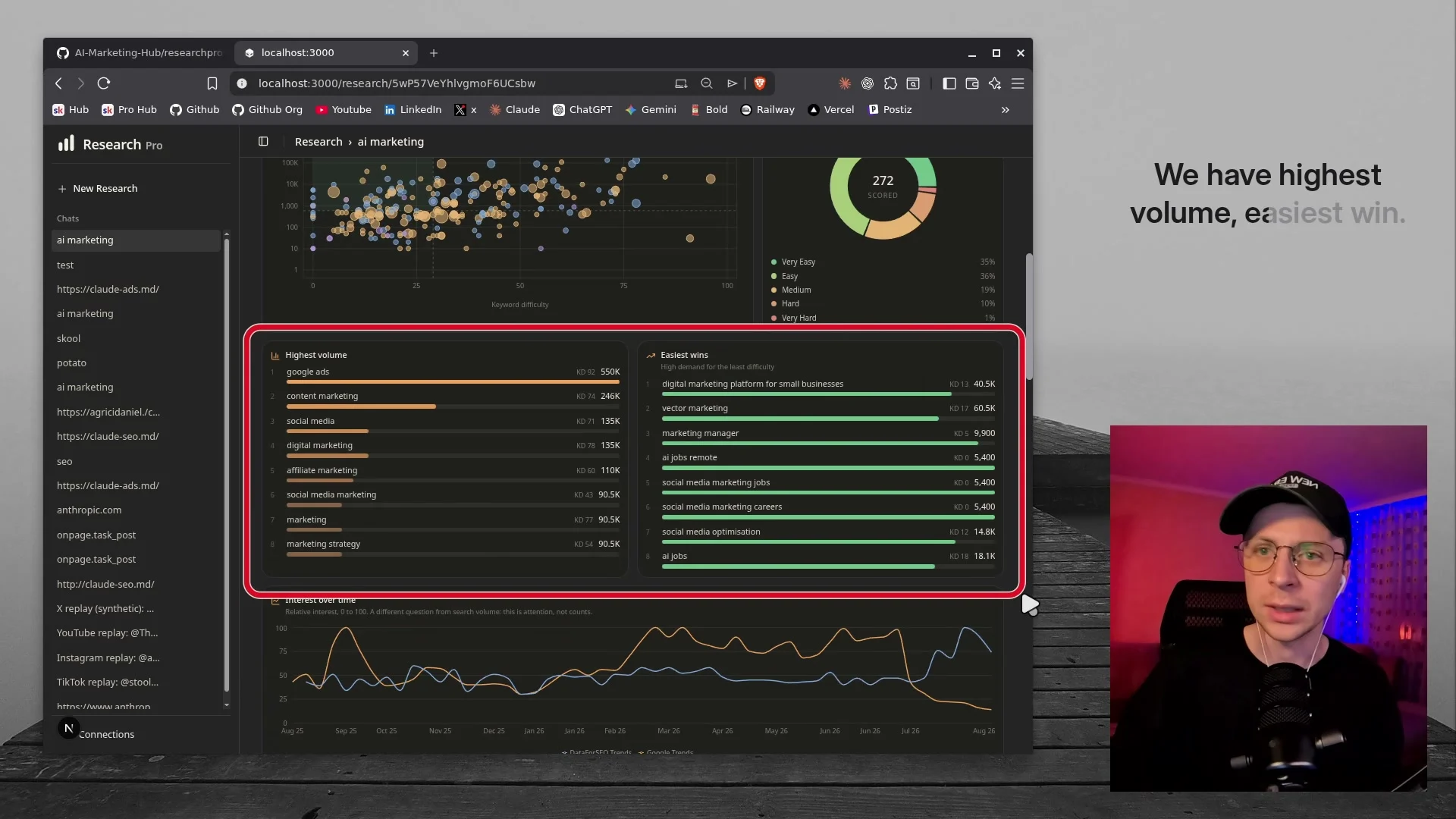
The recorded Research Pro example expanded ai marketing into 282 rows. The export reported a total estimated volume of 2.5 million, median CPC of $20.56, median difficulty of 29, and a 63 percent commercial intent share. Those values describe that provider-backed demo bundle on 2026-08-28. They are not current benchmarks for the market and they do not describe the target keyword of this article.
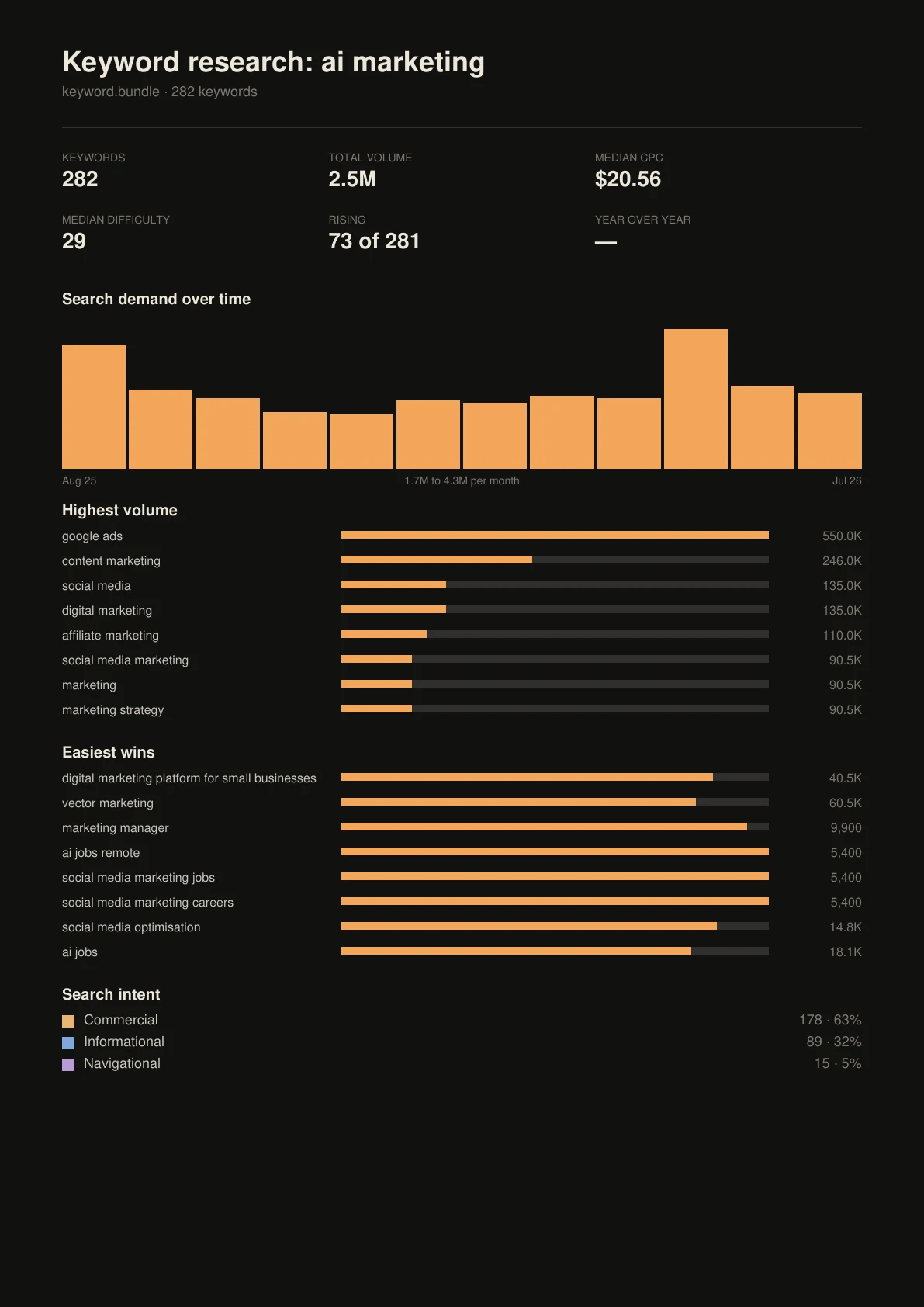
For this article, target-query volume and difficulty remain not measured. No paid provider lookup was authorized or run. Absent data is not zero.
Step 2: inspect the result shape and group compatible intent
Keyword clustering is not just string similarity. Two phrases can share words and require different pages. Two phrases can look different and express the same job.
For each meaningful term, inspect three things:
- The task: learn, compare, calculate, buy, troubleshoot, find a brand, or reach a local provider.
- The format: guide, category, product, tool, checklist, case study, video, or definition.
- The result overlap: whether substantially similar pages rank for the terms you want to group.
Group terms when one excellent page can satisfy them without becoming vague. Split them when the required action, audience, or format changes.
Suppose the list contains these phrases:
| Phrase | Likely job to validate in live results | Possible page purpose |
|---|---|---|
how to do keyword research for SEO |
Learn a process | Practical guide |
keyword research template |
Use a reusable artifact | Template or tool page |
website SEO audit |
Understand or obtain an audit | Audit guide or service page |
technical SEO audit checklist |
Execute a focused check | Checklist |
SEO agency |
Compare or hire a provider | Commercial service page |
The table is a hypothesis until you inspect the live results in the target market. The page purpose should follow the search job, not the label a tool assigned.
Avoid mechanical rules such as “one keyword equals one page.” That produces duplicate pages, thin variations, and internal competition. One page can own a compatible cluster when it provides one coherent answer.
Step 3: map every cluster to a page decision
A keyword map is a decision register, not a content calendar with extra columns.
For each cluster, record:
- primary search job
- supporting language
- intended URL
- page type and conversion role
- current page, new page, merge, refresh, redirect, or no action
- evidence supporting the decision
- owner and next review point
Use this order:
- Keep a current page when its purpose already matches and the evidence is sound.
- Refresh when the page purpose is right but the answer, examples, or technical implementation is weak.
- Merge when several pages divide one useful intent without adding unique value.
- Create only when the cluster has a distinct job and no suitable destination.
- Decline when demand is irrelevant, the business cannot serve it, or the evidence is too weak.
The decline decision is underrated. A large keyword list often contains attractive volume attached to the wrong audience. Deleting those rows protects the site from expensive, unfocused production.
Use short, descriptive URLs. Google's URL guidance recommends simple, logical structures that people can understand. A stable page purpose matters more than forcing every keyword into the slug.
Step 4: audit whether the website can support the plan
Now test the destination. A useful website SEO audit moves from eligibility to quality.
Discovery and crawlability
- Can a normal internal link reach the page?
- Does the link use a real, crawlable URL?
- Are robots rules or authentication blocking required resources?
- Is the status code correct?
- Is the page present in the intended navigation and sitemap?
A sitemap can help discovery, but it is not a command to index. Follow the official sitemap guidance and keep the listed canonical URLs accurate.
Indexability and canonical signals
- Is indexing allowed?
- Does the canonical point to the intended URL?
- Do redirects, alternate versions, and internal links agree?
- Is the page useful enough to deserve a separate indexable URL?
Rendering
- Does the primary content appear when scripts load normally?
- Can search engines discover links in the rendered HTML?
- Are title, description, canonical, and structured data present in the final output?
JavaScript can work in Search, but implementation still matters. Google's JavaScript SEO guidance explains rendering, links, status behavior, and unique metadata.
Content and page experience
- Does the title make the page purpose clear?
- Does the opening answer the search job directly?
- Does the page show enough original evidence, examples, or experience to earn trust?
- Are headings useful for scanning?
- Do images have meaningful alternatives?
- Do internal links connect this page to the wider topic and next action?
- Does the page work on a narrow screen and with a keyboard?
If you want a focused companion, my guide to free SEO audit tools separates crawl, performance, structured-data, and content checks by job. The Claude Code SEO stack shows how I combine these checks in an agent-assisted workflow.
Performance without score confusion
PageSpeed Insights can show both field and lab data. Field data comes from the Chrome User Experience Report over a trailing 28-day collection period. Lab data is a simulated Lighthouse run. They can disagree because they answer different questions.
Use lab findings to reproduce and debug. Use field data, when available, to understand real-user experience. Do not turn either into a guaranteed ranking forecast.
Step 5: prioritize by impact, confidence, and effort
An audit is useful only when it changes the order of work.
For every candidate fix, write three short judgments:
- Impact: what important outcome could improve if this is fixed?
- Confidence: which evidence says this is a real constraint?
- Effort and risk: how hard is the change, and what can it break?
Start with high-impact, high-confidence work that has a reversible implementation. Typical examples include an accidentally blocked page, a broken canonical, a missing internal path to an important page, a mismatch between page purpose and query intent, or a template problem repeated across many valuable URLs.
Do not let a composite score set the priority by itself.
In the recorded Research Pro website export, the overall health score was 98. The report still listed 13 findings, including missing alternative text, title-length issues, render-blocking resources, a measured Largest Contentful Paint of 2.7 seconds in that run, and missing structured data. The report defined its score as a weighted blend of on-page SEO, Lighthouse SEO, performance, accessibility, and best practices.
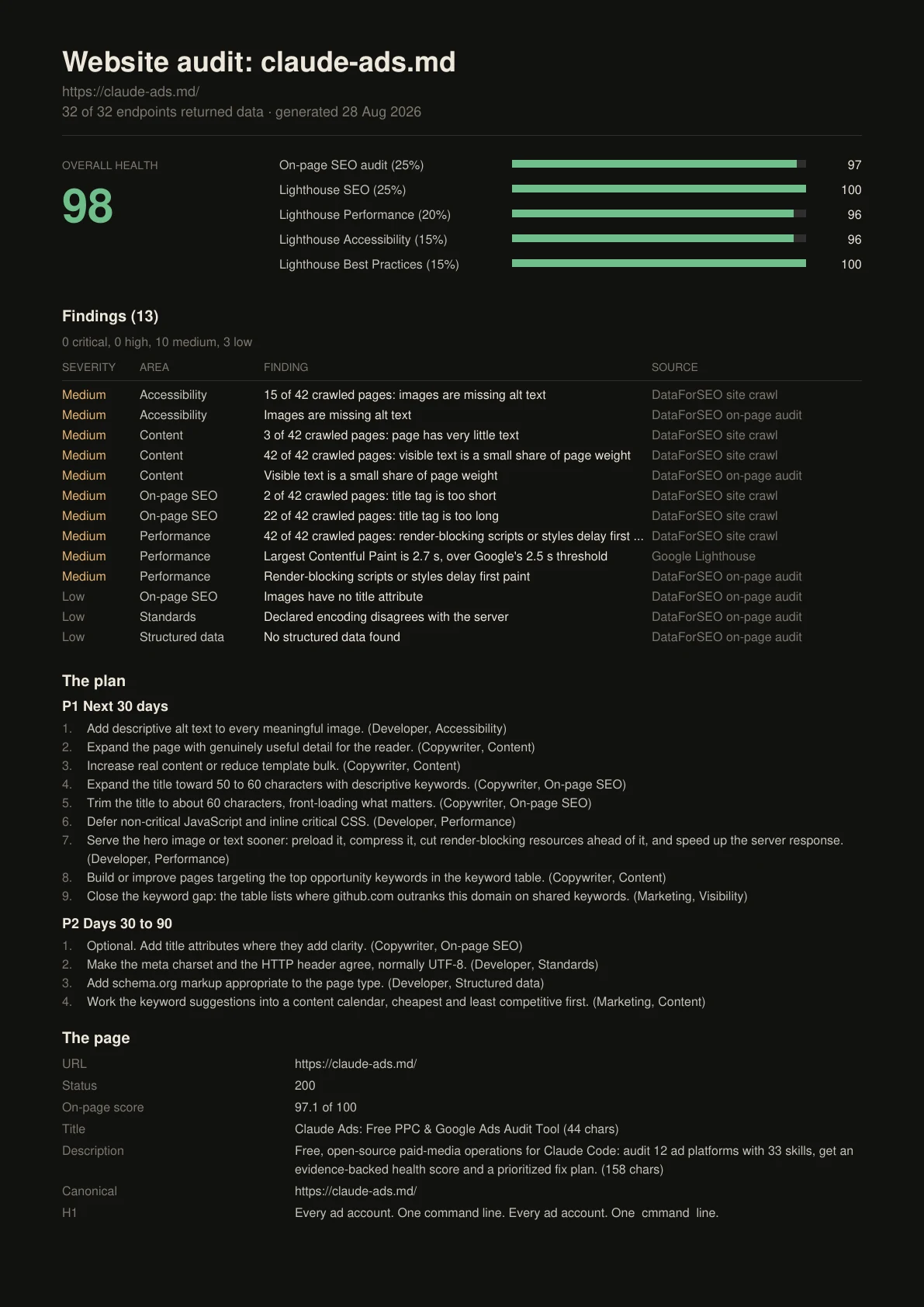
That is the right way to read a health score: as navigation into the findings. A 98 does not mean “98 percent likely to rank.” A lower score does not mean every flagged item deserves immediate work.
Step 6: publish, measure, and revise
Before changing the page, record:
- URL and intended cluster
- page purpose and conversion action
- implementation date
- exact changes
- country and device scope
- current impressions, clicks, click-through rate, relevant conversions, and known caveats
Then inspect both queries and pages in Search Console. Google's Search Console and Analytics guidance separates search performance from on-site behavior and conversions. Look at clicks and impressions, compare periods, and check whether changes are site-wide or page-specific. An observed change is not proof that the edit caused it.
Avoid one noisy before-and-after screenshot. Use an annotation log, comparable periods, and enough time for crawling, indexing, demand, and reporting to move. Separate brand from non-brand where useful. Check whether a click increase reaches the intended audience and action.
The result can send you back to any earlier stage:
- Impressions rise but clicks do not: revisit the result shape, title promise, and snippet evidence.
- The page is not indexed: return to crawl, canonical, rendering, and content-quality checks.
- Rankings improve but conversions do not: question the cluster, page purpose, and offer fit.
- A different query family appears: decide whether the current page can serve it or whether it reveals a new job.
That feedback is what turns keyword research into an operating system instead of a one-time export.
What the Research Pro demo actually showed
The recorded application brought a wide keyword bundle and a multi-source website audit into one local interface.
For keyword research, the demonstration showed demand history, intent, difficulty, cost-per-click fields, competition, result depth, backlink-related fields, current ranking domains, autocomplete, related questions, opportunity views, and a wide keyword table. It offered PDF, CSV, JSON, and Markdown exports.
For website auditing, it showed crawl and on-page findings, PageSpeed Insights and Lighthouse sections, page-level status and timing, organic visibility, competitors, backlinks, referring domains, anchor text, technology signals, brand mentions, and a content outline.
Classic mode selected a preset group of endpoints. Raw mode let the operator choose endpoints. Website research used simple and advanced choices. The video shows a DataForSEO login and API password being saved alongside a Gemini key. In the 2026-08-31 source snapshot, Keyword and Website research require DataForSEO credentials, while Gemini remains a saved setting that those workflows do not call.
The keyword run was described as costing about $0.50, and the site run was described as roughly $0.57 to $0.70 for around 30 pages. Those were my own run estimates at the time of recording. They are not a tariff. Endpoint selection, result size, crawl depth, and provider pricing can change the bill. DataForSEO exposes task costs in its keyword endpoint responses. Check the current provider pages and your own usage before running large jobs.
This article is a first-party guide by the person who built Research Pro, not an independent review.
What the demo did not prove
- It did not prove that a keyword is valuable to your business.
- It did not prove that a suggested page will rank.
- It did not prove that a difficulty score matches Google's systems.
- It did not prove that every returned field is available for every query, market, or site.
- It did not validate the target volume or difficulty for this article.
- It did not replace Search Console, analytics, customer evidence, or human review.
- It did not show scheduled tracking, hosted collaboration, writing, publishing, or automatic remediation.
The application reduces retrieval and reporting friction. It does not automate the final editorial or technical decision.
The practical checklist
Before approving a keyword-to-page decision, confirm:
- [ ] The target audience and business outcome are explicit.
- [ ] The research records market, language, device, date, and source.
- [ ] Estimates, live SERPs, diagnostics, and first-party outcomes remain separate.
- [ ] The cluster represents one compatible search job.
- [ ] One clear URL owns that job.
- [ ] Existing pages were considered before creating a new one.
- [ ] The page is discoverable, crawlable, indexable, and renderable.
- [ ] The content answers the job with original evidence or experience.
- [ ] Internal links connect the page to related context and the next action.
- [ ] Performance findings distinguish lab from field data.
- [ ] Priorities include impact, confidence, effort, and risk.
- [ ] The implementation and measurement plan are written before release.
Frequently asked questions
Is Google Keyword Planner enough for SEO keyword research?
No. It is useful for ideas and advertising-oriented estimates, but you still need live result inspection, customer language, page mapping, website diagnostics, and first-party measurement. Keyword Planner is one evidence source, not the whole workflow.
Is search volume exact?
No. Search-volume tools provide estimates based on their data, method, market, and time window. Google Trends web results are scaled to relative interest rather than a raw volume count. Record the source and context, then use the number as a decision aid.
Should every keyword have its own page?
No. Group terms when one excellent page can satisfy the same search job and split them when the audience, action, or required format changes. One-keyword-per-page planning often creates thin, overlapping pages.
Does a high SEO audit score mean a website will rank?
No. A tool score summarizes the checks and weights chosen by that tool. It can help you triage findings, but Google does not guarantee crawling, indexing, serving, or ranking because a page passed an audit.
How often should I repeat keyword research and website audits?
Repeat them when the decision context changes: a new offer, market, site section, template, migration, major content update, or meaningful performance shift. Use scheduled checks where they protect an important risk, but do not rerun expensive research without a question it can answer.
Method, disclosure, and limitations
This article was prepared from Daniel's first-party video, transcript, source thumbnail, one six-page keyword export, one fourteen-page website audit, and the Research Pro README snapshot archived on 2026-08-31. Public technical claims were checked against official Google and DataForSEO documentation on 2026-08-31.
The worked example is evidence of what one recorded Research Pro run displayed. It is not an independent product review, a ranking case study, or a universal cost benchmark. The article did not make a paid provider request for its own target keyword. Classic web results were sampled for the editorial gap; AI Overviews, AI Mode, and People Also Ask were not directly observed in the available research environment.
If a source, price, interface, or product capability changes, the current official documentation controls. Corrections can be sent through the contact route on agricidaniel.com.
Related reading
- YouTube niche research in one command with YouTube Scout, the YouTube side of this research loop, with real run data from a free agent skill.
- How I automated YouTube keyword research with one browser agent prompt, a narrower workflow for YouTube discovery.
- Free SEO audit tools, organized by the job each tool performs.
- The Claude Code SEO stack, for a broader agent-assisted SEO system.
- My n8n SEO content system, for turning approved research into a governed production workflow.
The useful output is the decision
Keyword research should end with a page decision. Website SEO should begin by asking whether that page deserves to exist for a real search job. Measurement should challenge both.
Use tools to retrieve evidence faster. Keep estimates, diagnostics, and outcomes separate. Map one coherent purpose to each URL. Fix the constraints with the highest impact and confidence. Then measure what happened on the actual site.
That is how keyword research becomes website SEO, and how website SEO becomes a learning loop instead of a checklist.
About the author
Agrici Daniel builds open-source and local-first systems for SEO, advertising, research, and content workflows. Research Pro is his own application, so product descriptions in this article are first-party and the limitations are stated beside the capabilities.