YouTube Niche Research in One Command: What YouTube Scout Finds
By Agrici Daniel | September 12, 2026
YouTube niche research in one free command: YouTube Scout ranks the 50 most relevant videos by default and writes a workbook. Run data, quota math, limits.

- 50videos ranked per run
- 1 of 100daily search calls per run
- 83.4xviews per subscriber, top outlier
- 15:44replay peak in a 50-minute course
- 606comments read, 68 with a question mark
YouTube niche research comes down to four questions: which format wins, which videos outgrew their channel, where viewers rewind, and what the audience keeps asking. YouTube Scout is a free, open source agent skill that answers all four from public data in one command. Type /scout matcha recipe in Claude Code, and it pulls the 50 most relevant videos for that topic and ranks them. Then it writes an Excel workbook with the numbers, the creators behind them, and, when you ask, the comments, hooks, and replay peaks.
In the video description, I put it this way: "YouTube niche research used to eat my weeks: fifty tabs open, one spreadsheet, and an afternoon of copy-pasting view counts by hand." It is released under the MIT license, and it is the YouTube side of the research loop from my guide to keyword research and website SEO. This guide shows what one run returns, what it costs in API quota, and what three runs on 2026-09-11 found. The results come from those workbooks and the tool's cached probe data. The platform rules link to Google's own documentation.
Key takeaways
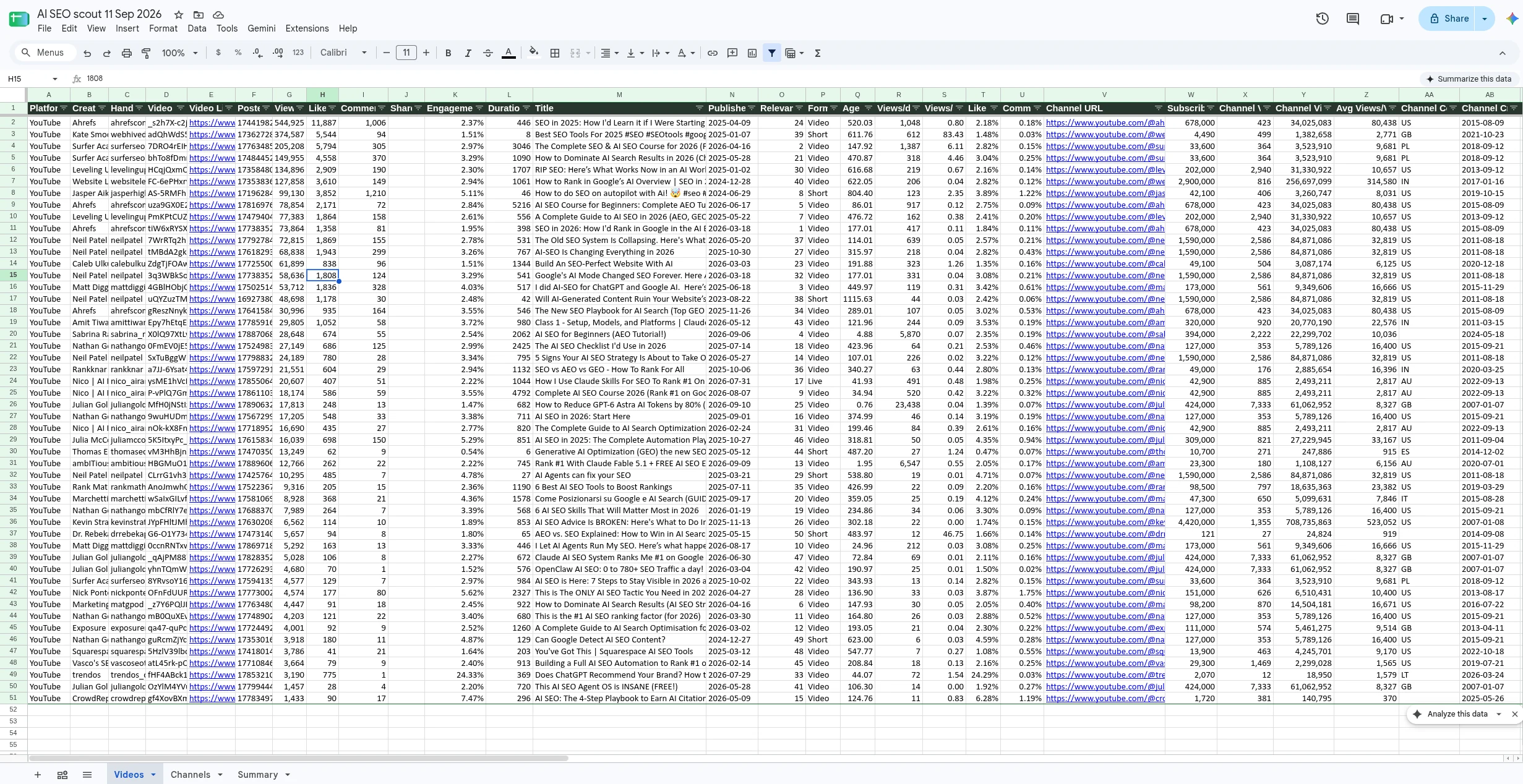
- One command writes one workbook: Videos, Channels, and Summary sheets, plus Comments and Transcripts when you ask for them.
- A default 50-video run costs 1 of your 100 daily search calls and 3 of your 10,000 daily quota units.
- Format differs by niche: my AI SEO run was 14% Shorts with a 12-minute median, while matcha recipe was 74% Shorts with a median of about a minute (Summary sheets, 2026-09-11).
- Views per subscriber finds outliers: an 8-second Short on a 4,490-subscriber channel reached 374,587 views, or 83.4 views per subscriber. Compare Shorts with Shorts.
- The replay curve shows what people rewatch: a 50-minute SEO course peaks at 15:44, inside its keyword chapter.
- Comments show demand: the matcha run pulled 606 comments, 68 with a question mark, and the most-liked request, for banana matcha, had 1,666 likes.
- It cannot see shares, click-through rate, or retention for other people's videos. No official YouTube API exposes them without the channel owner's authorization.
Watch the YouTube Scout walkthrough
The 9 minute 14 second video shows the command, the workbook, every column group, installation, the API key, and the four research questions this article covers. The title mentions Codex and Gemini; the runs in this article were recorded in Claude Code, and Codex support is not ready yet (see the FAQ).

Video: “Free Open-Source YouTube Research Agent (Claude, Codex, Gemini)” by Agrici Daniel, published 2026-09-11. The privacy-enhanced player loads only after you activate it. Watch directly on YouTube.
Jump to a chapter:
- 0:22 The research sheet
- 2:25 Install the skill
- 2:54 Get a free YouTube API key
- 6:21 Videos that outgrow their channel
- 6:41 See where viewers rewind
- 7:11 The comments write your next video
- 7:37 Drops into your sheet
What one /scout run gives you
You type a topic. The skill asks the official YouTube Data API for the most relevant videos, pulls public statistics, metadata, and channel details for each one, ranks the rows, prints a top-10 table, and writes a workbook in your current folder.
> /scout ai seoscout: searching YouTube for "ai seo" (max 50, since any, length any) # Views V/Sub Len Fmt Handle Title 1 544,925 0.8 7:26 Video ahrefscom SEO in 2025: How I'd L 2 374,587 83.4 0:08 Short webhivedigital Best SEO Tools For 202 3 205,208 6.1 50:46 Video surferseo The Complete SEO & AI 4 149,955 4.5 18:10 Video surferseo How to Dominate AI Sea 5 134,896 0.7 28:27 Video levelingupofficial RIP SEO: Here’s What Wscout: wrote 50 rows to scout-ai-seo-2026-09-11.xlsx (sheets: Videos, Channels, Summary). Quota used: 1 search call of 100 a day, 3 units of 10,000.
/scout ai seo run recorded on 2026-09-11. The ranked rows match the README sample output and the workbook, with titles shortened and the engagement and views-per-day columns trimmed for width. The status lines use the v0.2.0 message format; this earlier-build run logged its quota as 103 units. Row 2 is the 8-second Short that pulled 83.4 views per subscriber.The workbook has up to five sheets:
| Sheet | What it holds | When you get it |
|---|---|---|
| Videos | One row per video: identity, views, likes, comments, engagement, views per day, views per subscriber, format, category, tags, language, captions, paid promotion flag, and channel size and country | Every run |
| Channels | One row per creator in the sample, with subscribers, channel totals, videos in the sample, and their best video. This is your competitor or outreach list | Every run |
| Summary | Topic, filters, quota used, median and mean views, Shorts share, paid promotion share, top channels, tags, categories, languages, and countries | Every run |
| Comments | The top comments on every video, with likes and reply counts | With --comments |
| Transcripts | The opening lines (hook) and full transcript per video, with its source: captions or local Whisper | With --hooks or --transcribe |
About the column count: a default v0.2.0 run writes 48 columns per video, the number in the video. Flags add their own columns only when they fill them, so my every-flag AI SEO run wrote 61, and --into keeps the full layout of your existing sheet.
How a run works and what it costs
Most of the work happens in four API methods. Search is the scarce one, so Scout asks for 50 results per search call, which means a default run usually needs a single call, and it gets everything else from 1-unit lookups.
How one run works
One command, five steps, almost no quota
- Topic
/scout matcha recipe, or any phrase you would type into YouTube search. - Search
search.listreturns up to 50 video IDs per page, by relevance. A default run usually needs one page: 1 of your 100 daily search calls. - Details
videos.list,channels.list, andvideoCategories.listfill in statistics, metadata, and channel details. Cost: 3 units of 10,000. - Optional flags
--commentsadds 1 unit per video.--hooksreads captions and the replay curve through yt-dlp, and--transcriberuns Whisper on your machine. Those two use no API quota. - Workbook
Videos, Channels, and Summary sheets, plus Comments and Transcripts when you ask for them.
Google's quota documentation is the authority here, and it changed in 2026. Since June 1, 2026, search.list draws from its own bucket. According to the YouTube Data API overview, a project gets "a default quota allocation of 100 search.list calls, 100 videos.insert calls, and 10,000 units per day combined for all other endpoints." The quota calculator lists videos.list, channels.list, commentThreads.list, and videoCategories.list at 1 unit per call, and daily quotas reset at midnight Pacific Time. The change itself is dated in the Data API revision history. Google also notes that default quota is subject to change.
That leaves plenty of room. Even with --comments, a 50-video run uses 53 of 10,000 units. The run prints what it used, and the Summary sheet records it, so you can check the math against your own quota page in Google Cloud Console.
Question 1: which format wins in this niche?
The first decision is format: does this niche reward 60-second Shorts or 20-minute tutorials? The Summary sheet computes the split on every run. Scout counts a video as a Short when it runs 180 seconds or less and is not confirmed horizontal; that is the tool's own rule, not a label from YouTube.
Same tool, two niches
The format question, answered before you film
In AI SEO, 7 of the top 50 were Shorts and the median video ran 12 minutes, so what ranks is mostly courses and walkthroughs. In matcha recipe, 37 of 50 were Shorts and the median ran 1:02. From these two snapshots, I would plan Shorts first for a matcha channel, and tutorials first for AI SEO, with Shorts as trailers.
Two cautions apply. The runs used different date filters, and search relevance is not deterministic, so a second run of the same topic can differ by a few videos. My later AI SEO run with every flag on returned 18% Shorts instead of 14% (both runs on 2026-09-11). Read the Summary as a direction, not a census.
Question 2: which videos outgrew their channel?
Raw views mostly tell you who is already big. Views per subscriber is a video's views divided by its channel's subscriber count, so it shows which ideas travelled beyond the people who already follow the creator. Sort by it with --sort breakout.
Views per subscriber
An 8-second Short with 83.4 views per subscriber
4,490subscribers
374,587views on one 8-second Short
83.4xviews per subscriber
Small-channel trap. In the matcha run, a channel with 77 subscribers scored 2,331x on 179,504 views. Ratios explode when the denominator is tiny, so read views per subscriber next to raw views, or set a subscriber floor before you sort.
The 8-second Short from the terminal above is the clearest example in my runs: 374,587 views on a channel with 4,490 subscribers, about 83 times as many views as the channel has subscribers. That is the kind of video worth studying before you film. Compare like with like, though: Shorts and long videos reach viewers in different ways, so rank Shorts against Shorts by filtering on the Format column.
YouTube is testing a related idea. In August 2026, Tubefilter reported on a new Studio tab called Research. A YouTube spokesperson told the outlet it is an experiment being tested with "a small number of users." Tubefilter describes its outlier multiplier as "a number that rates how well a video performed compared to a creator's other content." Scout's ratio is simpler: views divided by subscribers, for any topic you type.
Momentum is views per day, the companion metric. Scout computes it from the video's age with a six-hour floor, so it separates a video that is climbing now from one that collected its views years ago. Sort by it with --sort momentum.
Question 3: where do viewers rewind?
Add --hooks and Scout reads each video's captions and YouTube's "most replayed" data through yt-dlp. A hook is a video's opening, here its first 15 seconds as text. The most replayed graph is YouTube's curve of the moments viewers rewatch most. Scout records both when they exist. Add --transcribe and Scout fills missing hooks by transcribing the audio locally with Whisper.
Most replayed, as data
The replay peak sits at 15:44, inside "Finding the right keywords"
--hooks on 2026-09-11. Shaded bands are the video's 10 chapters. Only 14 of the 50 videos in that every-flag run exposed a replay curve.In Surfer Academy's 50-minute SEO course, the replay peak sits at 15:44, inside the chapter "Finding the right keywords." That is the stretch viewers rewatched or jumped to most, which makes it a candidate for its own video. YouTube describes the graph as a way to "find which parts of a video are most often rewatched" in its help page on seeking features. The Data API does not return it, which is why Scout reads it with yt-dlp.
The hook text is the other half. Here is how the same course opens: "In the next 60 minutes or so, I'm going to teach you everything you need to know about getting your website ranking on Google and showing up in AI search results, even if you're a complete beginner." In the every-flag run, Scout collected opening lines for 49 of the 50 videos, all 49 through local Whisper. Without --transcribe, the matcha run got 29 of 50. Either way, you end up with a swipe file of openings from the videos that rank for your topic.
Two limits apply. Only 14 of the 50 videos in the every-flag run exposed a replay curve. YouTube says the graph may not show when a video is "too new or has too few views." Treat it as a bonus signal, not a column you can count on. And a replay peak is a proxy: it shows where people rewound, not how many stayed to the end.
Question 4: what is the audience asking?
--comments pulls the top comments on every video, 20 by default, into their own sheet. That sheet is where viewers sometimes ask for the next video.
In the matcha run, Scout pulled 606 comments, and 68 of them contained a question mark. Not every one is a real question, so read them. Several are rhetorical, such as "Who agrees with me?", while others are real asks, like a request for the creator's strawberry syrup recipe with 184 likes. The most-liked request was "Can you do banana matcha," with 1,666 likes, and the comment also reads "SHE DID IT YALL," which suggests the creator answered it. Another channel in the same sample, nioteas, posted a banana matcha latte recipe on 2026-07-27, about a month after that comment. That is the pattern to look for: a request with visible support, then a check on whether someone has already filled it.
The Channels sheet adds the competitive view. In the same run, one creator, michellekanemitsu, held 11 of the 50 slots, and the sheet lists that channel's subscribers, totals, and best video next to everyone else's.
Add YouTube rows to a sheet you already use
If you already track TikTok and Instagram creators in a spreadsheet, point Scout at it with --into. The first columns match a social ads tracking layout, so YouTube rows slot in next to your existing ones. Scout deduplicates by video ID, re-sorts by views, keeps your manual columns and hyperlinks, and writes a timestamped backup before it touches anything.
Close the file in Excel first. Append mode rewrites the body of the Videos sheet, so charts or images placed on that sheet would not survive. That is what the backup is for.
Install YouTube Scout and add an API key
You need Python 3.10 or newer, the openpyxl package, and a YouTube Data API v3 key. yt-dlp is optional and unlocks --hooks and --transcribe.
- Clone the repository and run the installer:
git clone https://github.com/AgriciDaniel/youtube-scout.git, thencd youtube-scoutand./install.sh. That copies the skill to~/.claude/skills/scout. The installer also has--target codex,--target agents,--target portable, and--target allfor other agent runtimes, which I have not tested. - Install the dependencies:
python3 -m pip install --user openpyxl, and optionallyyt-dlp. For--transcribe, add ffmpeg and a Whisper package. - Create an API key: in Google Cloud Console, enable the YouTube Data API v3, create an API key, and restrict it to that API. Google's YouTube Data API overview walks through the project and key setup.
- Store the key where the skill can read it:
export YOUTUBE_API_KEY=...for one session, or save it to~/.config/scout/.envwithchmod 600so only your user can read it. - Run your first topic:
/scout matcha recipe.
In Claude Code, you can use the plugin route instead of cloning:
/plugin marketplace add AgriciDaniel/youtube-scout
/plugin install youtube-scout@agricidaniel-youtube-scout
A few commands worth keeping:
/scout iced matcha latte --since month --length short --max 100
/scout ai seo --comments --hooks
/scout matcha recipe --sort breakout --dry-run
/scout matcha recipe --into OWT-Social-Ads.xlsx
The skill is a SKILL.md file plus one Python script. Claude Code and OpenAI's Codex skills docs both describe skills built on the open Agent Skills standard, which is why the installer ships generic targets. Codex support is not there yet: SKILL.md currently calls its script through a Claude Code path variable, and I have not tested a Codex run. The runs in this article were recorded in Claude Code. If you want the bigger picture on how skills move between agents, I wrote about the Claude Code and Codex skills ecosystem.
What YouTube Scout cannot tell you
Here is where the data ends.
- Shares, click-through rate, impressions, retention, and demographics. These exist only in YouTube Analytics for channels you own or manage. Google states that "all YouTube Analytics and YouTube Reporting API requests must be authorized by the channel or content owner that owns the requested data" in its Analytics and Reporting API introduction. Any tool that shows them for someone else's channel is estimating, unless that channel's owner authorized it.
- Why a video worked. The workbook shows which videos won and how they opened. The judgment about why is still yours.
- A permanent record. Numbers move daily, and search results change between runs. Treat each workbook as a dated snapshot and re-run when you need current numbers.
- Guaranteed captions. The project README notes that YouTube rate-limits caption downloads per IP after bursts, sometimes for hours. Scout paces requests, caches probes for seven days, and stops after one hard failure.
--transcribefills the gaps locally with Whisper. - Stability. yt-dlp can break when YouTube changes its pages. Updating it is the usual fix (
python3 -m pip install --user -U yt-dlpfor a pip install), and the API columns still fill when captions fail.
Use the data within YouTube's rules
Scout runs on your own API key, so YouTube's Developer Policies apply to your project and your workbooks. Two rules matter most for a research sheet:
- Storage. Section III.E.4.b says an API client "must not store statistics retrieved as Non-Authorized Data for more than 30 days," and gives a channel's subscriber count as the example. Data read with an API key, without the channel owner's authorization, falls in that category. Refresh or delete a workbook within 30 days.
- Calculated metrics. By default, Section III.E.4.h says API clients must not "access or use API Data to create new or derived data or metrics." Since June 1, 2026, Section III.L lets audited developers with analytics use cases apply for permission to calculate specific additional metrics. YouTube's derived metrics policy lists channel scores and ratios among them. The condition: you must "distinguish these metrics from metrics sourced from API Data." Views per day, views per subscriber, engagement, and the Summary medians are calculations of that kind: they are Scout's numbers, not YouTube's. The default rule covers the calculation itself, not only publishing it, and the III.L permission requires an audited analytics use case. The ratios in this article are my analysis of a dated snapshot; check the policy against your own project before you rely on them.
YouTube Scout is an independent open source project. It is not affiliated with, sponsored by, or endorsed by YouTube or Google.
Pair it with YouTube Pro
Scout answers "what is working in this niche." YouTube Pro picks up from there: it carries one research snapshot through grounded ideas, an editable script, and a thumbnail. Use Scout to choose the video, then YouTube Pro to make it.
Before Scout, I automated keyword research by letting Claude drive a dashboard in my browser. That approach, and its trade-offs, is in how I automate YouTube keyword research with one Claude prompt. Scout replaces the browser with direct API calls.
Frequently asked questions
Is YouTube Scout free?
Yes. The skill is open source under the MIT license, and it runs on the free default quota of the YouTube Data API. A default 50-video run uses 1 of 100 daily search calls and 3 of 10,000 daily units.
Does YouTube Scout work in Codex?
Not yet. The installer has a Codex target, but SKILL.md currently calls the script through a Claude Code path variable, and I have not tested a Codex run. The runs in this article were recorded in Claude Code.
Do I need OAuth or a YouTube account?
No. An API key is enough for everything the skill reads, because it only reads public data. You need a Google Cloud project to create the key.
Can YouTube Scout show retention or click-through rate for other channels?
No. Retention, click-through rate, impressions, and shares are only available to channel owners through YouTube Analytics. Scout reads the most replayed curve instead, which is the closest public signal.
Where does the workbook go, and can I share it?
It lands in your current folder as an .xlsx file. It contains other creators' public data, so keep it for your own research, refresh or delete it within 30 days, and do not commit it to a public repository.
Methodology, disclosure, and limitations
I built YouTube Scout, so read this as a first-party product walkthrough. Sample size: three runs of 50 videos each, from three workbooks written on 2026-09-11: an AI SEO run with default flags, an AI SEO run with --comments --hooks --transcribe --download 10 (the every-flag run), and a matcha recipe run with --comments --hooks --since year. The figures are a snapshot from that day and are not refreshed. The two afternoon runs used an earlier build, which logged quota in the old format (103 and 153 units) and kept blank columns (60 and 64 columns); the evening every-flag run used a pre-release build of v0.2.0. Chapter names and replay values come from the tool's cached yt-dlp probe for that course. I re-read every number in this article from those files on 2026-09-12, and the article went through two rounds of adversarial fact-checking against the workbooks, the tool's source code, and the linked sources the same day. The platform rules come from Google's documentation, checked on 2026-09-12; quota rules change, so check the linked pages before you plan a large batch. Creator names appear because they are part of the public data the tool returns; no creator reviewed or endorsed this article. Written by Agrici Daniel. To report an error, open an issue on the YouTube Scout repository or contact me in the AI Marketing Hub community, and I will correct the article.
Related reading
- YouTube Pro: one evidence chain from research to thumbnail
- How I automate YouTube keyword research with one Claude prompt
- Keyword research and website SEO: from demand to audit
- The best Claude Code skills in 2026
Scout one topic this week
Pick the niche you are about to film, run one command, and read the Summary sheet before you write a script. It costs one search call.
Get YouTube Scout on GitHub. If you run it, tell me what broke and which topic you scouted in the free AI Marketing Hub community. I share builds like this first in AI Marketing Hub Pro.