YouTube Pro: One Evidence Chain From Research to Thumbnail
By Agrici Daniel | August 27, 2026
Meet YouTube Pro, an open-source local-first workflow for public YouTube research, grounded AI insights, script writing, and thumbnail creation.

YouTube Pro is an open-source, local-first workspace that carries one public YouTube research snapshot through AI Insights, grounded ideas, an editable script, and a thumbnail. It is built for creators who want fewer context switches and a clearer line between what the public data shows, what AI infers, and what only YouTube Studio can validate. It is the public, rebuilt successor to the browser-driven workflow I documented in my original YouTube keyword research experiment.
I built YouTube Pro, so this is a first-party product guide, not an independent review. The code is public under the Apache License 2.0, and the v1.0.0 source is available on GitHub.
Watch the complete creator walkthrough
The launch video shows the real product flow from research to thumbnail in 7 minutes 31 seconds. It also explains the context-loss problem that led me to build the app.
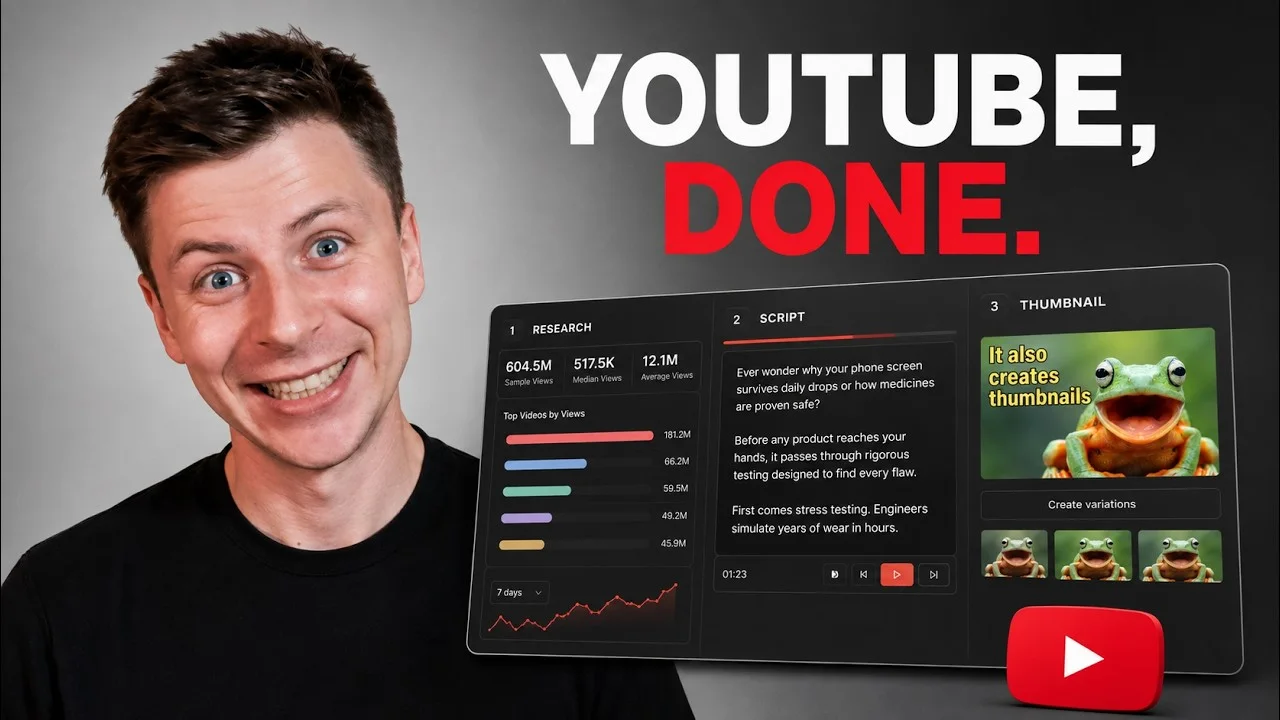
Video: “I built an AI YouTube tool and open-sourced it” by Agrici Daniel. The privacy-enhanced YouTube player loads only after you activate it. Watch directly on YouTube.
The walkthrough covers the origin, the connected stages, the evidence labels, local workflow history, the script teleprompter, Thumbnail Creator, and the public repository. If you prefer to inspect before installing, start here and keep the GitHub source open beside it.
Listen to the audio edition
This site edition includes a concise narrated summary in Daniel's authorized local 02-warm voice, with an original sample-free music bed mixed beneath the speech. It includes downloadable MP3 audio, English WebVTT captions, and a visible synchronized transcript.
Listen instead
YouTube Pro in one evidence chain
AI-generated audio using Daniel's authorized local 02-warm voice at 1.05 times speech speed. The original sample-free music bed is sidechain-ducked beneath the narration. Duration: 3:01.
Download MP3Download English captions
Read the synchronized transcript
The short version
YouTube Pro gives you one connected project for five jobs:
- Search and compare up to 50 public videos.
- Generate AI Insights from that exact snapshot.
- Turn the evidence into grounded video ideas.
- Write and edit a script, then read it in a teleprompter.
- Build a 16:9 thumbnail from the selected promise and brief.
The important word is connected. Your research does not disappear when you open the script writer. The selected idea, evidence context, script, thumbnail brief, and generated result stay together in a recent local workflow.
The equally important boundary is public. YouTube Pro can inspect returned public metadata and calculate useful proxies. It cannot see your impressions, click-through rate, retention curve, traffic sources, revenue, or viewer satisfaction. Those require owner-authorized analytics or a real publishing test.
Why I built it: good research kept losing its context
The problem was not a lack of tools. It was the handoff between them.
Research happened in YouTube tabs. Notes lived somewhere else. An AI chat produced an idea without retaining the exact source set. The script moved into another editor. Thumbnail prompts began from a blank box. By the time the package was ready, it was hard to answer a basic question: which evidence led to this promise?
That friction shaped the product. YouTube Pro treats a video project as a continuous evidence trail, not five unrelated generators. A search creates a named snapshot. Insights analyze that snapshot. Ideas inherit it. The selected idea becomes the script input. The same promise and thumbnail concept continue into packaging.
This does not make creative judgment automatic. It makes the chain inspectable. You can still disagree with the model, revise the idea, rewrite a section, or start a new workflow. The product's job is to preserve the reasoning context while you do that.
The five-stage workflow at a glance
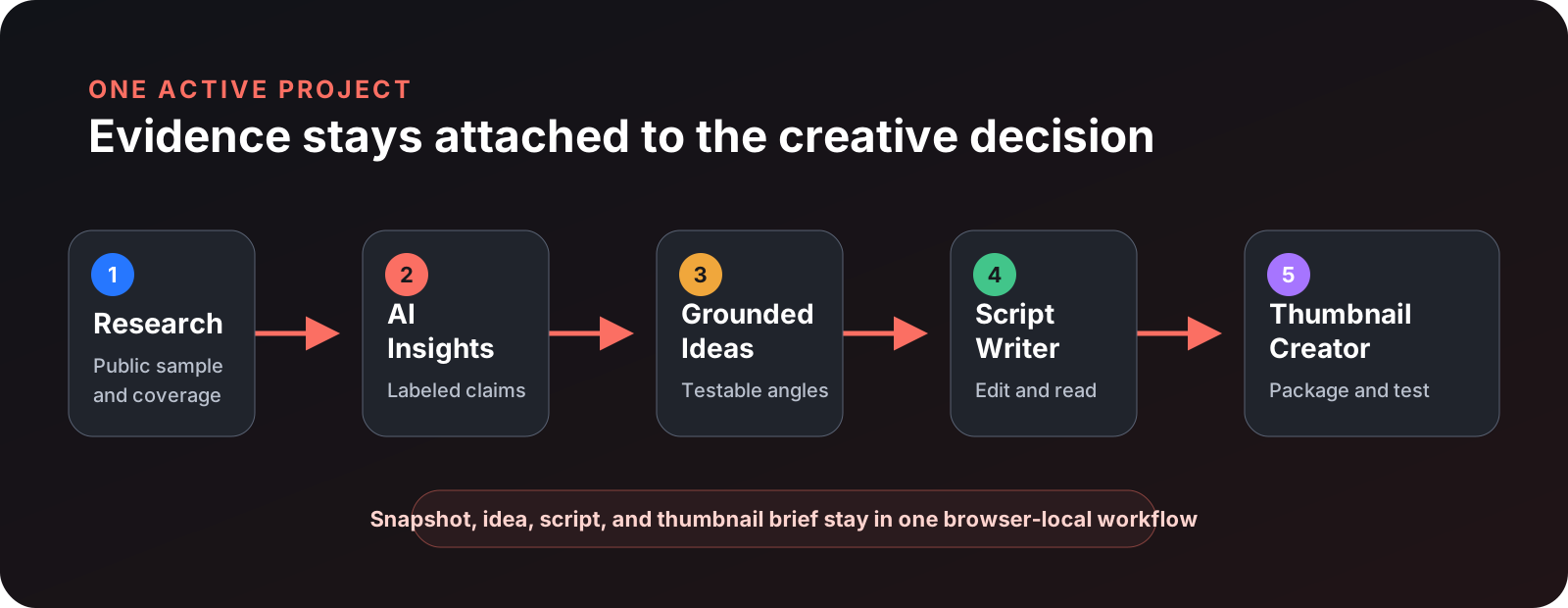
1. Research
Enter a topic, choose filters, and inspect the returned public-video sample. You get overview metrics, publication and duration patterns, momentum proxies, data-coverage warnings, and the source rows used by the analysis.
2. AI Insights
Gemini receives the active ordered snapshot and its deterministic aggregates. The output is a scan-first brief with audience questions, opportunity hypotheses, recommended experiments, and an expandable evidence ledger.
3. Grounded Ideas
Ideas generate after valid Insights. Each one starts from the research package instead of a blank prompt. You select the idea that best matches the intended viewer and honest promise, then explicitly continue to Script Writer.
4. Script Writer
The selected idea becomes an editable script. You can regenerate a section or paragraph within the same bounded evidence context, then switch to a focused teleprompter with pace, size, cue, undo, and playback controls.
5. Thumbnail Creator
The selected promise and thumbnail concept become a practical brief. You can use outcome-oriented presets, adjust controls, add up to three permitted reference images, generate a readable 16:9 image, and create variations.
There is no hidden standalone Ideas product between Research and Script Writer. The current repository workflow contract documents the same five-stage path.
Research starts with a public-data snapshot, not a prediction
YouTube Pro uses the YouTube Data API v3 to search for videos and enrich the returned IDs with public video and channel fields. Depending on availability, that can include titles, descriptions, tags, publication time, duration, views, public likes and comments, channel metadata, caption presence, topic categories, and selected status fields.
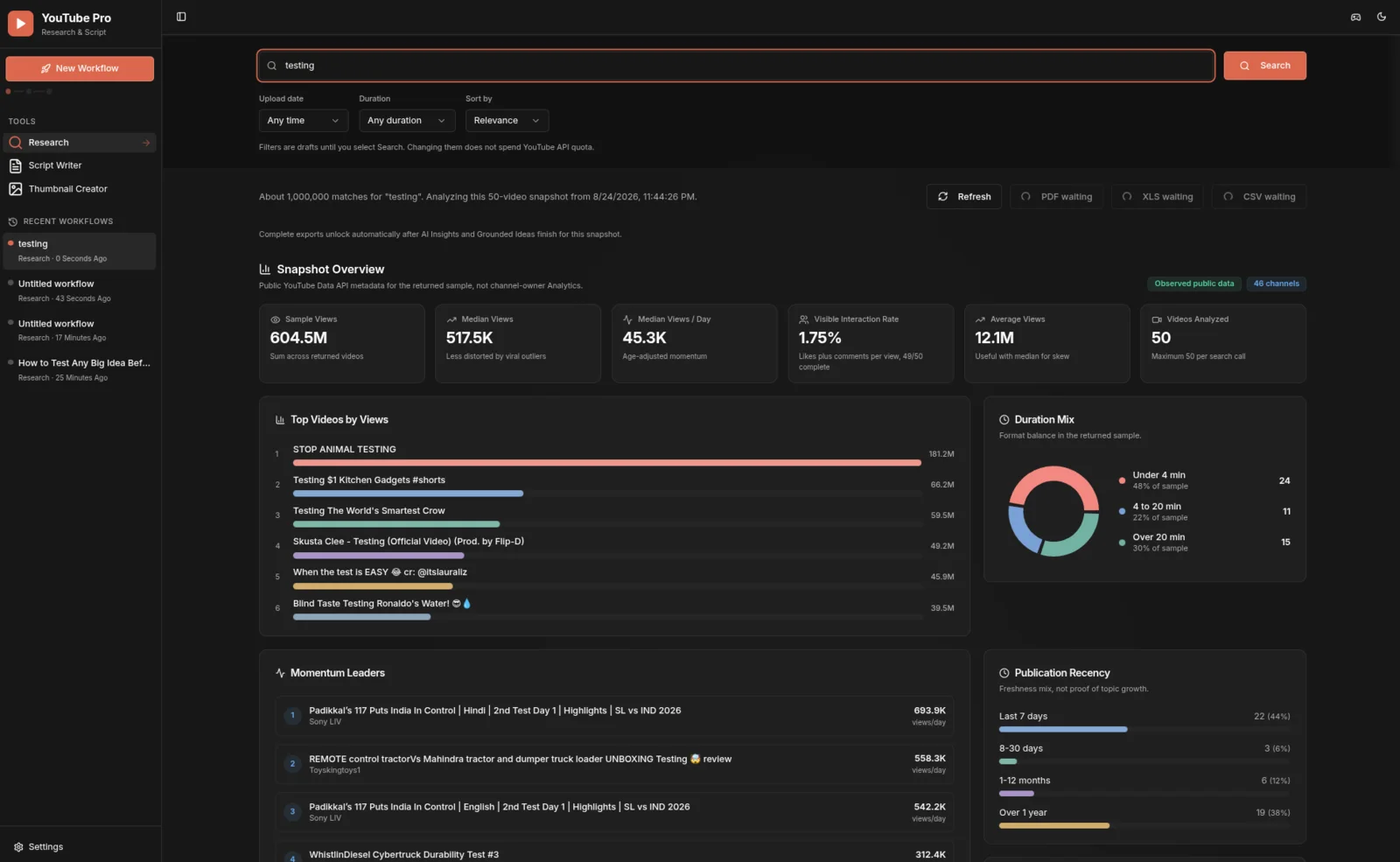
The dashboard then builds deterministic views that help you read the sample without letting one viral result dominate:
- Median and average views appear together because large outliers can distort an average.
- Views per day normalizes public views by video age. It is a momentum proxy, not real-time velocity.
- Visible interaction rate uses public likes plus comments divided by views for complete rows. It is not a complete engagement or satisfaction metric.
- Duration, recency, tags, and channel diversity expose patterns in the returned supply.
- Coverage indicators show where public fields are unavailable instead of silently replacing missing values with zero.
That last behavior matters. A hidden subscriber count and a real zero are not the same fact. Honest analysis preserves the difference.
The sample is also not a census. YouTube Pro accepts between 1 and 50 returned videos per request. The provider's overall result count is approximate, and search behavior can vary with query settings and context. The tool can help you inspect a bounded public snapshot. It cannot convert that snapshot into a universal claim about an entire market.
The official YouTube Data API overview explains the API and key requirement. The video resource documentation shows why some fields are public while others require authorization. YouTube Pro keeps that provider boundary visible in the product instead of smoothing it away in the copy.
Three evidence labels keep the brief honest
AI can make a weak pattern sound final. YouTube Pro addresses that failure mode with three explicit evidence classes.
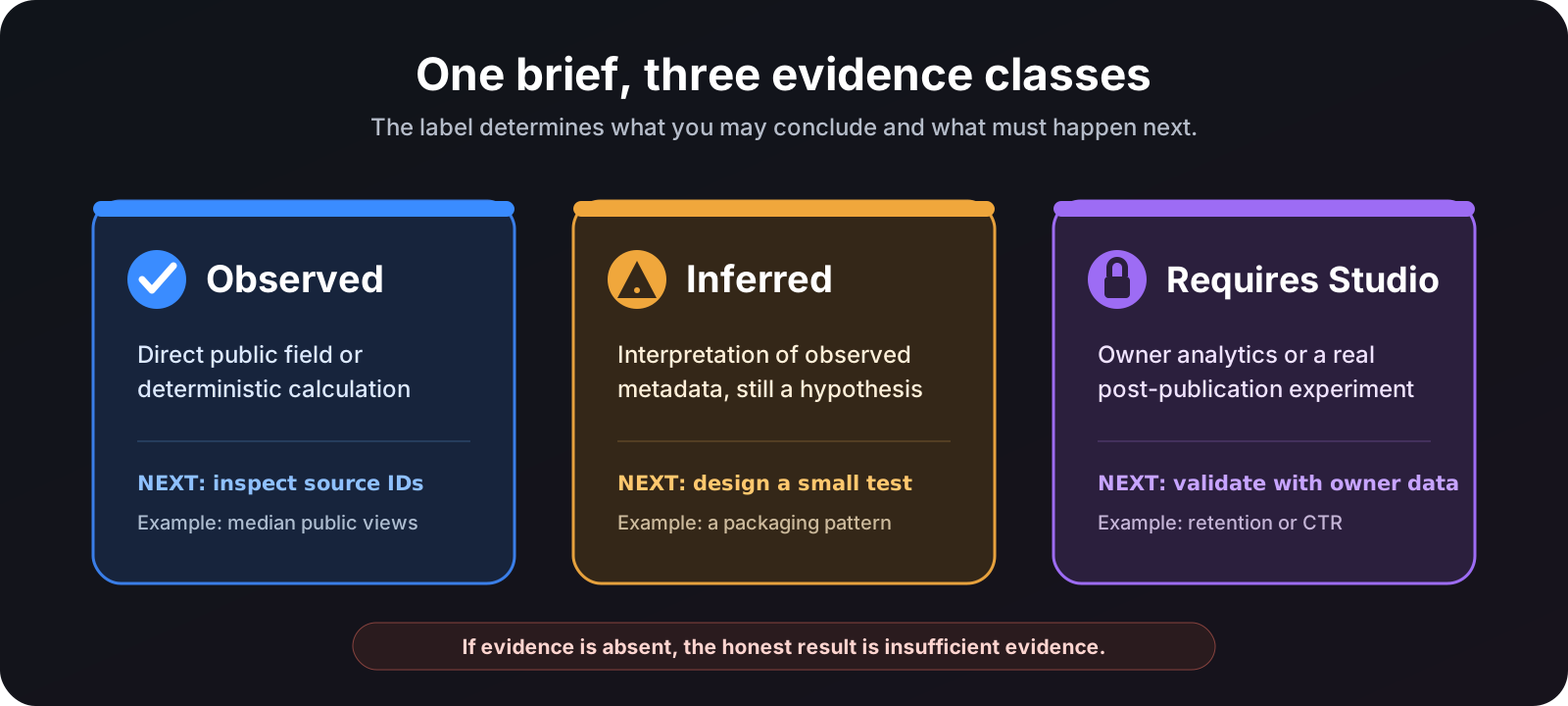
Observed
An observed statement must be directly present in the snapshot or deterministically calculated from it. Source-specific claims retain source video IDs. Snapshot identity travels with the request so an answer cannot quietly cite a different research set.
Inferred
An inferred statement interprets observed metadata. For example, repeated title structures may suggest a packaging pattern. That can be useful, but it remains a hypothesis. Repetition in the public supply does not prove audience demand.
Requires Studio
Some decisions need channel-owner data: impressions, click-through rate, watch time, average view duration, retention, traffic sources, returning viewers, revenue, or private audience dimensions. The YouTube Analytics reporting documentation describes those owner-authorized reports. YouTube Pro names the missing metric instead of inventing it.
When the evidence is absent, the correct output is insufficient evidence. That sounds less magical than a prediction. It is also far more useful when your next action involves weeks of production work.
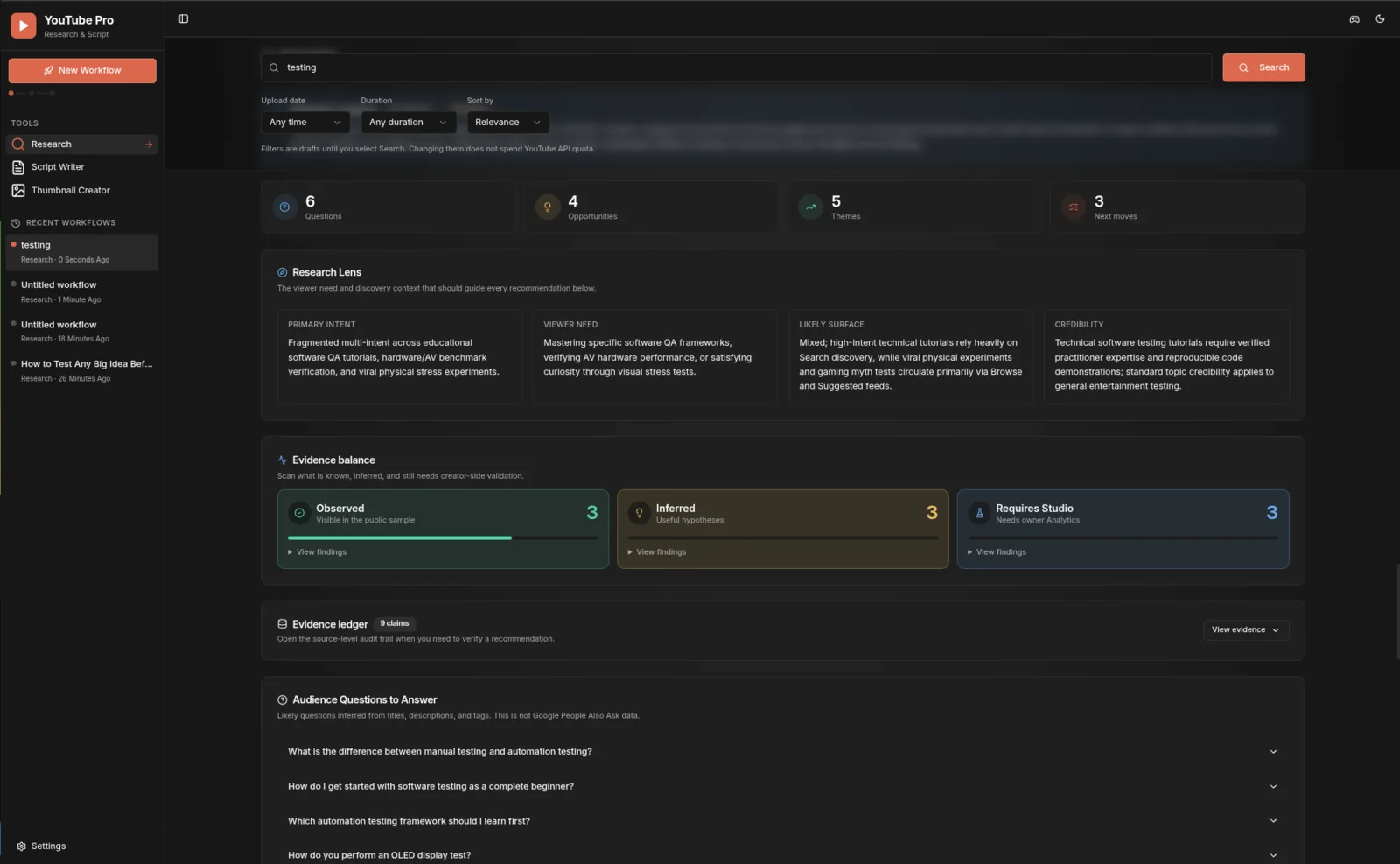
This schema is a guardrail, not a guarantee of model accuracy. You should still inspect the source rows, challenge an inference, and validate owner-only claims after publishing. The benefit is that the interface gives you somewhere concrete to do that.
The evidence chain continues into ideas, scripts, and thumbnails
Many research tools end with a dashboard. Many AI writing tools begin with a blank prompt. YouTube Pro connects those two moments.
After Insights finishes, the app generates grounded ideas from the same research package. A useful idea should name a viewer, an honest outcome, a likely discovery surface, and a packaging direction. You select one before moving forward. That explicit choice is important because a model can offer options, but it should not take over your editorial decision.
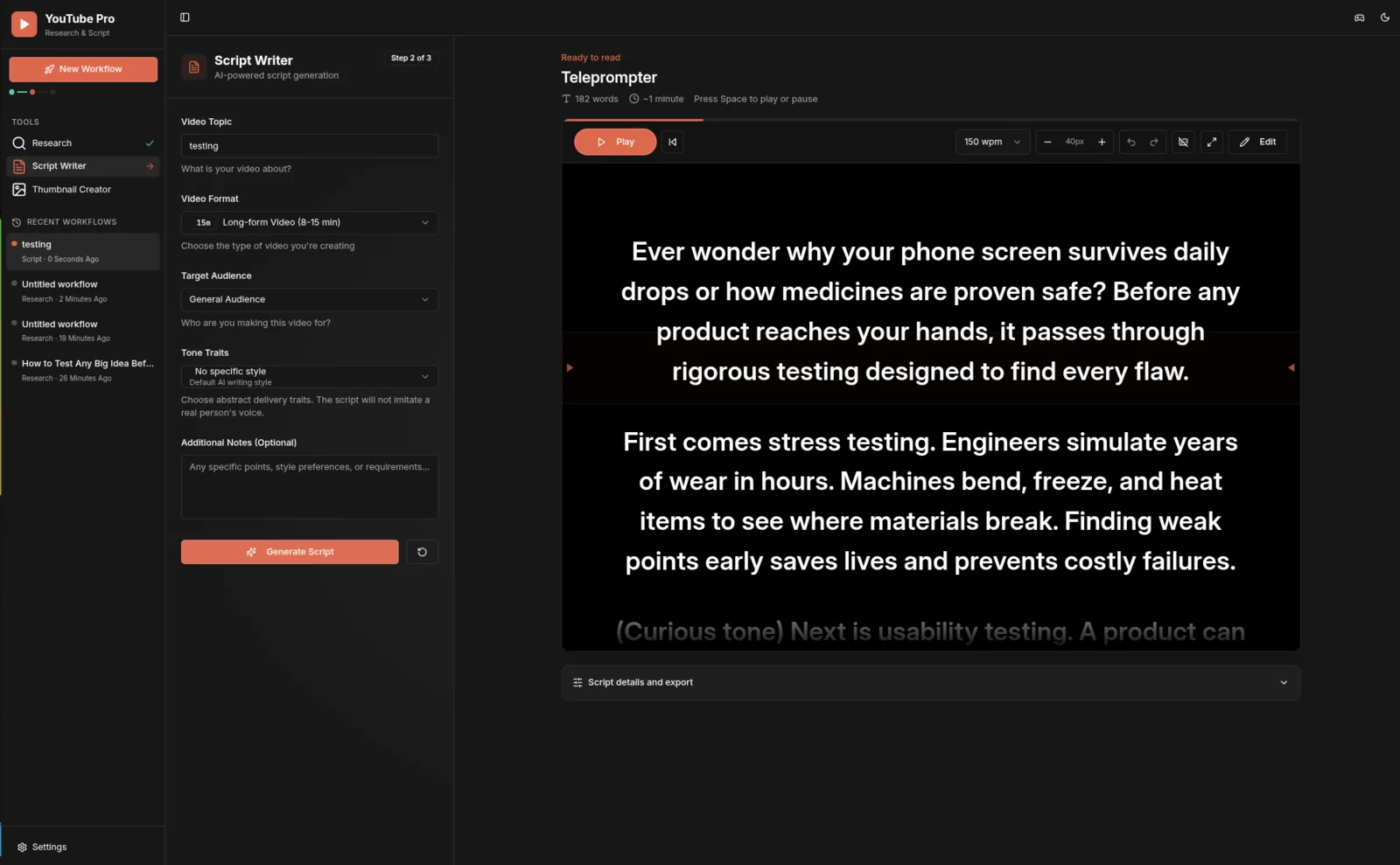
The Script Writer then receives the selected idea and its evidence. You can edit the output directly, regenerate a bounded section or paragraph, and preserve your revisions. The teleprompter turns the final draft into a reading surface without requiring another export.
The Thumbnail Creator completes the package. It starts from the selected promise and thumbnail concept instead of asking you to reconstruct the idea from memory. Optional references are limited and validated, and the browser intentionally does not retain uploaded reference files in workflow history. That means permission and file selection are fresh when you generate again later.
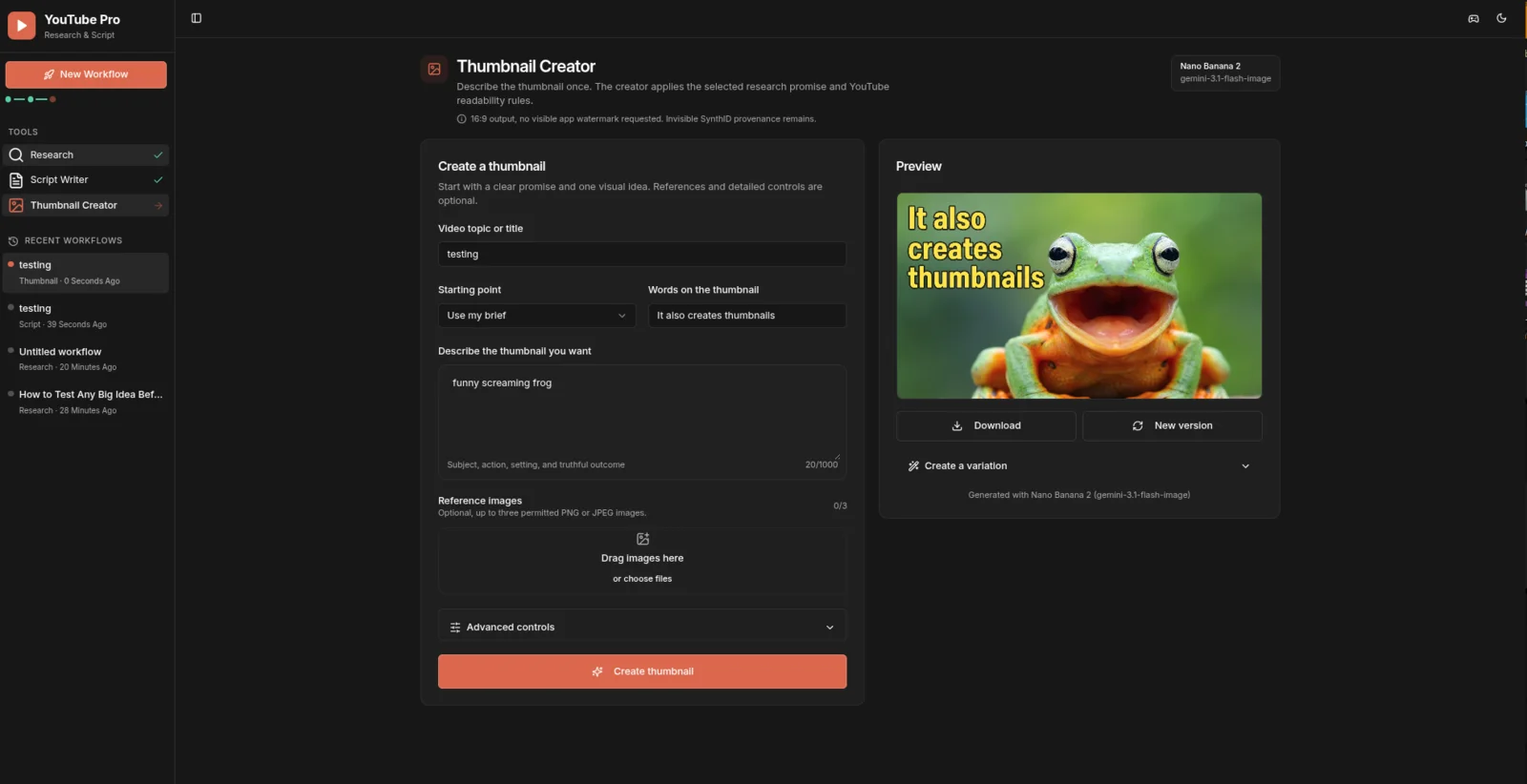
Gemini image outputs include Google's invisible SynthID provenance, according to the official Gemini image-generation documentation. YouTube Pro does not add a visible watermark or claim that SynthID can be disabled.
Packaging still needs a real test. YouTube's native title and thumbnail experiments can compare up to three options and select a winner using watch time, not click-through rate alone. The official YouTube test guide is the right place to confirm the current behavior before planning an experiment.
What YouTube Pro deliberately does not claim
The cleanest way to understand the product is to see its boundaries beside its capabilities.
| YouTube Pro can | YouTube Pro cannot |
|---|---|
| Search and enrich a returned sample of public videos | Measure YouTube search volume |
| Compare public views, age, duration, recency, tags, and visible interactions | Predict the recommendation algorithm or a viral result |
| Calculate age-normalized and coverage-aware proxies | Observe impressions, CTR, retention, watch time, or traffic sources without owner authorization |
| Generate hypotheses tied to one active snapshot | Turn a public sample into a market census |
| Carry research context into ideas, scripts, and thumbnails | Replace creator judgment, rights review, or post-publication measurement |
| Store recent workflow state in the current browser profile | Sync projects to another device or act as a hosted team service |
There is another subtle boundary: public thumbnail URLs do not mean the research model inspected thumbnail pixels. The Research stage evaluates public metadata and patterns. Visual packaging review still needs image analysis or a human eye.
These constraints are not footnotes to hide below the call to action. They define what a responsible research recommendation can be. The project's YouTube Research Playbook documents the same separation between public evidence, hypotheses, and owner-only validation.
Local-first means control of the workflow, not zero network traffic
YouTube Pro runs as a local Node application and binds to 127.0.0.1:5000 by default. There is no product login gate. Your eight most recent workflows live in IndexedDB in the current browser profile. API keys stay in the server environment, and saved key values are not returned to the browser.
That design reduces unnecessary product infrastructure, but it is not an offline claim:
- Research sends requests to the YouTube Data API.
- Insights, ideas, scripts, and thumbnails send bounded requests to Gemini.
- A Google account and provider keys may be needed to use those services.
- Provider quotas, terms, pricing, and availability still apply.
The app also avoids retaining thumbnail reference uploads in workflow history. Research snapshots, ideas, scripts, briefs, and generated results can be restored. The original reference files must be selected again for a later generation.
The local Settings endpoint accepts direct loopback, same-origin requests and rejects normal forwarded or reverse-proxy requests. Billable routes have an in-memory, per-process rate limiter. Those controls match a single-user local default. They do not turn the app into a hardened internet service.
Do not expose it directly to the public internet. The security policy calls for authentication, trusted secret management, shared rate limiting, safe observability, and a deployment-specific threat review before remote use.
Run the public release locally
You need Node.js 20.19 or newer, a YouTube Data API v3 key for Research, and a Gemini API key for the generative stages. The current repository also supports the relevant Node 22 toolchain noted in its README. If provider credentials are new to you, my Google API automation guide explains the broader setup pattern.
git clone https://github.com/AgriciDaniel/youtubepro.git
cd youtubepro
cp .env.example .env
npm install
npm run dev
Add the two keys to your local .env, or start the app and enter them through Settings. Then open http://127.0.0.1:5000.
For a safer first session:
- Start with a narrow topic and a sample small enough to inspect manually.
- Read the coverage notes before the AI brief.
- Open several source rows and challenge one recommendation.
- Choose an idea only after you can state its viewer and promise in one sentence.
- Edit the script in your own voice.
- Treat the thumbnail as a hypothesis to test after publishing.
Open source does not mean provider usage has no cost. Check the current YouTube quota documentation and Gemini pricing for your account before running high-volume workflows.
Who YouTube Pro is for, and who should skip it
YouTube Pro is a strong fit if you:
- Want public competitor and topic research to remain connected to production.
- Prefer transparent evidence labels over a confident black-box score.
- Are comfortable running a local Node application and supplying your own API keys.
- Want editable scripts and thumbnails, not one-click publishing.
- Value open source, inspectable boundaries, and browser-local project history.
It is probably the wrong fit if you:
- Need a hosted multi-user workspace with accounts, permissions, and cloud sync.
- Expect private channel analytics without connecting an owner-authorized account.
- Need a guaranteed performance score or automatic publishing decision.
- Cannot review provider terms, quotas, rights, and generated outputs yourself.
- Want an offline-only application with no external API requests.
That distinction is intentional. YouTube Pro is a focused local creator workspace, not a hidden SaaS, an analytics replacement, or an automatic channel operator.
Public release, verification, and the open-source path
The public v1.0.0 release is pinned to commit 2bacd513c91c8b9cfbe4ae2a4ac4e834ee6dc19a and licensed under Apache-2.0. The release includes the complete workflow, current product screenshots, security guidance, contributor instructions, and automated checks. The release follows the inspectable, source-first distribution approach I explain in my open-source growth case study.
For this article package, I cloned the pinned commit into a separate clean checkout, installed its locked dependencies, and ran npm test, npm run check, npm run build, and an npm audit at the high severity threshold on 2026-08-26. The result was 62 passing tests, a passing TypeScript check, completed client and server builds, and zero reported audit vulnerabilities. The local environment was Node 24.16.0 with npm 11.13.0 on 64-bit Linux. The build also reported a large client-chunk warning and stale Browserslist data, so the result is a completed build, not a claim of perfect optimization.
I separately verified the successful public CI run at the exact release commit. That workflow repeats install, tests, type checking, and the production build on Node 20.19.0. This gives the release a second, public execution record without pretending that passing checks make the application bug-free.
You can inspect the source, issue tracker, release, contribution guide, and security policy on GitHub. If the evidence model or local workflow is useful to you, the best next step is not to trust this article. Open the code, read the boundaries, run a small research project, and try to refute one recommendation.
Frequently asked questions
Is YouTube Pro affiliated with YouTube or Google?
No. It is an independent open-source project. YouTube and Google product names are trademarks of their respective owners.
Does YouTube Pro use private YouTube Studio data?
No. The current Research workflow uses public YouTube Data API metadata. It labels conclusions that need impressions, CTR, retention, traffic sources, revenue, or other owner-only analytics as requiring Studio.
Can it tell me which video will go viral?
No. It can compare a returned public sample and generate testable hypotheses. It cannot predict YouTube's recommendation system, viewer satisfaction, or future performance.
Is the application fully offline?
No. The app and recent workflow history run locally, while Research calls YouTube and generative features call Gemini. Local-first describes the application and storage model, not an absence of network requests.
Where are my API keys stored?
Keys stay in the local server environment. If you save them through Settings, the server writes replacements to the ignored .env file with owner-only permissions and does not return saved values to browser state.
Where are recent projects stored?
The eight most recent workflows are stored in IndexedDB in the current browser profile. They are not synchronized to another browser or device. Uploaded thumbnail references are intentionally not retained.
Do I need both API keys?
Research needs a YouTube Data API v3 key. AI Insights, ideas, scripts, and thumbnails need a Gemini API key. You can start the interface without keys and add them locally in Settings.
Can I host it for a team?
Not safely as-is. The current release is designed for loopback, single-user local use. A remote deployment needs authentication, a trusted secrets path, shared rate limiting, safe observability, and a dedicated threat review.
What license does the project use?
Apache License 2.0. Read the repository's license and notices before redistributing or building a derivative.
Keep the evidence attached to the creative decision
A research tool should not make uncertainty disappear. It should show you what is known, what is inferred, and what experiment closes the gap.
That is the principle behind YouTube Pro. One public snapshot becomes an inspectable brief. One selected idea becomes an editable script. One honest promise becomes a thumbnail to test. The workflow stays together, and the boundary between public evidence and private performance remains visible.
Explore YouTube Pro on GitHub, watch the walkthrough, and run one small topic through the full chain. Keep the idea only if you can trace it back to evidence and state what YouTube Studio must validate next.
About the author
Agrici Daniel built and maintains YouTube Pro. He develops open-source systems for research, SEO, advertising, and content workflows through the AI Marketing Hub community. This article documents his own product and links to the public source so readers can inspect the claims directly.