How I Automate YouTube Keyword Research With One Claude Prompt
By Agrici Daniel | August 18, 2026
I gave Claude one prompt and browser control. It drove my YouTube Data API app, researched SEO, AI SEO, and GEO, and handed me a clean CSV. Zero mouse touches, and the whole setup is reproducible without my app.

On August 18, 2026 I gave Claude one prompt, handed it my Chrome tab, and it ran my entire YouTube keyword research: three keywords (SEO, AI SEO, GEO), every metric my dashboard exposes, and one clean CSV that ended up in Google Sheets. I did not touch the mouse once. The model was Sonnet 5 on high reasoning, driving a real browser through Claude's browser control, against a YouTube Data API app I built on Replit about a year ago and then forgot existed.
This is the kind of task I used to block an afternoon for. Search a keyword, screenshot the results, tab over to a spreadsheet, repeat until my eyes glaze over. Now the workflow is: write one sentence, go make coffee, come back to a spreadsheet. This post is the full setup - the app, the exact prompt, what the data actually said about the GEO hype, and how to build the same thing yourself without my app.
One Prompt, Three Keywords, Zero Mouse Touches
To automate YouTube keyword research end to end, you need two things: a data source (the YouTube Data API) and an agent that can operate a browser (Claude with browser control). I typed one prompt into the Claude sidebar in Chrome, and here is everything it did on its own:
- Opened my YouTube Research Pro app in the active tab
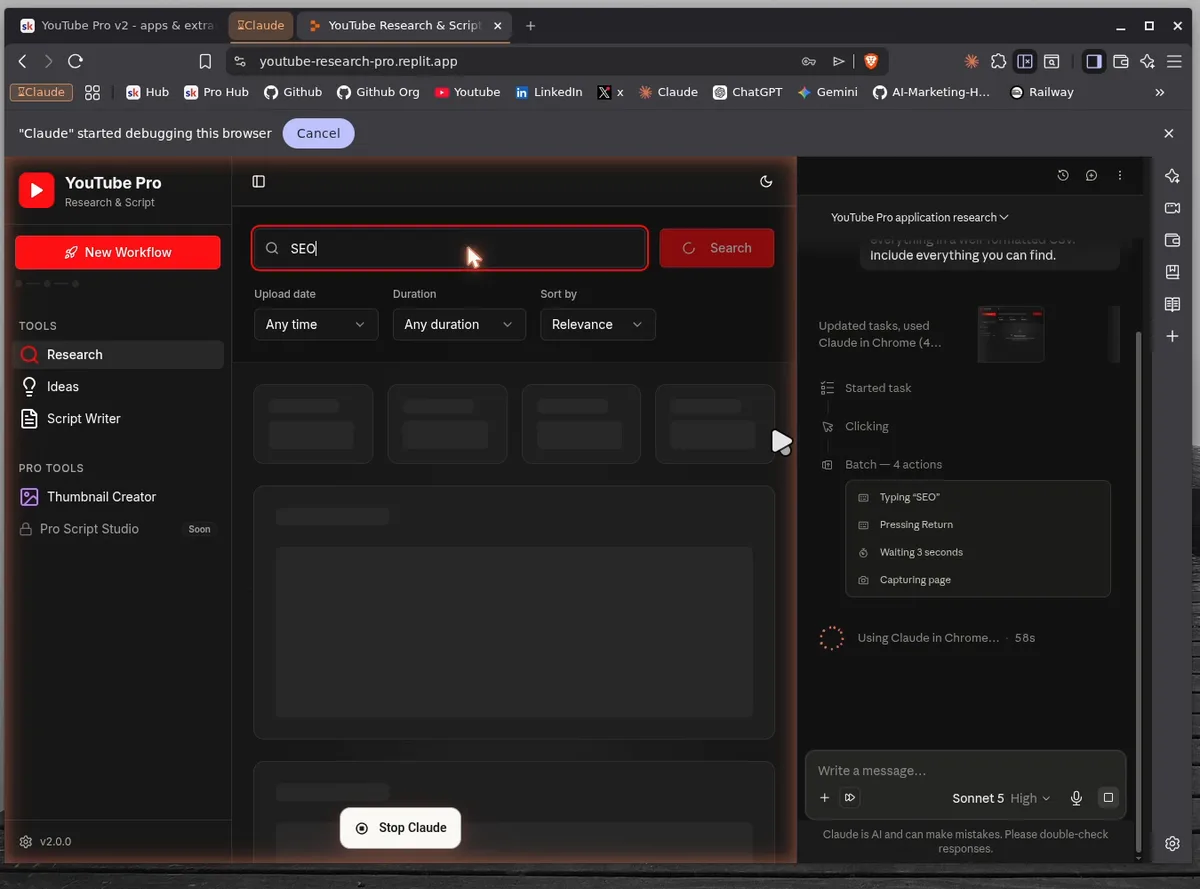
- Typed each keyword into the search field and pressed enter - SEO first, then AI SEO, then GEO
- Waited for the YouTube Data API results and the AI insights to render, then captured the page
- Repeated for all keywords, including the ideas section I did not even ask about
- Compiled everything into one well-formatted CSV, ready for Google Sheets
Start to finish it took roughly 15 minutes, and it ran while I talked through the app on camera. The full 19-minute run is here, uncut, including the part where I test a thumbnail generator I had not touched in half a year:
What Is Claude Browser Control?
Claude browser control (Claude in Chrome) lets Claude operate a real Chrome browser: clicking, typing, scrolling, and reading rendered pages, so it can drive any web app a human can. The difference from an API integration is that nothing needs to be integrated. My app has no MCP server, no webhook, no plugin. It is a password-protected Replit page, and Claude used it exactly the way I do: through the UI, with its own cursor.
That second cursor is the part that still gets me. In the video you can see my mouse and Claude's mouse on screen at the same time, and only one of us is working.
The App Claude Drove: YouTube Research Pro
YouTube Research Pro is a keyword research dashboard I built on Replit around mid-2025. It talks directly to the YouTube Data API, which is why results come back in seconds instead of the scraping-and-praying loop most YouTube tools run on.
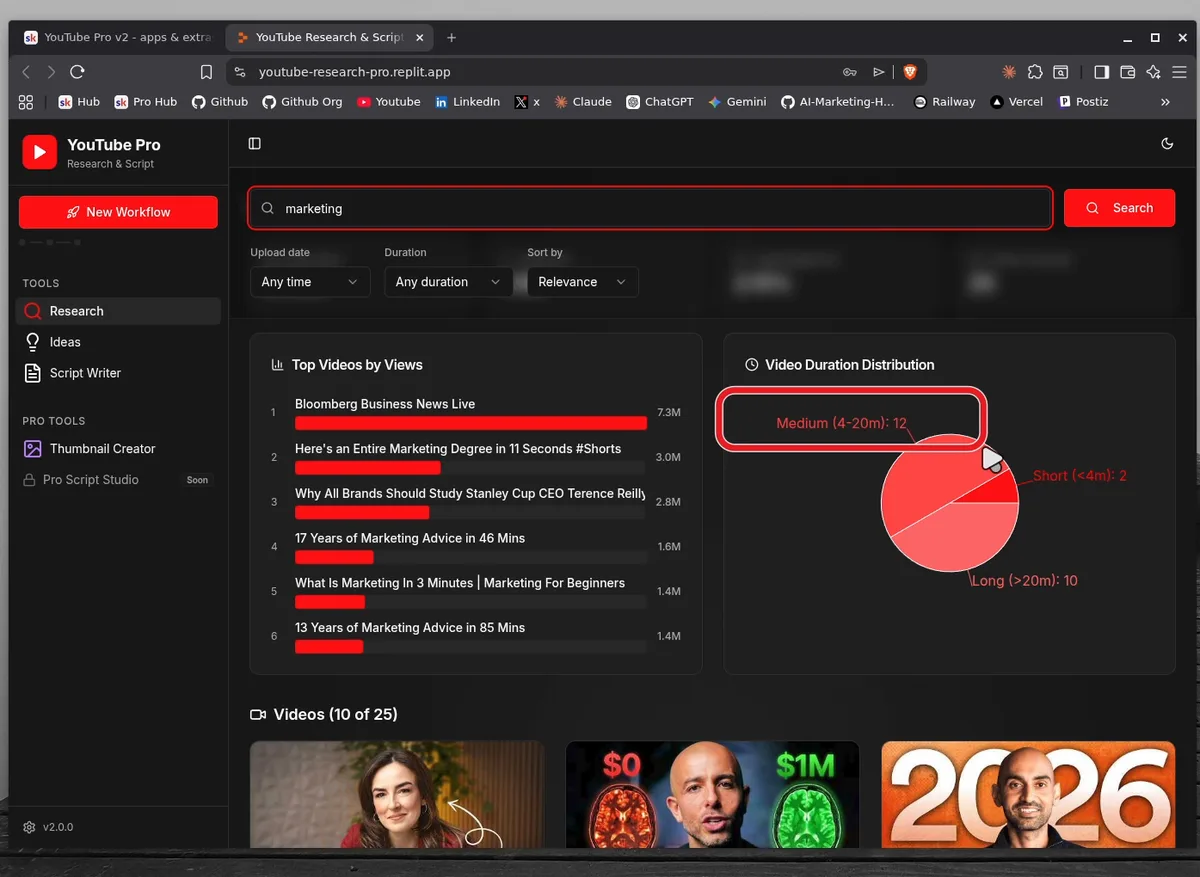
What It Pulls From the YouTube Data API
- Search overview - total results, total views, average views, average engagement, videos analyzed
- Top videos by views - the ranked list you actually compete against, with view counts
- Duration distribution - shorts vs 4-20 minute videos vs long form, so you know the format the niche rewards
- Trending videos - what is moving right now on that exact keyword
The AI Layer
On top of the raw API data there is an insights layer running on Gemini 2.5 Flash: people also ask, niche analysis, target audience, content gaps, and trending subtopics per keyword. From there the app chains into a video ideas generator, a script writer, and a thumbnail generator built on Nano Banana - the same model I covered in my Nano Banana creative direction post. There is also a PDF report export, which still overlaps text in places because I never gave it attention. I left that in the video instead of cutting around it.
The Exact Prompt and Workflow
The Prompt I Gave Claude
Lightly cleaned of my on-camera filler words, this is the whole thing:
Hey there. Can you search for SEO, AI SEO and GEO on this
YouTube Pro application. Just do the research, gather everything
and then put everything in a well formatted CSV.
Include everything you can find.
No system prompt, no tool schemas, no selectors. The app's UI is the API.
Watching Claude Work the Dashboard
Claude batched its actions the way a fast human would: type the keyword, press return, wait three seconds, capture the page. When the AI insights were slow to render, it waited instead of scraping a half-loaded page. It also went one step past my prompt and pulled the generated video ideas per keyword, which I had not asked for but kept.
From CSV to Google Sheets
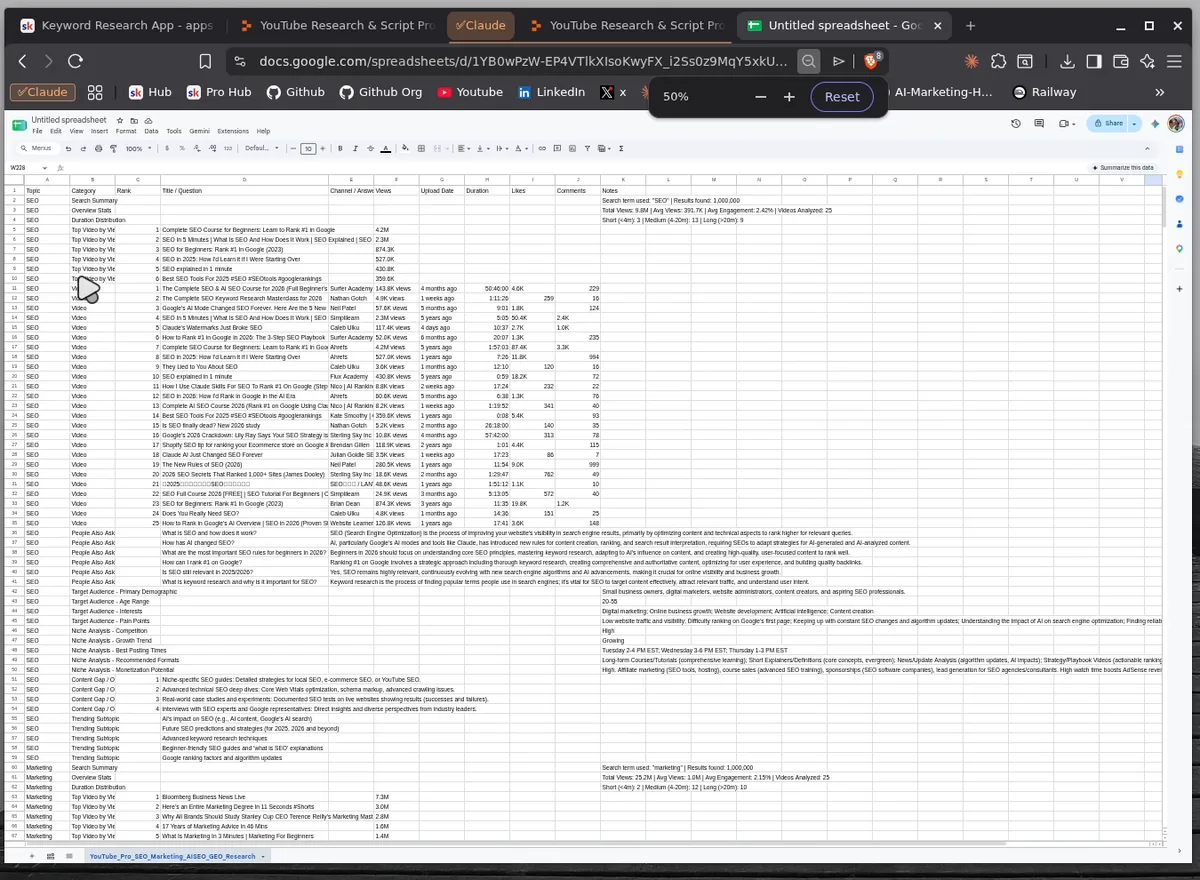
While Claude worked I typed sheets.new, and when the CSV landed I imported it. One sheet, one row per finding: search summaries, overview stats, top videos with views, upload dates, durations, likes and comments, people also ask with full answers, target audience, niche analysis, content gaps, and trending subtopics, for every keyword.
What the Data Says About SEO, AI SEO, and GEO Keywords
My honest take: the GEO and AI SEO wave is real but past its peak, and the space is drowning in scripted, interchangeable content. That is a judgment call, built from reading the people-also-ask, niche-analysis, and content-gap outputs across all three keywords plus a year of watching this niche, not a trend line from one API snapshot. The benchmark numbers I can show side by side come from the top 25 videos analyzed per keyword ("marketing" is from my on-camera demo; the agent run covered SEO, AI SEO, and GEO):
- "SEO" - 1,000,000 results found, 9.8M total views across the top 25, 391.7K average views, 2.42% average engagement
- "marketing" - 1,000,000 results found, 25.2M total views across the top 25, 1.0M average views, 2.15% average engagement
Both keywords report 1,000,000 results because that is the ceiling: the API's totalResults field is an approximation capped at 1,000,000, so read it as "maxed out", not a count.
The medium format dominating both keywords matches what I keep finding across the stack I described in my Claude Code SEO stack post: the boring, reproducible signal beats the hype narrative. The people-also-ask answers for AI SEO read like everyone is holding the same script. If you are entering that niche, the content gap is not another explainer - it is receipts. Show a run, show the data, show what broke.
You Don't Need My App
One prompt to Claude Code or Codex can wire up the YouTube Data API and build this same dashboard. The app took me a weekend a year ago; today it is genuinely a one-prompt scaffold. The recipe:
- Create a project in Google Cloud Console and enable the YouTube Data API v3 (free API key)
- Tell your agent: "call search.list and videos.list for my keyword, aggregate views, engagement and duration, render it as a dashboard"
- Point Claude's browser control at whatever it builds, and ask for the CSV
Quota reality, per Google's current documentation: projects get a default allocation of 100 search.list calls per day plus 10,000 units per day for most other endpoints, and ordinary reads cost 1 unit. Searches are the constrained resource, so cache them. I covered the broader Google API setup, credentials included, in my Google API SEO automation guide.
Why Sonnet, Not Haiku
Haiku would probably have clicked through my app just fine, and faster. I used Sonnet 5 on high reasoning anyway, because research is the step where I want judgment. Clicking a search button is mechanical; deciding that the ideas section is worth scraping even though I forgot to ask for it is not. My rule: route the cheapest model that survives the task, and research tasks deserve one tier more than clicking tasks.
What Happened Next: YouTube Pro Became Open Source
The browser-driven dashboard in this experiment became YouTube Pro, a public local-first workflow from research to thumbnail. Version 1.0.0 connects public-video research, evidence-labeled AI Insights, grounded ideas, an editable script and teleprompter, and a thumbnail creator in one saved project. The source is available under Apache License 2.0, so you can inspect the exact boundaries before running it.
The research half also became YouTube Scout, a free agent skill for YouTube niche research. It skips the browser and calls the YouTube Data API directly, so one 50-video run costs a single search call and writes a ranked workbook with the outliers, comments, and replay peaks.
Per-video owner analytics and video editing remain future work, not features of the current release. The members-only dashboard shown in the original video was a stepping stone. For captions, I was also using CapForge, an open-source local caption generator with word-level alignment and styled rendering.
Frequently Asked Questions
Can Claude control a web browser?
Yes. With browser control (Claude in Chrome), Claude operates a real Chrome tab: it clicks, types, waits for pages to load, and reads what renders, so it can drive any web app a human can. It needs the extension installed and per-site permissions granted. In my run it completed the full research flow without me touching the mouse.
Can you use the YouTube Data API for keyword research?
Yes. The search.list endpoint returns ranked videos and total result counts for any query, and videos.list adds views, likes, comments, and duration for each result. Together that covers demand, competition, engagement, and format split. My app is those two calls wrapped in a dashboard, with an AI insights layer on top.
Is the YouTube Data API free?
Yes, within quota. Per Google's current documentation, projects get a default allocation of 100 search.list calls per day plus 10,000 units per day combined for most other endpoints, and an ordinary read costs 1 unit. For keyword research at my scale, a handful of searches per session, the free tier is plenty.
Which Claude model is best for browser automation?
The cheapest model that survives the task. Haiku clicks fine and is faster for simple flows. I ran Sonnet 5 on high reasoning because research is the step where I want judgment: deciding what the data means is not a clicking task. Match the model to the thinking, not the clicking.
Are GEO and AI SEO keywords still worth targeting?
Worth targeting, carefully. The interest is real but, from what I saw in my August 2026 research run and a year of tracking the niche, past its peak and slowly declining. The space is saturated with scripted, interchangeable content. The opportunity I see is demonstrable workflows with receipts, not another hype explainer about how AI search changes everything.
Related Posts
- YouTube Niche Research in One Command - the open source skill that replaced the browser run with direct API calls
- Google API SEO Automation With Claude Code - the credential setup behind every API workflow on this site, YouTube Data API included
- Claude Code Just Replaced Your Entire SEO Stack - the terminal-first SEO system this research feeds into
- Nano Banana + Claude - the image model behind the thumbnail generator
- AI Marketing Automation: The Open-Source Stack I Use Daily - where the YouTube Studio plan fits
Join 4,500+ AI Marketing Builders
Get workflow templates, automation blueprints, and connect with SEOs, agency owners, and creators who ship.
JOIN FREE →