n8n SEO Automation: Complete Beginner's Guide (2026)
By Agrici Daniel | March 25, 2026
n8n is the most underrated tool in SEO. Here's how to set it up, 5 workflows you can build today, and how I use it to automate 80% of my SEO work.

I've tried every automation tool that exists for SEO. Zapier, Make, custom Python scripts, cron jobs held together with duct tape. n8n is the one I actually use every day, and it's not even close.
It's open source, self-hostable, and has a visual workflow builder that makes complex automations feel almost trivial. I run 23 active workflows on a $5/month VPS, handling everything from rank tracking to content publishing to competitor monitoring. This guide will get you from zero to your first working SEO workflow in about 30 minutes.
By the end, you'll understand how n8n works, have 5 practical workflow blueprints you can copy, and know how it fits into a broader AI-powered SEO stack. Let's get into it.
What Is n8n (And Why SEOs Should Care)
n8n (pronounced "nodemation") is an open-source workflow automation platform. Think of it as Zapier, but you own the infrastructure, there are no per-task limits, and you can build workflows that would cost $500/month on Zapier for literally $5/month on a cheap VPS.
For SEO specifically, n8n is perfect because:
- API-native - SEO runs on APIs (DataForSEO, Google Search Console, PageSpeed Insights, Screaming Frog). n8n connects to all of them natively or via HTTP requests.
- Scheduling - SEO is repetitive. Rank checks, site audits, content monitoring - these need to run on schedules. n8n handles cron triggers out of the box.
- Data transformation - SEO data is messy. n8n has built-in JavaScript/Python nodes for cleaning, transforming, and routing data between systems.
- No task limits - Self-hosted means unlimited executions. Track 10,000 keywords daily without worrying about your Zapier bill.
- Visual debugging - When a workflow breaks (and they will), you can see exactly which node failed and what data it received. This alone saves hours of debugging compared to code-only approaches.
(The name "n8n" stands for "nodemation" which is a portmanteau of "node" and "automation." I know. The naming convention is not its strongest feature.)
Here's the stat that convinced me to go all-in: I run approximately 2,000 automated tasks per day across my n8n instance. On Zapier's Professional plan, that would cost $89/month minimum, and I'd probably hit the 2,000 task cap regularly. On n8n self-hosted, it costs me $5/month for the VPS regardless of how many tasks I run. That's an 18x cost difference for the orchestration layer alone.
Getting Started: Installation in 5 Minutes
The fastest way to get n8n running is Docker. If you have Docker installed (and if you're reading this, you probably should), it's one command:
docker run -it  - rm \
   - name n8n \
  -p 5678:5678 \
  -v n8n_data:/home/node/.n8n \
  docker.n8n.io/n8nio/n8n
Open localhost:5678 in your browser. That's it. You have a running n8n instance. For production, you'll want to add persistent storage and a reverse proxy, but for learning, this is all you need.
For a more permanent setup, I recommend a small VPS (Hetzner CX22 at $4.35/month is what I use) with Docker Compose:
version: '3.8'
services:
  n8n:
    image: docker.n8n.io/n8nio/n8n
    restart: always
    ports:
      - "5678:5678"
    environment:
      - N8N_BASIC_AUTH_ACTIVE=true
      - N8N_BASIC_AUTH_USER=admin
      - N8N_BASIC_AUTH_PASSWORD=your-secure-password
      - WEBHOOK_URL=https://your-domain.com/
    volumes:
      - n8n_data:/home/node/.n8n
volumes:
  n8n_data:
Set up a Cloudflare tunnel or Caddy reverse proxy, and you've got a production-ready automation server for under $5/month.
A few notes on the VPS setup that I learned the hard way:
- Give it at least 2GB RAM. n8n itself is light, but when you're running 20+ workflows with data transformations, memory matters. The Hetzner CX22 (2 vCPU, 4GB RAM) is the sweet spot.
- Enable swap space. Even with 4GB RAM, complex workflows with large datasets can spike memory usage. A 2GB swap file acts as insurance.
- Set up automatic backups. Your workflows are your infrastructure. Hetzner's automated backups cost $0.85/month and save your entire server state nightly.
- Use a subdomain like
n8n.yourdomain.cominstead of an IP address. You'll need it for webhook URLs, and it looks more professional in client-facing integrations.
Your First Workflow: The Concepts
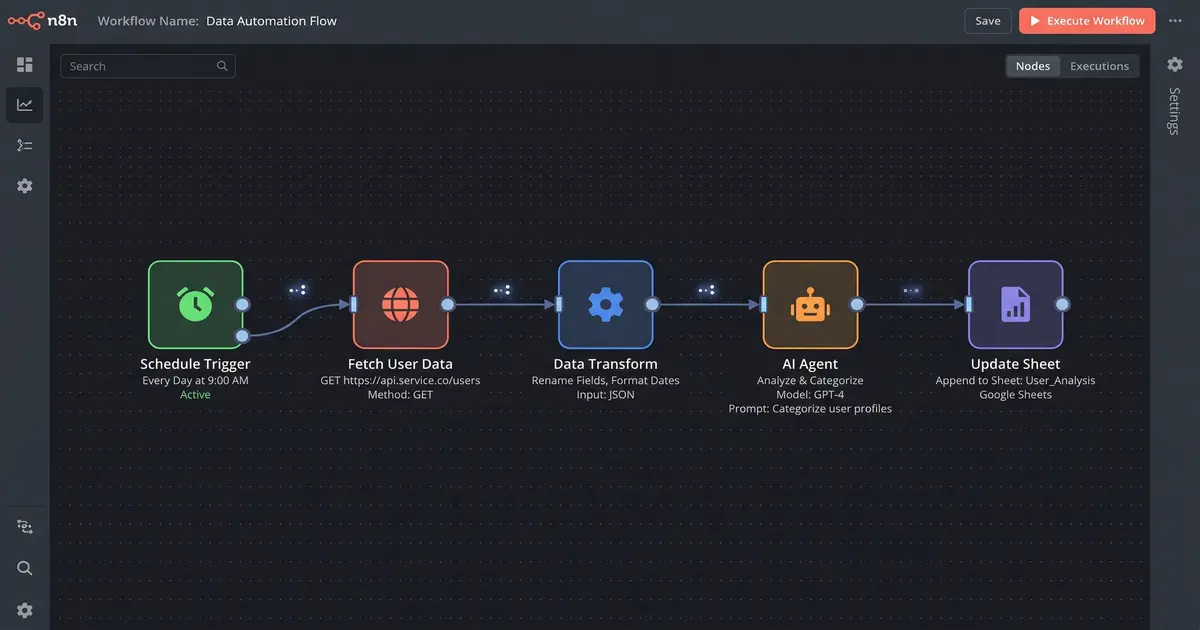
Before we build, let me explain the 4 things you need to understand:
- Triggers - What starts the workflow. Can be a schedule (cron), a webhook (external event), or manual. Every workflow starts with exactly one trigger.
- Nodes - Each step in the workflow. HTTP requests, data transformations, conditionals, integrations. You drag them onto the canvas and configure them.
- Connections - The lines between nodes. Data flows through them. A node can have multiple outputs (like an IF node that branches based on conditions).
- Expressions - How you reference data from previous nodes. Uses
{{ $json.fieldName }}syntax. This is where most beginners get stuck, but the expression editor has autocomplete that makes it manageable.
That's genuinely all there is to it. The visual builder makes the rest intuitive. If you can draw a flowchart, you can build an n8n workflow.
One mental model that helped me: think of each node as a function that receives data, does something with it, and passes the result to the next node. The visual canvas is just a way to wire those functions together without writing the boilerplate code that connects them.
5 Practical SEO Workflows You Can Build Today
1. Automated Rank Tracking with DataForSEO
This is the first workflow everyone should build. It checks your keyword rankings daily and stores the results in a Google Sheet (or database, if you prefer).
How it works:
- Cron trigger - Fires daily at 6 AM
- Google Sheets node - Reads your keyword list from a spreadsheet
- HTTP Request node - Sends each keyword to DataForSEO's SERP API
- Code node - Extracts your domain's position from the results
- Google Sheets node - Writes the rank + date back to the spreadsheet
- IF node - Checks if any keyword dropped more than 5 positions
- Slack node - Alerts you about significant drops
Cost: about $0.002 per keyword check via DataForSEO. Track 500 keywords daily for $1/day - that's $30/month vs. $65+/month for a dedicated rank tracker.
Pro tip: batch your DataForSEO requests. Instead of sending 500 individual API calls, their bulk endpoint lets you send up to 700 keywords in a single request. This is faster, cheaper (bulk pricing), and easier on your n8n server's resources. I batch mine in groups of 100 with a 2-second delay between batches to avoid rate limits.
2. Content Performance Monitoring
This workflow connects to Google Search Console and monitors your content's search performance over time.
How it works:
- Cron trigger - Weekly on Monday
- HTTP Request - Pulls last 7 days of GSC data (impressions, clicks, CTR, position) for all pages
- Code node - Compares current week vs. previous week, calculates deltas
- Filter node - Isolates pages with >20% traffic drop
- Google Sheets node - Logs the declining pages
- Email/Slack node - Sends you a weekly content health report
I use a variation of this that also triggers a claude-seo audit on any page that drops more than 30% week-over-week. The audit runs automatically, identifies the probable cause (content decay, new competitor, algorithm shift), and drafts an update plan. I just review and approve.
The key insight here is the delta calculation. A page dropping from position 3 to position 5 is very different from a page dropping from position 50 to position 55. My Code node weights the alert severity based on both the absolute position and the magnitude of change. Top-10 drops get immediate Slack alerts. Page-2+ drops get logged for weekly review.
3. Competitor Keyword Gap Analysis
Know what your competitors rank for that you don't. Updated weekly, automatically.
How it works:
- Cron trigger - Weekly
- HTTP Request - Hits DataForSEO's competitor analysis endpoint for each competitor domain
- Code node - Cross-references their keywords with yours, identifies gaps
- Filter node - Keeps only keywords with volume >100 and difficulty <40 (the sweet spot)
- Sort node - Orders by estimated traffic value
- Google Sheets node - Writes the opportunities to a "Content Ideas" sheet
(The difficulty <40 filter is my personal preference. Adjust based on your domain's authority. If you have a DR 60+ site, you can go higher.)
I track 5 competitors per client site. Each week, the workflow produces a ranked list of keyword opportunities that I'm not targeting but my competitors are. Over 3 months, this workflow identified 127 keyword opportunities that turned into published content, generating an estimated 15,000 additional monthly organic visits across my managed sites. That's the compound value of consistent automation.
4. Automated Blog Publishing Pipeline
This is where it gets powerful. This workflow takes a keyword, generates a full blog post, optimizes it, and publishes it - with human review in the middle.
How it works:
- Webhook trigger - Receives a keyword + target URL from your content calendar
- HTTP Request - Runs a SERP analysis for the keyword via DataForSEO
- Code node - Analyzes top 10 results: word count, headers, topics covered, content gaps
- HTTP Request - Sends the content brief to Gemini API for first-draft generation
- Code node - Formats the content, adds internal links from your sitemap, optimizes meta tags
- Wait node - Pauses for human review (sends draft via Slack/email for approval)
- HTTP Request - On approval, publishes to your CMS via API
- HTTP Request - Submits the URL to Google for indexing via Indexing API
This is essentially what Rankenstein does, packaged as a product. Read the full walkthrough of how the advanced workflow operates node by node. The workflow template is available in the AI Marketing Hub for Pro members.
The Wait node is critical. I'm a firm believer in human-in-the-loop for content publishing. The automation handles the 80% that's mechanical (research, first draft, formatting, SEO optimization, publishing mechanics). I handle the 20% that requires judgment (tone, accuracy, strategic alignment). This split is what keeps the content quality high while maintaining a publishing cadence that would be impossible manually.
5. Site Health Alerting
Catch issues before they tank your rankings.
How it works:
- Cron trigger - Every 6 hours
- HTTP Request - Checks your sitemap for new/removed URLs
- HTTP Request - Runs PageSpeed Insights on your top 10 pages
- HTTP Request - Checks for 4xx/5xx status codes across critical pages
- IF nodes - Evaluates thresholds: LCP >2.5s, CLS >0.1, any 5xx errors
- Slack/Email node - Fires alerts for anything that fails the checks
This has saved me multiple times. Last month it caught a broken redirect chain on a client's highest-traffic page within 6 hours of it happening. Without the alert, that page would have been returning 404s for days before anyone noticed.
I also added a node that checks the HTTP response headers for unexpected changes - things like a CDN dropping the cache-control header, or a WAF rule accidentally blocking Googlebot's user agent. These are the subtle issues that don't show up in basic uptime monitoring but can destroy your search performance silently.
How I Use n8n with claude-seo and Rankenstein
The real magic happens when n8n orchestrates the Claude Code skills. Here's the actual flow:
- n8n detects an event (new keyword opportunity, ranking drop, content due for update)
- n8n triggers claude-seo via CLI or API to analyze the situation
- claude-seo returns structured data (audit results, content brief, optimization recommendations)
- n8n routes the output to the appropriate next step (content generation, alert, task creation)
- Rankenstein handles publishing if the output is content
n8n is the orchestrator. claude-seo is the intelligence. Rankenstein is the execution layer. Together, they form a closed loop that can run autonomously - I'm just the quality gate in the middle.
The key architectural decision was keeping these layers separate instead of building one monolithic tool. Each layer can be replaced or upgraded independently. If a better orchestration tool than n8n emerges, I can swap it without touching the skills. If I build a better analysis skill, it drops into the same n8n workflows without reconfiguration. This modularity is what makes the whole system maintainable as a solo developer.
Tips for Scaling
Error Handling
Always add error handling nodes to your workflows. APIs fail, rate limits hit, data comes back malformed. Use n8n's built-in error trigger and set up a "dead letter" workflow that catches and logs all failures. I have one Slack channel that receives every workflow error - it's the first thing I check each morning. On average, I see 2-3 errors per day out of 2,000 tasks. That's a 99.85% success rate, which is good enough for SEO automation where most tasks can simply be retried.
Scheduling
Don't run everything at the same time. Stagger your workflows throughout the day. I run rank tracking at 6 AM, content monitoring at 9 AM, competitor analysis at noon, and site health checks every 6 hours. This spreads the API load and makes debugging easier. It also means I get a steady stream of insights throughout the day instead of everything landing in my inbox at once.
Webhook Triggers
For anything that needs to happen in real-time (new content published, form submission, GSC anomaly), use webhooks instead of cron. n8n's webhook nodes give you a URL that triggers the workflow instantly. Much more responsive than polling. I use webhooks for the content publishing pipeline (triggered from our editorial calendar) and for site health alerts that come from external monitoring services.
Version Control
Export your workflows as JSON and commit them to Git. n8n makes this easy with its export feature. I keep all my workflow JSONs in a private repo and deploy changes via a simple script. Treat your workflows like code, because they are code. I've been burned exactly once by losing a workflow to a server migration. Never again.
Environment Variables
Never hardcode API keys or credentials in your workflows. Use n8n's credential system for built-in integrations, and environment variables for custom HTTP requests. This makes it safe to version-control your workflows (no secrets in Git) and easy to move between development and production instances.
Common Mistakes I Made (So You Don't Have To)
- Not handling pagination. DataForSEO returns paginated results. My first rank tracking workflow only checked the first page of SERP results, which meant any keyword ranked below position 10 showed as "not found." Embarrassing.
- Running workflows too frequently. Checking rankings every hour doesn't give you more insight than checking once a day. It just burns through your API budget 24x faster. Match your schedule to the actual rate of change.
- Not deduplicating alerts. Without deduplication, the same issue triggers a new Slack message every 6 hours. I now track alert state in a simple Google Sheet - if an issue was already reported and not resolved, it appends to the existing thread instead of creating a new one.
- Ignoring timezone issues. My VPS is in UTC. DataForSEO's data is timestamped in UTC. But GSC data has a 2-day lag and uses the property's timezone. My week-over-week comparisons were off by a day until I accounted for this. Small thing, but it made my data unreliable.
Resources
- My YouTube channel (@AgriciDaniel) - I'm building out tutorial content for each of these workflows, with screen recordings of the actual build process
- AI Marketing Hub on Skool - The community where people share their n8n + SEO setups. Also check out the full AI marketing automation stack to see how n8n fits the bigger picture. Free tier available. This is where you'll find people running similar workflows who can help troubleshoot.
- Rankenstein templates - Pre-built n8n workflows for SEO, available to Pro members ($88/month). These are production-tested workflows that you import and configure in 20 minutes.
- n8n official docs - docs.n8n.io is genuinely excellent documentation. Start with the "Getting Started" guide and the "Building Your First Workflow" tutorial.
- DataForSEO API docs - You'll spend a lot of time here. Their docs are thorough, and their support team is responsive if you hit edge cases.
- n8n community forum - community.n8n.io has answers to most common questions. Search before asking.
FAQ
Do I need to know how to code?
Not really. n8n's visual builder handles 90% of what you need. For the other 10% (data transformation, custom logic), basic JavaScript helps. But you can get surprisingly far with just drag-and-drop nodes. If you can write a Google Sheets formula, you can handle n8n expressions.
How much does DataForSEO cost?
Pay-per-use. SERP checks are about $0.002 each. A typical setup tracking 500 keywords daily runs about $30/month. Compare that to Ahrefs at $249/month for similar data. They have a free tier for testing with limited requests, which is enough to build and validate your first workflow.
Can I use this for client work?
Absolutely. I run workflows for multiple client sites from one n8n instance. Each client gets their own set of workflows and data sources. There's no per-seat or per-site pricing - it's your server, run whatever you want on it. Some agency owners in the Hub manage 30+ client sites from a single n8n instance.
What about n8n Cloud vs. self-hosted?
n8n Cloud starts at $24/month and is fine for getting started. But self-hosted gives you unlimited executions, full control, and costs $5/month on a VPS. For SEO automation where you might run thousands of tasks daily, self-hosted pays for itself immediately. My recommendation: start with n8n Cloud to learn, then migrate to self-hosted once you have 5+ workflows running.
Is this better than Python scripts?
For most SEO workflows, yes. n8n gives you visual debugging, built-in scheduling, error handling, and integrations without writing boilerplate. I still use Python for heavy data analysis, but for workflow orchestration, n8n wins every time. The visual nature also makes it easier to hand off workflows to team members who aren't developers.
How do I get started with Rankenstein?
Rankenstein v7 and v8 are available on Gumroad. They're n8n workflow packages that you import into your instance. The setup guide walks you through configuration in about 20 minutes. If you want hands-on help, the Pro tier in the AI Marketing Hub includes setup support and screen-share onboarding sessions.
What if n8n goes down?
This is why I run it on a VPS with Docker restart policies and automated backups. In 4 months of daily use, I've had exactly 2 unplanned downtimes - both caused by VPS provider maintenance, not n8n itself. Each lasted under 30 minutes. For SEO automation where most tasks are daily, a 30-minute outage is a non-event. But if uptime is critical for your use case, consider running a secondary instance or using n8n Cloud as a backup.
Related Posts
- How I Built an AI SEO Content System in n8n - Full walkthrough of the Rankenstein n8n workflow, node by node
- AI Marketing Automation: The Open-Source Stack I Use Daily - The full open-source AI marketing stack at $50/month
- Claude Code Just Replaced Your Entire SEO Stack - How I replaced $300/month in SEO tools with one terminal command
Join 4,500+ AI Marketing Builders
Get workflow templates, automation blueprints, and connect with SEOs, agency owners, and creators who ship.
JOIN FREE →