How to Do a Full SEO Audit With Claude Code (Free, Multi-Agent Walkthrough)
Install Claude SEO in three commands, run /seo audit with parallel specialist agents, and get a 0 to 100 score, impact-sorted fix plan, and PDF report. Tested live on two real sites.

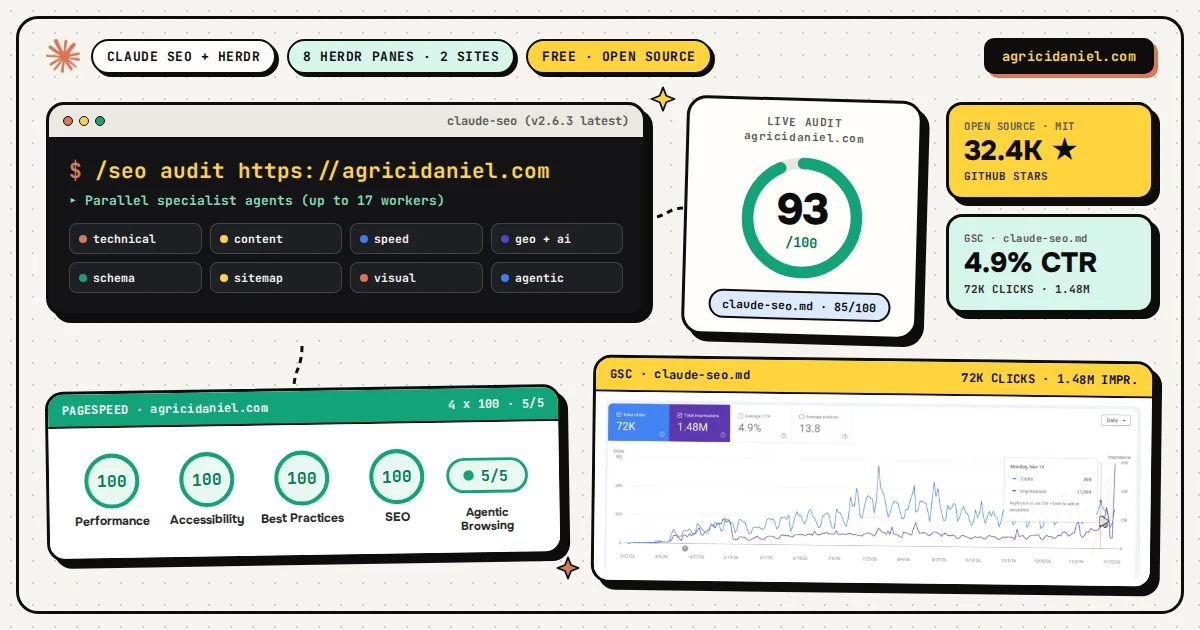
To run a full SEO audit with Claude Code, install my free MIT-licensed plugin Claude SEO in three commands (/plugin marketplace add AgriciDaniel/claude-seo, /plugin install claude-seo@agricidaniel-claude-seo, and /seo setup), then run /seo audit https://yoursite.com. Inside one session, specialist agents crawl your sitemap and pages, check Core Web Vitals, validate JSON-LD schema, test AI crawler access and Lighthouse Agentic Browsing, and write three local files: a 0 to 100 weighted health report (FULL-AUDIT-REPORT.md), a fix plan sorted by impact (ACTION-PLAN.md), and a shareable PDF report.
In this walkthrough, I ran the audit live on two real websites at the same time using eight herdr agent panes inside Obsidian with herdr. My personal site, agricidaniel.com, scored 93/100 (exact weighted score 92.86 across 57 sitemap URLs). The project documentation site, claude-seo.md, scored 85/100 (exact weighted score 85.19 across 96 crawled URLs, executed by 12 specialist subagents). The live two-site walkthrough ran on claude-seo v2.6.2 on 2026-11-26 (with v2.6.3 shipping right afterward with 36 community fixes), cross-checked against my 2026-11-25 verification run and official search documentation fetched on 2026-11-26.
At a glance: verified numbers from the 2026-11-26 run
- 3Commands to install in Claude Code
- 29 / 20Sub-skills and specialist agents (up to 17 parallel)
- 32.4KGitHub stars (3,953 forks, MIT)
- 93 / 100agricidaniel.com live audit (57 URLs)
- 85 / 100claude-seo.md live audit (96 URLs)
Watch the full 47-minute walkthrough
If you prefer to watch the agents crawl both sites live while I walk through every concept, play the companion video below (47:46). Everything on screen is live, including real Google Search Console data from claude-seo.md and the unedited audit outputs.
Video chapters (47:46): 0:00 Intro · 1:15 Live audit setup · 3:41 Search answers first · 4:29 Install in 3 commands · 5:54 Google in 4 steps · 9:25 Five audit layers · 12:26 Fix by impact · 15:41 Core Web Vitals · 17:53 Schema JSON-LD · 19:39 robots.txt and llms.txt · 26:31 Agentic Browsing · 32:30 Keywords and PAA · 35:58 Full audit and score · 45:21 Finished two-site PDF
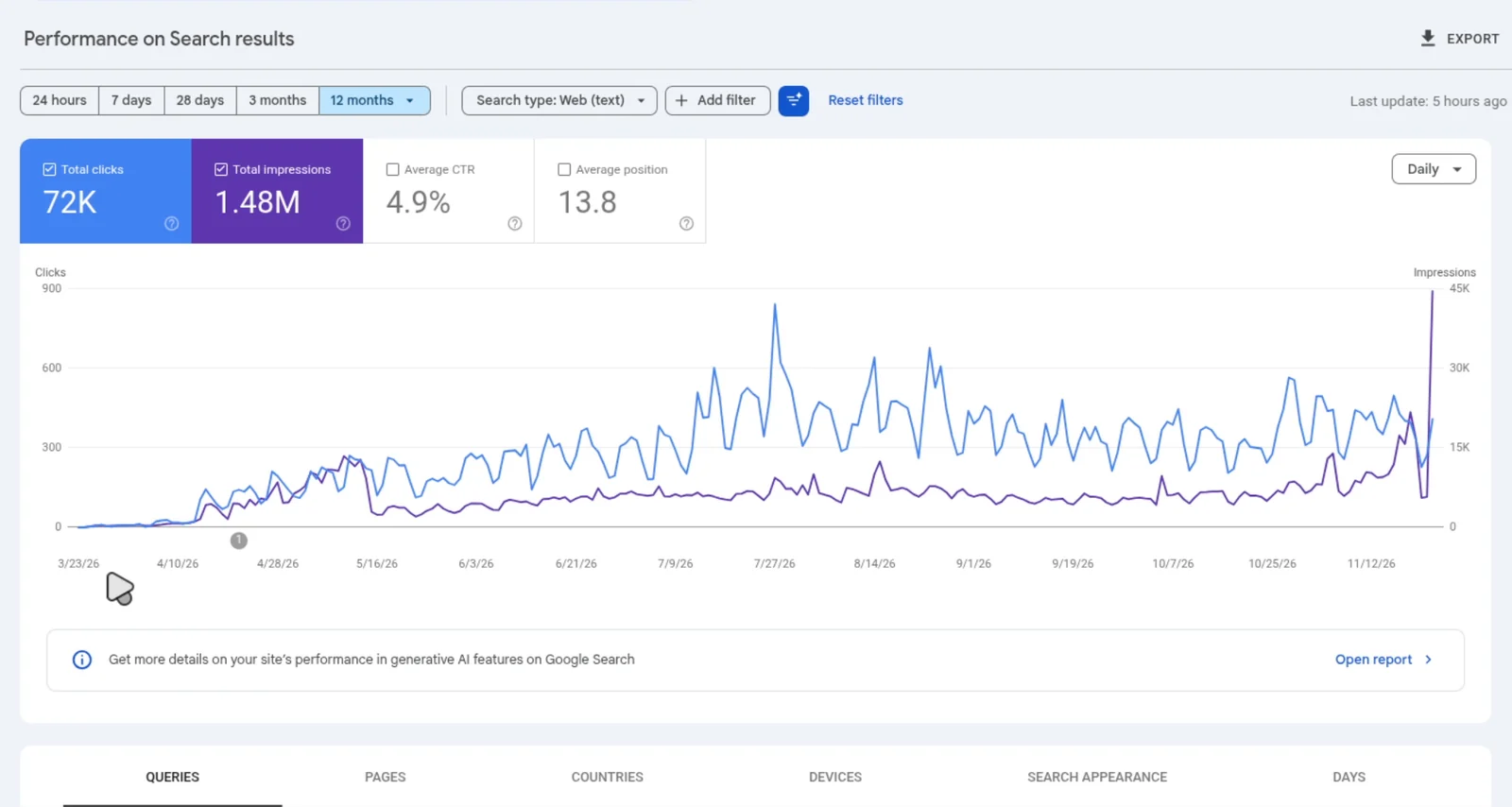
Before running any audit, I start with a baseline. Below is the 12-month Google Search Console chart for claude-seo.md captured during the walkthrough: 72K clicks, 1.48M impressions, 4.9% average CTR, and 13.8 average position from March 23 to November 2026. These are first-party numbers from my own documentation site, shown to demonstrate how I track changes over time, not a promise of results on any other site.
Install Claude SEO in three commands
Before you start (5 minutes): Claude SEO itself is free and MIT-licensed, but it runs inside Claude Code, which requires a Claude Pro or Max subscription or an Anthropic API key. Make sure Claude Code (1.0.33 or newer) and Python (3.11 to 3.14) are installed first. New to Claude Code? Start with my full Claude Code system tour or browse the Claude Code for SEO hub.
Most "AI SEO audit" guides tell you to paste raw HTML into a chat box and ask for tips. That misses redirect chains, broken HTTP status codes, JavaScript rendering gaps, real Core Web Vitals, and cross-page canonical conflicts. An audit agent needs real local scripts and a headless browser.
Claude SEO requires Claude Code 1.0.33 or newer and Python 3.11 to 3.14. Inside Claude Code, run three commands to install the plugin and build its isolated runtime:
/plugin marketplace add AgriciDaniel/claude-seo
/plugin install claude-seo@agricidaniel-claude-seo
/seo setup
Then verify the environment and start your first audit:
/seo doctor
/seo audit https://example.com- Marketplace install: Pulls the latest MIT-licensed release (
v2.6.3, published2026-11-25T23:14:00ZUTC on GitHub and dated2026-11-26inCHANGELOG.md, with 36 community fixes and HTTPS install forseo-cockpit; the live video run recorded right before that release usedv2.6.2). The plugin ships 29 sub-skills, 20 specialist agents (up to 17 parallel), and 30 core and extension commands grouped in the GitHub README (with additional extension commands indocs/COMMANDS.md, whichclaude-seo.mdcounts as 36 commands and 11 optional extensions). /seo setup: Creates an isolated Python virtual environment and installs headless Chromium for JavaScript rendering and screenshots without modifying your system Python packages./seo doctor: Checks runtime readiness without mutating your machine. Running it first prevents mid-audit failures from missing browsers or expired API tokens./seo audit <url>: Detects your site type (SaaS, publisher, e-commerce, local, or agency), crawls up to 500 pages respectingrobots.txtby default, fans out parallel specialist agents, and writes local Markdown, JSON, and optional PDF reports.
If you want to run a single focused pass instead of a full site audit, use the direct sub-commands shown in the video:
/seo technical https://example.com
/seo google pagespeed https://example.com
/seo schema https://example.com
/seo agentic https://example.com
/seo geo https://example.com
On Windows, macOS, or Linux, you can also clone the repository and inspect install.sh or install.ps1 before running it rather than piping a remote script straight to your shell. To run multiple Claude Code sessions across two domains side by side inside Obsidian, I used herdr for Obsidian.
How Google works in four steps (and why AI search still starts here)
Search interfaces have shifted: Google AI Overviews, AI Mode, ChatGPT, and Perplexity often summarize an answer before showing links. That tempts people to skip crawl and index checks and jump straight to "AI optimization."
Google's own documentation makes clear why that order fails. In How Google Search Works, Google documents three core stages (Crawling, Indexing, and Serving search results), noting that not all pages make it through each stage. In the walkthrough, I split "Serving" into two practical checks (Rank and Show) so you can see where a page breaks:
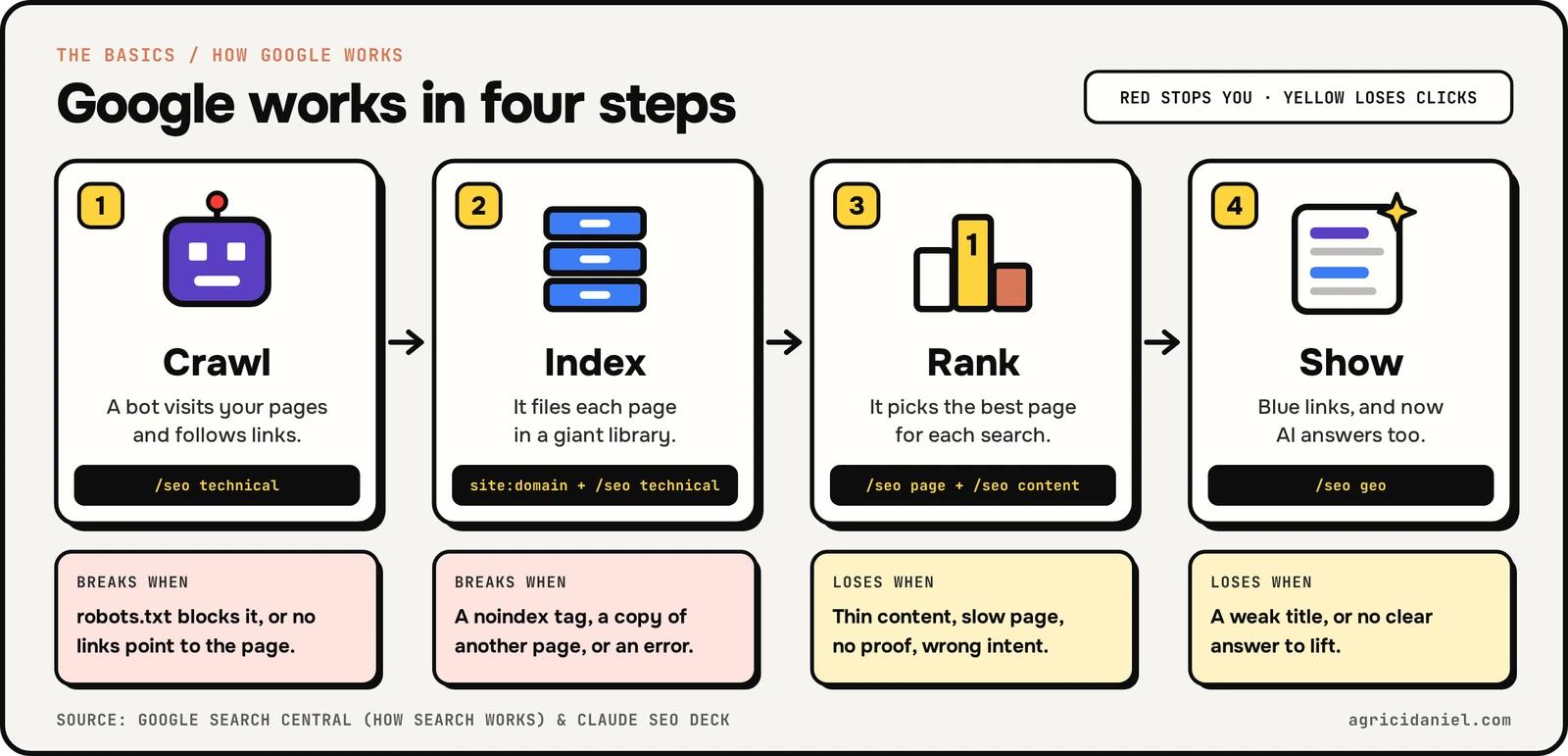
- Crawl: Automated crawlers discover URLs and fetch HTML, images, and scripts. If
robots.txtblocks a section or no internal links reach a page, crawling stops. - Index: Google parses the fetched content and files it in its index. A stray
noindextag, duplicate canonical pointing elsewhere, or 5xx server error blocks indexing. - Rank: Google's systems evaluate relevance, content quality, speed, and trust signals to pick the strongest pages for a query.
- Show: Google renders your page as a blue link, rich result, AI Overview citation, or AI Mode source. Weak titles or buried answers lose clicks and citations.
In AI Features and Your Website (fetched 2026-11-26), Google states plainly: "The best practices for SEO remain relevant for AI features in Google Search (such as AI Overviews and AI Mode)." If a page fails step 1 or step 2, no AI feature can cite it.
The five layers of an SEO audit and the fix-by-impact rule
A common mistake after running any audit tool is opening a list of 90 warnings and fixing whichever ticket looks easiest, like tweaking image alt text while half your product pages return a soft 404 or point canonical tags at the homepage.
I group every audit into five stacked layers and enforce one rule: build and fix from the bottom up.
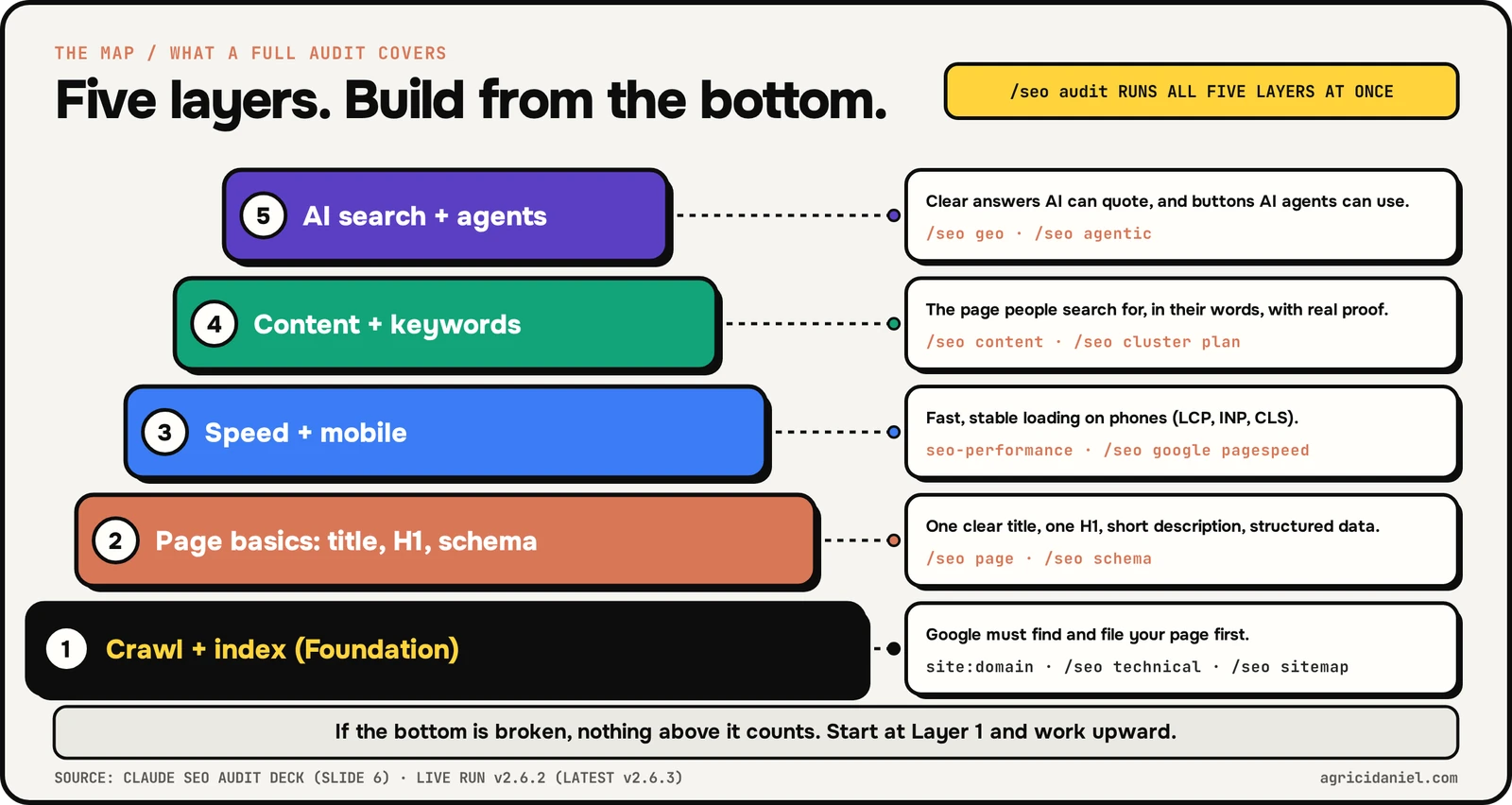
| Layer | What it covers | Claude SEO command | What breaks if skipped | Fix priority |
|---|---|---|---|---|
| 1. Crawl + index | robots.txt, XML sitemap, HTTP status codes, redirects, canonicals, noindex, HTTPS |
/seo technical, /seo sitemap |
Search engines and AI crawlers never fetch or store the page | Critical (first) |
| 2. Page basics: title, H1, schema | Unique titles, single H1, meta descriptions, valid JSON-LD matching visible text | /seo page, /seo schema |
Ambiguous topic signals, truncated snippets, missed rich results | High |
| 3. Speed + mobile | Core Web Vitals (LCP, INP, CLS), mobile viewport fit, image sizing, render-blocking CSS | /seo google pagespeed, /seo images |
Poor mobile experience and layout shifts that break human clicks and AI agents | High / Medium |
| 4. Content + keywords | Search intent alignment, E-E-A-T evidence, topical hubs, internal links, PAA answers | /seo content, /seo cluster, /seo sxo |
Thin or cannibalizing pages that never earn rankings or trust | Medium |
| 5. AI search + agents | AI crawler policy, direct quotable answers, llms.txt, Lighthouse Agentic Browsing |
/seo geo, /seo agentic |
Missed citations in AI answers and broken UI flows for browsing agents | Medium / Low |
When /seo audit writes ACTION-PLAN.md, it sorts every finding into Critical, High, Medium, and Low buckets so you fix blockers before polishing details.
Speed and Core Web Vitals (lab tests vs real user data)
Speed audits confuse people because Lighthouse shows two different datasets on the same screen: field data (real Chrome users over the past 28 days from the Chrome UX Report, CrUX) and lab data (a single simulated run on a throttled device).
According to web.dev's Web Vitals documentation (verified 2026-11-26), Google evaluates Core Web Vitals at the 75th percentile of real mobile and desktop page loads using three thresholds:
| Metric | What it measures | Good threshold (p75) |
|---|---|---|
| LCP (Largest Contentful Paint) | Loading speed of the main visible element | <= 2.5 seconds |
| INP (Interaction to Next Paint) | Responsiveness after a user tap or click | <= 200 milliseconds |
| CLS (Cumulative Layout Shift) | Visual stability while the page loads | <= 0.1 |
Use field data to judge whether real visitors experience a problem, and use lab runs to diagnose specific regressions before shipping. Look at both audited sites to see why you need both numbers (and why API runs and browser checks can differ by a couple of points):
agricidaniel.com: In the live browser PageSpeed Insights check during the video (shot-pagespeed-100s.webp), mobile scored 100 across Performance, Accessibility, Best Practices, and SEO (1.1 slab LCP,5/5Agentic Browsing). In the Nov 26/seo auditAPI pass (findings/performance.md), mobile Lighthouse Performance landed at 98/100 (100/100desktop,4.2 smobile Speed Index), which is the98used in the weighted score table below. Real-user CrUX p75 passed every threshold in both scopes: homepage URL-level mobile CrUX measured 1,423 ms LCP, 85 ms INP, and 0 CLS (799 ms / 56 ms / 0desktop) on Nov 26, while origin-level CrUX (2026-10-27 to 2026-11-23, Nov 25 verification pass) measured 1,214 ms LCP, 62 ms INP, 0.0 CLS, and 420 ms TTFB. Even with those scores, the audit flagged a concrete fix: 275 of 574 wide image placements lacked smaller responsivesrcsetvariants for mobile screens.claude-seo.md: Passed all three Core Web Vitals in field CrUX (Nov 26 homepage URL-level p75 1,059 ms LCP, 78 ms INP, 0 CLS; origin p75 974 ms LCP, 78 ms INP, 0 CLS). The automated/seo auditAPI pass scored Performance 97/100 (100homepage,97blog post,96skills page at1,079 KiBand2.7 slab LCP). Meanwhile, a separate live browser PageSpeed run captured on the Obsidian canvas scored mobile Performance 95 and caught a 0.131 mobile lab CLS from the hero wrap and an unsized video embed, plus an eager-load fix for the first homepage image. Field data confirmed real visitors were fine; the live lab test caught the layout shift before it worsened.
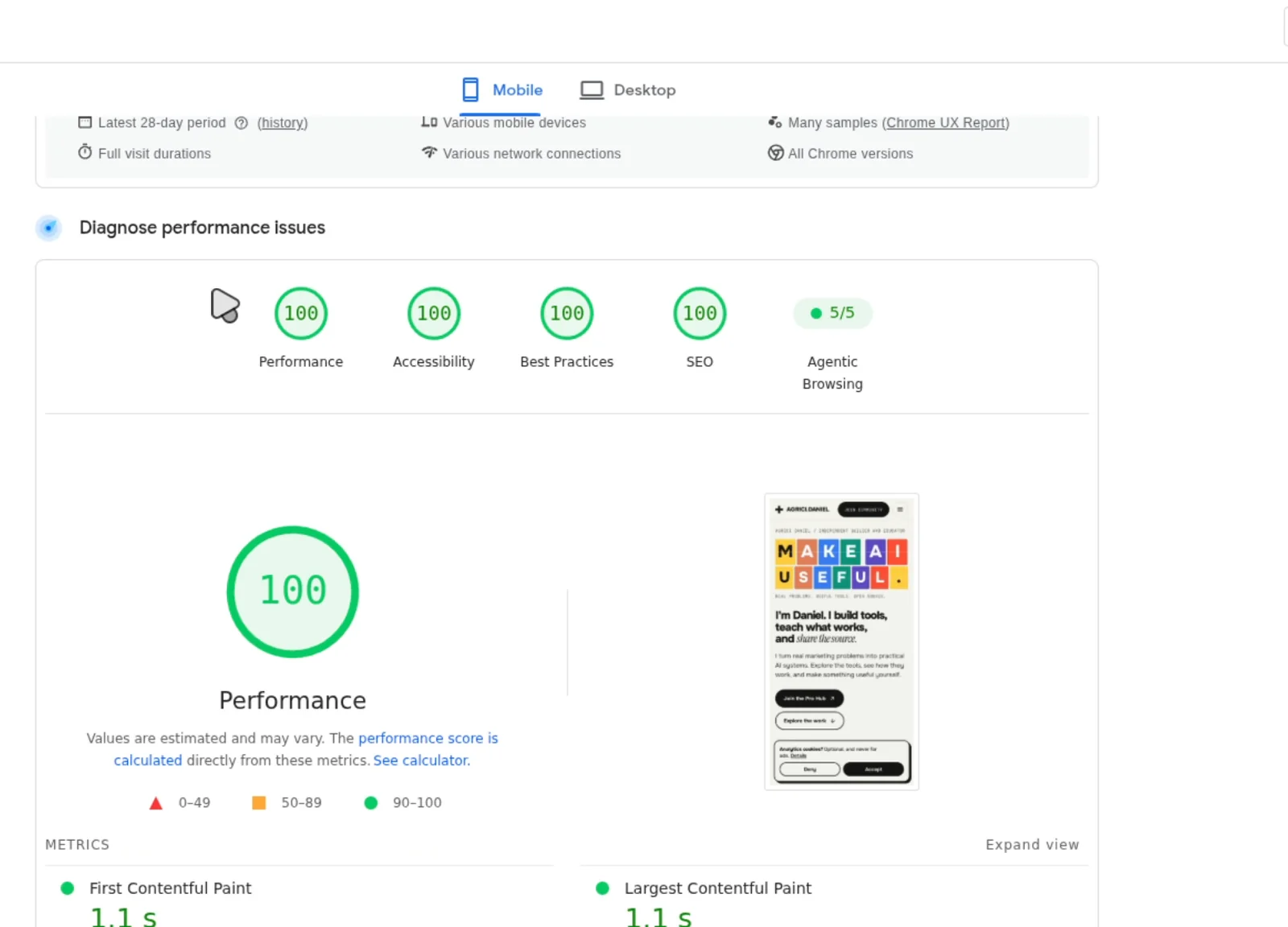
Run /seo google pagespeed https://yoursite.com inside Claude Code to pull live PageSpeed Insights and CrUX results. One practical gotcha documented during testing: the keyless PageSpeed quota hits HTTP 429 fast during multi-page audits, so setting a free GOOGLE_API_KEY via /seo google setup prevents rate limits.
Schema markup and JSON-LD (what Google still supports)
Structured data gives search engines an explicit machine-readable summary of your page: who wrote it, what software or product it describes, and which video belongs to it. In Intro to How Structured Data Markup Works, Google recommends JSON-LD and emphasizes that supplying fewer, complete, accurate properties matters more than stuffing optional fields.
- Schema must match visible page content. In the
claude-seoREADME example (rankenstein.pro/about), the page listed two co-founders while theOrganizationJSON-LD named only one. When your JSON-LD disagrees with the visible page, Google flags mismatches and can ignore the markup. - Link entities with
@id. Onagricidaniel.com, all 57 pages shipped valid server-rendered JSON-LD (0 parse errors acrossArticle,BreadcrumbList,VideoObject,SoftwareSourceCode,Person,Organization, andWebSite) connected by@id, scoring 99/100 in Schema. Onclaude-seo.md, all blocks parsed cleanly, but the audit scored Schema 82/100 because the entity graph lacked@idlinks and logo and LinkedInsameAsURLs differed across pages. - Stop chasing retired rich results. Many older checklists still tell you to add
FAQPageJSON-LD for expandable Google SERP accordions. Per the Google Search Central changelog (fetched 2026-11-26), Google deprecated the FAQ rich result feature starting May 7, 2026 (announced May 8, 2026) and removed the FAQ rich result documentation in June 2026. Previously, in September 2025, Google also removed docs forcourse info,estimated salary,learning video,special announcement, andvehicle listing. Visible FAQs remain useful for readers and AI answer extraction, and validFAQPagemarkup causes no harm, but do not expect Google FAQ rich snippets from it.
Run /seo schema https://yoursite.com to detect existing blocks, validate them against visible HTML, and generate missing JSON-LD for currently supported types like Article, BreadcrumbList, Product, VideoObject, SoftwareSourceCode, Organization, and LocalBusiness.
robots.txt, Google-Extended, and llms.txt: rules vs folklore
No area of technical SEO attracts more confident misinformation than crawler files. Here is what the primary specifications and Google's current documentation state as of 2026-11-26:
| File or token | Common folklore | Verified primary-source reality | Source |
|---|---|---|---|
robots.txt |
"Disallow hides private pages from Google." | False. robots.txt is a voluntary crawling preference, not access control. Blocked URLs can still be indexed if linked externally. Use noindex or authentication to keep pages out of Google. |
Google robots.txt intro, RFC 9309 |
User-agent blocks |
"Wildcard * rules merge with specific bot blocks." |
False. Under RFC 9309, a crawler matches its most specific User-agent group and ignores * once matched. Restate every disallow rule inside each dedicated bot group. |
IETF RFC 9309 |
Google-Extended |
"Blocking Google-Extended removes my site from AI Overviews." |
False. Google-Extended controls Gemini training and grounding usage. Google states: "It has no effect on Google Search or other products." AI Overviews rely on Googlebot. |
Google common crawlers |
/llms.txt |
"Adding llms.txt boosts Google AI Overviews rankings." |
False for Google Search. Google's AI Optimization Guide states: "You don't need to create new machine readable files, AI text files, markup, or Markdown to appear in Google Search (including its generative AI capabilities), as Google Search itself doesn't use them." | Google AI Optimization Guide, llmstxt.org |
I still maintain /llms.txt on both agricidaniel.com and claude-seo.md because coding assistants, agent harnesses, and Lighthouse Agentic Browsing checks read it, and it gives developers a clean Markdown index of my docs.
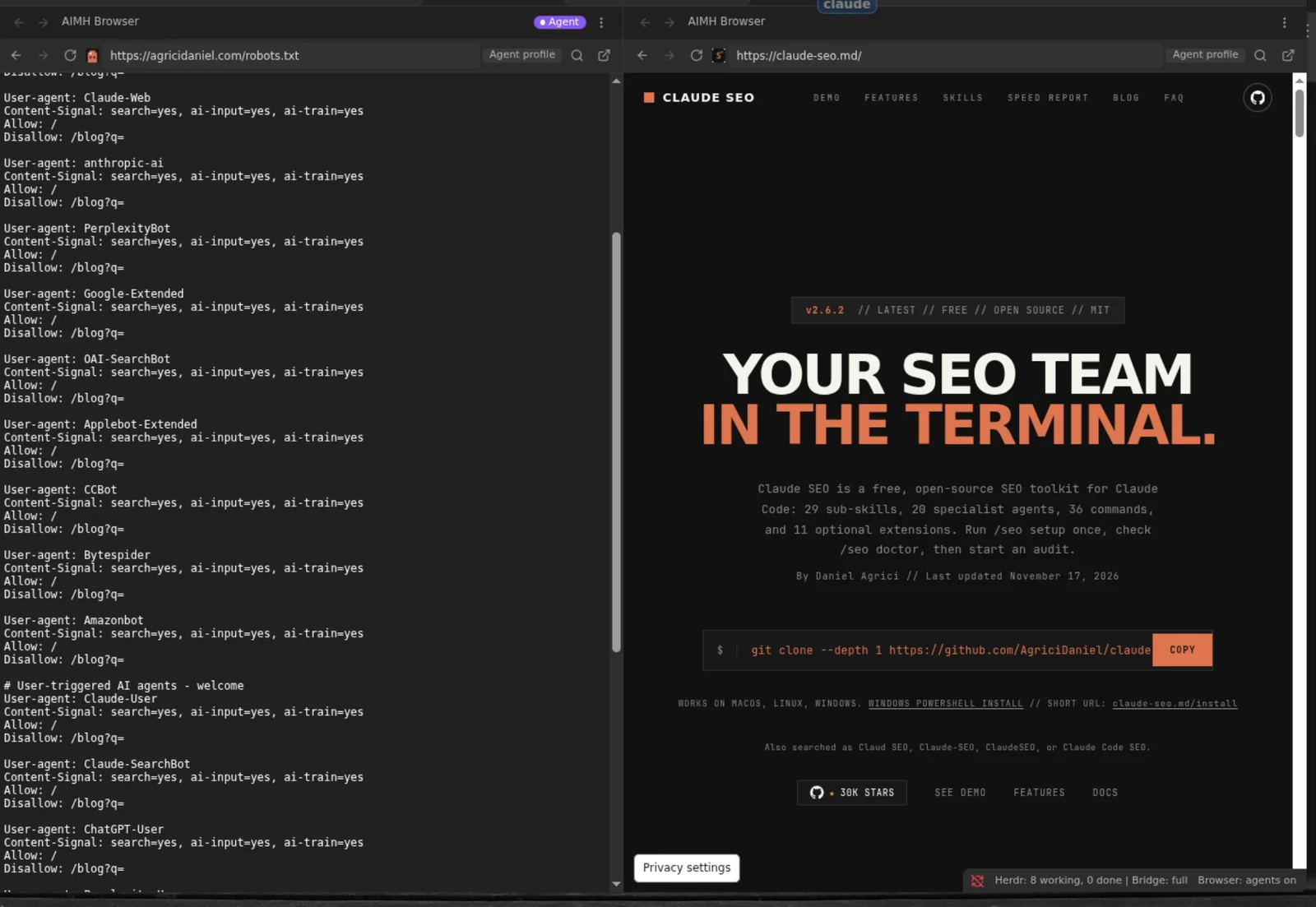
Running automated browser checks against your own crawler files also catches silent drift. Below, two autonomous AIMH browser panes inspect agricidaniel.com/robots.txt (explicit User-agent and Content-Signal blocks for Claude-Web, PerplexityBot, Google-Extended, OAI-SearchBot, and others) alongside the live claude-seo.md homepage (v2.6.2). In the Nov 25 verification pass, checking /llms.txt also caught a real bug on my own site: agricidaniel.com/llms.txt still listed claude-seo at v2.4.0 with 26 skills and 19 agents instead of the current 29 skills and 20 agents.
How AI agents see your page (Lighthouse Agentic Browsing)
Traditional crawlers fetch HTML text. Modern browsing agents click buttons, fill forms, scroll, and read the browser's accessibility tree. If a button has no accessible label, or if a cookie banner or unsized image shifts a button 40 pixels mid-click, an autonomous agent misclicks or fails.
Chrome's Lighthouse now includes an Agentic Browsing category. Per Chrome for Developers' Lighthouse Agentic Browsing scoring docs (fetched 2026-11-26), this category is marked under development and displays a fractional score (X/N ratio of passed readiness checks) rather than a 0 to 100 percentage. It audits:
- Accessibility for agents: Whether interactive controls expose clean names and roles in the accessibility tree.
- Layout stability (CLS): Whether shifting elements move targets between inspection and click.
- Discoverability: Presence and validity of
/llms.txtand/.well-known/ard.json. - WebMCP integration: Declarative WebMCP form annotations, registered WebMCP tools, and schema validity.
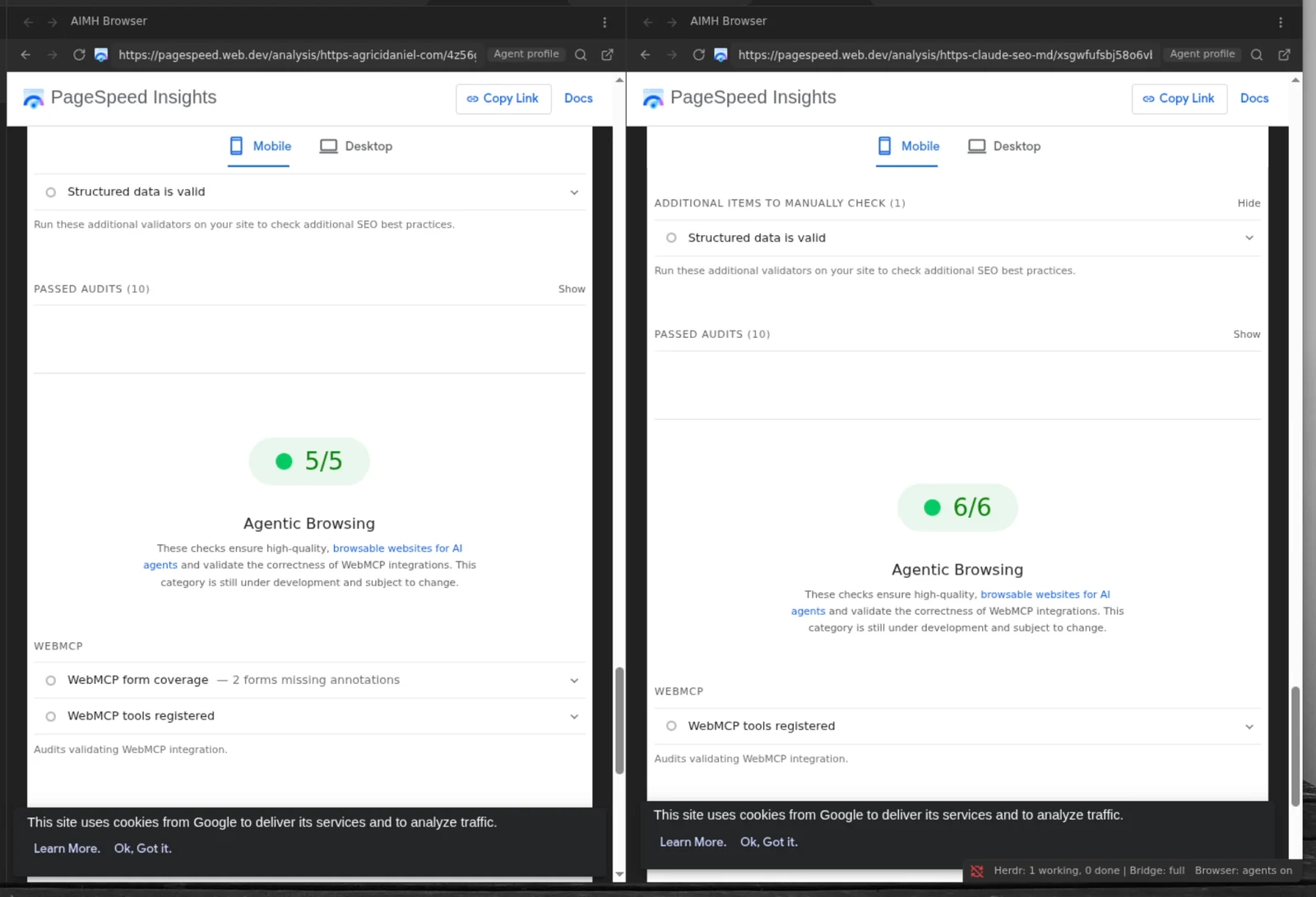
Because the denominator counts only the checks that apply to a given page, two passing sites can show different fractions. During our live side-by-side run in PageSpeed Insights (Lighthouse 13.6.0), agricidaniel.com scored 5/5 (with an informative note that 2 forms lacked WebMCP annotations) while claude-seo.md scored 6/6 on both mobile and desktop:
Run /seo agentic https://yoursite.com to check Lighthouse Agentic Browsing, accessibility-tree unnamed controls, llms.txt, ard.json, Markdown delivery, and WebMCP readiness in one command. Pair it with /seo geo https://yoursite.com to audit AI crawler access (OAI-SearchBot, GPTBot, Claude-SearchBot, ClaudeBot, PerplexityBot, Googlebot, Google-Extended) and passage citability.
Grouping keywords by stage and answering real questions
Technical health gets your pages indexed; matching search intent gets them clicked. When auditing content with /seo content and /seo cluster, organize topics across three buyer stages rather than stuffing one generic page with twenty keywords:
- Top of funnel (TOFU / Learning): Readers looking for concepts and definitions (
what is an seo audit,how does google indexing work). Give clear explanations and internal links to your practical guides. - Middle of funnel (MOFU / Doing and comparing): Readers comparing workflows and tools (
how to do an seo audit with claude,best free seo audit tools). Show real steps, trade-offs, and verifiable outputs. - Bottom of funnel (BOFU / Acting): Readers ready to install, configure, or buy (
claude seo install,seo audit agency pricing). Put the install command, requirements, or offer above the fold with zero fluff.
You do not need a $200/month keyword subscription to start clustering. During our verification run, we queried free Google Autocomplete for the seed seo audit, collecting 22 modifier queries and 17 question queries (standing in for People Also Ask when no paid SERP API is connected), then checked top-10 SERP URL overlap across six head queries (15 unique query pairs total). Only two pairs overlapped (3 shared URLs each: what is an seo audit with seo audit checklist, and free seo audit tool with best seo audit tools). The other 13 of the 15 pairs shared zero overlapping URLs, confirming they deserved separate pages instead of one bloated guide.
On claude-seo.md, this content-structure pass exposed the single biggest drag on its score: no pillar pages, zero internal body links inside the main audit tutorial, 13 skill pages with no supporting blog guide, and 13 pages with four or fewer internal links. Fixing internal links and hub structure costs nothing and usually pays off faster than publishing twenty more isolated posts. For a deeper workflow on demand-to-audit keyword planning, see my guide on keyword research and website SEO.
Live results from auditing two real sites with parallel agents
When you run /seo audit https://yoursite.com, Claude SEO does not crawl sequentially in one monolithic prompt. It discovers your site type, renders and crawls up to 500 pages, and fans out parallel specialist agents (9 core agents in /seo audit, out of 20 specialist agents shipped and up to 17 running in parallel) across Technical, Content, Speed, and AI tracks before compiling your local reports:
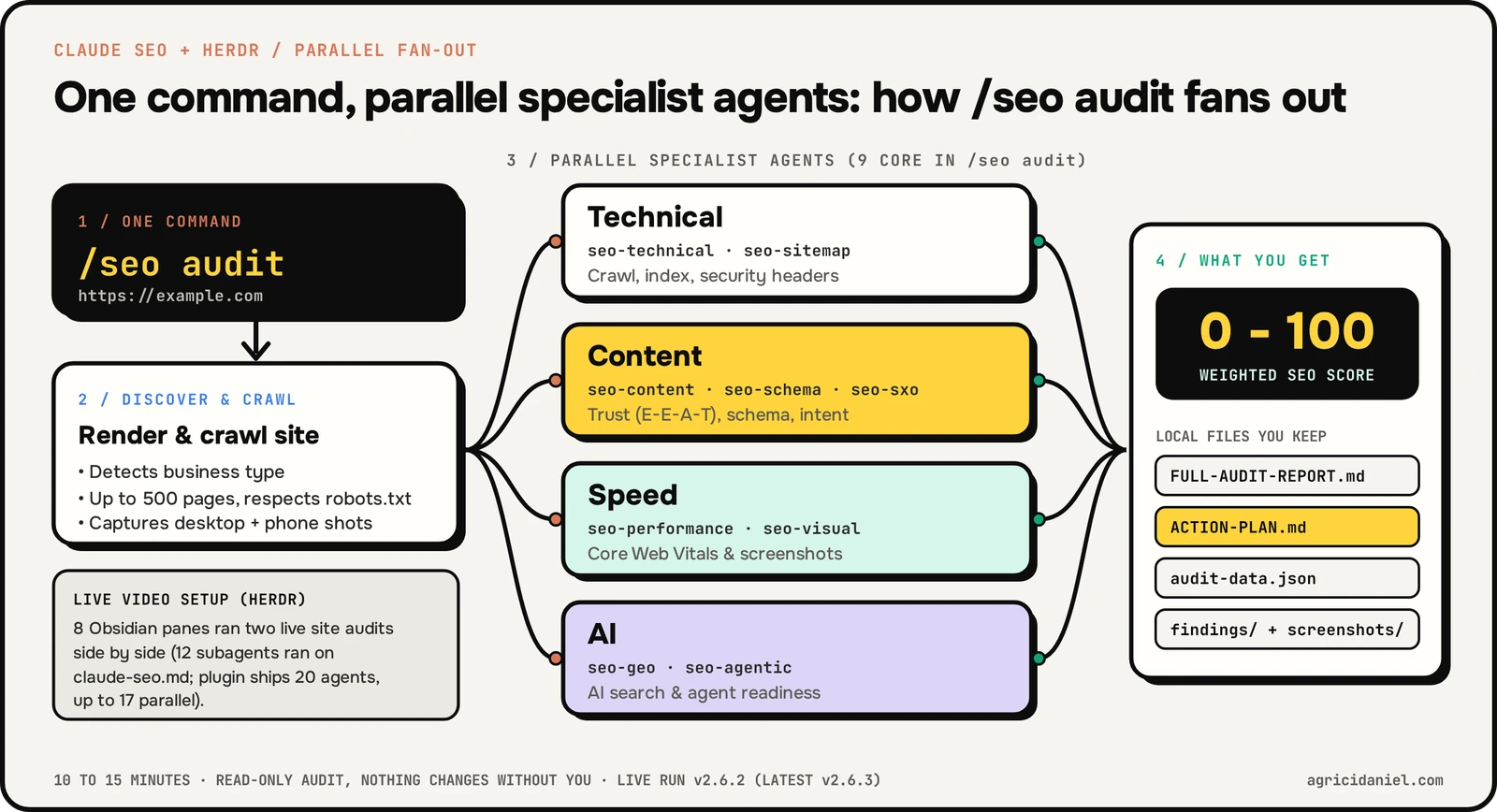
For the video walkthrough, I ran two full v2.6.2 audits at the same time inside Obsidian using herdr: 8 herdr panes coordinated both sites side by side across two live Obsidian Canvases (agricidaniel.com on the left canvas, claude-seo.md on the right canvas, where the claude-seo.md audit executed 12 specialist subagents).
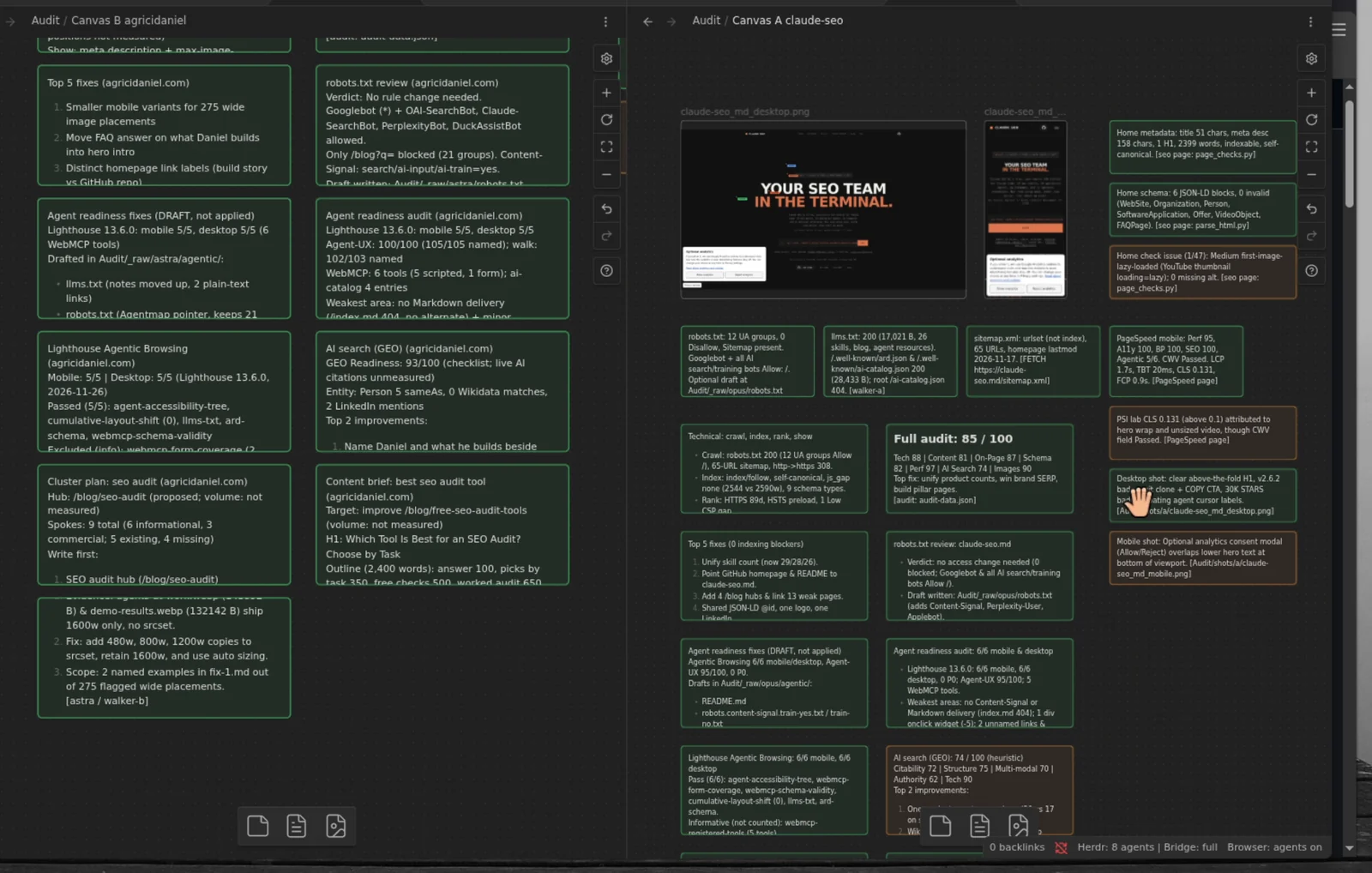
Side-by-side weighted category scores (2026-11-26)
agricidaniel.com (93/100) vs claude-seo.md (85/100)
One honest note on score reproducibility: a separate script-driven v2.6.2 verification pass the evening before (2026-11-25, shown in the walkthrough slide deck) scored agricidaniel.com at 93.53 (rounded to 94/100), while the live multi-agent herdr run on 2026-11-26 scored 92.86 (rounded to 93/100). Because Claude applies the weighted rubric to specialist findings rather than running a rigid hard-coded formula, fresh runs can vary by 1 to 2 points. Track the individual defects and ACTION-PLAN.md checklist items over time, not a single-point swing.
Real fixes found on agricidaniel.com (93/100, 57 sitemap URLs)
- Responsive mobile images: All 625 image placements had alt text and explicit dimensions, but 275 of 574 wide placements shipped full-width files without smaller
srcsetcandidates for mobile screens. - Homepage opening clarity: A specific description of what I build appeared lower down on the homepage; moving it into the opening hero improves human scanning and AI answer extraction.
- Distinct anchor labels: The homepage used
claude-seoas anchor text for both a build story and the GitHub repository; separate labels remove link ambiguity. - Mobile cookie prompt overlap: On narrow phones, the consent banner overlapped the lower edge of the secondary hero button.
- Stricter Content Security Policy (CSP):
script-srcstill allowed'unsafe-inline'; testing nonce or hash policies on staging tightens security headers. (The Nov 25 verification pass also caught stalev2.4.0counts in/llms.txt.)
Real fixes found on claude-seo.md (85/100, 96 crawled URLs)
- Conflicting product numbers: Different pages listed 29, 28, and 26 sub-skills while the sitemap held 27 skill pages. One source of truth fixes this across every page.
- Brand SERP gap:
claude-seo.mdappeared in 0 of 28 checked results for"claude seo"while GitHub mirrors held the brand positions; updating the GitHub repository homepage field and README links strengthens canonical ownership. - Weak internal linking and missing pillars: The main audit tutorial had 0 internal body links, 13 pages had 4 or fewer internal links, and 13 skills lacked supporting blog guides.
- Unlinked JSON-LD entity graph: Schema blocks were valid on all pages, but missing
@idlinks and inconsistent logo and LinkedInsameAsfields dropped Schema to 82/100. - Missing trust pages and minor UI/perf issues: No dedicated About or Contact page, a stale footer link, lazy-loading on the first above-the-fold homepage image, a
0.131mobile lab CLS caught in the live browser PSI check, and a wrongGPTBotvs ChatGPT explanation card.
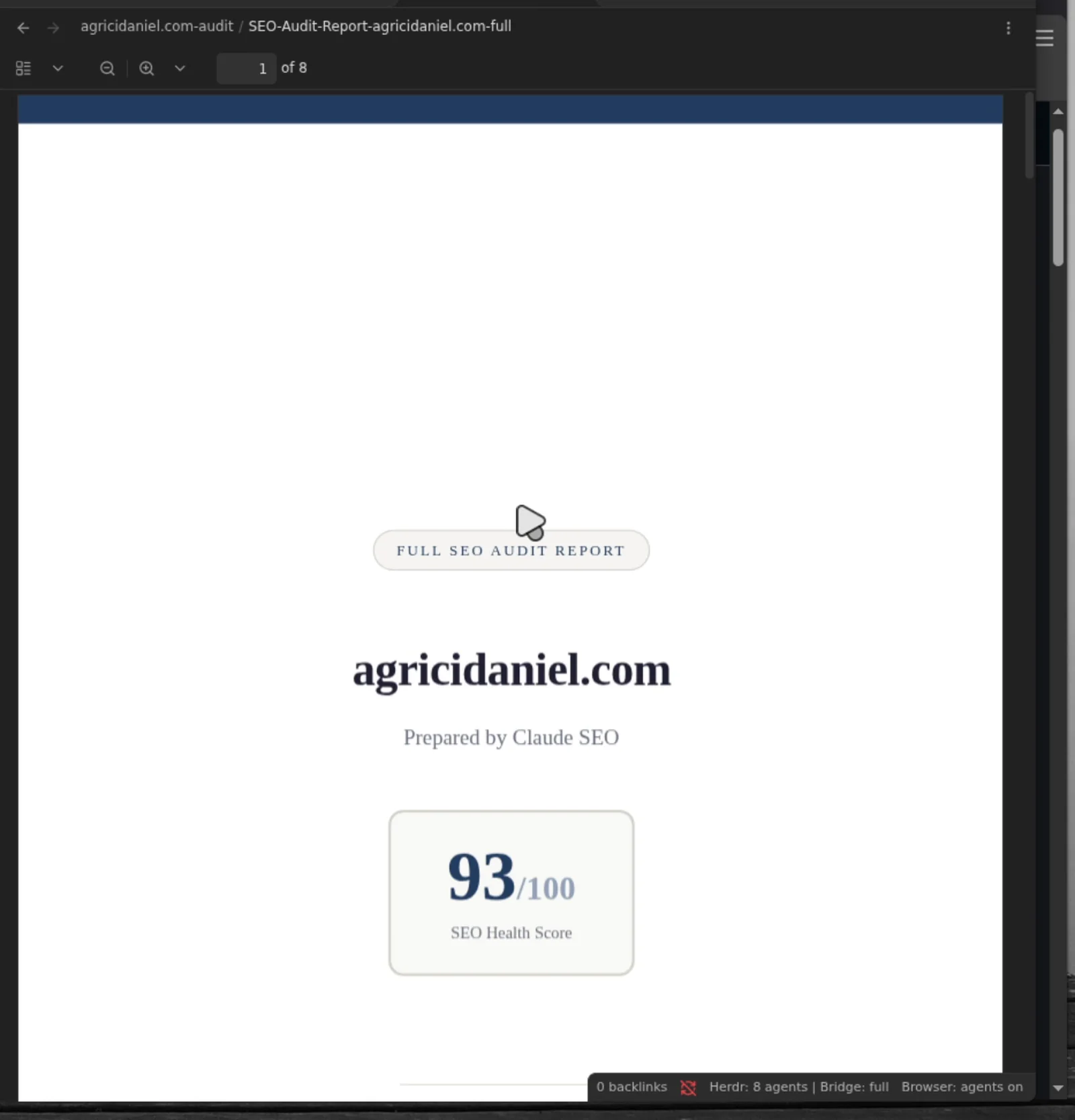
When the agents finish, running /seo google report compiles the Markdown findings and charts into a clean client-ready PDF. Here is page 1 of the 8-page report generated live for agricidaniel.com:
What an automated Claude SEO audit does not measure
Every honest audit report ends with a Not run section. A terminal plugin cannot see everything. Here is what the live run skipped and what each missing piece needs:
| Data source or check | Status in our live run | Why it was skipped / what it requires |
|---|---|---|
| Google Search Console queries & indexation | Not run in live crawl | Stored Google OAuth token had expired (invalid_grant); claude-seo.md had no configured property mapping. Requires fresh /seo google setup OAuth login. |
| Google Analytics 4 (GA4) / Matomo | Not run | No property ID configured in the workspace. Add a read-only property ID if you want organic landing-page traffic joined into the report. |
| Commercial backlink profiles | Partial (Common Crawl graph only) | Full link-toxicity and referring-domain audits need Moz, Bing Webmaster, or paid APIs (Ahrefs, Semrush, DataForSEO). |
| Monthly keyword search volumes | Not run | Free Google Autocomplete surfaces real queries and questions, but exact monthly volumes require a paid keyword API (see DataForSEO Agent). |
| Live AI citation share-of-voice | Not run | Checking whether ChatGPT, Perplexity, or AI Mode cite your brand requires repeated multi-prompt tracking (optional seranking or profound extensions). |
| Claude plan token budget | Trade-off to watch | Five judgment-heavy agents (seo-content, seo-geo, seo-cluster, seo-sxo, seo-drift) default to Opus while the rest run on Sonnet. You can change any agent's model in agents/. |
Frequently asked questions
Is Claude SEO free, or do I need paid API keys?
Claude SEO is MIT-licensed and free to install with no per-site fees or usage caps. You only need a Claude Code plan. It runs out of the box without API keys; connecting free Google APIs (PageSpeed Insights, CrUX, Search Console, GA4) is optional and adds field data.
How long does a full /seo audit take in Claude Code?
A standard site audit typically finishes in 10 to 15 minutes, depending on page count (capped at 500 URLs by default with a 1-second crawl delay) and how many specialist agents run in parallel.
Does Claude SEO work on JavaScript sites built with Next.js, React, or Vue?
Yes. Running /seo setup installs a local headless Chromium runtime inside an isolated environment. When a page requires JavaScript to render its main content, Claude SEO renders it in Chromium and checks for raw-HTML versus rendered-DOM gaps.
Do I need an /llms.txt file to show up in Google AI Overviews?
No. Google's official AI Optimization Guide states that Google Search (including AI Overviews and AI Mode) does not use llms.txt or special Markdown files. Maintaining /llms.txt neither helps nor harms Google rankings, though it helps external AI tools and passes Lighthouse Agentic Browsing discoverability checks.
Does FAQ schema still trigger expandable rich results in Google Search?
No. Per Google's Search Central changelog, Google retired the FAQ rich result feature starting May 7, 2026 and removed its documentation in June 2026. Keep visible FAQ sections for readers and clear answer extraction, but do not add FAQPage markup expecting Google FAQ rich snippets.
Does my site data leave my machine when I run Claude SEO?
Claude SEO runs inside Claude Code, so fetched page text and audit data are sent to Anthropic's Claude models the same way as any other Claude Code session. Generated reports stay as local files on your machine, and no third-party SEO SaaS receives your data unless you connect an optional extension yourself.
How does Claude SEO compare to Screaming Frog or Ahrefs?
Crawlers like Screaming Frog crawl tens of thousands of URLs faster, and platforms like Ahrefs or Semrush maintain large backlink and keyword volume databases. Claude SEO explains why each issue matters, checks AI search and agent readiness, prioritizes fixes by impact, and lets you ask follow-up questions in plain language. Many teams run both.
Methodology, sources, and disclosure
Disclosure: I am the author of claude-seo (MIT open source) and I own both audited domains (agricidaniel.com and claude-seo.md). Every metric shown in this article is first-party data from my own sites and is not a promise of rankings, traffic, or revenue on yours.
Audit environment: Live two-site run executed on 2026-11-26 with claude-seo v2.6.2, Lighthouse 13.6.0, and herdr coordinating 8 panes inside Obsidian (claude-seo.md executed 12 specialist subagents), cross-checked against the 2026-11-25 v2.6.2 script verification pass (94/100 on agricidaniel.com and origin-level CrUX). Latest public plugin release: v2.6.3 (published 2026-11-25T23:14:00Z UTC on GitHub Releases; dated 2026-11-26 in CHANGELOG.md).
- How Google Search Works (Google Search Central, verified 2026-11-26)
- AI Features and Your Website (Google Search Central, verified 2026-11-26)
- Google's Guide to Optimizing for Generative AI Features on Google Search (Google Search Central, verified 2026-11-26)
- Introduction to robots.txt and Overview of Google Crawlers (Google Search Central, verified 2026-11-26)
- RFC 9309: Robots Exclusion Protocol (IETF, verified 2026-11-26)
- Intro to How Structured Data Markup Works and Search Central Documentation Changelog (Google Search Central, verified 2026-11-26)
- Web Vitals (web.dev, verified 2026-11-26)
- Lighthouse Agentic Browsing Scoring (Chrome for Developers, verified 2026-11-26)
- The /llms.txt File Proposal (verified 2026-11-26)
Share this article
Keep reading.
All 51 posts
Legends GeoGrid: Local SEO You Can See on a Map
An open-source Google Maps rank checker with updated interface screenshots, local leaders, business-name reviews, and six historical maps.
13 min read

I Made Jev Do My SEO Audit: One URL, Three Reports, 93/100
Jev SEO turns one homepage into a full SEO audit: a PDF, an Excel tracker and a Markdown report, judged by Jev with every answer's confidence shown.
10 min read
Free SEO Audit Tools That Actually Work (No $300/month Required)
Ahrefs costs $99-999/month. Semrush is $120-450/month. Here's what you can do for free with open-source tools and why I stopped paying for most of them.
11 min read